
Wstęp
Thank you for choosing the GEARSTONE Foldable Magnetic Exercise Bike. This manual provides essential information for the safe assembly, operation, and maintenance of your exercise bike. Please read this manual thoroughly before use and keep it for future reference.
Ważne informacje dotyczące bezpieczeństwa
- Przed rozpoczęciem jakiegokolwiek programu ćwiczeń skonsultuj się z lekarzem.
- Zawsze rozgrzewaj się przed ćwiczeniami i wyciszaj po nich.
- Przed każdym użyciem należy upewnić się, że wszystkie śruby i nakrętki są mocno dokręcone.
- Ustaw rower treningowy na płaskiej i stabilnej powierzchni.
- Podczas użytkowania trzymaj dzieci i zwierzęta z dala od urządzenia.
- Maksymalna waga użytkownika tego roweru wynosi 120 kg (264 funtów).
- Natychmiast przerwij ćwiczenia, jeśli poczujesz osłabienie, zawroty głowy lub ból.
- Noś odpowiednią odzież i obuwie sportowe.
Zawartość opakowania
Carefully unpack the box and ensure all parts are present. Refer to the diagram below for a visual representation of the components.

Rysunek 1: Package Contents. This image displays the various components and tools included with your exercise bike, such as the main frame, pedals, seat, backrest, and assembly tools.
Pakiet powinien zawierać:
- Zespół ramy głównej
- Lewy i prawy pedał
- Siedzisko i oparcie
- Handlebar with LCD Monitor
- Stabilizer Bars (Front and Rear)
- Zestaw elementów montażowych (śruby, nakrętki, podkładki)
- Narzędzia montażowe (klucz, klucz imbusowy)
- Instrukcja obsługi
Konfiguracja i montaż
Follow these steps to assemble your GEARSTONE Foldable Magnetic Exercise Bike. It is recommended to have two people for assembly.
- Zamontuj drążki stabilizujące: Przymocuj przednie i tylne stabilizatory do ramy głównej za pomocą dołączonych śrub i nakrętek. Upewnij się, że są mocno dokręcone, aby zapewnić stabilność.
- Zainstaluj pedały: Identify the left (L) and right (R) pedals. The left pedal screws counter-clockwise, and the right pedal screws clockwise. Thread them into the crank arms and tighten securely.
- Montaż siedziska i oparcia: Insert the seat post into the main frame and adjust to your desired height. Secure it with the locking pin. Attach the backrest to the seat support.
- Zamontuj kierownicę i monitor: Connect the handlebar assembly to the main frame. Ensure all cables for the LCD monitor and pulse sensors are properly connected. Secure the handlebar with the designated bolts.
- Kontrola końcowa: Before first use, double-check all connections and ensure all bolts and nuts are tightened.

Rysunek 2: Assembly Steps. This diagram illustrates the key stages of assembling the exercise bike, from attaching the base supports to installing the seat and pedals.
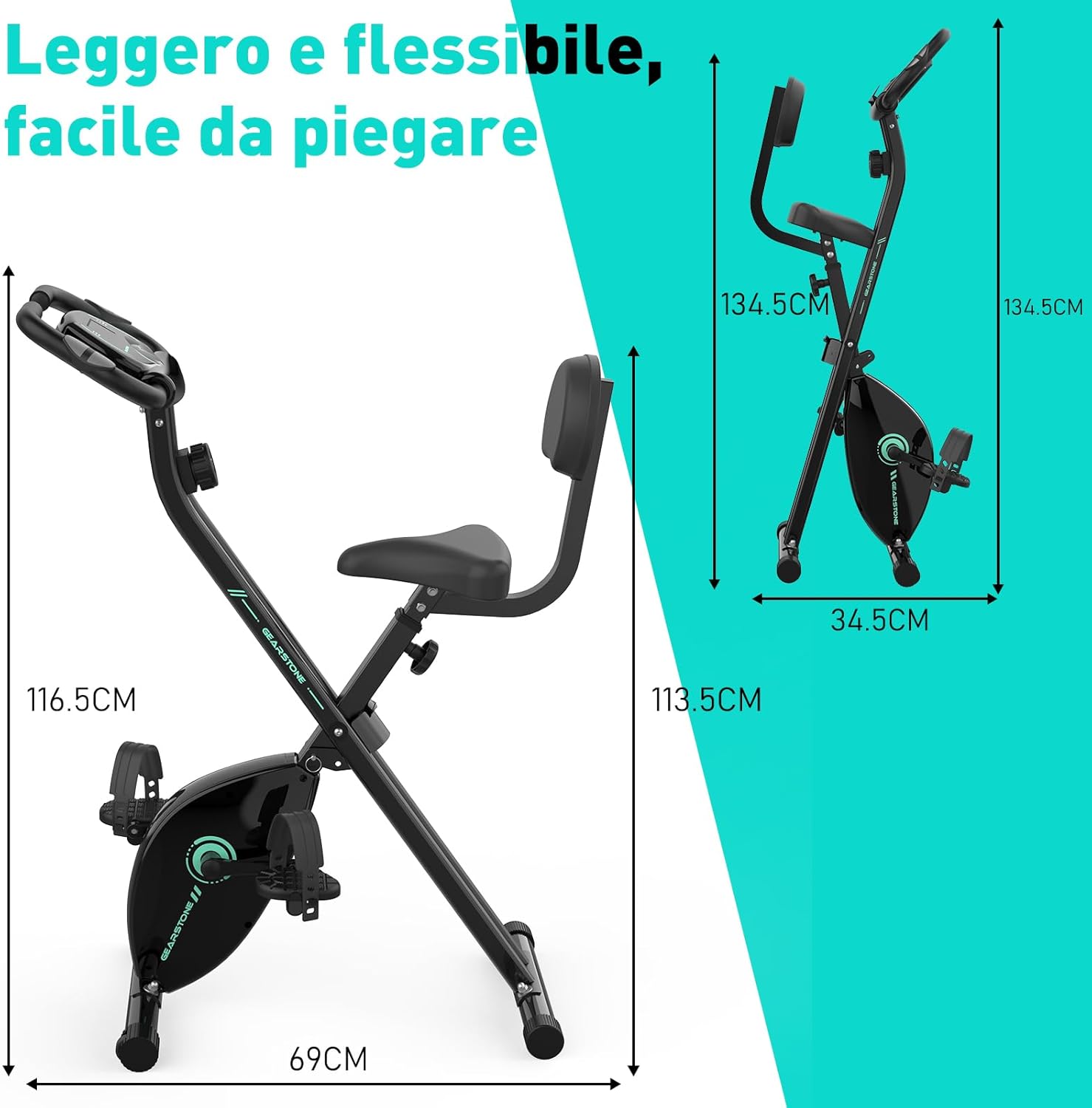
Rysunek 3: Assembled Bike Dimensions. This image shows the fully assembled exercise bike with its dimensions, highlighting its compact and foldable nature.
Instrukcja obsługi
Regulacja wysokości siedziska
The seat height can be adjusted to five different levels to accommodate various user heights. Loosen the adjustment knob located on the seat post, slide the seat to the desired height, and then tighten the knob securely. Ensure your knees have a slight bend at the bottom of the pedal stroke.

Rysunek 4: Seat and Resistance Adjustment. This image highlights the knob for adjusting magnetic resistance and the mechanism for adjusting seat height.
Regulacja oporu
The bike features 8 levels of magnetic resistance. Turn the resistance knob, located below the LCD monitor, clockwise to increase resistance and counter-clockwise to decrease it. Start with a lower resistance and gradually increase as your fitness improves.
Korzystanie z monitora LCD
The LCD monitor displays key workout data. It is battery-powered. The monitor automatically turns on when you start pedaling or press a button.
- SKANDOWAĆ: Automatycznie przełącza wszystkie funkcje wyświetlacza co kilka sekund.
- CZAS: Wyświetla czas trwania treningu.
- PRĘDKOŚĆ: Pokazuje aktualną prędkość jazdy na rowerze.
- DYSTANS: Wyświetla dystans pokonany podczas bieżącego treningu.
- KALORIE: Szacuje liczbę kalorii spalonych podczas treningu.
- PRZEBIEG (ODO): Wyświetla całkowity przebyty dystans.
- PULS: Pokazuje tętno po przytrzymaniu czujników tętna na kierownicy.
To reset the monitor, press and hold the button for a few seconds, or remove and reinsert the batteries.

Rysunek 5: LCD Monitor Display. This image provides a detailed view of the LCD monitor and its various data display functions.

Rysunek 6: Resistance Control and Monitor Interaction. This image illustrates how to adjust the resistance level and interact with the LCD monitor's buttons.
Korzystanie z uchwytu telefonu
A phone holder is integrated into the LCD monitor panel. Place your smartphone or tablet securely in the holder to enjoy videos or music during your workout.
Folding the Bike for Storage
To fold the bike, loosen the main folding knob (usually located near the base of the frame). Carefully fold the frame inwards until it locks into its compact position. This design allows for easy storage and space-saving.
Konserwacja
- Czyszczenie: Wytrzyj rower reklamąamp Po każdym użyciu przetrzyj ściereczką pot i kurz. Nie używaj środków czyszczących o działaniu ściernym.
- Kontrola: Regularnie sprawdzaj wszystkie śruby, nakrętki i części ruchome pod kątem dokręcenia i zużycia. Dokręć wszystkie luźne elementy mocujące.
- Smarowanie: The magnetic resistance system and belt drive are generally maintenance-free. Do not lubricate internal components unless specifically instructed by customer support.
- Składowanie: Przechowuj rower w chłodnym, suchym miejscu, z dala od bezpośredniego światła słonecznego i ekstremalnych temperatur.
- Wymiana baterii: Replace the LCD monitor batteries when the display becomes dim or unresponsive.
Rozwiązywanie problemów
| Problem | Możliwa przyczyna | Rozwiązanie |
|---|---|---|
| Brak obrazu na monitorze LCD | Baterie są rozładowane lub nieprawidłowo zainstalowane. | Wymień baterie lub sprawdź, czy zostały zainstalowane z zachowaniem prawidłowej biegunowości. |
| Niedokładny odczyt tętna | Hands not firmly on sensors; sensors are dirty. | Ensure firm contact with both pulse sensors. Clean sensors with a dry cloth. |
| Rower jest niestabilny lub się chwieje | Luźne śruby; nierówna powierzchnia. | Check and tighten all assembly bolts. Move the bike to a flat, level surface. |
| Opór się nie zmienia | Kabel oporowy odłączony lub uszkodzony. | Inspect the resistance cable connection. If damaged, contact customer support. |
| Nietypowy dźwięk podczas pracy | Luźne części; tarcie spowodowane ruchomymi elementami. | Check all bolts and nuts for tightness. Ensure no foreign objects are caught in moving parts. If noise persists, contact customer support. |
Specyfikacje
| Funkcja | Szczegół |
|---|---|
| Nazwa modelu | cyclette pieghevole |
| Marka | KAMIEŃ ZĘBATOWY |
| Mechanizm oporu | Magnetyczny |
| Poziomy oporu | 8 regulowane poziomy |
| Układ napędowy | Pasek |
| Materiał główny | Steel, Metal, Foam/Leather |
| Maksymalna nośność | 120 kilogramów (264 funty) |
| Wymiary produktu (dł. x szer. x wys.) | 69 x 39 x 116.5 cm (27.2 x 15.4 x 45.9 cala) |
| Waga przedmiotu | 15.6 kilogramów (34.4 funty) |
| Źródło zasilania (monitor) | Zasilany bateryjnie (baterie nie są dołączone) |
| Cechy specjalne | Foldable design, LCD monitor, Pulse sensors, Phone holder, Adjustable seat (5 levels) |
Gwarancja i wsparcie
GEARSTONE provides a roczna gwarancja for this product from the date of purchase. This warranty covers manufacturing defects and material faults under normal use.
If you encounter any issues with your exercise bike or have questions regarding its operation or maintenance, please do not hesitate to contact our customer support team. Provide your purchase details and a description of the issue for prompt assistance.
Skontaktuj się z pomocą techniczną: Proszę zapoznać się z dokumentacją zakupu lub informacjami u sprzedawcy. website for the most up-to-date contact information (e.g., email address or support portal).
Informacje dodatkowe
For more information about GEARSTONE products and fitness tips, visit our official webwitryna lub kanały mediów społecznościowych.