
Wstęp
Thank you for choosing the PETLIBRO 5L Automatic Pet Feeder with 1080P Camera. This device is designed to provide convenient and reliable feeding for your pets, ensuring they receive their meals on schedule while allowing you to monitor and interact with them remotely. This manual provides essential information for setting up, operating, and maintaining your feeder.

The PETLIBRO 5L Automatic Pet Feeder offers a range of features including a 1080p HD camera, night vision, two-way audio, remote feeding, in-app monitoring, and easy cleanup.
Instrukcje bezpieczeństwa
- Read all instructions carefully before using the feeder.
- To urządzenie jest przeznaczone wyłącznie do użytku wewnątrz pomieszczeń.
- Nie zanurzaj jednostki głównej w wodzie ani innych płynach.
- Trzymaj karmnik z dala od bezpośredniego światła słonecznego i źródeł ciepła.
- Upewnij się, że przewód zasilający nie jest uszkodzony i znajduje się w miejscu niedostępnym dla zwierząt domowych.
- Należy używać wyłącznie oryginalnego zasilacza dołączonego do zasilacza.
- Always supervise children around the feeder.
- Only use dry pet food with a diameter between 2-15mm.
Zawartość opakowania
Sprawdź, czy w opakowaniu znajdują się wszystkie komponenty:
- PETLIBRO Automatic Pet Feeder (Main Unit)
- Miska na karmę ze stali nierdzewnej
- Zasilacz
- Instrukcja obsługi
- Desiccant Bag (may be pre-installed)
Produkt ponadview
Familiarize yourself with the different parts of your PETLIBRO Automatic Pet Feeder.

The main unit of the feeder, featuring the food hopper, dispensing mechanism, 1080P camera, and control panel. A cat is shown eating from the stainless steel bowl, with a smartphone displaying the live camera feed.
- Pojemnik na żywność: Przechowuje suchą karmę dla zwierząt.
- Lid with Twist-Lock: Secures the food hopper and keeps food fresh.
- Panel sterowania: Buttons for manual feeding and settings.
- Kamera 1080P HD: Do monitorowania i nagrywania na żywo.
- Czujnik podczerwieni: Detects low food levels and blockages.
- Głośnik i mikrofon: Do dwukierunkowej komunikacji audio.
- Punkt gastronomiczny: Miejsce, w którym jedzenie jest dozowane do miski.
- Miska ze stali nierdzewnej: Zdejmowany w celu łatwego czyszczenia.
- Port zasilania: Do podłączenia zasilacza sieciowego.
- Komora baterii: For backup batteries (not included).
Organizować coś
1. Rozpakowanie i montaż
- Wyjmij wszystkie elementy z opakowania.
- Umieść główny podajnik na płaskiej i stabilnej powierzchni.
- Włóż miskę ze stali nierdzewnej do przeznaczonego gniazda u podstawy podajnika.
2. Zasilanie
- Podłącz zasilacz do portu zasilania podajnika, a następnie do gniazdka ściennego.
- Dla mocytage protection, install 3 D-cell alkaline batteries (not included) into the battery compartment at the bottom of the feeder. This ensures continuous operation during power interruptions.
3. Napełnianie zasobnika na żywność
- Open the Twist-Lock lid on top of the feeder.
- Pour dry pet food into the hopper. Ensure the food size is between 2-15mm.
- Zamknij pokrywę, przekręcając ją, aż się zablokuje.
4. Instalacja aplikacji i połączenie Wi-Fi
- Pobierz aplikację PETLIBRO ze sklepu App Store (iOS) lub Google Play Store (Android).
- Załóż konto i zaloguj się.
- Follow the in-app instructions to add your feeder. Ensure your smartphone is connected to a 2.4GHz or 5GHz Wi-Fi network. The feeder supports both for a more stable connection.
- The app will guide you through connecting the feeder to your home Wi-Fi network.
5. Konfiguracja kamery
- Once connected to Wi-Fi, the 1080P camera will automatically activate.
- For video recording, insert a Micro SD card (up to 256GB, not included) into the designated slot, usually located near the camera or at the bottom of the unit.
Instrukcja obsługi
1. Karmienie ręczne
- Press the manual feed button on the feeder's control panel to dispense one portion of food instantly.
- Alternatively, use the 'Feed Now' option in the PETLIBRO app for immediate dispensing.
2. Planowanie posiłków za pomocą aplikacji
The PETLIBRO app allows you to customize your pet's feeding schedule.

The PETLIBRO app provides an intuitive interface to set custom feeding times and amounts, and to review feeding logs.
- Open the PETLIBRO app and select your feeder.
- Navigate to the 'Feeding Schedule' section.
- Set up to 10 meals per day. For each meal, specify the time and the number of portions (1-50 portions per meal).
- Zapisz swój harmonogram. Podajnik automatycznie wyda karmę o zaprogramowanych porach.
- Możesz view feeding logs within the app to track your pet's meal history.
3. Two-Way Audio & Voice Recording
Communicate with your pet remotely using the two-way audio feature.

The feeder allows two-way audio communication, enabling you to speak to your pet and hear their responses through the app.
- Komunikacja na żywo: Na żywo w aplikacji view, tap the microphone icon to speak to your pet. Your voice will be played through the feeder's speaker.
- Nagrywanie głosu: Record a personalized voice message (up to 10 seconds) in the app. This message can be set to play at meal times (0-5 times per meal). A new recording will overwrite any previous one.
4. Monitoring with 1080P Camera and Night Vision
The integrated camera allows you to keep an eye on your pet at all times.

The 1080P camera provides clear vision, even at night, allowing you to monitor your pet's meals with high-definition infrared night vision.
- Access the live camera feed through the PETLIBRO app to view Twojego zwierzaka w czasie rzeczywistym.
- The 145° wide-angle lens provides a broad view obszaru karmienia.
- Infrared night vision ensures clear visibility even in dark conditions.
- Videos can be stored on a Micro SD card (up to 256GB, not included).
5. Inteligentne alerty i powiadomienia
- Detekcja ruchu i dźwięku: The feeder automatically records pet activity and saves video clips (SD card required). You will receive notifications on your phone for detected motion or sounds.
- Low Food Level Alert: The infrared sensor monitors the food level in the hopper. You will receive an alert on your phone when the food supply is low, prompting you to refill.
- Blockage Detection: The sensor also detects potential food blockages in the dispensing mechanism and will send an alert if an issue occurs.
- Wi-Fi Disconnection Alert: If the feeder loses its Wi-Fi connection, you will be notified via the app.
Konserwacja
1. Czyszczenie podajnika
Regularne czyszczenie zapewnia higienę i prawidłowe funkcjonowanie podajnika.
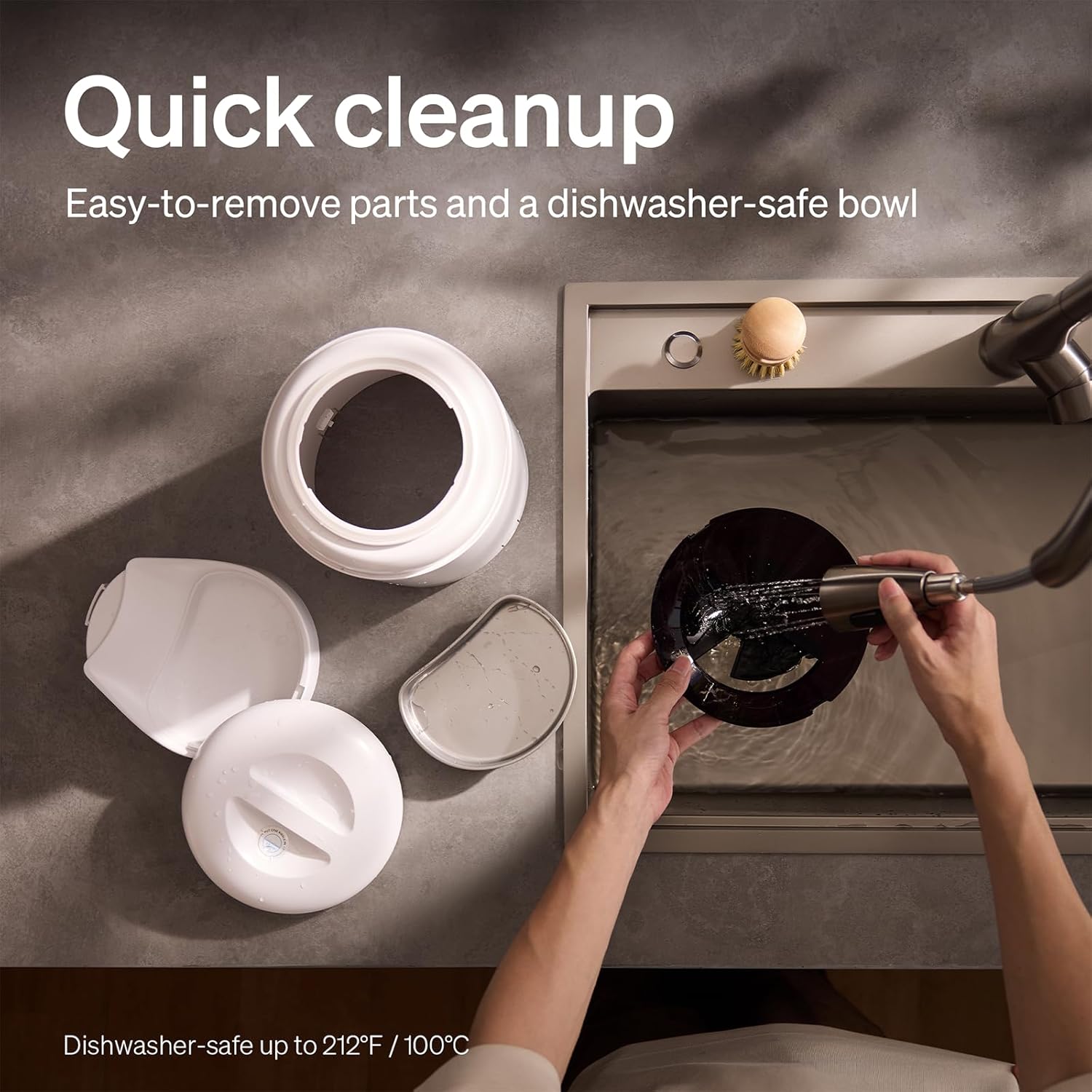
The feeder is designed for quick cleanup with easy-to-remove parts and a dishwasher-safe bowl.
- Odłącz zasilanie: Przed czyszczeniem należy zawsze odłączyć podajnik od zasilania.
- Usuń jedzenie: Opróżnij zasobnik z resztek jedzenia.
- Demontować: Remove the food bowl, lid, and food hopper.
- Części nadające się do mycia: The stainless steel bowl and food hopper are dishwasher-safe (up to 100°C / 212°F) or can be hand-washed with mild soap and water.
- Jednostka główna: Przetrzyj jednostkę główną miękką, damp płótno. Nie zanurzaj go w wodzie.
- Dokładnie osuszyć: Przed ponownym złożeniem i napełnieniem pojemnika żywnością należy upewnić się, że wszystkie części są całkowicie suche.
2. Wymiana środka pochłaniającego wilgoć
- The desiccant bag helps keep the food fresh. It is recommended to replace it every 15 days.
- Locate the desiccant compartment, usually under the lid.
- Remove the old desiccant bag and insert a new one.
Rozwiązywanie problemów
| Problem | Możliwa przyczyna | Rozwiązanie |
|---|---|---|
| Podajnik nie podaje pokarmu. | Food blockage; empty hopper; dispensing mechanism issue. | Check for food blockages and clear them. Refill hopper if empty. Ensure food size is appropriate (2-15mm). |
| Rozłączenie Wi-Fi. | Weak Wi-Fi signal; router issues; incorrect password. | Ensure feeder is within Wi-Fi range. Restart your router. Reconnect the feeder to Wi-Fi via the app, verifying the password. |
| Camera not working or frequently disconnecting. | Poor Wi-Fi connection; app glitch; SD card issue. | Check Wi-Fi stability. Restart the feeder and the app. Ensure the SD card is properly inserted and not full. Consider a system reset if issues persist. |
| App shows "status unknown" or feeding errors. | Wi-Fi disconnection; app synchronization issue. | Verify Wi-Fi connection. Close and reopen the app. Restart the feeder. |
| Nagranie głosowe nie jest odtwarzane. | No recording saved; volume too low; incorrect schedule. | Ensure a voice message is recorded and saved in the app. Check the playback settings for meal times. |
Specyfikacje
| Funkcja | Szczegół |
|---|---|
| Numer modelu | AF203 |
| Wymiary (dł. x szer. x wys.) | Wymiary 12 x 10 x 27 cm |
| Waga | 2.15 kilogramów |
| Tworzywo | Stal nierdzewna (miska) |
| Pojemność | 5 litrów |
| Gatunki docelowe | Kot pies |
| Zalecane zastosowania | Automatic indoor dog/cat feeding |
| Cechy specjalne | 1080P Camera, Smart App, Two-way Audio |
| Kolor | Biały |
| Technologia łączności | Wi-Fi (2.4 GHz i 5 GHz) |
| Tryb działania | Automatyczny |
| Instrukcje pielęgnacji | Dishwasher safe (bowl) |
| Wymagane baterie | No (for primary operation), Yes (for backup, 3 D-cell, not included) |
Gwarancja i wsparcie
PETLIBRO products come with a standard manufacturer's warranty. For detailed warranty information, please refer to the warranty card included in your package or visit the official PETLIBRO webstrona.
If you encounter any issues or have questions regarding your PETLIBRO Automatic Pet Feeder, please contact PETLIBRO customer support through the following channels:
- E-mail: Zapoznaj się z opakowaniem produktu lub z informacjami PETLIBRO website for the latest support email address.
- Webstrona: Odwiedź oficjalną stronę PETLIBRO webwitryna z odpowiedziami na często zadawane pytania, poradnikami rozwiązywania problemów i formularzami kontaktowymi.
- Wsparcie w aplikacji: The PETLIBRO app may offer a support section for direct assistance.
Please have your model number (AF203) and purchase information ready when contacting support.