
1. Wprowadzenie
This manual provides essential information for the safe and efficient use of your CUBOT P80 smartphone. Please read it carefully before using the device and keep it for future reference.
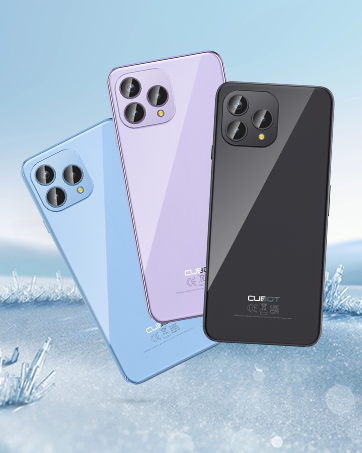
The CUBOT P80 is available in multiple color options.
2. Co znajduje się w pudełku
Sprawdź, czy w opakowaniu produktu znajdują się wszystkie elementy:
- Smartfon CUBOT P80
- Etui ochronne na telefon
- Phone protection film (pre-applied or separate)
- Ładowarka (9V2A)
- Kabel USB (Typ C)
- Słuchawki typu C
- SIM pin ejector tool
- Szybki przewodnik
- Compliance regulation document

Included accessories with the CUBOT P80 smartphone.
3. Device Layout and Physical Features
The CUBOT P80 features a sleek design with a 6.58-inch FHD+ display and a triple camera system on the rear.
Wymiary i waga
- Grubość: 9.75 mm
- Waga: 217 gramów

The CUBOT P80's slim profile i lekka konstrukcja.
Skaner linii papilarnych
The device includes a side-mounted fingerprint scanner for secure and quick unlocking.

Fingerprint sensor location for convenient unlocking.
4. Konfiguracja
Wkładanie kart SIM i karty TF
The CUBOT P80 supports dual SIM functionality or one SIM card with a TF (microSD) card for expanded storage.
- Znajdź tackę na kartę SIM znajdującą się z boku telefonu.
- Włóż narzędzie do wyjmowania karty SIM do małego otworu obok tacki i naciśnij mocno, aż tacka wyskoczy.
- Umieść kartę(y) Nano SIM i/lub kartę TF w przeznaczonych do tego gniazdach na tacce. Upewnij się, że złote styki są skierowane w dół.
- Ostrożnie wsuń tackę z powrotem do telefonu, aż będzie przylegać do obudowy urządzenia.

SIM and TF card installation options.
Pierwsze włączenie zasilania
Press and hold the power button located on the side of the device until the CUBOT logo appears. Follow the on-screen instructions to complete the initial setup, including language selection, Wi-Fi connection, and Google account login.
5. Instrukcja obsługi
System operacyjny Android 13
The CUBOT P80 runs on Android 13, offering a user-friendly interface, enhanced privacy controls, and access to the Google Play Store for applications.

Nadview of the Android 13 operating system.
Funkcje wyświetlacza
The device features a 6.58-inch FHD+ Capacitive Touch Screen with a resolution of 2408x1080 pixels, 400 nits peak brightness, and a 20:9 aspect ratio.

Key features of the CUBOT P80 display.
6. Funkcje aparatu
The CUBOT P80 is equipped with an AI Quad Camera System on the rear and a high-resolution front camera.
Specyfikacja aparatu
- Główna kamera: 48MP
- Przednia kamera: 24MP
- Kamera makro: 2MP

The CUBOT P80's AI Quad Camera System.
Główna kamera
The 48MP main camera captures images with high detail and clarity.

High-resolution capture with the 48MP main camera.
Przednia kamera
The 24MP front camera is designed for clear selfies and video calls, featuring beauty modes.

Selfie capabilities of the 24MP front camera.
Aparat makro
The 2MP macro lens allows for detailed close-up photography of small objects.

Detailed close-up shots with the 2MP macro camera.
Wiele trybów aparatu
The camera application includes various modes such as Night View, Portrait, and Panorama to enhance your photography experience.

Explore various photography modes.
7. Łączność
Sieć i Wi-Fi
The CUBOT P80 supports Dual 4G Dual VoLTE for cellular connectivity and 2.4/5GHz Dual Wi-Fi for stable and faster internet access.
- GSM: 850/900/1800/1900MHz
- WCDMA: B1/2/4/5/6/8/19
- FDD: B1/2/3/4/5/7/8/12/13/17/18/19/20/26/28A/28B/66
- TDD: 38/39/40/41
Cellular and Wi-Fi network support.
NFC and GPS
The device includes Multifunctional NFC for cash-free mobile payments and supports GPS, GLONASS, and Galileo for accurate global satellite positioning.
NFC for payments and advanced GPS for navigation.
8. Bateria i ładowanie
The CUBOT P80 is equipped with a 5200mAh battery, providing extended usage times. It supports 18W fast charging and OTG (On-The-Go) functionality.
- Czuwanie: Do 26 dni
- Połączenia: Do 29 godzin
- Odtwarzanie muzyki: Do 26 godzin
- Odtwarzanie wideo: Do 7 godzin

Battery life and charging features.
9. Przechowywanie i wydajność
The CUBOT P80 is powered by an MT8788 Octa-core processor and features ample memory and storage.
- Edytor: MediaTek MT8788 Octa-core (12nm process, 2.0 GHz clock speed)
- BARAN: 8GB + 8GB Expansion RAM (total 16GB)
- Pamięć wewnętrzna (ROM): 256 GB
- Możliwość rozbudowy pamięci masowej: Do 1TB przez kartę TF

Processor and memory details.

RAM expansion technology for enhanced performance.

Internal and expandable storage options.
10. Ważne informacje
Zgodność z operatorem
The CUBOT P80 smartphone does not support AT&T, Cricket, or Verizon networks in the United States. Please confirm your carrier's compatibility before purchasing lub korzystania z tego urządzenia.

Important information regarding network compatibility.
11. Specyfikacje
| Funkcja | Specyfikacja |
|---|---|
| Numer modelu | P80-schwarz-US |
| System operacyjny | Android 13.0 |
| Edytor | MediaTek MT8788 ośmiordzeniowy |
| BARAN | 16 GB (8 GB + rozszerzenie 8 GB) |
| Pamięć wewnętrzna | 256 GB |
| Możliwość rozbudowy pamięci masowej | Do 1TB (karta TF) |
| Rozmiar ekranu | 6.58 cali |
| Rezolucja | 1920 x 1080 (FHD+) |
| Główna kamera | 48MP |
| Przednia kamera | 24MP |
| Aparat makro | 2MP |
| Pojemność baterii | 5200 mAh |
| Ładowanie | Szybkie ładowanie 18 W |
| Łączność | 4G LTE, Dual SIM, Wi-Fi (2.4/5GHz), NFC, Bluetooth |
| Nawigacja | GPS, GLONASS, Galileo |
| Gniazdo audio | 3.5 mm |
| Wymiary | 9.29 x 7.17 x 1.81 cala (opakowanie) |
| Waga przedmiotu | 7.7 uncji |
12. Rozwiązywanie Problemów
Typowe problemy i rozwiązania
- Urządzenie się nie włącza: Upewnij się, że bateria jest naładowana. Podłącz telefon do ładowarki i odczekaj kilka minut przed ponownym włączeniem.
- Słaby sygnał sieciowy: Check SIM card insertion. Ensure you are within your carrier's coverage area. Note that the CUBOT P80 is not compatible with AT&T, Cricket, or Verizon.
- Aplikacje ulegają awarii: Clear the cache of the problematic app (Settings > Apps > [App Name] > Storage > Clear Cache). If the issue persists, try reinstalling the app or performing a factory reset (backup data first).
- Bateria szybko się rozładowuje: Reduce screen brightness, close unused apps running in the background, disable unnecessary notifications, and limit location services.
- Czytnik linii papilarnych nie działa: Ensure your finger is clean and dry. Re-register your fingerprints in the security settings.
13. Gwarancja i wsparcie
Aby uzyskać informacje dotyczące gwarancji i pomocy technicznej, zapoznaj się z oficjalną stroną CUBOT webOdwiedź witrynę lub skontaktuj się ze sprzedawcą. Zachowaj dowód zakupu na wypadek reklamacji.
Zasoby internetowe:
- Odwiedź Sklep CUBOT na Amazonie Aby uzyskać informacje o produkcie i jego aktualizacjach.
14. Film o produkcieview
Oficjalny film prezentujący produktasing the CUBOT P80's features and design.