
Hoco WE-1005004459784466-002
Instrukcja obsługi bezprzewodowych słuchawek dousznych Hoco Smart Ear z technologią Bluetooth 5.3
Model: WE-1005004459784466-002
Produkt ponadview
The Hoco Smart Ear Wireless Bluetooth 5.3 Earbuds offer a seamless audio experience with advanced features. These smart touch stereo earbuds come with a digital LED display charging case, providing convenience and clear battery status at a glance. Designed for comfort and high-quality sound, they are ideal for daily use with mobile phones and other compatible devices.
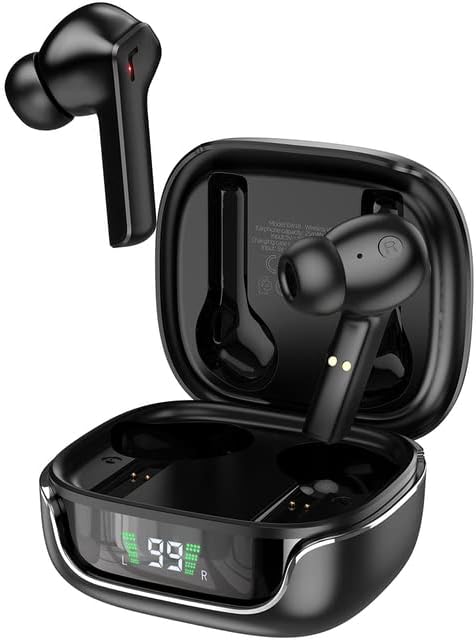
Image: The Hoco Smart Ear Wireless Bluetooth 5.3 Earbuds, showcasing both earbuds and their sleek charging case with a digital LED display.
Zawartość opakowania
- Hoco Smart Ear Wireless Bluetooth 5.3 Earbuds
- Etui ładujące
- Instrukcja obsługi
- Kabel ładujący
Organizować coś
Początkowe parowanie
To pair your Hoco Smart Ear Earbuds for the first time, ensure they are fully charged. Open the charging case; the earbuds will automatically enter pairing mode. On your device (e.g., smartphone), navigate to Bluetooth settings and select 'Hoco EW18' or a similar name from the list of available devices. Once connected, the earbuds are ready for use.

Image: A visual representation of the Hoco earbuds establishing a wireless connection using Bluetooth 5.3 technology, highlighting stable and low-power consumption.

Image: The earbuds and charging case next to a smartphone, illustrating the automatic pairing feature and the ability to switch between devices seamlessly.
Ponowne łączenie
After initial pairing, the earbuds will automatically reconnect to the last paired device when taken out of the charging case and Bluetooth is enabled on the device.
Instrukcja obsługi
The Hoco Smart Ear Earbuds feature intuitive touch controls for various functions:

Image: A detailed diagram illustrating the touch control functions of the Hoco earbuds, including playback, track navigation, call management, power, and voice assistant activation.
- Odtwórz/Pauza: Click the touch area once.
- Następny utwór: Double click the touch area.
- Poprzedni utwór: Triple click the touch area.
- Odbierz połączenie: Click the touch area once.
- Rozłączyć połączenie: Double click the touch area.
- Odrzuć połączenie: Naciśnij i przytrzymaj obszar dotykowy przez 2 sekundy.
- Włączyć coś: Open the cover of the charging case (automatic boot).
- Obudź Siri/Asystenta głosowego: Naciśnij i przytrzymaj obszar dotykowy przez 2 sekundy.
Konserwacja
Aby zapewnić długą żywotność i optymalną wydajność słuchawek dousznych, należy przestrzegać poniższych wskazówek dotyczących konserwacji:
- Czyszczenie: Regularnie czyść słuchawki douszne i etui ładujące miękką, suchą i niepozostawiającą włókien ściereczką. Nie używaj silnych środków chemicznych ani materiałów ściernych.
- Ładowanie styków: Periodically clean the charging contacts on both the earbuds and inside the case to ensure a proper connection.
- Składowanie: Gdy nie używasz słuchawek, przechowuj je w etui ładującym, aby chronić je przed kurzem i uszkodzeniami.
- Unikaj wilgoci: Trzymaj słuchawki i etui z dala od wody i nadmiernej wilgoci.
- Temperatura: Unikaj wystawiania produktu na działanie ekstremalnych temperatur.
Rozwiązywanie problemów
If you encounter issues with your Hoco Smart Ear Earbuds, refer to the following common solutions:
- Brak dźwięku:
- Sprawdź, czy słuchawki są naładowane.
- Sprawdź głośność urządzenia i słuchawek.
- Verify Bluetooth connection. Try disconnecting and reconnecting.
- Słuchawki douszne nie parują się:
- Upewnij się, że słuchawki są w trybie parowania (otwarte etui).
- Wyłącz i włącz ponownie Bluetooth w swoim urządzeniu.
- Usuń urządzenie z ustawień Bluetooth w telefonie i sparuj je ponownie.
- Upewnij się, że do słuchawek nie są podłączone żadne inne urządzenia.
- Problemy z ładowaniem:
- Sprawdź, czy kabel ładujący jest prawidłowo podłączony.
- Ensure the charging contacts on both earbuds and case are clean.
- Wypróbuj inny kabel ładujący lub zasilacz.
- Połączenie przerywane:
- Ensure you are within the effective Bluetooth range.
- Zminimalizuj zakłócenia ze strony innych urządzeń bezprzewodowych.
Specyfikacje
Detailed technical specifications for the Hoco Smart Ear Wireless Bluetooth 5.3 Earbuds:
| Funkcja | Specyfikacja |
|---|---|
| Model | WE-1005004459784466-002 |
| Wersja Bluetooth | 5.3 |
| Liczba kierowców | 2 |
| Średnica sterownika | 13mm |
| Całkowite zniekształcenie harmoniczne | 15% |
| Impedancja | 32 omy |
| Współczynnik kształtu słuchawek | Douszne |
| Technologia łączności | Bluetooth |
| Technologia komunikacji bezprzewodowej | Bluetooth |
| Kompatybilne urządzenia | Telefony komórkowe |
| Funkcja kabla | Cable-free (Wireless) |
| Kolor | Czarny |
| Pierwsza dostępna data | 6 lipca 2023 r. |

Obraz: Wybuch view illustrating the 13mm moving coil driver and bio-carbon fiber composite diaphragm, designed for immersive sound quality.

Image: A person wearing the Hoco earbuds, highlighting the soft silicone ear caps and in-ear ergonomic design for comfortable wear and pure sound enjoyment.
Gwarancja i wsparcie
Hoco is committed to customer satisfaction and product quality. We offer the following:
- 12-miesięczna gwarancja: All products come with a 12-month warranty.
- Obsługa klienta: If you experience any issues with defective or incorrect products, please contact us through the Amazon platform. We are dedicated to providing the best solution, including full refunds or product replacements, to ensure 100% customer satisfaction.
- Gwarancja dostawy: We ensure product delivery within the specified timeframe on our sales page.