
Wstęp
The Altec Lansing Kid Safe 2-in-1 Wireless Bluetooth Headphones (Model MZX4410) are designed to provide a safe and enjoyable audio experience for children. These headphones feature volume-limiting technology to protect delicate hearing, comfortable ear cushions, and versatile connectivity options. This manual provides instructions for setup, operation, and maintenance to ensure optimal performance and longevity of your headphones.
Co jest w pudełku
- Altec Lansing Kid Safe 2-in-1 Wireless Bluetooth Headphones
- Kabel ładujący USB-C
- Kabel audio 3.5 mm
- Etui ochronne
- Instrukcja obsługi (ten dokument)
Cechy produktu
- Krystalicznie czysty dźwięk: High-quality audio with enhanced bass for an immersive listening experience.
- Safe Volume Limiting: Integrated technology limits maximum volume to 85dB to protect children's hearing.
- Łączność 2 w 1: Supports both wireless Bluetooth and wired 3.5mm audio connections.
- Zasięg bezprzewodowy: Up to 30 feet of Bluetooth wireless range for unrestricted movement.
- Wygodny projekt: Soft ear cushions and an adjustable, cushioned headband ensure a comfortable fit for extended wear.
- Składany i przenośny: Convenient foldable design for easy storage and transport.
- Trwała konstrukcja: Built to withstand active use.
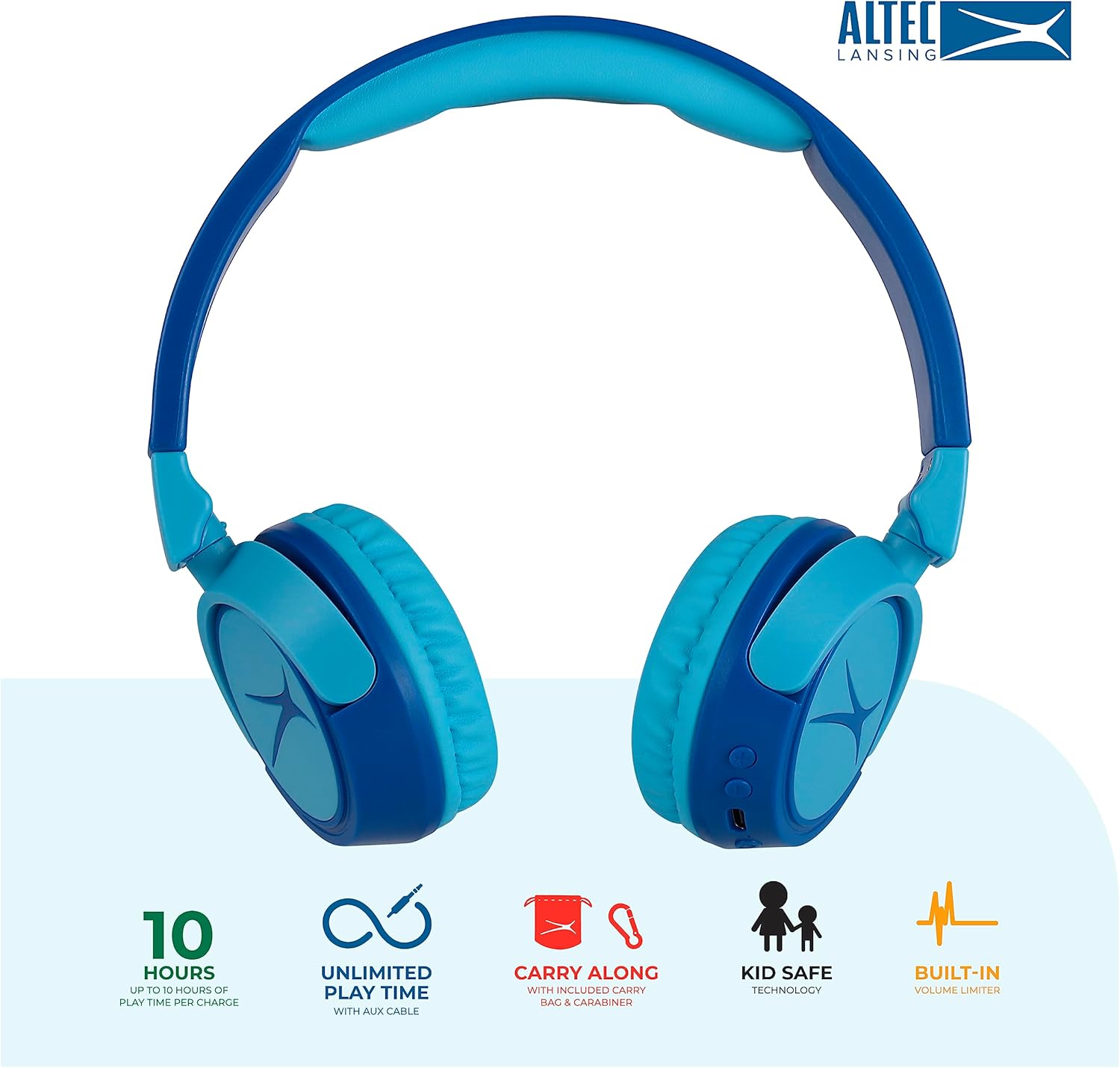
Image: Key features of the Altec Lansing Kid Safe Headphones, including battery life, wired option, portability, and safety features.

Image: Visual representation of the 85dB volume limiting technology for safe listening.
Instrukcje konfiguracji
1. Ładowanie słuchawek
- Locate the USB-C charging port on the headphone earcup.
- Connect the provided USB-C charging cable to the port on the headphones.
- Plug the other end of the USB-C cable into a compatible USB power source (e.g., computer, wall adapter).
- Podczas ładowania dioda LED będzie świecić, a po pełnym naładowaniu zmieni kolor lub wyłączy się.
- Pełne naładowanie zapewnia około 10 godzin odtwarzania.
2. Parowanie Bluetooth
- Upewnij się, że słuchawki są naładowane.
- Press and hold the Power button on the headphone earcup until the LED indicator flashes blue and red, indicating pairing mode.
- Na swoim urządzeniu (smartfonie, tablecie, komputerze) przejdź do ustawień Bluetooth i włącz Bluetooth.
- Select "Altec Lansing MZX4410" from the list of available devices.
- Po nawiązaniu połączenia dioda LED zacznie świecić ciągłym niebieskim światłem.
- Słuchawki automatycznie połączą się z ostatnio sparowanym urządzeniem po włączeniu, jeżeli będzie ono w zasięgu.
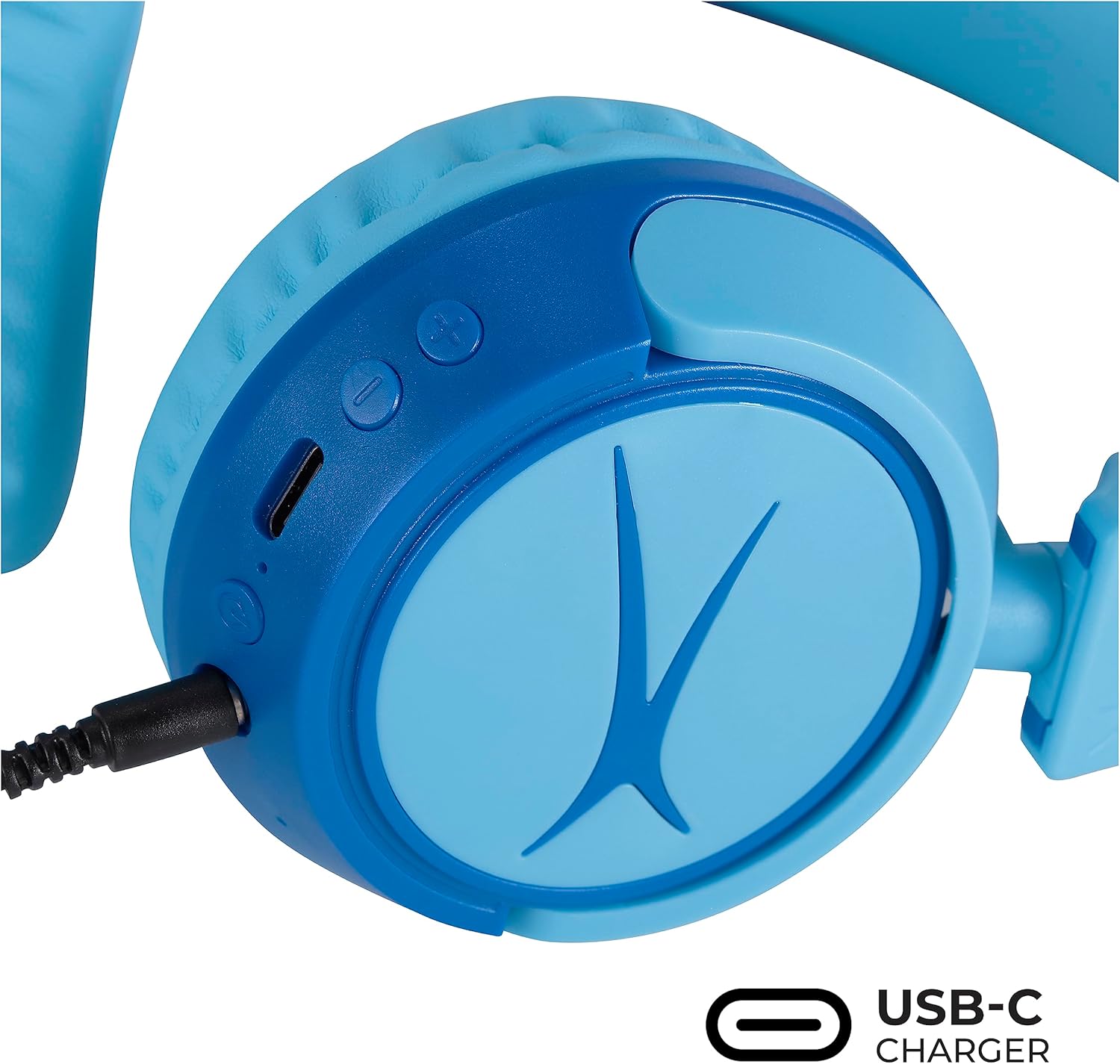
Image: Detail of the headphone controls and ports for charging and wired connection.
Instrukcja obsługi
Włączanie/wyłączanie zasilania
- Aby włączyć urządzenie, naciśnij i przytrzymaj przycisk zasilania, aż zaświeci się kontrolka LED.
- Aby wyłączyć urządzenie, naciśnij i przytrzymaj przycisk zasilania, aż dioda LED zgaśnie.
Kontrola głośności
- Use the '+' button to increase volume.
- Use the '-' button to decrease volume.
- The volume is limited to 85dB for hearing protection.
Kontrola mediów
- Naciśnij przycisk Odtwórz/Pauza raz, aby odtworzyć lub wstrzymać odtwarzanie dźwięku.
- Naciśnij i przytrzymaj przycisk „+”, aby przejść do następnego utworu.
- Naciśnij i przytrzymaj przycisk „-”, aby przejść do poprzedniego utworu.
Połączenie przewodowe (opcjonalnie)
For unlimited playtime or when Bluetooth is not available, use the provided 3.5mm audio cable:
- Podłącz jeden koniec kabla audio 3.5 mm do gniazda audio w nausznikach słuchawek.
- Podłącz drugi koniec do wyjścia audio 3.5 mm w urządzeniu.
- Słuchawki automatycznie przełączą się na tryb przewodowy.

Image: The headphones are compatible with multiple devices via Bluetooth or wired connection.
Video: An official product video demonstrating the Altec Lansing Kid Safe Bluetooth Headphones.
Konserwacja
Czyszczenie
- Wytrzyj słuchawki miękką, suchą ściereczką.
- Nie używaj żrących środków chemicznych ani materiałów ściernych.
- Ensure no moisture enters the ports.
Składowanie
- Fold the headphones for compact storage.
- Store them in the provided protective case when not in use to prevent damage.
- Przechowywać w chłodnym i suchym miejscu, chroniąc od ekstremalnych temperatur.

Image: Features highlighting the adjustable and cushioned design for comfort.
Rozwiązywanie problemów
- Brak zasilania: Upewnij się, że słuchawki są w pełni naładowane. Podłącz je do źródła zasilania za pomocą kabla USB-C.
- Nie można sparować przez Bluetooth: Make sure the headphones are in pairing mode (flashing blue/red LED). Check that Bluetooth is enabled on your device and that the headphones are within the 30-foot range. Try restarting both the headphones and your device.
- Brak dźwięku w trybie bezprzewodowym: Verify that the headphones are successfully paired and connected to your device. Check the volume levels on both the headphones and your device.
- Brak dźwięku w trybie przewodowym: Ensure the 3.5mm audio cable is securely plugged into both the headphones and your device. Check the volume levels on your device.
- Sound is Too Low: The headphones feature a built-in volume limiter at 85dB for safety. This is a design feature and not a malfunction.
Specyfikacje
| Funkcja | Szczegół |
|---|---|
| Nazwa modelu | MZX4410 |
| Technologia łączności | Bezprzewodowy (Bluetooth), przewodowy (gniazdo 3.5 mm) |
| Technologia komunikacji bezprzewodowej | Bluetooth |
| Zasięg Bluetooth | 30 stóp |
| Żywotność baterii | 10 godzin |
| Limit głośności | 85dB (Kid Safe) |
| Typ sterowania | Sterowanie multimediami, dotyk |
| Cechy specjalne | Adjustable Headband, Detachable Cable, Foldable, Lightweight, Wireless |
| Tworzywo | Plastikowy |
| Waga przedmiotu | 8.8 uncji (0.25 kilograma) |
| Producent | Altec Lansing Technologies |
| UPC | 021331082107 |
Gwarancja i wsparcie
Aby uzyskać informacje o gwarancji i obsłudze klienta, zapoznaj się z oficjalną stroną Altec Lansing website or contact their customer service directly. Details can typically be found on the product packaging or the Altec Lansing support portal.


