
1. Wprowadzenie
Thank you for choosing the Docreate LCD 99 Gear Adjustable Handheld Spot Welder. This portable device is designed for efficient and precise spot welding of nickel-plated sheets, ideal for 18650 lithium battery assembly, cell phone repair, and electric car repair. Featuring an intuitive LCD display and both automatic and manual operating modes, it offers versatility and ease of use for both professional and amateur users.
2. Instrukcje bezpieczeństwa
Please read and understand all safety instructions before operating the spot welder to prevent injury or damage to the device.
- Always wear appropriate personal protective equipment, including safety glasses, to protect your eyes from sparks.
- Zadbaj o odpowiednią wentylację w miejscu pracy, aby rozproszyć wszelkie opary.
- Nie należy używać urządzenia w wilgotnych warunkach ani w pobliżu materiałów łatwopalnych.
- Przechowywać urządzenie w miejscu niedostępnym dla dzieci i zwierząt domowych.
- Handle batteries with care. Do not short-circuit batteries or attempt to weld damaged batteries.
- Disconnect the device from power when not in use or during maintenance.
3. Zawartość opakowania
Sprawdź, czy w przesyłce znajdują się wszystkie elementy:
- 1 x Docreate Handheld Spot Welder
- 1 x 2-meter Nickel Roll
- 1 x papier ścierny
- 1 x kabel ładujący typu C
- 1 x Pen Cap
- 2 x Copper Pins (Welding Needles)

4. Koniec produktuview
The Docreate Spot Welder is a compact and powerful tool designed for precision welding tasks.
4.1. Główne cechy
- Przenośna konstrukcja: Lightweight and compact, ideal for both indoor and outdoor use.
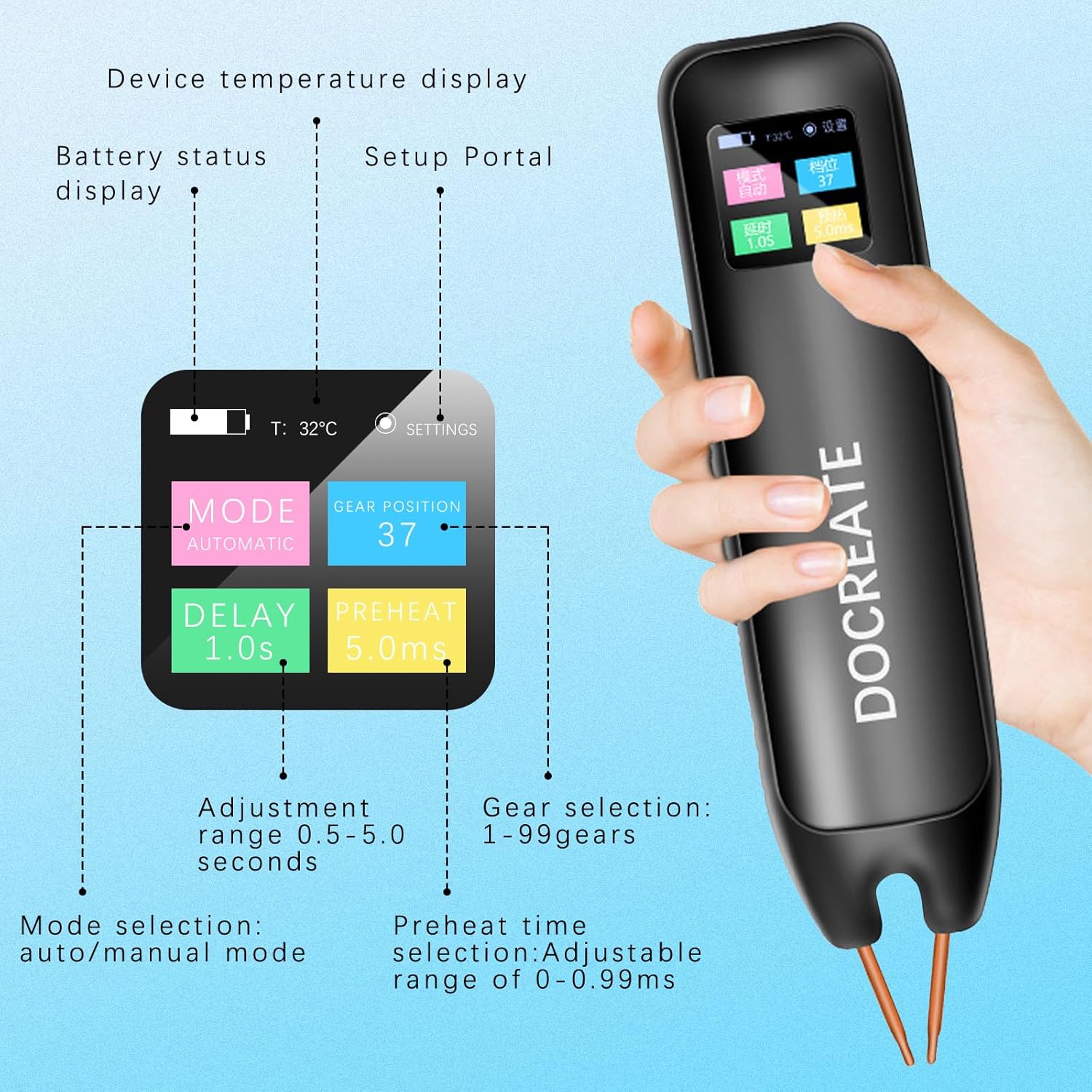
- Wyświetlacz LCD: Provides real-time information including temperature, mode, preheat time, trigger time, power level, and battery status.
- 99 regulowanych biegów: Allows for precise control over welding parameters to suit various materials and thicknesses.
- Technologia podwójnego impulsu: Ensures strong and reliable welds.
- Auto/Manual Modes: Offers flexibility in operation.

5. Konfiguracja
5.1. Ładowanie urządzenia
Before first use, fully charge the spot welder using the provided Type-C charging cable. Connect the cable to the device's Type-C port and a compatible USB power adapter (not included).

5.2. Włączanie/wyłączanie zasilania
Press and hold the power button on the side of the device to turn it on or off. The LCD screen will illuminate upon power-on.
6. Instrukcja obsługi
The spot welder offers both automatic and manual modes for different welding preferences.
6.1. Wybór trybu
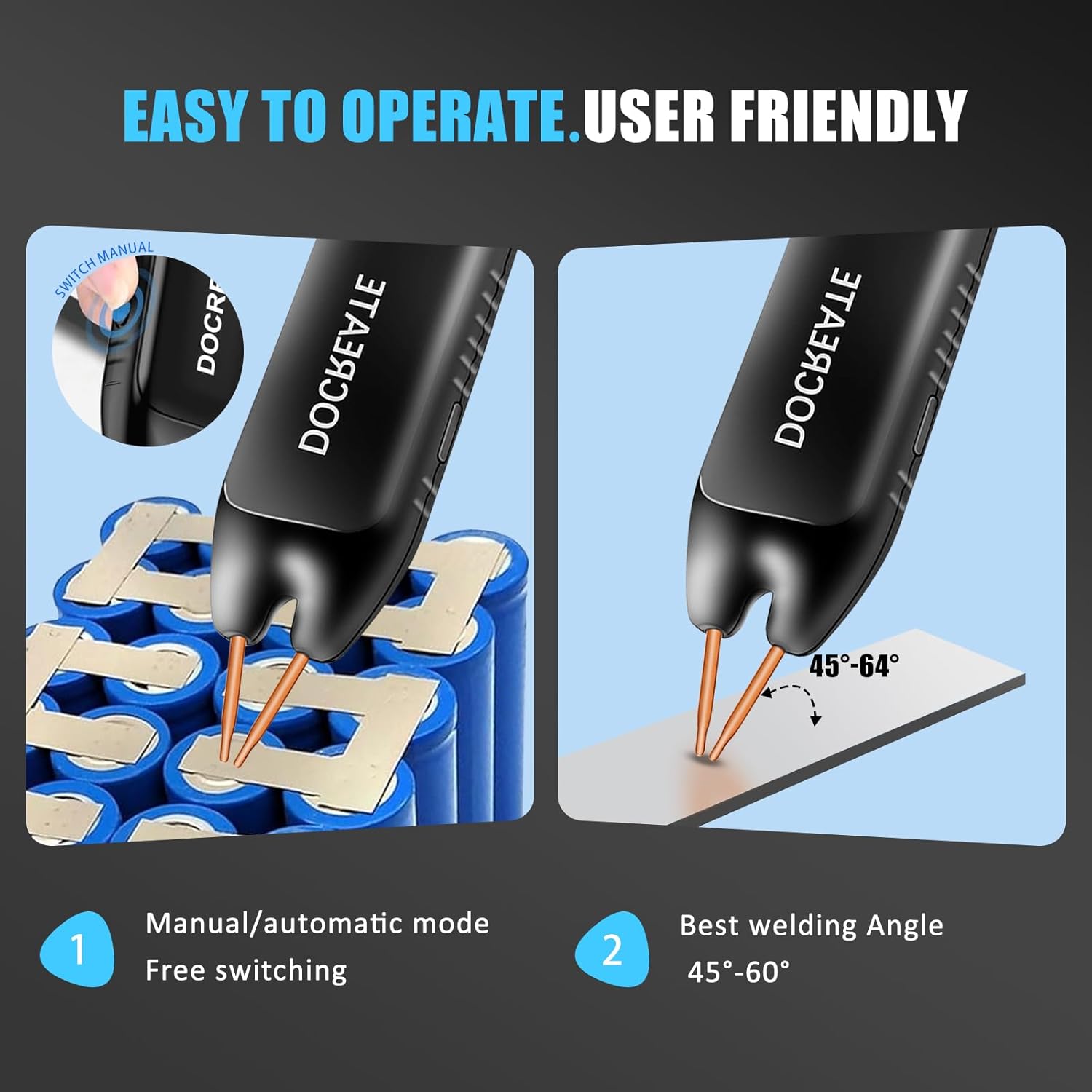
The device allows switching between Automatic and Manual modes. Use the controls on the device to navigate the LCD menu and select your desired mode.
6.2. Tryb automatyczny
In Automatic Mode, simply place both welding pins firmly on the desired welding position. The device will automatically detect contact and initiate the weld after a set delay time. Ensure the welding pins are inclined at an angle of 45°-60° to the welding surface for optimal results.
6.3. Tryb ręczny
In Manual Mode, you have direct control over the welding trigger. Adjust parameters via the LCD display. Place both welding pins firmly on the desired welding position, ensuring a 45°-60° inclination. Then, press the welding button on the side of the device to initiate the weld.
6.4. Adjusting Welding Gears (Power Level)
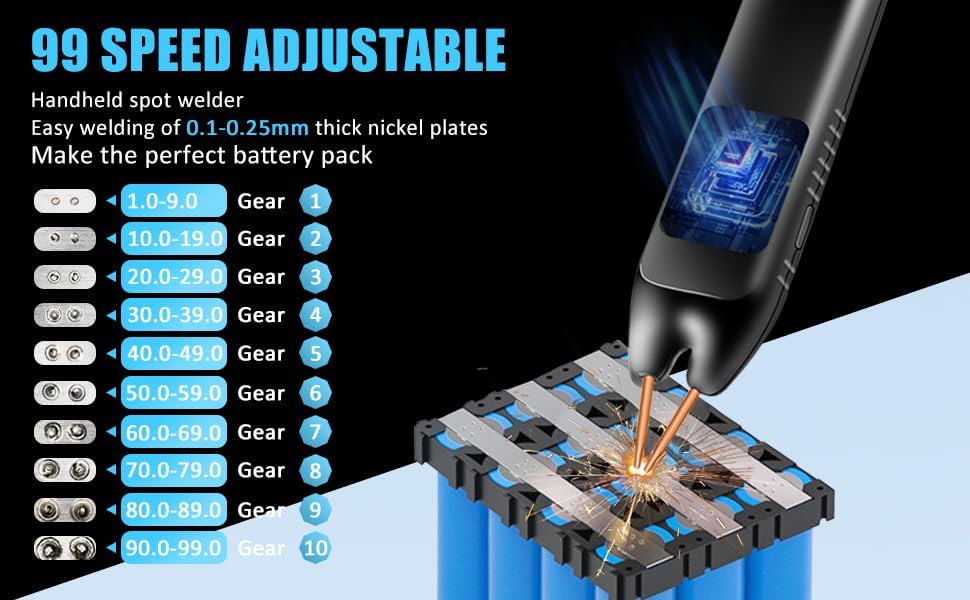
The spot welder features 99 adjustable gears to control the welding power. Higher gear numbers correspond to higher power. Adjust the gear setting via the LCD display to match the thickness of the nickel-plated sheets you are welding (0.1mm to 0.25mm).
7. Konserwacja
Właściwa konserwacja gwarantuje długowieczność i optymalną wydajność zgrzewarki punktowej.
- Czyszczenie: Regularnie przecieraj urządzenie suchą, miękką ściereczką. Nie używaj środków czyszczących o właściwościach ściernych ani rozpuszczalników.
- Pielęgnacja elektrod: The copper pins (electrodes) are replaceable. If they become worn or oxidized, gently sand them with the provided sandpaper or replace them to ensure good electrical contact.
- Składowanie: Przechowuj zgrzewarkę punktową w chłodnym i suchym miejscu, z dala od bezpośredniego światła słonecznego i wilgoci.
- Bateria: W przypadku długoterminowego przechowywania należy upewnić się, że akumulator jest częściowo naładowany (około 50%), aby wydłużyć jego żywotność.
8. Rozwiązywanie Problemów
If you encounter issues with your spot welder, refer to the following common problems and solutions:
- Urządzenie nie włącza się: Upewnij się, że bateria jest naładowana. Podłącz kabel ładujący typu C i odczekaj chwilę, aż się naładuje, zanim spróbujesz ponownie włączyć urządzenie.
- Weak or inconsistent welds:
- Check the battery level; a low battery can affect welding power.
- Increase the gear (power) setting.
- Ensure the welding pins are clean and have good contact with the nickel sheet and battery terminal. Sand the tips if necessary.
- Verify the welding angle (45°-60°) and apply firm, even pressure.
- Przegrzanie: The device has an intelligent internal temperature detection system. If it overheats, it may temporarily shut down. Allow it to cool down before resuming operation.
- Problemy z wyświetlaczem LCD: If the display is not functioning correctly, try restarting the device. If the problem persists, contact customer support.
9. Specyfikacje
| Funkcja | Specyfikacja |
|---|---|
| Marka | Docreate |
| Numer modelu | Docreate-757 |
| Waga przedmiotu | 9.9 uncji |
| Wymiary produktu | 7.72 x 1.62 x 1.62 cala |
| Kolor | Spot Welder, 99 Gears |
| Źródło zasilania | Zasilany bateryjnie |
| Cotage | 4.2 miliwaty |
| Grubość spawania | 0.1-0.25mm (nickel-plated sheets) |
| Regulowane przekładnie | 99 |
10. Gwarancja i wsparcie
Docreate products are manufactured to the highest quality standards. For warranty information, technical support, or any inquiries regarding your spot welder, please contact Docreate customer service through the retailer's platform or the official Docreate website. Please have your model number (Docreate-757) and purchase details ready when contacting support.