
Produkt ponadview
The TechniSat DIGITRADIO 4 IR is a versatile stereo internet radio designed for high-quality audio reception and playback. It supports DAB+, FM, and internet radio, offering a wide range of national and regional programs. The device features Bluetooth audio streaming, allowing playback from smartphones and tablets, and includes a USB port for MP3 file playback. Equipped with two 10W ELAC speakers and a clear 3.5-inch TFT color display, it delivers excellent sound and user experience. Control is intuitive via rotary knobs, remote control, or a smartphone application.
Zawartość opakowania
- DIGITRADIO 4 IR Stereo Internet Radio (Black)
- Telescopic antenna with mounting tool
- Zasilacz
- Pilot zdalnego sterowania z bateriami (2 x AAA)
- Instrukcja obsługi
Funkcje i sterowanie urządzenia
Familiarize yourself with the main components and controls of your DIGITRADIO 4 IR.

Obraz: Przód view of the TechniSat DIGITRADIO 4 IR radio, showing the central display, two large rotary knobs for volume/standby and select/snooze, and several control buttons (Mode, Menu, Fav, Scan, Play/Pause, Skip tracks).
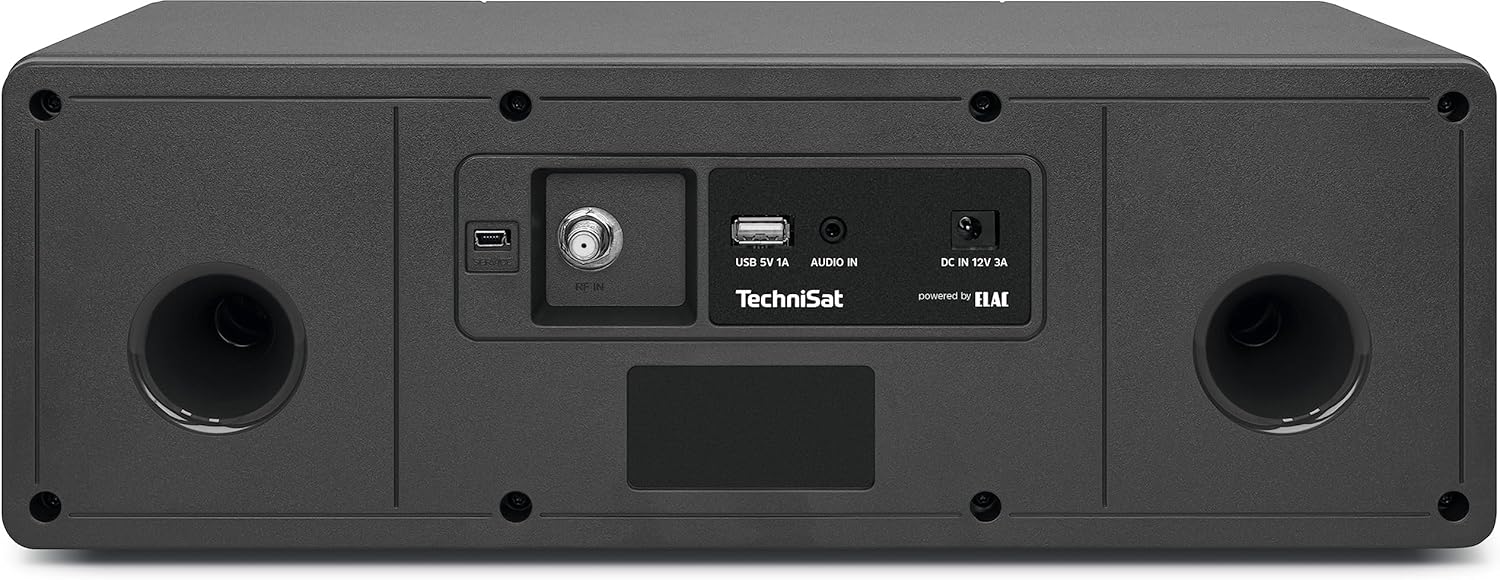
Obraz: Tył view of the TechniSat DIGITRADIO 4 IR radio, highlighting the connection ports: RF IN for antenna, USB 5V 1A, AUDIO IN (AUX), and DC IN 12V 3A power input. Two bass reflex ports are also visible.

Obraz: The remote control for the TechniSat DIGITRADIO 4 IR radio, featuring buttons for power, EQ, scan, alarm, sleep timer, playback controls, menu navigation, volume, and a numeric keypad for direct station access.
Organizować coś
- Rozpakowywanie: Ostrożnie wyjąć wszystkie elementy z opakowania.
- Połączenie antenowe: Connect the telescopic antenna to the RF IN port on the rear of the device. Extend the antenna for optimal reception.
- Podłączenie zasilania: Connect the power adapter to the DC IN 12V 3A port on the rear of the radio, then plug it into a wall outlet.
- Kreator konfiguracji początkowej: Upon first power-on, the radio will guide you through an initial setup wizard. Follow the on-screen instructions to set language, time, date, and network connection.
- Połączenie sieciowe (Wi-Fi): Select your Wi-Fi network from the list and enter the password. A stable internet connection is required for internet radio and streaming services.
Instrukcja obsługi
Włączanie/wyłączanie i tryb gotowości
Naciśnij VOL / STANDBY rotary knob to switch the device on or off. In standby mode, the display shows the time and date.
Wybór trybu
Naciśnij TRYB button on the front panel or remote control to cycle through available modes: DAB+, FM, Internet Radio, Bluetooth, USB, and AUX In.
Radio DAB+
- Select DAB+ mode.
- Radio automatycznie przeskanuje dostępne stacje DAB+.
- Użyj SELECT / SNOOZE rotary knob or the </> buttons on the remote to navigate through stations.
- Naciśnij SELECT / SNOOZE pokrętło lub OK on the remote to select a station.
- To save a favorite station, press and hold the ULUBIONY przycisk, a następnie wybierz numer ustawienia wstępnego.
Radio FM
- Wybierz tryb FM.
- Naciśnij SKANDOWAĆ button to automatically search for FM stations.
- Manually tune using the SELECT / SNOOZE rotary knob or the </> pikolak.
- To save a favorite station, press and hold the ULUBIONY przycisk, a następnie wybierz numer ustawienia wstępnego.
Radio internetowe
- Ensure the radio is connected to your Wi-Fi network.
- Wybierz tryb radia internetowego.
- Browse stations by location, genre, or search.
- Naciśnij SELECT / SNOOZE pokrętło lub OK on the remote to select a station.
- To save a favorite station, press and hold the ULUBIONY przycisk, a następnie wybierz numer ustawienia wstępnego.
Streaming audio przez Bluetooth
- Select Bluetooth mode on the radio. The display will show "Pairing".
- Włącz Bluetooth w swoim smartfonie lub tablecie i wyszukaj dostępne urządzenia.
- Select "DIGITRADIO 4 IR" from the list to pair.
- Po sparowaniu możesz przesyłać strumieniowo dźwięk ze swojego urządzenia do radia.
Odtwarzanie USB
- Włóż dysk USB zawierający plik MP3 filedo portu USB z tyłu radia.
- Wybierz tryb USB.
- Use the controls to navigate and play your music files.
Wejście AUX
- Connect an external audio source (e.g., an MP3 player) to the AUX IN port on the rear of the radio using a 3.5mm audio cable (not included).
- Wybierz tryb AUX.
- Audio from the connected device will play through the radio's speakers.
Budzik i timer snu
Access alarm and sleep timer settings via the MENU button or dedicated buttons on the remote control. Follow the on-screen prompts to configure these functions.
Ustawienia wyświetlania
Adjust display brightness for operating and standby modes through the MENU settings. The radio also features an auto-dimming function.
Konserwacja
To ensure the longevity and optimal performance of your DIGITRADIO 4 IR, follow these maintenance guidelines:
- Czyszczenie: Do czyszczenia obudowy radia należy używać miękkiej, suchej ściereczki. Nie należy używać środków ściernych, wosków ani rozpuszczalników.
- Pielęgnacja wyświetlacza: Gently wipe the display with a soft, lint-free cloth. Avoid pressing hard on the screen.
- Wentylacja: Upewnij się, że otwory wentylacyjne nie są zablokowane, aby zapobiec przegrzaniu.
- Środowisko: Keep the radio away from direct sunlight, heat sources, dust, and moisture.
Rozwiązywanie problemów
If you encounter issues with your DIGITRADIO 4 IR, refer to the following common solutions:
- Brak zasilania: Ensure the power adapter is securely connected to both the radio and a working power outlet.
- Brak dźwięku: Check the volume level. Ensure the correct audio source mode is selected. If using AUX or Bluetooth, verify the external device's volume and connection.
- Słaby odbiór radia (DAB+/FM): Extend and adjust the telescopic antenna. Try repositioning the radio to improve signal strength.
- Internet Radio Connection Issues: Verify your Wi-Fi network connection. Ensure the Wi-Fi password is entered correctly. Restart your Wi-Fi router and the radio.
- Problemy z parowaniem Bluetooth: Ensure the radio is in Bluetooth pairing mode. Delete "DIGITRADIO 4 IR" from your device's Bluetooth list and attempt to pair again.
- Connect App Not Recognizing Radio: If using a companion app, try restarting your smartphone or tablet if the app fails to connect to the radio.
- Problemy z odtwarzaniem przez USB: Ensure the USB drive is formatted correctly (FAT32) and contains supported MP3 audio files.
Specyfikacje
| Funkcja | Szczegół |
|---|---|
| Marka | TechniSat |
| Numer modelu | 0000/3957 |
| Kolor | Czarny |
| Technologia łączności | Pomocniczy, Bluetooth, USB, Wi-Fi |
| Cechy specjalne | Access to music services (Spotify, Amazon Music, Klassikradio Select, Calm Radio), USB interface with charging function and MP3 playback, FM Radio, Bluetooth audio streaming (reception), Favorite memory (30 DAB+ / 30 FM / 30 Internet) |
| Kompatybilne urządzenia | Headphones, Smartphone, Tablet |
| Wymiary produktu | 38 dł. x 18.5 szer. x 13.5 wys. cm |
| Technologia strojenia | DAB+ |
| Obsługiwane pasma radiowe | DAB+, FM, Internet |
| Źródło zasilania | Elektryczny przewodowy |
| Zawarte komponenty | Power adapter, Telescopic antenna with mounting tool, DIGITRADIO 4 IR, User manual, Remote control with batteries |
Informacje o gwarancji i pomocy technicznej
For detailed warranty information, please refer to the warranty card included with your product or visit the official TechniSat website. Please note that spare parts availability for this product is currently unavailable, and information regarding guaranteed software updates is not provided.
For technical support or service inquiries, please contact TechniSat customer service through their official channels.