1. Wprowadzenie
This user manual provides essential information for the installation, operation, and maintenance of your Palit GeForce RTX 4060 StormX 8GB graphics card. Please read this manual thoroughly before installing and using the product to ensure proper functionality and to prevent damage.
2. Zawartość opakowania
Sprawdź, czy w opakowaniu produktu znajdują się wszystkie elementy:
- Palit GeForce RTX 4060 8GB Storm X Graphics Card
- Krótki przewodnik instalacji (jeśli dołączony)
- Driver CD/DVD (if included, otherwise download latest drivers online)
3. Konfiguracja i instalacja
3.1 Lista kontrolna przed instalacją
- Upewnij się, że Twój zasilacz (PSU) spełnia minimalne wymagania dotyczące mocytage requirement (typically 550W or higher for an RTX 4060, check specific PSU recommendations).
- Confirm your motherboard has an available PCI Express x16 slot.
- Turn off your computer and disconnect the power cable before proceeding.
- Uziem się, aby rozładować ładunki elektrostatyczne.
3.2 Instalacja sprzętu
- Otwórz obudowę komputera.
- Znajdź wolne gniazdo PCI Express x16 na płycie głównej.
- Remove any expansion slot covers that obstruct the installation.
- Carefully align the graphics card with the PCIe slot and press it firmly until it is securely seated. Ensure the retention clip locks into place.
- Przymocuj kartę graficzną do obudowy za pomocą śrub.
- Connect the required 8-pin PCIe power connector from your power supply to the graphics card.
- Zamknij obudowę komputera.

Rycina 1: Przód view of the Palit GeForce RTX 4060 StormX 8GB graphics card, showing the single fan cooling solution.
3.3 Instalacja sterownika
- Connect your display cable (HDMI or DisplayPort) from the graphics card to your monitor.
- Włącz komputer.
- Once the operating system loads, download the latest NVIDIA drivers for the GeForce RTX 4060 from the official NVIDIA webStrona (www.nvidia.com/drivers).
- Postępuj zgodnie z instrukcjami wyświetlanymi na ekranie, aby dokończyć instalację sterownika. Może być konieczne ponowne uruchomienie systemu.
4. Obsługa karty graficznej
4.1 Połączenia wyświetlacza
The Palit GeForce RTX 4060 StormX 8GB supports multiple display outputs. Connect your monitor(s) using the available ports:
- HDMI: For high-definition audio and video output.
- DisplayPort: Do wyświetlaczy o wysokiej rozdzielczości i wysokiej częstotliwości odświeżania.
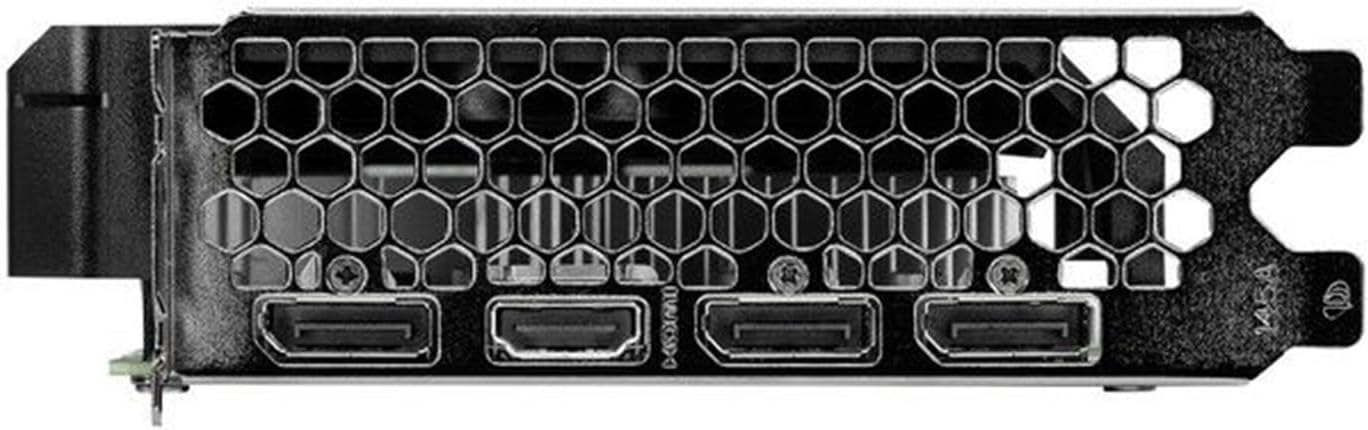
Figure 2: Rear I/O panel showing the HDMI and DisplayPort outputs.
4.2 Główne cechy
- NVIDIA G-SYNC: Enjoy smooth, tear-free gameplay at high refresh rates when paired with a compatible G-SYNC monitor.
- DLSS 3 & Ray Tracing: Experience enhanced visual fidelity and performance in supported games with NVIDIA's Deep Learning Super Sampling and real-time ray tracing technologies.
- Technologia 0dB: The fan remains off during light workloads, ensuring silent operation. Fan activation occurs only under heavier loads to maintain optimal temperatures.
- ThunderMaster Utility: Palit's proprietary software allows you to monitor GPU status, adjust fan speeds, and manage overclocking settings for personalized performance. Download from the official Palit webstrona.
- Mini-ITX Form Factor Support: With a compact length of 17cm, this card is suitable for small form factor PC builds, offering powerful performance in a space-saving design.
5. Konserwacja
Regularna konserwacja pomaga zapewnić długowieczność i optymalną wydajność karty graficznej.
- Usuwanie kurzu: Periodically clean dust from the graphics card heatsink and fan using compressed air. Ensure the computer is powered off and unplugged before cleaning. Hold the fan blades gently to prevent over-spinning during cleaning.
- Aktualizacje sterowników: Keep your graphics drivers updated by regularly checking the official NVIDIA website for the latest versions. Driver updates often include performance improvements, bug fixes, and support for new games.
- Monitorowanie temperatury: Use monitoring software (like Palit ThunderMaster or other third-party tools) to keep an eye on GPU temperatures, especially during heavy loads, to ensure it operates within safe limits.
6. Rozwiązywanie Problemów
Jeśli masz problemy z kartą graficzną, zapoznaj się z poniższymi typowymi procedurami rozwiązywania problemów:
- Brak wyjścia wyświetlacza:
- Upewnij się, że kabel wyświetlacza jest bezpiecznie podłączony zarówno do karty graficznej, jak i do monitora.
- Sprawdź, czy monitor jest włączony i ustawiony na prawidłowe źródło sygnału wejściowego.
- Check if the graphics card is properly seated in the PCIe slot and the 8-pin power connector is firmly attached.
- Spróbuj podłączyć się do innego portu wyjściowego wyświetlacza na karcie lub innego monitora, jeśli jest dostępny.
- Problemy ze sterownikiem:
- Perform a clean installation of the latest drivers from the NVIDIA website. Use the 'Custom' installation option and select 'Perform a clean installation'.
- If issues persist, try rolling back to a previous stable driver version.
- Słaba wydajność/awarie:
- Upewnij się, że Twój system spełnia minimalne wymagania dla uruchamianych aplikacji i gier.
- Monitor GPU temperatures to rule out overheating.
- Sprawdź, czy działające w tle aplikacje nie zużywają zasobów systemowych.
- Verify your power supply unit is sufficient and providing stable power.
- Hałas wentylatora:
- Upewnij się, że żadne kable ani przeszkody nie kolidują z łopatkami wentylatora.
- Clean any dust buildup on the fan and heatsink.
- Use the ThunderMaster utility to adjust fan curves if desired, but avoid setting fan speeds too low under load.
If these steps do not resolve your issue, please contact Palit customer support or your retailer for further assistance.
7. Specyfikacje
| Funkcja | Specyfikacja |
|---|---|
| Procesor graficzny | NVIDIA GeForce RTX 4060 |
| Rdzenie CUDA | 3072 |
| Zegar Boost | 2460MHz |
| Rozmiar pamięci | 8 GB pamięci GDDR6 |
| Interfejs pamięci | 128-bit |
| Prędkość pamięci | 17 Gb/s |
| Typ autobusu | PCI Express 4.0 x16 |
| Wyświetl wyjścia | 1x HDMI, 3x DisplayPort |
| Maksymalna rozdzielczość cyfrowa | 8K Ultra HD |
| Złącze zasilania | 1x 8-stykowe |
| TDP | 115 W |
| Chłodzenie | Active (Single Fan) |
| Wymiary (dł. x szer. x wys.) | 12.6 x 7.09 x 2.36 cala (ok. 320 x 180 x 60 mm) |
| Numer modelu przedmiotu | NE64060019P1-1070F |
8. Gwarancja i wsparcie
Palit products are manufactured to the highest quality standards. This product is covered by a limited warranty provided by Palit or your retailer. Please refer to the warranty information provided with your purchase or visit the official Palit webna stronie szczegółowe warunki.
For technical support, driver downloads, or further assistance, please visit the official Palit webmiejsce na www.palit.com or contact your local retailer.