
JOYING JY-UZS15N8
Instruction Manual for Joying Car Radio
Model: JY-UZS15N8
Wstęp
This manual provides comprehensive instructions for the installation, operation, and maintenance of your Joying Car Radio. This single-din car stereo features an ultra-thin 15.1-inch touchscreen with 1920x1080 resolution, offering Carplay and Android Auto compatibility, Bluetooth, Mirror Link, AM/FM Radio, and a 48-Band EQ. Please read this manual thoroughly before using the product to ensure proper functionality and safety.
Środki ostrożności
To ensure your personal safety and the safety of others, please observe the following basic requirements:
- When driving, adjust the sound volume to an appropriate level to ensure you can perceive the driving situation and traffic conditions.
- Ensure safe driving and avoid violating traffic laws. Do not watch videos or operate the machine while driving.
- Avoid placing objects that may obstruct ventilation or cause damage to the unit.
- Do not disassemble or modify the device. Unauthorized disassembly or modification may void the warranty and cause damage.
- For installation, you may require an installation frame kit, special ISO harness, amplifier adapter, or CAN bus decoder, depending on your car's specific situation.
- This unit does not support factory car GPS antenna, backup rear camera, Bluetooth, USB, and microphone.
- Only use Joying accessories for optimal compatibility and performance (DAB+ digital radio adapter, DVR, OBDII scanner, reverse camera, TPMS, and steering wheel controller are not included and must be ordered separately).
- Nie wystawiaj urządzenia na działanie ekstremalnych temperatur, bezpośredniego światła słonecznego przez dłuższy czas ani wysokiej wilgotności.
- Do not try to connect the power supply other than the car battery to the product, as it may burn the internal components.
- Unikaj silnych uderzeń i wibracji.
- If the screen is dirty, wipe it with a soft, clean cloth. For stubborn stains, use a mild detergent.
Co jest w pudełku
W pakiecie znajdują się następujące elementy:
- 15.1 inch Head Unit x 1
- ISO Wire Harness x 1
- Antena 4G x 2
- Kabel USB x 2
- External Mic x 1
- Antena GPS x 1
- Instrukcja obsługi x 1
- Zestaw instalacyjny x 1

Figure 1: Included accessories and wiring diagram.
Produkt ponadview
The Joying Car Radio (JY-UZS15N8) is an advanced single-din car stereo featuring a large 15.1-inch ultra-thin touchscreen. It runs on Android 12 with a Qualcomm Snapdragon 6125 processor, providing a powerful and responsive user experience.
Główne cechy:
- Wyświetlacz: 15.1-inch Ultra-Thin Full-fit Touchscreen, 1920x1080 resolution, 60Hz refresh rate, 240dpi.
- Edytor: Qualcomm Snapdragon 6125 (QCM6125 Octa Core 64bit ARM, 4xA73@2.0GHz, 4xA53@1.8GHz) with Adreno™ 610@950 MHz GPU.
- Pamięć: 8GB RAM + 128GB ROM.
- System operacyjny: Android 12.
- Łączność: Built-in 4G Module (supports FDD-LTE: B2/B4/B5/B7/B12/B13/B14/B17/B25/B26/B38/B66/B71, TDD-LTE: B41), Wi-Fi (Wi-Fi 5, up to 600 Mbps DL 802.11ac), Bluetooth 5.0, USB, Ethernet, HDMI.
- Audio: Built-in DSP (Digital Sound Processor) with 48-band EQ, preset sound effects, DTS 5.1 panoramic surround sound. Optical Fiber and Coaxial Digital Output for enhanced sound quality.
- Nawigacja: Precise GPS engines with included GPS antenna, support for offline maps.
- Integracja ze smartfonem: Bezprzewodowy CarPlay i Android Auto.
- Obsługa kamery: AR Camera function for front and rear camera views (Joying's AR camera recommended).
- Interfejs użytkownika: Two customizable UI options, split-screen multitasking.

Figure 2: Joying 15.1-inch Car Radio main display showing navigation and multimedia.

Rysunek 3: Koniecview of the core specifications including screen size, Android OS, and processor.

Figure 4: Precision 4-layer Motherboard Structure, highlighting key components like the Qualcomm Snapdragon processor and audio chips.
Konfiguracja i instalacja
Proper installation is crucial for the optimal performance of your Joying Car Radio. It is recommended to have the installation performed by a qualified professional.
Lista kontrolna przed instalacją:
- Sprawdź, czy wszystkie elementy wymienione w sekcji „Zawartość opakowania” są obecne.
- Ensure your vehicle's electrical system is compatible.
- Przed rozpoczęciem instalacji odłącz akumulator pojazdu, aby zapobiec zwarciom elektrycznym.
- Acquire any necessary vehicle-specific installation frame kits, ISO harnesses, amplifier adapters, or CAN bus decoders.
Instalacja fizyczna:
- Carefully remove your existing car stereo unit and dashboard trim.
- Connect the provided ISO Wire Harness to your vehicle's wiring. Ensure all connections are secure.
- Connect the 4G Antennas, USB Cables, External Mic, and GPS Antenna to the corresponding ports on the head unit. Refer to the wiring diagram in Figure 1.
- The screen is removable and adjustable. It can be moved up and down by 2.5cm depending on your installation requirements. This allows for flexible positioning within your vehicle's dashboard.
- Mount the head unit securely into the single-din slot using the provided installation kit.
- Zamontuj ponownie wykończenie deski rozdzielczej.
- Podłącz ponownie akumulator pojazdu.

Figure 5: Removable screen feature for flexible installation.
Instrukcja obsługi
Initial Boot-up and Fast Boot:
The first boot-up may take approximately 30-40 seconds. Subsequent boot-ups will be significantly faster, entering the user interface in about 2 seconds once the car key is inserted.
Interfejs użytkownika (UI):
The unit offers two customizable user interfaces (UI 1 and UI 2) to suit your preferences. You can switch between them in the settings menu.
- Interfejs użytkownika 1: Features a clean layout with prominent widgets for navigation, music, and speed. You can customize widgets and access all apps.
- Interfejs użytkownika 2: Presents a grid of applications, allowing for easy access to all installed apps. You can long-press the home interface to add widgets, slide up from the middle of the screen to access all apps, and create folders for sorting.

Figure 6: User Interface 1, optimized for quick access to essential functions.

Figure 7: User Interface 2, providing a comprehensive app overview.
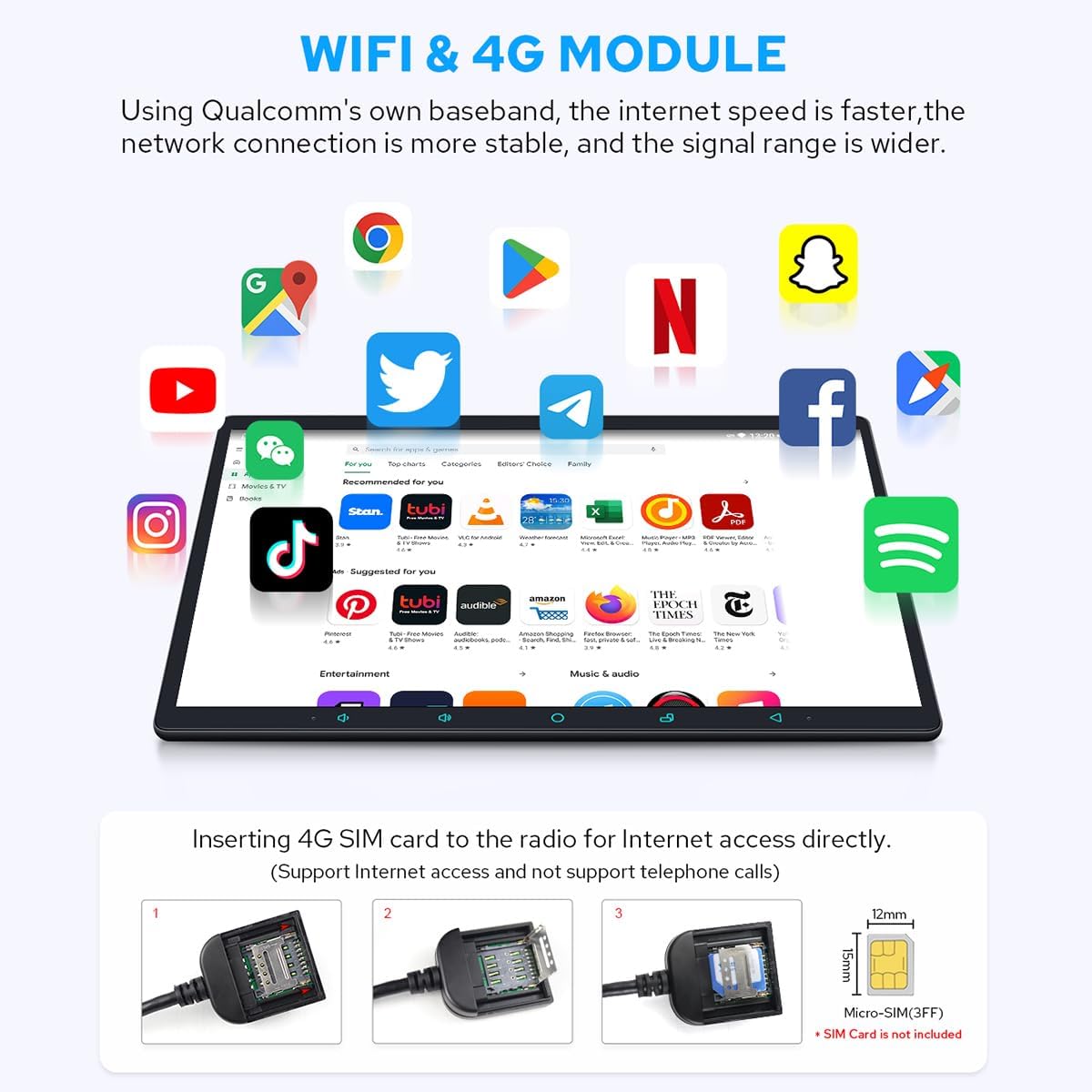
Figure 8: Split-screen Multitasking, allowing two applications to run side-by-side.
Ustawienia audio (DSP i EQ):
The built-in Digital Sound Processor (DSP) allows for precise audio customization. Access the "Sound effects" menu to adjust settings.
- 48-pasmowy korektor: Fine-tune your audio with a comprehensive 48-band equalizer. You can select from preset sound effects (e.g., Hip hop, Jazz, Rock) or create custom profiles.
- DTS Scenes: Experience immersive surround sound with DTS 5.1 panoramic surround sound effects and sound field correction.
- Fad-Bal: Adjust the fader and balance to optimize sound distribution within your vehicle.
- Wzmocnienie basów: Enhance low-frequency output for a richer bass experience.
- Wyjście cyfrowe światłowodowe i koncentryczne: Połącz z zewnętrznym amplifiers with these inputs for ultimate sound quality.

Figure 9: Built-in DSP interface for sound effects and equalization.

Figure 10: EQ settings and DTS Scenes for advanced audio configuration.
Łączność:
- Moduł 4G: Insert a SIM card (not included) for direct internet access. Note that it does not support phone calls or SMS.
- Wi-Fi: Połącz się z dostępnymi sieciami Wi-Fi, aby uzyskać dostęp do Internetu.
- Bluetooth: Pair your mobile phone for hands-free calling and audio streaming.
- CarPlay i Android Auto: Connect your smartphone via USB cable or Bluetooth to mirror apps, access navigation, make calls, and listen to music on the larger screen.

Figure 11: Built-in 4G Module for direct internet access.

Figure 12: Car-smartphone Connectivity via Wireless CarPlay and Android Auto.
Nawigacja:
The unit includes precise GPS engines and a dedicated GPS antenna for accurate positioning. You can use pre-installed navigation apps or download others from the Play Store.
- Mapy offline: Download map data for specific areas to use navigation without an internet connection.
- Synchronize Mobile Phone Map Data: Use CarPlay or Android Auto to display your phone's navigation on the head unit.
Odtwarzanie multimediów:
The car radio supports various multimedia formats for video and audio playback.
- Formaty wideo: Supports AVI, MKV, MP4, WMV, RMVB, MPG.
- Wyjście HDMI: Connect external displays (e.g., headrest monitors) via HDMI for synchronized video output. Note: A straight-head HDMI cable is not supported due to space constraints.

Figure 13: HDMI Output for connecting external displays.
Video 1: Demonstration of the Joying Car Radio's user interface, multimedia playback, and sound settings. This video showcases the responsiveness of the touchscreen, the clarity of the display when playing 4K UHD content, navigation features, radio functionality, and the extensive sound adjustment options including EQ and DTS settings.
AR Camera Function:
The unit supports an AR Camera function, allowing you to switch between front and rear camera views to observe your driving environment. For optimal performance, it is recommended to use Joying's optimized AR camera.

Figure 14: AR Camera interface displaying front and rear views for enhanced driving awareness.
Konserwacja
Regular maintenance helps prolong the life of your car radio.
- Keep the display screen clean by wiping it with a soft, clean cloth. Avoid abrasive cleaners.
- Zapewnij odpowiednią wentylację wokół urządzenia, aby zapobiec przegrzaniu.
- Periodically check all cable connections for security.
- Keep the unit away from dust, steam, smoke, or excessive moisture.
Rozwiązywanie problemów
If you encounter issues with your Joying Car Radio, refer to the following common troubleshooting steps:
| Problem | Możliwa przyczyna | Rozwiązanie |
|---|---|---|
| Urządzenie nie włącza się. | Luźne połączenie zasilania, przepalony bezpiecznik, problem z akumulatorem pojazdu. | Sprawdź kable zasilające i połączenia. Sprawdź bezpieczniki pojazdu. Upewnij się, że akumulator jest naładowany. |
| Brak dźwięku lub dźwięk zniekształcony. | Incorrect wiring, speaker issues, audio settings misconfigured. | Verify speaker wiring. Check audio settings (EQ, volume, fader/balance). Reset audio settings to default. |
| Ekran dotykowy nie reaguje lub działa niedokładnie. | Błąd oprogramowania, konieczność kalibracji ekranu, uszkodzenie fizyczne. | Restart the unit. Perform a screen calibration if available in settings. Contact support if issue persists. |
| Sygnał GPS jest słaby lub niedokładny. | GPS antenna obstruction or faulty, outdated map data. | Upewnij się, że antena GPS ma czyste pole widzenia view of the sky. Check antenna connection. Update map data. |
| Brak połączenia Bluetooth. | Device not in pairing mode, interference, software issue. | Ensure Bluetooth is enabled on both devices and in pairing mode. Restart both devices. Clear Bluetooth cache if possible. |
| 4G/Wi-Fi connectivity issues. | Incorrect SIM card, weak signal, network settings. | Verify SIM card is correctly inserted and compatible. Check network settings. Move to an area with better signal. |
If the problem persists after attempting these solutions, please contact Joying customer support for further assistance.
Specyfikacje
| Funkcja | Szczegół |
|---|---|
| Marka | RADOŚĆ |
| Numer modelu | JY-UZS15N8 |
| Rozmiar ekranu | 15.1 cali |
| Rozdzielczość ekranu | 1920x1080 |
| System operacyjny | Android 12 |
| Edytor | Qualcomm Snapdragon 6125 (Octa Core) |
| Pamięć RAM i ROM | 8 GB pamięci RAM + 128 GB pamięci ROM |
| Technologia łączności | Bluetooth, Wi-Fi, USB, Ethernet, HDMI, 4G Module |
| Typ kontrolera | Android |
| Cechy specjalne | DSP, RDS, Android Auto, Apple CarPlay, Equalizer |
| Kompatybilne urządzenia | Telefon komórkowy |
| Wszystkie porty HDMI | 1 |
| Typ złącza | Optyczny, koncentryczny |
| Tryb wyjścia audio | Stereofoniczny |
| Konfiguracja kanału dźwięku przestrzennego | 5.1 |
| Kodowanie wideo | Supports AVI, MKV, MP4, WMV, RMVB, MPG. |
| Waga przedmiotu | 6.6 funta |
| Wymiary opakowania | 15.83 x 11.14 x 6.14 cala |
Gwarancja i wsparcie
JOYING products come with a standard manufacturer's warranty. For specific warranty terms and conditions, please refer to the warranty card included with your product or visit the official JOYING website. For technical support, troubleshooting assistance, or to inquire about additional accessories, please contact JOYING customer service through their official channels. Keep your purchase receipt as proof of purchase for warranty claims.
You can visit the official JOYING store for more information: JOYING Official Store
Ask a question about this manual
Ask about setup, troubleshooting, compatibility, parts, safety, or missing instructions. Manuals+ will review the question and use this page’s manual context to help answer it.