
Wstęp
This manual provides essential information for the safe and effective operation and maintenance of your CRAFTSMAN CMMT25166 Rechargeable Aluminum Pen Light. Please read this manual thoroughly before using the product and retain it for future reference. This pen light features a durable aluminum body, USB-C charging, and dual LED brightness modes for versatile illumination.
Informacje dotyczące bezpieczeństwa
- Bezpieczeństwo oczu: Do not stare directly into the LED light. The high intensity light can cause temporary vision impairment or eye damage.
- Bezpieczeństwo baterii: This product contains a Lithium-Ion battery. Do not expose the battery to extreme temperatures, fire, or water. Do not attempt to disassemble or replace the internal battery.
- Ładowanie: Use only the provided USB-C cable or a certified USB-C cable with a compatible power adapter for charging.
- Wodoodporność: To urządzenie jest Nie jest wodoodporny. Avoid exposure to water or high humidity to prevent damage.
- Sprzedaż: Dispose of the product and its battery responsibly according to local regulations. Do not dispose of in household waste.
Zawartość opakowania
Sprawdź, czy wszystkie elementy są obecne:
- CRAFTSMAN CMMT25166 Rechargeable Aluminum Pen Light
- USB-C Charging Cable (included with the product)
Produkt ponadview
Familiarize yourself with the components of your pen light:

Figure 1: CRAFTSMAN CMMT25166 Pen Light
- Soczewka LED: Emits light in either flood or pen mode.
- Przycisk zasilania: Controls power and switches between light modes.
- Port ładowania USB-C: Located under a protective cover, used for recharging the internal battery.
- Klip kieszonkowy: Do bezpiecznego mocowania do odzieży lub sprzętu.
- Korpus aluminiowy: Durable, tri-sided design to prevent rolling.
Organizować coś
Początkowe ładowanie
Before first use, fully charge the pen light.
- Locate the USB-C charging port, usually covered by a rubber flap for protection.
- Connect the provided USB-C cable to the pen light's charging port.
- Podłącz drugi koniec kabla USB-C do kompatybilnego źródła zasilania USB (np. zasilacza sieciowego, portu USB komputera).
- The charging indicator light (if present) will show the charging status. Refer to the product packaging for specific indicator light behavior.
- Charging typically takes a few hours. A full charge provides approximately 2-3 hours of runtime.
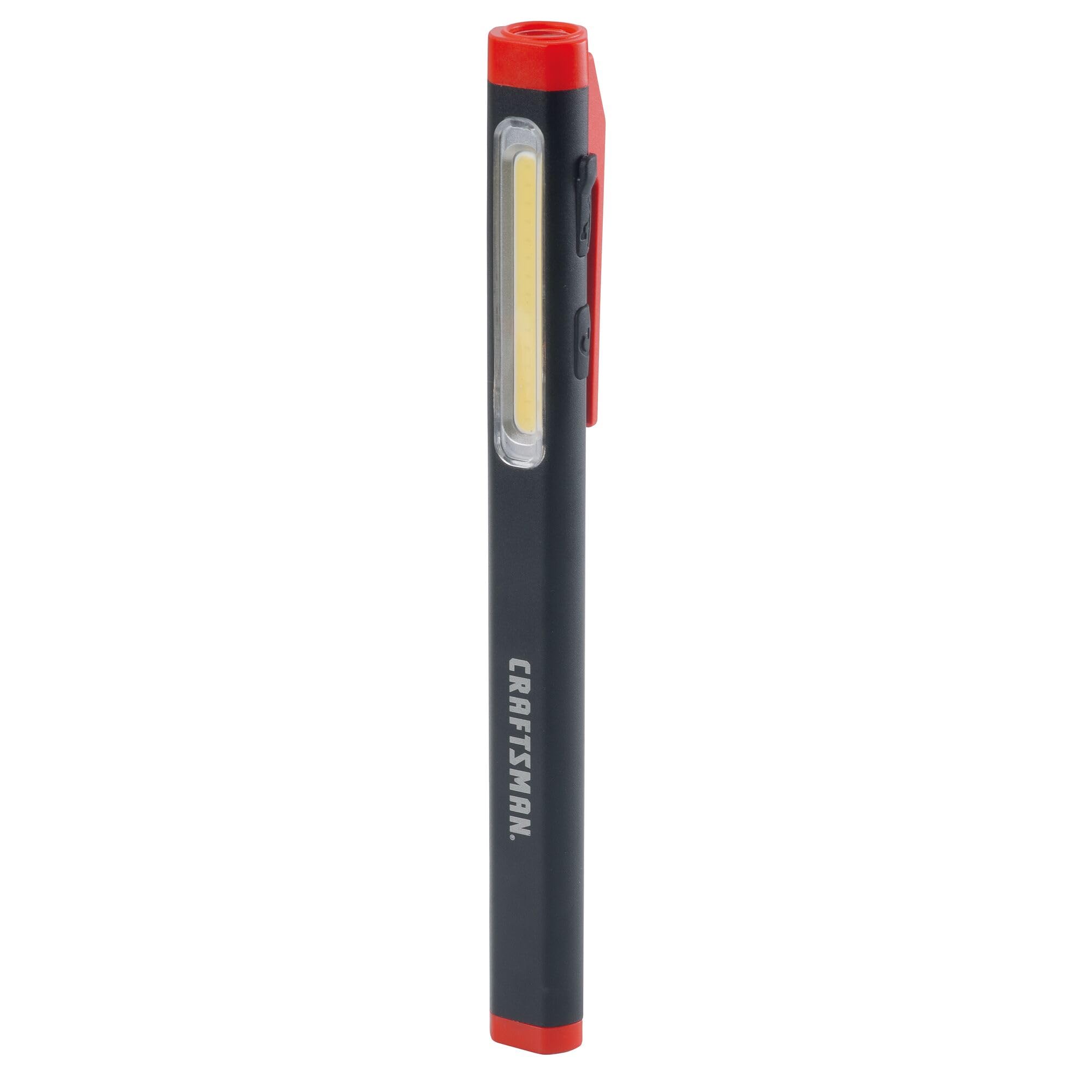
Figure 2: Charging the Pen Light via USB-C
Instrukcja obsługi
Włączanie/wyłączanie zasilania i wybór trybu
The pen light features a single power button for all operations.
- Włączyć: Press the power button once. The light will typically turn on in its last used mode or a default mode.
- Aby przełączyć tryby: While the light is on, press the power button repeatedly to cycle through the available modes: Flood Mode (300 Lumens) and Pen Mode (180 Lumens).
- Wyłączyć: Press and hold the power button for approximately 1-2 seconds, or cycle through all modes until the light turns off.
Konserwacja
Czyszczenie i przechowywanie
- Czyszczenie: Wipe the pen light with a soft, damp cloth. Do not use abrasive cleaners or solvents. Ensure the USB-C port cover is closed before cleaning.
- Składowanie: Store the pen light in a cool, dry place away from direct sunlight and extreme temperatures. For long-term storage, ensure the battery is partially charged (around 50%) to maintain battery health.
- Pielęgnacja baterii: Recharge the battery regularly, even if not frequently used, to prevent deep discharge and prolong its lifespan.
Rozwiązywanie problemów
| Problem | Możliwa przyczyna | Rozwiązanie |
|---|---|---|
| Światło się nie włącza. | Bateria jest rozładowana. | Charge the pen light using the USB-C cable. |
| Światło jest słabe. | Niski poziom naładowania baterii. | Recharge the pen light. |
| Pen light not charging. | Wadliwy kabel USB-C lub źródło zasilania. | Spróbuj użyć innego kabla USB-C lub zasilacza. Upewnij się, że kabel jest całkowicie włożony. |
| Nie można przełączać się między trybami. | Naciśnięcie niewłaściwego przycisku. | Ensure you are pressing the power button briefly to cycle modes. |
Specyfikacje
| Funkcja | Szczegół |
|---|---|
| Numer modelu | CMMT25166 |
| Źródło zasilania | Zasilanie bateryjne (litowo-jonowe) |
| Typ źródła światła | PROWADZONY |
| Tworzywo | Aluminium |
| White Brightness (Flood Mode) | 300 lumenów |
| White Brightness (Pen Mode) | 180 lumenów |
| Czas wykonania | Do 3 godzin |
| Port ładowania | USB-C |
| Poziom wodoodporności | Nie jest wodoodporny |
| Waga przedmiotu | 3.68 uncji |
| Pozycja Wymiary (dł. x szer. x wys.) | 2.7" dł. x 8.9" szer. x 1.5" wys. |
Gwarancja
This CRAFTSMAN product is backed by a Pełna dożywotnia gwarancja. If the product fails to perform for any reason, it will be replaced. No proof of purchase is required for warranty claims.
To initiate a warranty claim, return the damaged product to a stocking Retail Partner or call CRAFTSMAN customer service at 1-888-331-4569 for details and assistance.
Wsparcie
For further assistance, technical support, or to inquire about other CRAFTSMAN products, please visit the official CRAFTSMAN webodwiedź witrynę lub skontaktuj się z obsługą klienta.
CRAFTSMAN Customer Service: 1-888-331-4569
Więcej informacji i produktów znajdziesz również na stronie Sklep CRAFTSMAN na Amazonie.