
1. Wprowadzenie i koniecview
The UGREEN Uno 65W GaN USB-C Charger is a compact and efficient multi-port charging device. Utilizing advanced GaN (Gallium Nitride) technology, it offers high power output in a smaller form factor, reducing energy loss and heat generation during operation. This charger features an interactive LED display that indicates the charging status, providing a clear visual cue.
Equipped with two USB-C ports and one USB-A port, it supports various fast charging protocols, making it compatible with a wide range of devices including laptops, tablets, and smartphones. Integrated multiple safety features protect against short circuits, overcharging, overheating, and overvoltage, ensuring safe and reliable charging.

Image 1.1: UGREEN Uno 65W GaN USB-C Charger, showcasinze względu na kompaktową konstrukcję.
2. Informacje dotyczące bezpieczeństwa
- Nie wystawiaj ładowarki na działanie płynów, wilgoci ani ekstremalnych temperatur.
- Unikaj upuszczania ładowarki i narażania jej na silne uderzenia.
- Nie rozmontowuj, nie modyfikuj ani nie próbuj naprawiać ładowarki. Może to spowodować unieważnienie gwarancji i zagrożenie bezpieczeństwa.
- Ensure proper ventilation when using the charger. Do not cover it with clothing or other materials.
- Use only compatible cables and devices with the charger.
- Przechowywać w miejscu niedostępnym dla dzieci.
- Odłączaj ładowarkę od gniazdka elektrycznego, gdy jej nie używasz, a także podczas burzy.
3. Zawartość opakowania
Proszę sprawdzić, czy w paczce znajdują się następujące elementy:
- UGREEN Uno 65W GaN USB-C Charger (Model CD361)
- Instrukcja obsługi
4. Funkcje produktu
- Maksymalna moc wyjściowa 65 W: Zapewnia moc do 65 W i umożliwia szybkie ładowanie zgodnych urządzeń.
- GaNFast Technology: High-efficiency power conversion (95%) for reduced heat and compact size.
- Konstrukcja wieloportowa 3 w 1: Features 2 USB-C ports and 1 USB-A port for simultaneous charging of multiple devices.
- Wyświetlacz LED: An interactive LED screen indicates the current charging status.
- Zaawansowany system bezpieczeństwa: Built-in protections against short circuits, overcharging, overheating, and overvoltage.
- Removable Magnetic Feet: Provides stability and a unique aesthetic.
- Szeroka kompatybilność: Supports a wide range of devices including laptops, tablets, and smartphones from various brands.

Rysunek 4.1: Szczegółowy view of the charger's ports, magnetic feet, and LED display.
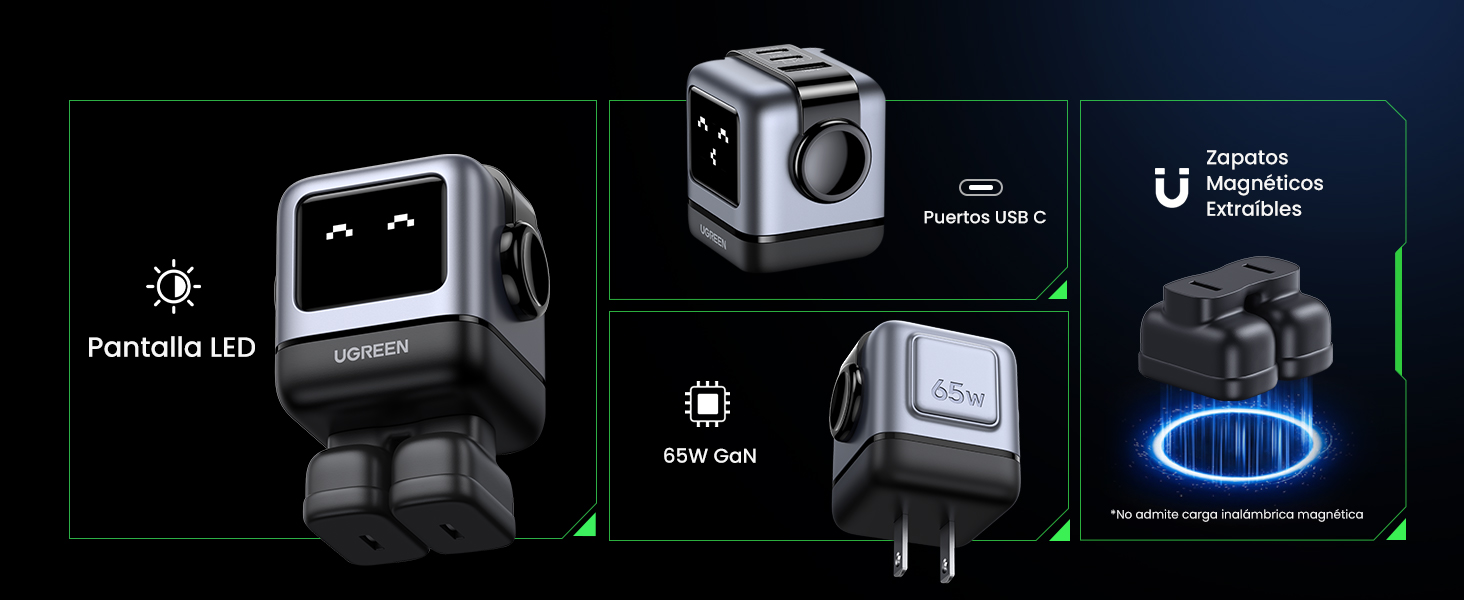
Image 4.2: The charger's LED display showing charging status.
5. Konfiguracja
- Rozpakuj ładowarkę: Carefully remove the UGREEN Uno 65W GaN USB-C Charger from its packaging.
- Attach Magnetic Feet (Optional): If desired, attach the removable magnetic feet to the bottom of the charger for added stability.
- Podłącz do gniazdka elektrycznego: Plug the charger into a standard wall power outlet (AC 100-240V, 50/60Hz).
- Gotowy do użycia: Ładowarka jest teraz gotowa do podłączenia urządzeń.
6. Instrukcja obsługi
6.1 Podłączanie urządzeń
- Use a compatible USB-C to USB-C cable for devices that support USB-C charging.
- Use a compatible USB-A to [device connector] cable for devices that charge via USB-A.
- Connect the appropriate cable to one of the charger's ports (2x USB-C, 1x USB-A).
- Podłącz drugi koniec kabla do urządzenia.
6.2 Dystrybucja zasilania
The charger intelligently distributes power based on the connected devices and their charging requirements:
- Użycie pojedynczego portu: When only one USB-C port is used, it can deliver up to 65W (e.g., charging a MacBook Air M2 from 0% to 51% in approximately 30 minutes).
- Wykorzystanie wielu portów: When multiple ports are in use, the 65W total power is dynamically distributed. For example, if both USB-C ports are used, one might provide 45W for a laptop and the other 20W for a mobile device.
- Port USB-A: The USB-A port provides standard charging output, typically up to 18W, depending on the device.
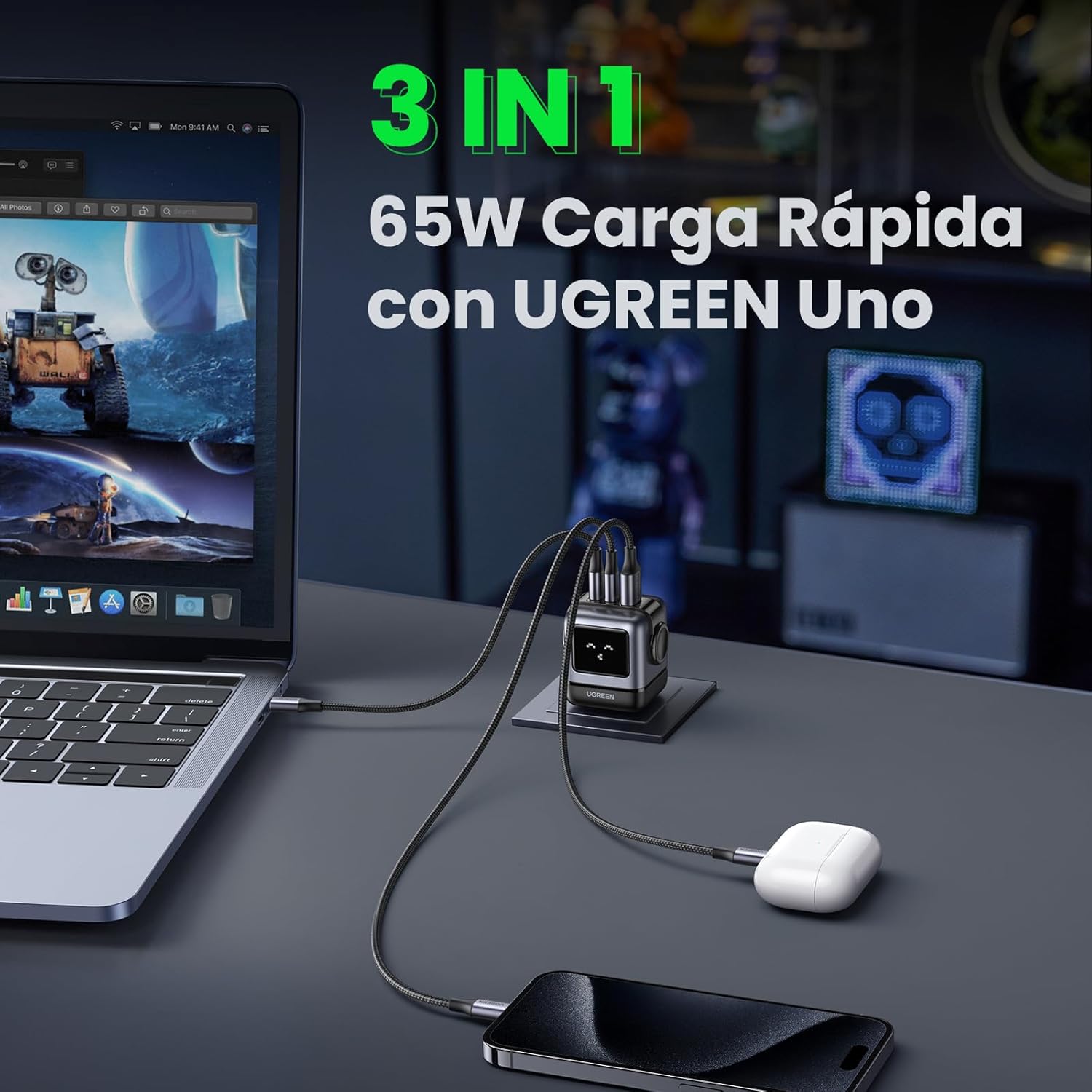
Image 6.1: The charger simultaneously charging a laptop, smartphone, and earbuds.
6.3 LED Display Indications
The LED display on the charger provides visual feedback on its operational status:
- Ładowanie: The LED display will show an animation or specific icon indicating that a device is actively charging.
- W pełni naładowany: Once a connected device reaches full charge, the LED display will change to indicate completion.
- Bezczynny: When no devices are connected or charging, the display may show a standby indicator.

Image 6.2: Comparison of the LED display during charging and when fully charged.
Notatka: The charger is not compatible with 60W fast charging for the Samsung S26 Ultra; it will charge at a maximum of 45W PPS for this device.
7. Konserwacja
- Czyszczenie: Przed czyszczeniem odłącz ładowarkę od gniazdka elektrycznego. Do przecierania powierzchni użyj miękkiej, suchej ściereczki. Nie używaj płynnych ani aerozolowych środków czyszczących.
- Składowanie: Przechowuj ładowarkę w chłodnym, suchym miejscu, z dala od bezpośredniego światła słonecznego i ekstremalnych temperatur.
- Pielęgnacja kabli: Unikaj nadmiernego zginania i skręcania kabli ładujących, ponieważ może to spowodować ich uszkodzenie.
8. Rozwiązywanie Problemów
| Problem | Możliwa przyczyna | Rozwiązanie |
|---|---|---|
| Urządzenie się nie ładuje. | 1. Ładowarka nie jest podłączona. 2. Cable is faulty. 3. Device is incompatible or port is damaged. | 1. Ensure the charger is securely plugged into a live power outlet. 2. Wypróbuj inny kabel ładujący. 3. Test with another device or try a different port on the charger. |
| Powolne ładowanie. | 1. Using a non-fast charging cable. 2. Multiple devices connected, distributing power. 3. Device does not support fast charging. 4. Device requires higher PPS than provided (e.g., S26 Ultra). | 1. Use a high-quality, fast-charging compatible cable. 2. Disconnect other devices to allow maximum power to a single device. 3. Verify your device supports fast charging. 4. Note that some devices may not achieve their absolute maximum charging speed if they require specific PPS profiles not fully supported by the charger. |
| Ładowarka jest ciepła. | Normalna praca, szczególnie podczas ładowania o dużej mocy. | The charger is designed with thermal protection. If it becomes excessively hot, disconnect it and allow it to cool. Ensure adequate ventilation. |
| LED display not working or showing incorrect status. | Tymczasowa usterka oprogramowania lub problem z zasilaniem. | Unplug the charger from the wall outlet, wait a few seconds, and plug it back in. If the issue persists, contact customer support. |
9. Specyfikacje
| Funkcja | Szczegół |
|---|---|
| Marka | ZIELONY |
| Numer modelu | CD361 |
| Typ złącza | USB typu C |
| Kompatybilne urządzenia | Game consoles, Laptops, Smartphones, Tablets (e.g., iPhone 8-17 Series, Galaxy S10-S24 Series, Pixel 8/7/6, MacBook Air/Pro, iPad Pro/Air/mini, Watch 8/7, HomePod, AirPods Pro) |
| Wejście Voltage | 240 V (prąd zmienny 100–240 V) |
| Ampwymazać | 3.25 Ampjesteś |
| Łączna liczba portów USB | 3 (2x USB-C, 1x USB-A) |
| Maksymalna moc wyjściowa | 65 watów |
| Prąd wyjściowy | 5 Ampjesteś |
| Objętość wyjściatage | 5 wolty |
| Źródło zasilania | Przewodowy elektryczny |
| Zakres częstotliwości | 50-60 XNUMX Hz |
| Typ głównego złącza zasilania | 2-pin (North America Type A) |
| Przenośny | Tak |
| Waga przedmiotu | 146 gram |
| Materiał zewnętrzny | GaN |
| Współczynnik kształtu | Robot-shaped |
10. Gwarancja i wsparcie
10.1 Informacje o gwarancji
This UGREEN product is covered by an 18-miesięczna gwarancja od daty zakupu. Niniejsza gwarancja obejmuje wady produkcyjne i problemy wynikające z normalnego użytkowania. Nie obejmuje ona uszkodzeń spowodowanych niewłaściwym użytkowaniem, wypadkami, nieautoryzowanymi modyfikacjami ani klęskami żywiołowymi.
Proszę zachować dowód zakupu na potrzeby roszczeń gwarancyjnych.
10.2 Obsługa klienta
For technical support, warranty claims, or any questions regarding your UGREEN Uno 65W GaN USB-C Charger, please contact UGREEN customer service through the following channels:
- Oficjalny UGREEN Webstrona: Odwiedzać www.ugreen.com Aby uzyskać odpowiedzi na często zadawane pytania, zasoby pomocy technicznej i informacje kontaktowe.
- Wsparcie e-mailowe: Więcej informacji znajdziesz w sekcji kontaktowej na oficjalnej stronie webwitrynę, aby uzyskać odpowiedni adres e-mail.
- Wsparcie dla sprzedawców internetowych: If purchased from an online retailer, you may also contact their customer service for assistance.