
1. Wprowadzenie
This manual provides detailed instructions for the installation, setup, operation, and maintenance of your Decdeal WKQ-BL WLAN Thermostat. This programmable room thermostat is designed for water underfloor heating systems and features remote control via the Tuya app. Please read this manual thoroughly before installation and use to ensure proper function and safety.
2. Informacje dotyczące bezpieczeństwa
- Instalację musi wykonać wykwalifikowany elektryk, zgodnie z lokalnymi przepisami elektrycznymi.
- Przed przystąpieniem do instalacji lub prac konserwacyjnych należy upewnić się, że zasilanie jest odłączone, aby zapobiec porażeniu prądem.
- This thermostat is designed for 230V systems. Verify your system's voltage przed podłączeniem.
- Do not use this thermostat for electric underfloor heating systems. It is specifically for water underfloor heating and boiler-controlled heating.
- Trzymaj urządzenie z dala od wody i środowisk o wysokiej wilgotności.
3. Koniec produktuview
The Decdeal WKQ-BL WLAN Thermostat offers precise temperature control for your home. It features an LCD display, Wi-Fi connectivity for remote control via the Tuya app, and a 6+1 programmable function for customized heating schedules.
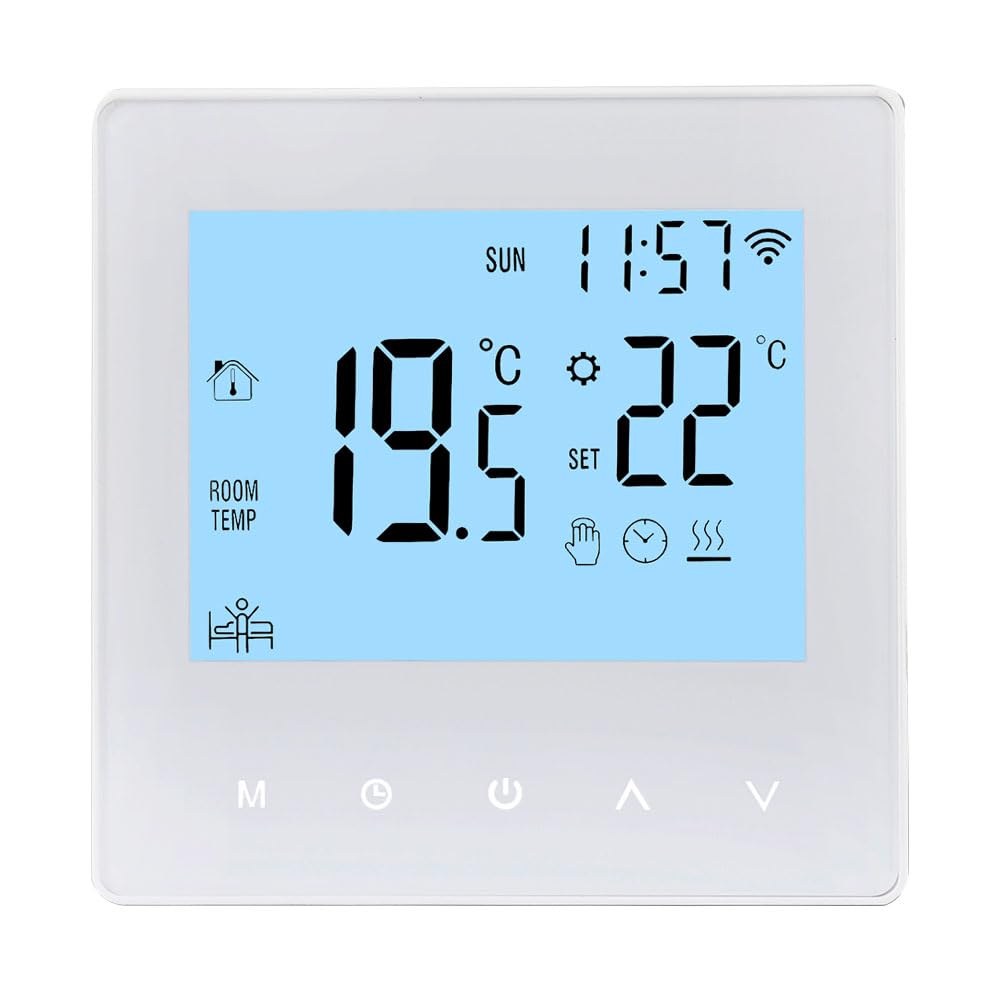
Image: The Decdeal WKQ-BL WLAN Thermostat shown alongside its control interface on the Tuya mobile application. This illustrates the remote control capability.

Obraz: szczegółowy view of the Decdeal WKQ-BL thermostat's LCD screen and physical buttons. Labels indicate functions such as Time, Week, Room Temperature, Heat indicator, Programming, Manual mode, Mode selection, Clock setting, Power, Up, Down, and Wi-Fi status.
4. Instalacja
The thermostat is designed for wall mounting. Ensure the installation location is free from direct sunlight, drafts, or other heat sources that could affect temperature readings. Connect the thermostat to your water underfloor heating system's wiring according to the provided wiring diagram (not included in this general manual, refer to product packaging for specific diagrams). Remember to disconnect power before beginning installation.
5. Konfiguracja
5.1 Pierwsze włączenie zasilania
After successful installation and power connection, the thermostat's LCD screen will illuminate, displaying current room temperature and time.

Image: The Decdeal WKQ-BL thermostat displaying its LCD color screen, showing room temperature, set temperature, time, and Wi-Fi status in a living room setting.
5.2 Wi-Fi and App Connection (Tuya App)
- Download the Tuya Smart app from your mobile device's app store.
- Zarejestruj się lub zaloguj na swoje konto Tuya Smart.
- Ensure your mobile phone's Wi-Fi and Bluetooth are enabled simultaneously.
- Switch your Wi-Fi network to a 2.4GHz band or use a mobile phone hotspot for the initial connection process.
- Follow the in-app instructions to add your Decdeal WKQ-BL thermostat. This typically involves putting the thermostat into pairing mode (refer to the device's specific instructions for pairing mode activation, usually by holding a button).
- Once connected, you can control the thermostat remotely via the Tuya app.
6. Instrukcja obsługi
6.1 Manual and Automatic Operation
The thermostat supports both manual and automatic (programmable) operation modes. You can switch between these modes using the designated button on the thermostat or through the Tuya app.

Image: A hand interacting with the Decdeal WKQ-BL thermostat, illustrating its manual and automatic operation capabilities. The display shows current temperature and settings.
6.2 Programming Function (6+1 Schedule)
The thermostat features a 6+1 programming function, allowing you to set different temperature schedules for weekdays (6 periods) and weekends (1 period). This optimizes energy consumption and comfort.

Image: A table illustrating the programming options for the Decdeal WKQ-BL thermostat, showing key, option, icon, time, and adjustable default temperatures for workday and holiday schedules. Below the table, the thermostat is shown in a living room setting, with the Tuya app on a phone.
Aby ustawić program:
- Access the programming menu on the thermostat or via the Tuya app.
- For each period (e.g., morning, day, evening, night for weekdays, and specific times for holidays), set the desired start time and target temperature.
- Save your settings. The thermostat will then automatically adjust the heating according to your schedule.
7. Konserwacja
Aby zapewnić optymalną wydajność i długą żywotność termostatu, należy przestrzegać poniższych prostych wskazówek dotyczących konserwacji:
- Wyczyść ekran termostatu iasing regularly with a soft, dry cloth. Avoid abrasive cleaners or solvents.
- Do not attempt to open or repair the thermostat yourself. Refer to qualified service personnel for any issues.
- Ensure the area around the thermostat is clear of obstructions that could block airflow or affect temperature readings.
8. Rozwiązywanie Problemów
| Problem | Możliwa przyczyna | Rozwiązanie |
|---|---|---|
| Termostat się nie włącza | Brak zasilania; nieprawidłowe okablowanie | Check circuit breaker; verify wiring connections (consult electrician if unsure). |
| Cannot connect to Wi-Fi/Tuya app | Incorrect Wi-Fi band; Bluetooth off; incorrect pairing procedure | Ensure 2.4GHz Wi-Fi; enable Bluetooth; follow app pairing instructions carefully. |
| Odczyt temperatury wydaje się niedokładny | Thermostat exposed to drafts/direct sunlight; sensor issue | Relocate thermostat if possible; ensure no external factors are influencing the sensor. |
| Ogrzewanie nie włącza się/wyłącza zgodnie z planem | Incorrect programming; thermostat in manual mode | Review and adjust programming schedule; ensure thermostat is in automatic mode. |
9. Specyfikacje
| Funkcja | Specyfikacja |
|---|---|
| Marka | Dekada |
| Nazwa modelu | WKQ-BL |
| Wymiary produktu | 3.9 gł. x 8.6 szer. x 8.6 wys. cm |
| Typ sterowania | Asystent Google, zdalne sterowanie (za pośrednictwem aplikacji) |
| Funkcja specjalna | Remote control via app, programmable |
| Kolor | Jasnoniebieski |
| Konkretne zastosowania | Boiler-controlled heating, water underfloor heating |
| Rodzaj kontroli temperatury | Programowalny |
| Technologia łączności | Wi-Fi |
| Źródło zasilania | Elektryczny przewodowy |
| Tomtage | 230 wolty |
| Typ wyświetlacza | LCD |
| Protokół komunikacyjny | Wi-Fi |
| Typ montażu | Montaż ścienny |
| Podświetlenie | Tak |
| Waga przedmiotu | 210 gram |
| Kształt | Kwadrat |
| Styl | Kompaktowy |
| Tworzywo | Akrylonitryl-butadien-styren (ABS) |
10. Gwarancja i wsparcie
For warranty information or technical support, please refer to the documentation included with your product packaging or contact Decdeal customer service. Keep your purchase receipt as proof of purchase.