
Rraycom BW4N
Rraycom BW4N Wireless Security Camera User Manual
Model: BW4N-B-4pack
1. Wprowadzenie
Thank you for choosing the Rraycom BW4N Wireless Home/Outdoor Security Camera system. This manual provides comprehensive instructions for setting up, operating, and maintaining your security cameras to ensure optimal performance and peace of mind. The Rraycom BW4N offers 5MP resolution, AI motion detection, color night vision, two-way talk, and flexible storage options, designed for both indoor and outdoor surveillance.

Image 1.1: Four Rraycom BW4N wireless security cameras included in the pack.
2. Koniec produktuview
2.1 Główne cechy
- Rozdzielczość 5MP 2.7K: Zapewnia wyraźny i szczegółowy obraz wideotage.
- Wykrywanie ruchu AI: Utilizes infrared sensor technology and cloud image analysis for real-time motion detection and alerts, with customizable detection zones.
- Kolorowe widzenie nocne: Offers full-color night vision and infrared night vision modes with a visible range of up to 33ft.
- Rozmowa dwukierunkowa: Umożliwia komunikację w czasie rzeczywistym poprzez kamerę.
- Bezprzewodowe i zasilane bateryjnie: Equipped with a 5200mAh rechargeable battery, offering 1 to 6 months of operation on a full charge depending on usage.
- Wodoodporność IP66: Designed for outdoor use, resistant to harsh weather conditions.
- Elastyczne przechowywanie: Supports free 3-day rolling cloud storage and local storage via Micro SD card (up to 256GB, not included).
- Działa z Alexą: Kompatybilny z Amazon Alexa, umożliwiający sterowanie głosowe i transmisje na żywo view.

Obraz 2.1: Koniecview of Rraycom BW4N camera features.
2.2 Zawartość opakowania
The Rraycom BW4N-B-4pack includes:
- 4 x Rraycom BW4N Wireless Security Cameras
- 4 x wsporniki montażowe
- Śruby montażowe i kołki ścienne
- Kabel ładujący USB
- Instrukcja obsługi
3. Konfiguracja
3.1 Ładowanie kamery
Before initial use, fully charge the camera's 5200mAh battery. Connect the camera to a 5V/2A USB power adapter (not included) using the provided USB charging cable. The charging indicator light will show the charging status. A full charge can take several hours.
Note: Battery life varies based on device settings, actual usage, and environmental factors.
3.2 Instalacja aplikacji i konfiguracja konta
- Pobierz [O-KAM] APP ze sklepu App Store (iOS) lub Google Play Store (Android).
- Open the O-KAM app and follow the on-screen instructions to create a new account or log in if you already have one.

Image 3.1: Download the O-KAM app from your device's app store.
3.3 Dodawanie kamery do aplikacji
- In the O-KAM app, tap the "+" icon to add a new device.
- Select your camera model (BW4N) from the list.
- Postępuj zgodnie z instrukcjami w aplikacji, aby podłączyć kamerę do urządzenia Sieć Wi-Fi 2.4 GHz. (5GHz WiFi is not supported).
- Zeskanuj kod QR wyświetlony na ekranie telefonu za pomocą obiektywu aparatu.
- Po podłączeniu nadaj nazwę swojej kamerze i zakończ proces konfiguracji.
3.4 Umiejscowienie i instalacja kamery
The Rraycom BW4N camera can be installed almost anywhere, including shops, offices, homes, garages, yards, and both outdoor and indoor locations. It is designed for easy setup, typically taking about 5 minutes.
- Wybierz lokalizację, która zapewnia pożądane viewpod odpowiednim kątem i znajduje się w zasięgu sieci WiFi 2.4 GHz.
- Use the included mounting bracket and screws to securely attach the camera to a wall or other suitable surface.
- Ensure the camera is positioned to capture the area of interest, considering the 120-degree viewkąt.

Obraz 3.2: Example of camera placement on a home exterior.
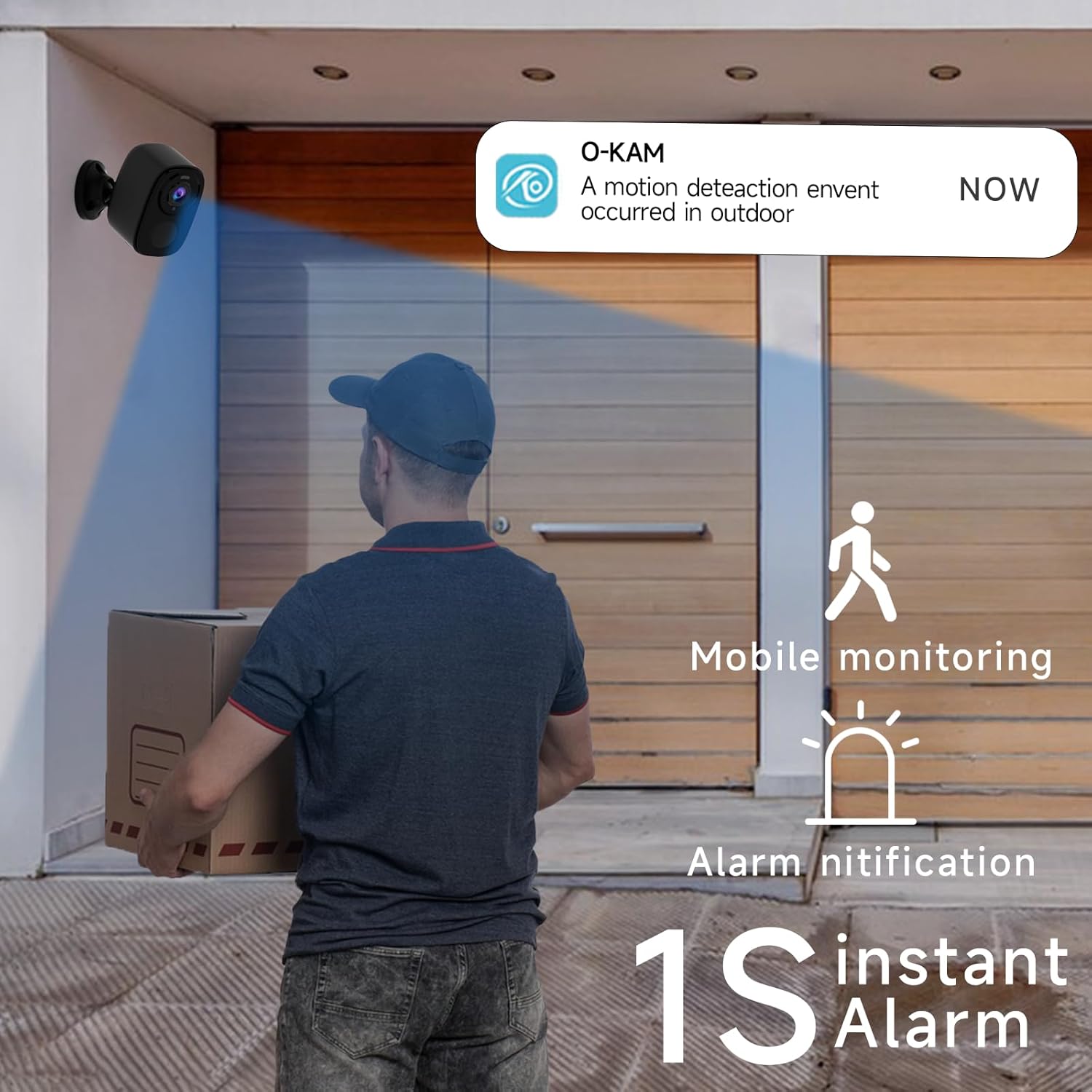
Image 3.3: The camera provides mobile monitoring and instant alarm notifications upon motion detection.
4. Obsługa aparatu
4.1 Na żywo View i nagrywanie
Access live video streams from your camera anytime through the O-KAM app. You can view real-time monitoring from every corner of your property.

Image 4.1: House security overview in the O-KAM app, allowing real-time monitoring from various locations.
4.2 Detekcja ruchu i rozpoznawanie AI
The camera uses advanced PIR motion detection and AI recognition to differentiate between people and objects, reducing false alarms. You will receive instant alerts to your smartphone when motion is detected.
- Konfigurowalne strefy wykrywania: Ustaw określone obszary w obrębie kamery view where you want motion to be detected, ensuring you only receive notifications for relevant events.
- Human Filtering: The AI system helps filter out non-human movements, focusing on important activity.

Image 4.2: AI Motion Detection identifies human activity.

Image 4.3: Customize monitoring areas to reduce false alerts.
4.3 Dźwięk dwukierunkowy
The built-in microphone and speaker allow for two-way communication. You can speak to visitors or deter intruders directly through the camera using the O-KAM app.
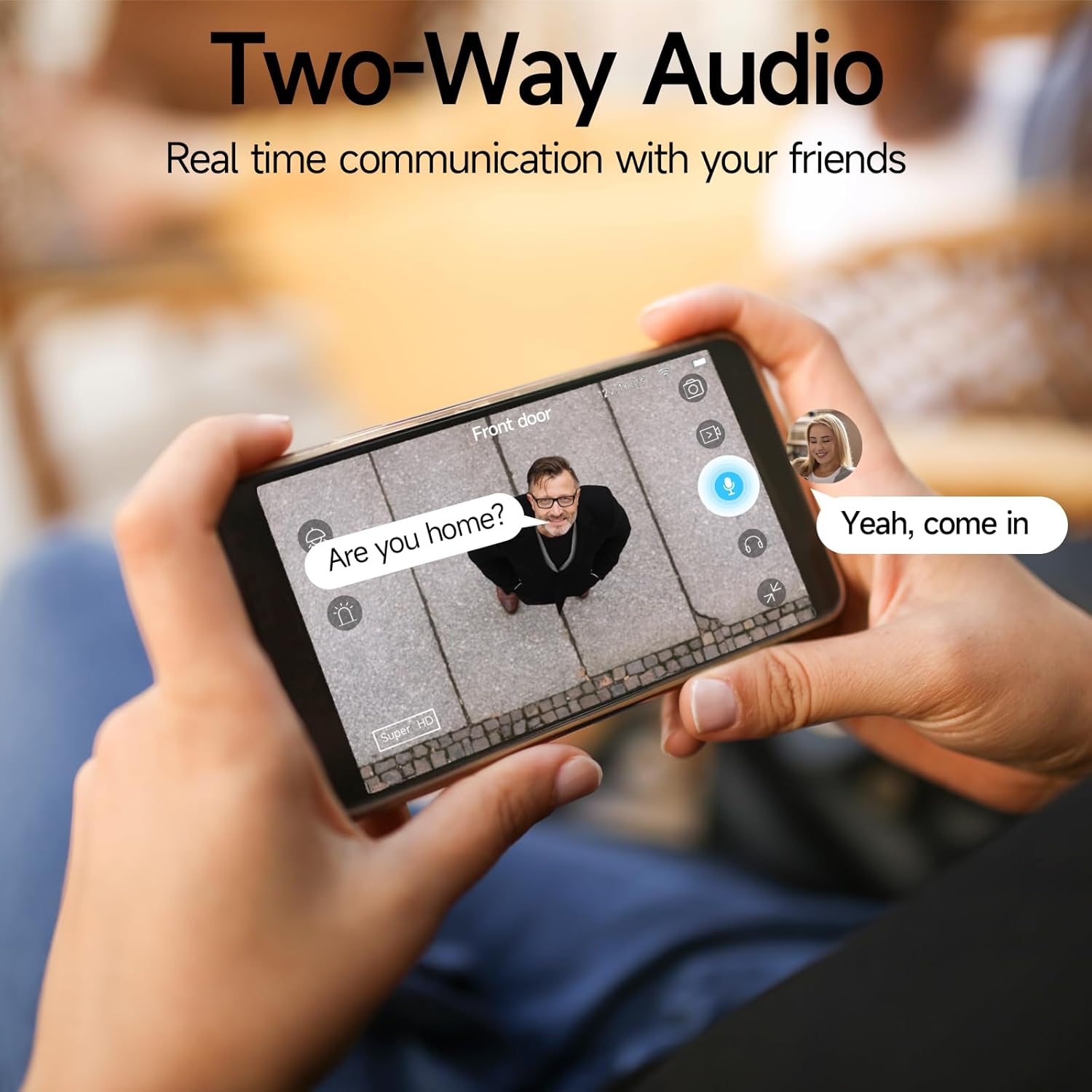
Image 4.4: Engage in real-time communication with two-way audio.

Image 4.5: Multiple users can share and watch the camera feed simultaneously, enabling interactive communication.
4.4 Tryby widzenia nocnego
The camera offers two night vision modes to ensure clear visibility in low light conditions:
- Pełnokolorowa wizja nocna: Provides vivid, color images even in the dark, utilizing the camera's spotlight.
- Nocna Nocna Wizja: Offers clear black-and-white footage w całkowitej ciemności.

Image 4.6: Compare 5MP Color Night Vision and Infrared Night Vision for optimal nighttime surveillance.

Image 4.7: The camera supports motion detection, color night vision, and infrared night vision.
4.5 Siren Alarm and Spotlight Warning
The camera features a built-in siren and spotlight that can be activated manually or automatically upon motion detection to deter unwanted visitors.

Image 4.8: Deter intruders with siren and spotlight warnings.
4.6 Opcje przechowywania
Your Rraycom camera offers versatile storage solutions:
- Bezpłatne przechowywanie w chmurze: Enjoy free 3-day rolling cloud storage for life, with no subscription needed.
- Przechowywanie kart Micro SD: Insert a Micro SD card (up to 256GB, not included) for local video storage.

Image 4.9: Save important moments to cloud or SD card.

Image 4.10: Cloud and local storage options for your recordings.
4.7 Integracja z Alexą
The Rraycom BW4N camera is compatible with Amazon Alexa, allowing you to view live feeds using voice commands on compatible Alexa-enabled devices.
- Link your O-KAM account with your Alexa account through the Alexa app.
- Use commands like "Alexa, show me the front door camera" or "Alexa, show me the backyard camera" to view kanały na żywo.

Image 4.11: Seamless integration with Amazon Alexa for convenient monitoring.

Obraz 4.12: View obraz z kamery na urządzeniach obsługujących Alexę.
4.8 Demonstracja wideo
Video 4.1: A demonstration of the Rraycom BW4N wire-free camera's features, including its 5MP resolution, waterproof design, ease of mounting, night vision capabilities, activity zone setup, two-way audio, multi-user sharing, human filtering, Alexa compatibility, and cloud/local storage options.
5. Konserwacja
5.1 Zarządzanie baterią
- Monitor battery levels regularly through the O-KAM app.
- Recharge the camera promptly when the battery is low to ensure continuous operation.
- For optimal battery life, avoid extreme temperatures during charging and operation.
5.2 Czyszczenie aparatu
- Gently wipe the camera lens and body with a soft, dry cloth to remove dust and smudges.
- Do not use liquid cleaners or abrasive materials, as they may damage the camera.
5.3 aktualizacji oprogramowania sprzętowego
Periodically check the O-KAM app for available firmware updates. Keeping your camera's firmware up-to-date ensures you have the latest features and security enhancements.
6. Rozwiązywanie Problemów
| Problem | Możliwa przyczyna | Rozwiązanie |
|---|---|---|
| Kamera nie łączy się z siecią Wi-Fi | Nieprawidłowe hasło Wi-Fi; Kamera znajduje się zbyt daleko od routera; Dostępne jest tylko Wi-Fi 5 GHz. | Ensure correct password. Move camera closer to router. Confirm your Wi-Fi is 2.4GHz. |
| Częste fałszywe alarmy | Detection zone too wide; Environmental factors (e.g., moving branches, shadows). | Adjust detection zones in the app. Enable human filtering if available. |
| Słaba jakość widzenia w nocy | Obstructions in front of lens; Insufficient ambient light for color night vision. | Clear any obstructions. Ensure adequate lighting for color night vision or switch to infrared mode. |
| Problemy z dwukierunkową transmisją dźwięku | Zablokowany mikrofon/głośnik; Głośność aplikacji jest zbyt niska; Opóźnienie sieci. | Check for obstructions. Adjust volume settings in app. Ensure stable network connection. |
| Bateria szybko się rozładowuje | Częste wykrywanie ruchu; Na żywo view usage; Extreme temperatures. | Reduce motion detection sensitivity/frequency. Limit live view. Operate within recommended temperature range. |
7. Specyfikacje
| Funkcja | Szczegół |
|---|---|
| Nazwa modelu | BW4N |
| Rozdzielczość przechwytywania wideo | 5 MP (2560*1920P) |
| Technologia łączności | Bezprzewodowa (tylko Wi-Fi 2.4 GHz) |
| Źródło zasilania | Zasilany bateryjnie (akumulator 5200mAh) |
| Zastosowanie wewnątrz/na zewnątrz | Na zewnątrz, Wewnątrz |
| Stopień wodoodporności | IP66 |
| Viewing kąt | 120 stopni |
| Zakres noktowizora | Do 33 stóp |
| Opcje przechowywania | Micro SD Card (up to 256GB, not included), Free 3-day Cloud Storage |
| Kompatybilne urządzenia | Android & iOS (O-KAM App), Amazon Alexa |
| Tworzywo | Akrylonitryl-butadien-styren (ABS) |
| Waga przedmiotu | 2.68 funta (dla opakowania 4 sztuk) |
| Wymiary opakowania | 10.47 x 9.17 x 2.95 cala |
8. Gwarancja i wsparcie
8.1 Informacje o gwarancji
Rraycom products come with a standard manufacturer's warranty. Please refer to the warranty card included in your package or visit the official Rraycom webSzczegółowe warunki gwarancji można znaleźć na naszej stronie.
8.2 Obsługa klienta
If you have any questions, encounter issues, or require technical assistance with your Rraycom BW4N security camera, please contact our customer service team:
- E-mail: posprzedażna@rraycom.com
- You can also find contact information and FAQs on the Rraycom brand store on Amazon or the official webstrona.

Image 8.1: Contact Rraycom customer service for assistance.
Ask a question about this manual
Ask about setup, troubleshooting, compatibility, parts, safety, or missing instructions. Manuals+ will review the question and use this page’s manual context to help answer it.