
Wstęp
The COLAMY Ergonomic Mesh Office Chair, model XK, is designed to provide superior comfort and support for extended periods of sitting. This BIFMA-certified chair features multiple adjustment options and high-quality materials to enhance productivity and well-being in your work environment. This manual provides detailed instructions for assembly, operation, maintenance, and troubleshooting to ensure optimal use of your new office chair.

Figure 1: The COLAMY Ergonomic Mesh Office Chair, Grey Contemporary.
Specyfikacja produktu
| Funkcja | Szczegół |
|---|---|
| Marka | COLAMY |
| Nazwa modelu | COLAMY CL361 (XK) |
| Kolor | Szary |
| Wymiary produktu | 28" gł. x 29" szer. x 44" wys. |
| Regulacja wysokości siedziska | od 16.73" do 21.06" |
| Wymiary siedzenia | 19.88"(W) x 15.75"~17.72"(D) x 6.3" (Thickness) |
| Nośność | Do 300 funtów |
| Przybory | Imported Mesh (South Korea), High-Density Foam, Korean Imported Knitted Fabric |
| Opierać | Sturdy 360° Swivel Metal Base |
| Certyfikaty | Certyfikat BIFMA |
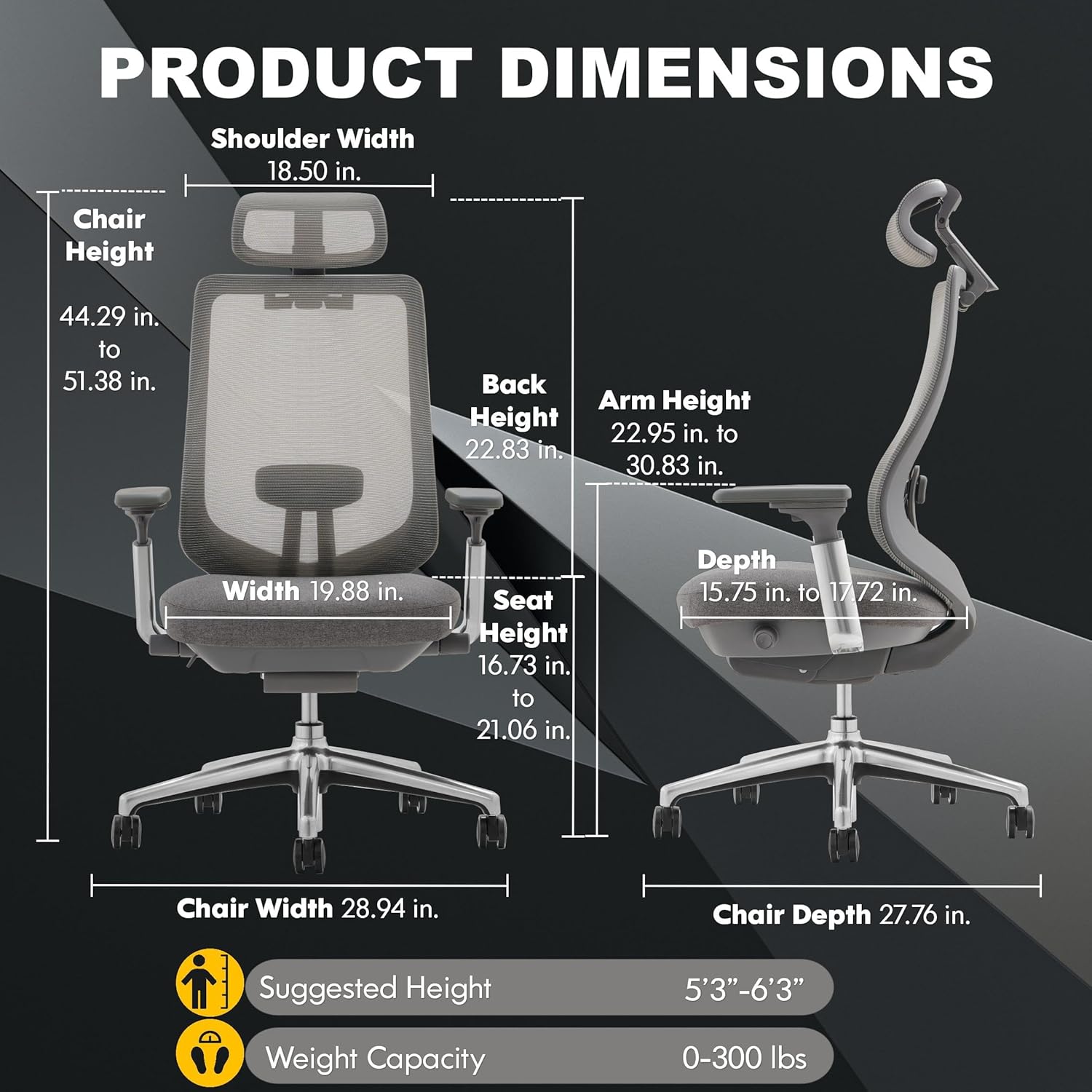
Figure 2: Product Dimensions and Suggested User Height/Weight.
Figure 3: Premium Materials used in the COLAMY chair construction.
Konfiguracja i montaż
The COLAMY Ergonomic Mesh Office Chair is designed for straightforward assembly. All necessary components are clearly organized and labeled, and the chair can be assembled using the provided single tool, requiring no additional equipment.
- Rozpakuj komponenty: Carefully remove all parts from the packaging. Verify that all components listed in the instruction manual are present. Parts are often labeled to correspond with assembly steps.
- Złóż podstawę: Insert the casters (wheels) into the five-star metal base. Ensure they click securely into place. Then, insert the gas lift cylinder into the center hole of the base.
- Zamontuj podłokietniki na siedzisku: Secure the 4D adjustable armrests to the underside of the seat cushion using the provided screws and the multi-purpose tool. Ensure the correct orientation for left and right armrests.
- Zamontuj oparcie na siedzisku: Align the backrest with the designated slots on the seat assembly. Secure it firmly with the appropriate screws.
- Zamontuj zagłówek: Slide the adjustable headrest into the top of the backrest. Secure it with the provided screws.
- Podłącz siedzisko do podstawy: Ostrożnie umieść zmontowane siedzisko i oparcie na siłowniku gazowym, upewniając się, że jest wyśrodkowane i stabilne.
The packaging includes clearly labeled hardware packets for each step, simplifying the process and minimizing confusion. No complex tools are required, making assembly quick and hassle-free.
Instrukcja obsługi
Your COLAMY Ergonomic Mesh Office Chair offers a range of adjustments to customize your seating experience for optimal comfort and ergonomic support. Familiarize yourself with the following features:
1. Regulacja wysokości siedziska
Locate the lever on the right side beneath the seat. Pull the lever upwards to raise the seat. To lower the seat, pull the lever upwards while seated. Release the lever to lock the seat at the desired height.
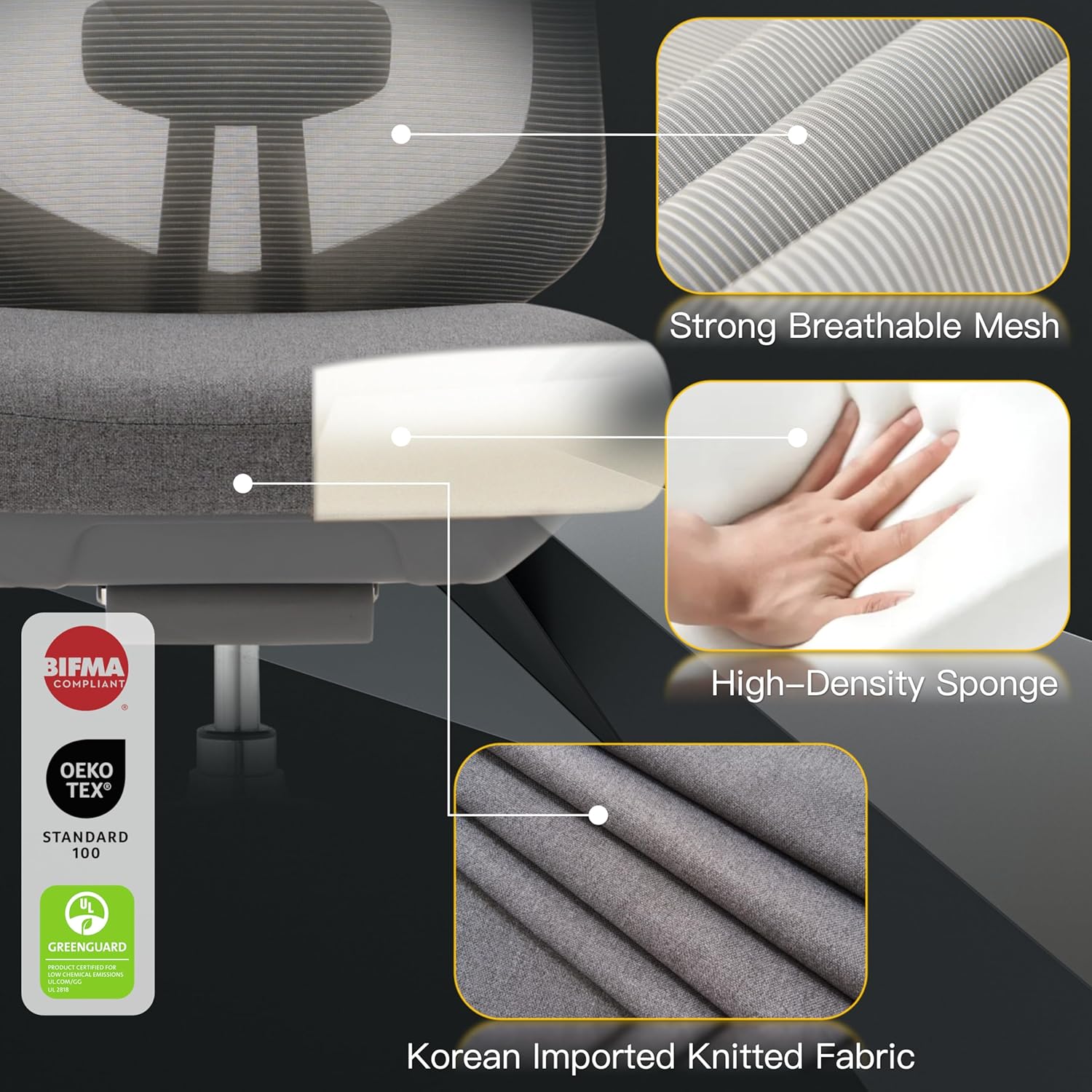
Figure 4: Seat Height Adjustment and Tilt Tension Knob.
2. Sliding Seat Cushion (Seat Depth Adjustment)
To adjust the seat depth, locate the knob on the left side beneath the seat. Pull the knob outwards and slide the seat forward or backward to achieve optimal thigh support. Release the knob to lock the seat in position. This feature helps accommodate users of different leg lengths and ensures proper ergonomic posture.

Figure 5: Sliding Seat Cushion Adjustment.
3. 4D Armrests
The armrests offer four-dimensional adjustments for personalized support:
- Height Adjustment (Up & Down): Naciśnij przycisk znajdujący się z boku podłokietnika i przesuń go w górę lub w dół.
- Depth Adjustment (In & Out): Przesuń podłokietnik do przodu lub do tyłu.
- Width Adjustment (Left & Right): Przesuń podłokietnik w lewo lub w prawo.
- Pivot/Swivel: Obróć podłokietnik do wewnątrz lub na zewnątrz.
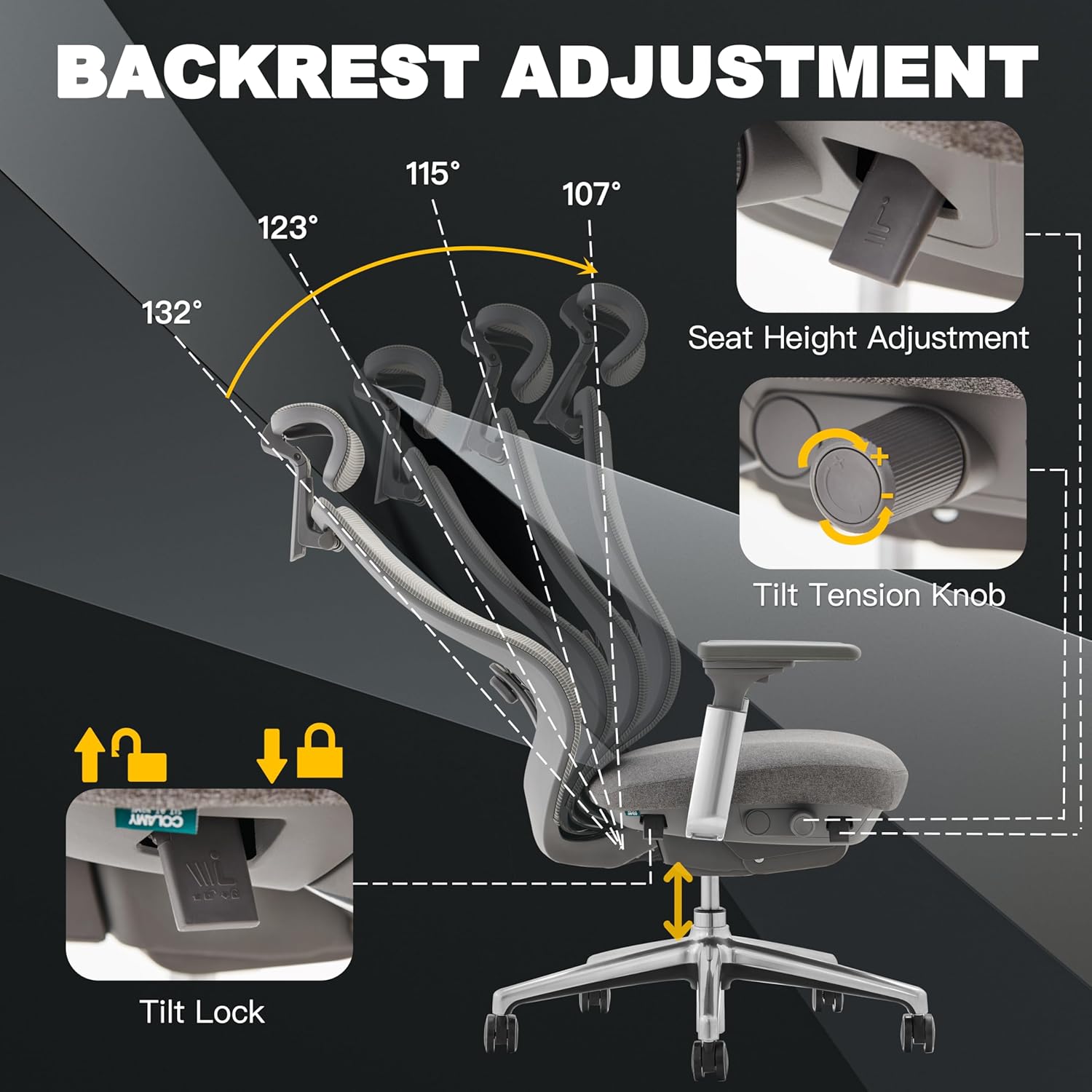
Figure 6: 4D Armrests Adjustment Options.
4. Built-In Adjustable Lumbar Support
The integrated lumbar support can be adjusted vertically to match the natural curve of your spine. Simply push the lumbar support pad up or down to find your most comfortable position. This helps alleviate lower back strain during prolonged sitting.
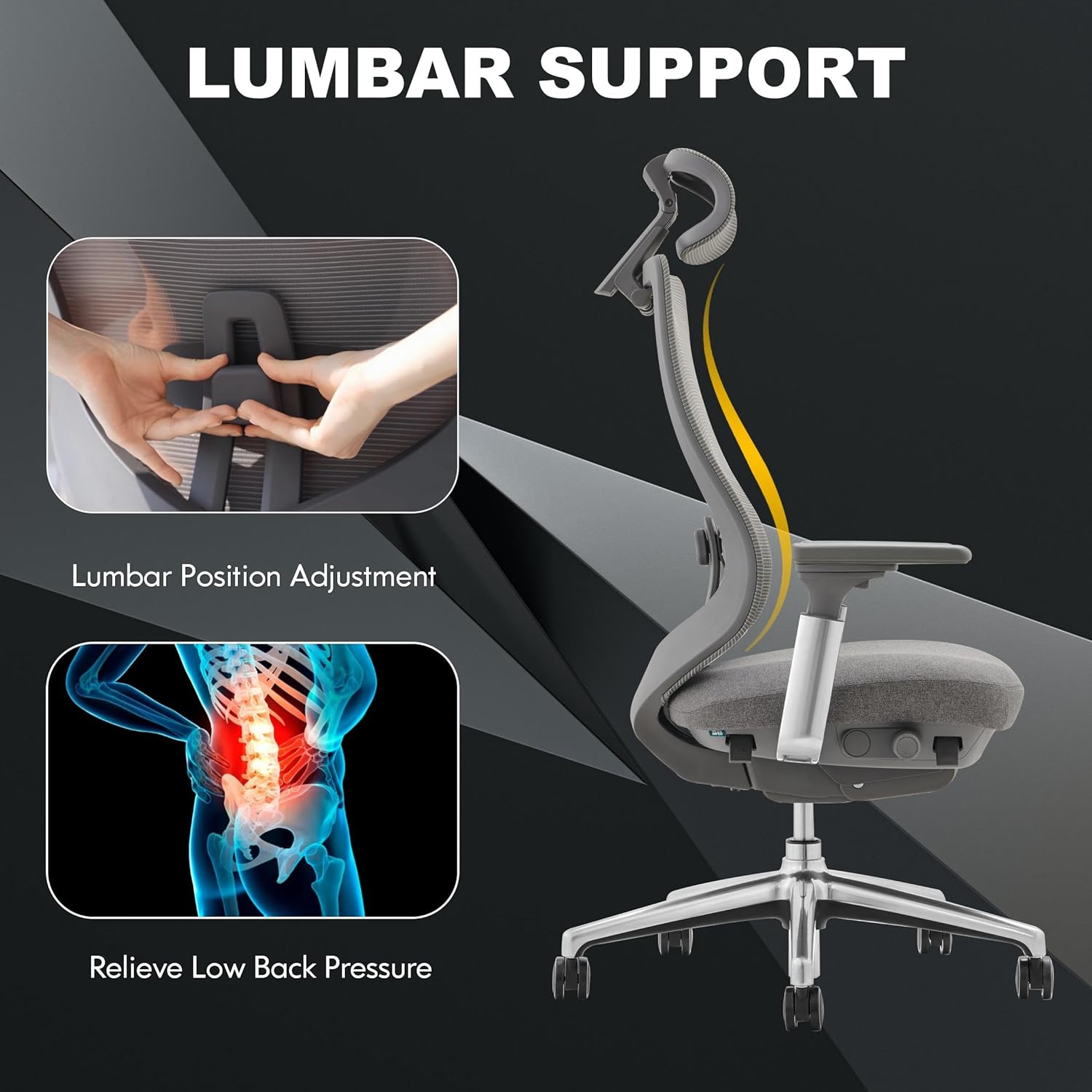
Rysunek 7: Regulacja podparcia lędźwiowego.
5. Customizable Headrest
The headrest offers both height and angle adjustments. Pull the headrest up or down to adjust its height. Tilt the headrest forward or backward to find the optimal angle for neck and head support. This helps reduce tension and improve posture.
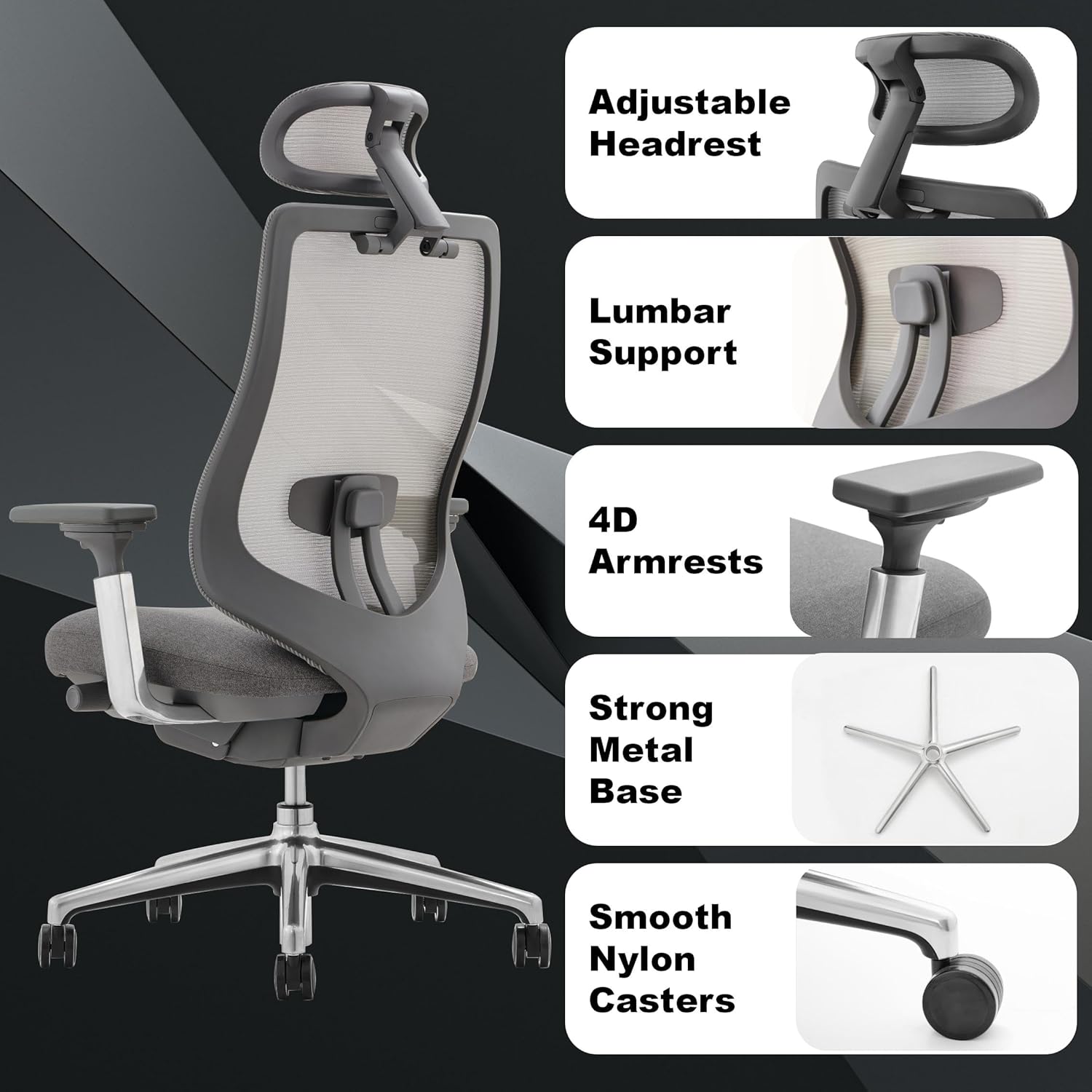
Figure 8: Headrest Adjustment Options.
6. 4-Position Tilt Lock & Tension Adjustment
The chair features a multi-functional reclining mechanism with 4 locking positions (between 90°-130°). To recline, pull the lever on the left side beneath the seat outwards to unlock the tilt. Lean back to your desired angle and push the lever inwards to lock it. To adjust the tension of the recline, rotate the round knob located beneath the seat. Turn it clockwise to increase tension (making it harder to recline) or counter-clockwise to decrease tension (making it easier to recline).
Figure 9: Tilt Lock and Tension Adjustment Controls.
Oficjalne filmy produktowe
COLAMY Ergonomic Mesh Office Chair Ver2
This video from COLAMY-US demonstrates various adjustable features of the ergonomic mesh office chair, including seat height, armrest adjustments, and recline functions.
COLAMY Ergonomic Office Chair Atlas
An official video from COLAMY-US showcasing the ergonomic design and key adjustable features of the Atlas office chair, highlighting its comfort and adaptability.
Konserwacja
Proper maintenance will extend the life and performance of your COLAMY office chair:
- Czyszczenie: Wyczyść za pomocą reklamyamp Ściereczką. W przypadku powierzchni z siatki i tkaniny, w razie potrzeby użyj łagodnego roztworu mydła i osusz. Unikaj silnych środków chemicznych i ściernych środków czyszczących.
- Regularna kontrola: Periodically check all screws and bolts to ensure they are tight. Re-tighten if any looseness is detected to maintain stability and safety.
- Pielęgnacja kół: Keep the casters clean from dust, hair, and debris to ensure smooth rolling.
- Unikaj przeciążania: Nie należy przekraczać maksymalnej zalecanej wagi wynoszącej 300 funtów.
Rozwiązywanie problemów
If you encounter any issues with your COLAMY Ergonomic Mesh Office Chair, refer to the following common problems and solutions:
- Krzesło skrzypi lub trzeszczy:
- Check all assembly bolts and tighten any that are loose.
- Nanieść niewielką ilość smaru silikonowego na ruchome części, zwłaszcza tam, gdzie stykają się elementy metalowe.
- Armrests Move Too Easily (Side-to-Side/Pivot):
- While 4D armrests offer extensive movement, if they feel excessively loose, ensure all mounting screws are securely tightened. Some movement is inherent to the 4D design.
- Seat Feels Too Hard:
- The high-density foam seat is designed for firm support. Allow some time for the cushion to adapt to your body. If discomfort persists, consider a seat cushion overlay.
- Lumbar Support Not Effective:
- Ensure the lumbar support is adjusted to the correct height for your lower back. Experiment with different vertical positions.
- Seat Depth Adjustment Range Insufficient:
- The seat depth has a defined adjustment range. If it doesn't meet your specific needs, ensure you are utilizing the full range of motion.
- Headrest Ratchet Mechanism Issues:
- If the headrest is difficult to adjust downwards or overshoots, ensure the mechanism is clean and free of obstructions. The ratchet design requires moving it to the highest point to reset before lowering.
- Recline Tension Too Loose/Stiff:
- Adjust the tilt tension knob located beneath the seat. Turn clockwise for more resistance, counter-clockwise for less.
- Chair Back Not Truly Upright When Locked:
- The chair's design may allow for a slight recline even in the most upright locked position for comfort. Ensure the tilt lock lever is fully engaged.
If these troubleshooting steps do not resolve your issue, please contact customer support.
Gwarancja i wsparcie
COLAMY is committed to your satisfaction. Your COLAMY Ergonomic Mesh Office Chair is backed by a comprehensive warranty to ensure peace of mind.
- Gwarancja: The product typically comes with a 3-year warranty. For specific terms and conditions, please refer to the warranty card included with your product or contact customer service.
- Plany ochrony: Additional protection plans (e.g., 2-Year or 3-Year Protection Plans) may be available for purchase to extend coverage.
- Obsługa klienta: Should you have any questions, concerns, or require assistance with your product, our dedicated COLAMY service team is ready to help.
Aby uzyskać bezpośrednią pomoc, odwiedź stronę COLAMY Store on Amazon lub skorzystaj z danych kontaktowych znajdujących się na opakowaniu produktu.


