
OUKITEL OUKITEL WP26
Instrukcja obsługi wytrzymałego smartfona OUKITEL WP26
Model: OUKITEL WP26
1. Wprowadzenie
Welcome to the OUKITEL WP26 Rugged Smartphone user manual. This guide provides essential information to help you set up, operate, maintain, and troubleshoot your device. The OUKITEL WP26 is designed for durability and performance, featuring a robust build, a powerful camping light, and a long-lasting battery.

Key features of your OUKITEL WP26 include:
- 1200 lumenów CampŚwiatło: Integrated powerful light for various outdoor and emergency situations.
- Akumulator o dużej pojemności 10000 mAh: Extended battery life for prolonged use without frequent charging.
- Wodoodporność IP68 i IP69K: Certified for water, dust, and shock resistance, meeting MIL-STD-810H standards.
- 16 GB pamięci RAM + 256 GB pamięci ROM: Amppamięć i miejsce do przechowywania danych, z możliwością rozszerzenia do 1TB za pomocą karty TF.
- Android 13: Latest operating system for smooth performance and enhanced privacy.
- 48MP Main Camera + 20MP Night Vision Camera: High-resolution photography and clear imaging in low-light conditions.
- 6.58" FHD+ INCELL Display: Large, vibrant display for an immersive visual experience.
2. Konfiguracja
2.1 Wkładanie kart SIM i karty TF
The OUKITEL WP26 supports dual SIM cards and a TF card for expanded storage. Follow these steps to properly insert your cards:
- Znajdź tackę na kartę SIM znajdującą się z boku urządzenia.
- Otwórz tackę za pomocą dołączonego narzędzia do wyjmowania karty SIM.
- Ostrożnie umieść karty Nano-SIM i/lub kartę TF w wyznaczonych gniazdach na tacce. Upewnij się, że złote styki są skierowane w dół.
- Delikatnie wsuń tackę z powrotem do urządzenia, aż będzie przylegać do korpusu.

2.2 Pierwsze włączenie i konfiguracja systemu Android 13
Aby włączyć urządzenie po raz pierwszy:
- Press and hold the Power button located on the side of the phone until the OUKITEL logo appears.
- Follow the on-screen prompts to complete the initial setup process for Android 13. This includes selecting your language, connecting to Wi-Fi, setting up your Google account, and configuring security features.

3. Obsługa OUKITEL WP26
3.1 1200 Lumen Campświatło
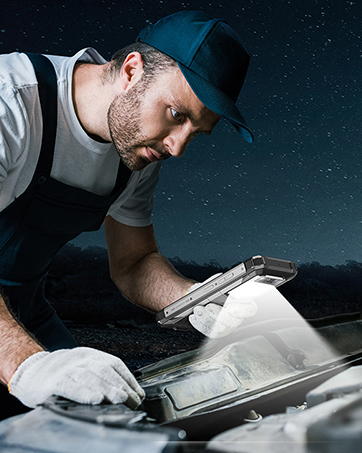
The OUKITEL WP26 features a powerful 1200 lumen camping light, ideal for various lighting needs. It offers five versatile modes:
- S.O.S: Do sygnalizacji awaryjnej.
- Błysk eksplozji: A rapid flashing mode.
- Słabe oświetlenie: For subtle illumination.
- Half Light: Moderate brightness.
- Pełne światło: Maksymalna jasność zapewniająca dobrą widoczność.
To activate and switch modes, use the dedicated camping light application or physical button (refer to your Quick Start Guide for exact button location). The light is designed to be 360-degree rainproof, enhancing its utility in outdoor environments.




Video 3.1: Official product video demonstrating the OUKITEL WP26's waterproof capabilities, 20MP night vision camera, and 1200LM camping light in various scenarios.
3.2 10000mAh Large Capacity Battery
The OUKITEL WP26 is equipped with a 10000mAh battery, providing exceptional endurance. You can expect:
- Do 52 dni czasu czuwania.
- Do 49 godzin rozmów.
- Do 16 godzin odtwarzania wideo.
- Over 10 hours of continuous use with the brightest camptryb oświetlenia.
The phone also supports OTG (On-The-Go) functionality, allowing it to act as a power bank to charge other devices.


3.3 System kamer
Capture stunning photos and videos with the OUKITEL WP26's versatile camera system:
- 48 MP tylny aparat: For high-resolution images with F1.79 aperture and PDAF.
- Kamera noktowizyjna 20 MP: Equipped with two infrared lights for clear and detailed photos in dark or shadowy environments.
- Przedni aparat 16 MP: Do wysokiej jakości selfie i połączeń wideo.
- Aparat makro 2MP: Do szczegółowych ujęć z bliska.


3.4 Wytrzymałość i trwałość
The OUKITEL WP26 is built to withstand harsh environments, certified with IP68, IP69K, and MIL-STD-810H ratings. This means it is:
- Wodoodporny: Can be submerged in 1.5m of water for up to 30 minutes.
- Pyłoszczelny: Fully sealed to prevent dust ingress.
- Odporność na wstrząsy: Zaprojektowane tak, aby wytrzymać upadki i uderzenia.

3.5 Wyświetlacz
Experience vivid visuals on the 6.58" FHD+ INCELL display with a resolution of 2408*1080. The 20.5:9 aspect ratio and 480nit brightness ensure clear and vibrant content, even in bright outdoor conditions.


3.6 Wydajność i przechowywanie
Powered by a MediaTek MTK6779 8-core processor (12nm process), the OUKITEL WP26 delivers smooth performance. It comes with 16GB RAM (8GB fixed + 8GB adjustable memory) and 256GB ROM, expandable up to 1TB with a TF card, providing ample space for apps, games, and media.

3.7 Łączność i narzędzia
The OUKITEL WP26 offers comprehensive connectivity options and pre-installed tools:
- 4G Dual SIM: Supports 4G global networks (compatible with T-Mobile, Metro by T-Mobile, Mint Mobile, Boost Mobile, Republic Wireless, Ultra Mobile, Tello Mobile, and Sprint).
- Bluetooth 5.0: Dla szybkich i stabilnych połączeń bezprzewodowych.
- NFC + Google Pay: For quick mobile payments and data transfer.
- Przydatny zestaw narzędzi: Includes a compass, protractor, height meter, alarm bell, gradiometer, picture hanging tool, magnifier, mirror, sound meter, and plumb bob.
4. Konserwacja
4.1 Czyszczenie urządzenia
To maintain the integrity and appearance of your OUKITEL WP26:
- Przetrzyj ekran i obudowę miękką, niepozostawiającą włókien ściereczką.
- W przypadku uporczywych zabrudzeń, delikatnieampWyczyść szmatkę wodą lub płynem do czyszczenia ekranów.
- Avoid using harsh chemicals, abrasive materials, or compressed air, as these can damage the device or compromise its waterproof seals.
- Aby zachować ochronę przed wodą i kurzem, należy upewnić się, że wszystkie pokrywy portów są szczelnie zamknięte.
4.2 Pielęgnacja baterii
Aby zmaksymalizować żywotność baterii:
- Unikaj ekstremalnych temperatur, zarówno wysokich, jak i niskich.
- Do not fully discharge the battery regularly. It is best to keep the charge between 20% and 80%.
- Używaj wyłącznie oryginalnej ładowarki i kabla dostarczonych wraz z urządzeniem.
4.3 Aktualizacje oprogramowania
Regularly check for and install software updates to ensure optimal performance, security, and access to new features. You can usually find updates in the device's Settings menu under "System" or "About phone."