
CoolBox COO-AUB-TWS01
Instrukcja obsługi słuchawek bezprzewodowych CoolBox TWS-01
Model: COO-AUB-TWS01
1. Wprowadzenie
This manual provides detailed instructions for the safe and efficient use of your CoolBox TWS-01 Wireless Headphones. Please read this manual thoroughly before using the product and retain it for future reference.
2. Koniec produktuview
2.1 Zawartość opakowania
- CoolBox TWS-01 Wireless Headphones (Left and Right)
- Etui ładujące
- Kabel ładujący USB-C
- Końcówki do uszu
- Instrukcja obsługi
2.2 Składniki
Familiarize yourself with the main components of your CoolBox TWS-01 headphones and charging case.

Image: The CoolBox TWS-01 wireless headphones, white in color, are shown inside their open charging case. The case is also white and has the "CoolBox" logo on the front. This image provides a clear view of both earbuds and the charging case.
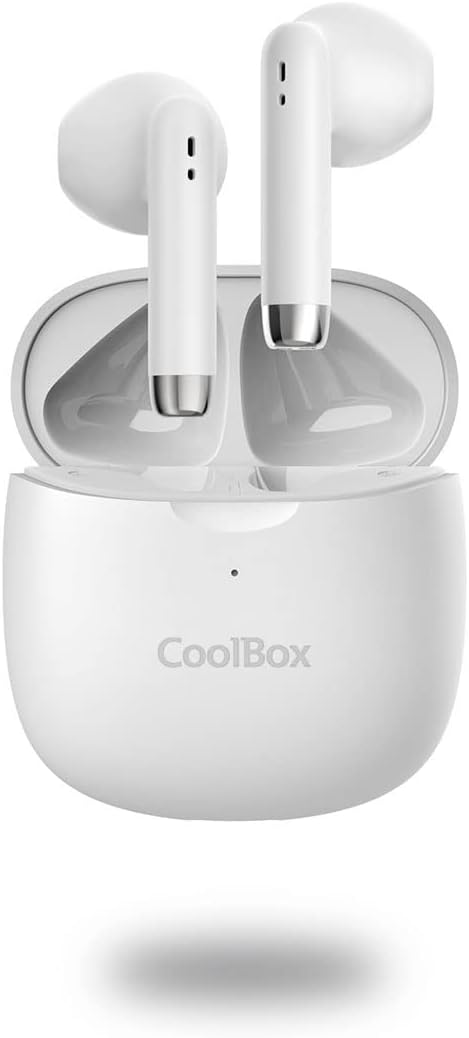
Obraz: widok z przodu view of the CoolBox TWS-01 wireless headphones, nestled within their open charging case. The earbuds are white with silver accents at the bottom of the stems, and the case is white with the CoolBox logo.

Image: A close-up shot of the two CoolBox TWS-01 wireless headphones, showing their individual design with white bodies and silver accents at the bottom of the stems. The ear tips are black.

Image: A graphic displaying the CoolBox TWS-01 wireless headphones against a blue background, highlighting their exceptional sound quality, Bluetooth 5.1 + EDR technology, and up to 10m range.

Image: A graphic illustrating the touch control functionality of the CoolBox TWS-01 wireless headphones, showing concentric circles emanating from the earbud to represent touch interaction for play/pause, volume control, track skipping, and power.
3. Konfiguracja
3.1 Pierwsze ładowanie
Przed pierwszym użyciem należy w pełni naładować słuchawki i etui ładujące.
- Umieść obie wkładki douszne w etui ładującym.
- Podłącz kabel ładujący USB-C do portu ładowania w obudowie, a drugi koniec do źródła zasilania USB (np. komputera, zasilacza sieciowego).
- Wskaźnik LED na obudowie pokaże stan ładowania. Pełne ładowanie trwa około 1.5 godzin.
3.2 Parowanie z urządzeniem
To pair your CoolBox TWS-01 headphones with a Bluetooth-enabled device:
- Sprawdź, czy słuchawki są naładowane i znajdują się w etui ładującym.
- Open the charging case. The headphones will automatically enter pairing mode (or manually activate by pressing and holding the touch control area on both earbuds for a few seconds if they don't pair automatically).
- Na swoim urządzeniu (smartfonie, tablecie, komputerze) przejdź do ustawień Bluetooth i włącz Bluetooth.
- Szukaj available devices. You should see "CoolBox TWS-01" or a similar name appear in the list.
- Select "CoolBox TWS-01" to connect. Once connected, a voice prompt will confirm successful pairing.
- Jeśli parowanie się nie powiedzie, wyłącz Bluetooth w urządzeniu, włóż słuchawki douszne z powrotem do etui, zamknij pokrywę, odczekaj kilka sekund, a następnie otwórz etui i spróbuj jeszcze raz.
4. Instrukcja obsługi
4.1 Włączanie/wyłączanie zasilania
- Włączanie: Open the charging case, and the earbuds will automatically power on and connect to the last paired device. Alternatively, press and hold the touch control area on both earbuds for 3 seconds.
- Wyłączone: Place the earbuds back into the charging case and close the lid. They will automatically disconnect and power off. Alternatively, press and hold the touch control area on both earbuds for 5 seconds.
4.2 Sterowanie dotykowe
The CoolBox TWS-01 headphones feature intuitive touch controls:
| Działanie | Lewa słuchawka | Prawa słuchawka |
|---|---|---|
| Odtwórz/Pauza | Pojedyncze dotknięcie | Pojedyncze dotknięcie |
| Następny utwór | Podwójne dotknięcie | Podwójne dotknięcie |
| Poprzedni utwór | Potrójne dotknięcie | Potrójne dotknięcie |
| Zwiększ głośność | Brak | Naciśnij i przytrzymaj |
| Zmniejsz głośność | Naciśnij i przytrzymaj | Brak |
| Odbierz/Zakończ połączenie | Pojedyncze dotknięcie | Pojedyncze dotknięcie |
| Odrzuć połączenie | Naciśnij i przytrzymaj przez 2 sekund | Naciśnij i przytrzymaj przez 2 sekund |
| Aktywuj Asystenta Głosowego | Czterokrotny kran | Czterokrotny kran |
4.3 Ładowanie słuchawek
Place the earbuds into the charging case. They will automatically begin charging. The LED indicators on the earbuds (if present) or case will indicate charging status. A full charge provides approximately 5 hours of playback.
4.4 Ładowanie etui
Connect the USB-C cable to the charging port on the case and a power source. The case provides up to 15 hours of additional battery life for the headphones. It takes approximately 1.5 hours to fully charge the case.
5. Konserwacja
- Czyszczenie: Do czyszczenia słuchawek i etui ładującego używaj miękkiej, suchej i niepozostawiającej włókien ściereczki. Nie używaj środków czyszczących o właściwościach ściernych ani rozpuszczalników.
- Składowanie: Gdy nie używasz słuchawek, przechowuj je w etui ładującym, aby je chronić i utrzymać naładowanie.
- Wodoodporność: These headphones are not water-resistant. Avoid exposure to liquids, moisture, and extreme temperatures.
- Pielęgnacja baterii: To preserve battery life, charge the headphones and case regularly, even if not in frequent use. Avoid fully depleting the battery for extended periods.
6. Rozwiązywanie Problemów
| Problem | Możliwe rozwiązanie |
|---|---|
| Słuchawki nie łączą się |
|
| Działa tylko jedna wkładka douszna |
|
| Brak dźwięku |
|
| Problemy z ładowaniem |
|
7. Specyfikacje
| Funkcja | Szczegół |
|---|---|
| Numer modelu | COO-AUB-TWS01 |
| Wersja Bluetooth | 5.1 + EDR |
| Zasięg bezprzewodowej | Do 10 metrów |
| Czas odtwarzania | 5 hours (headphones), up to 15 hours (with charging case) |
| Czas ładowania (etui) | 1.5 godziny (pełne naładowanie) |
| Port ładowania | USB-C |
| Waga (na jedną słuchawkę) | 4g |
| Waga całkowita (z walizką) | 44g |
| Zakres częstotliwości | 20 Hz - 20 000 Hz |
| Impedancja | 32 omy |
| Tworzywo | Plastikowy |
| Kolor | Biały |
| Kompatybilny Profiles | HSP, HFP, A2DP, AVRCP |
8. Gwarancja i wsparcie
CoolBox products are designed for reliability and performance. For warranty information and technical support, please refer to the warranty card included with your purchase or visit the official CoolBox webZachowaj dowód zakupu na wypadek roszczeń gwarancyjnych.
For further assistance, you may contact CoolBox customer service through their official channels. Please have your model number (COO-AUB-TWS01) ready when contacting support.
Ask a question about this manual
Ask about setup, troubleshooting, compatibility, parts, safety, or missing instructions. Manuals+ will review the question and use this page’s manual context to help answer it.