
bopmen STAR 10
Instrukcja obsługi bezprzewodowego mikrofonu karaoke Bluetooth Star10
Model: STAR 10 | Brand: bopmen
Wstęp
The bopmen Star10 Wireless Bluetooth Karaoke Microphone is a versatile 4-in-1 device designed for singing, acting as a portable handheld microphone, speaker, and featuring an integrated disco light. It offers high-resolution audio quality and extensive compatibility, making it suitable for various entertainment settings including car travel, home parties, and general use for adults and children.

Image: The Star10 Wireless Bluetooth Karaoke Microphone in Rose Gold, showcasing its sleek design and integrated disco ball.
Informacje dotyczące bezpieczeństwa
- Nie wystawiaj urządzenia na działanie ekstremalnych temperatur lub wilgoci.
- Unikaj upuszczania i narażania urządzenia na silne uderzenia.
- Przechowywać poza zasięgiem małych dzieci, aby zapobiec ryzyku zadławienia się małymi elementami.
- Use only the provided USB C-A cable for charging.
- Nie próbuj demontować ani modyfikować urządzenia.
- Czyść urządzenie miękką, suchą ściereczką. Unikaj stosowania silnych środków chemicznych i ściernych środków czyszczących.
Zawartość opakowania
Proszę zaznaczyć pole dotyczące następujących elementów:
- 1 x Karaoke microphone (Star10)
- 1 x USB C-A charging cable
- 1 x Instrukcja obsługi
Produkt ponadview
Familiarize yourself with the main controls and ports of your Star10 microphone.

Image: Detailed diagram illustrating the main control panel and bottom ports of the Star10 microphone, including Microphone Volume, On/Off/Play/Pause, Reverb On/Off, Volume Up/Down, Next/Previous Song, Tone Mode, Disco Light Control, USB Port, 3.5mm Earphone Jack, and TF Card slot.
Główne elementy sterujące:
- Microphone Volume / Accompaniment Mode On/Off: Adjusts microphone volume or toggles accompaniment.
- On/Off, Play/Pause: Powers the device on/off and controls music playback.
- Reverb On/Off / Bluetooth & TF Card Mode: Toggles reverb effect and switches between input modes.
- Zwiększanie/zmniejszanie głośności: Reguluje ogólną głośność głośnika.
- Poprzedni/następny utwór: Nawiguje po ścieżkach.
- Tryb tonowy: Cycles through different voice effects.
- Disco Light Control / Twins Pairing: Controls the disco light and initiates Twins Mode pairing.
Porty dolne:
- Kontrolka: Shows device status (e.g., charging, connected).
- 3.5 mm Earphone Jack / Re-Set button inside: For private listening or resetting the device.
- Port USB: Do ładowania mikrofonu.
- Gniazdo karty TF: For playing music directly from a micro TF card (up to 32GB, not included).
Organizować coś
Ładowanie mikrofonu:
- Connect the provided USB C-A cable to the USB port on the bottom of the microphone.
- Podłącz drugi koniec kabla do kompatybilnego zasilacza USB (nie ma go w zestawie) lub do portu USB komputera.
- The indicator light will show charging status. A full charge provides up to 10 hours of use (minimum 5 hours).
Włączanie/wyłączanie:
- Naciśnij i przytrzymaj Wł./Wył./Odtwórz/Pauza button for a few seconds to power on the microphone. You will hear an audible prompt.
- To power off, press and hold the same button until you hear the power-off prompt.
Instrukcja obsługi
Połączenie Bluetooth:
The Star10 microphone uses Bluetooth 5.2 for seamless connection to your devices.
- Włącz mikrofon. Automatycznie przejdzie on w tryb parowania Bluetooth.
- On your smartphone, tablet, or other Bluetooth-enabled device, open the Bluetooth settings.
- Szukaj "STAR 10" in the list of available devices and select it to pair.
- Once connected, you will hear a confirmation prompt. You can now play music from your device through the microphone's speaker and sing along.

Image: The Star10 microphone demonstrating its wide compatibility, connecting wirelessly to smartphones, tablets, and laptops via Bluetooth.
Tryb karty TF:
Play music directly from a micro TF card.
- Insert a micro TF card (up to 32GB, not included) with your music files into the TF Card slot on the bottom of the microphone.
- The microphone will automatically switch to TF Card mode. If not, press the Reverb On/Off / Bluetooth & TF Card Mode button to cycle modes.
- Użyj Poprzedni / następny utwór przyciski do nawigacji po utworach i Odtwórz/Pauza for playback control.
Disco Light Control:
Enhance your karaoke experience with the built-in disco light.
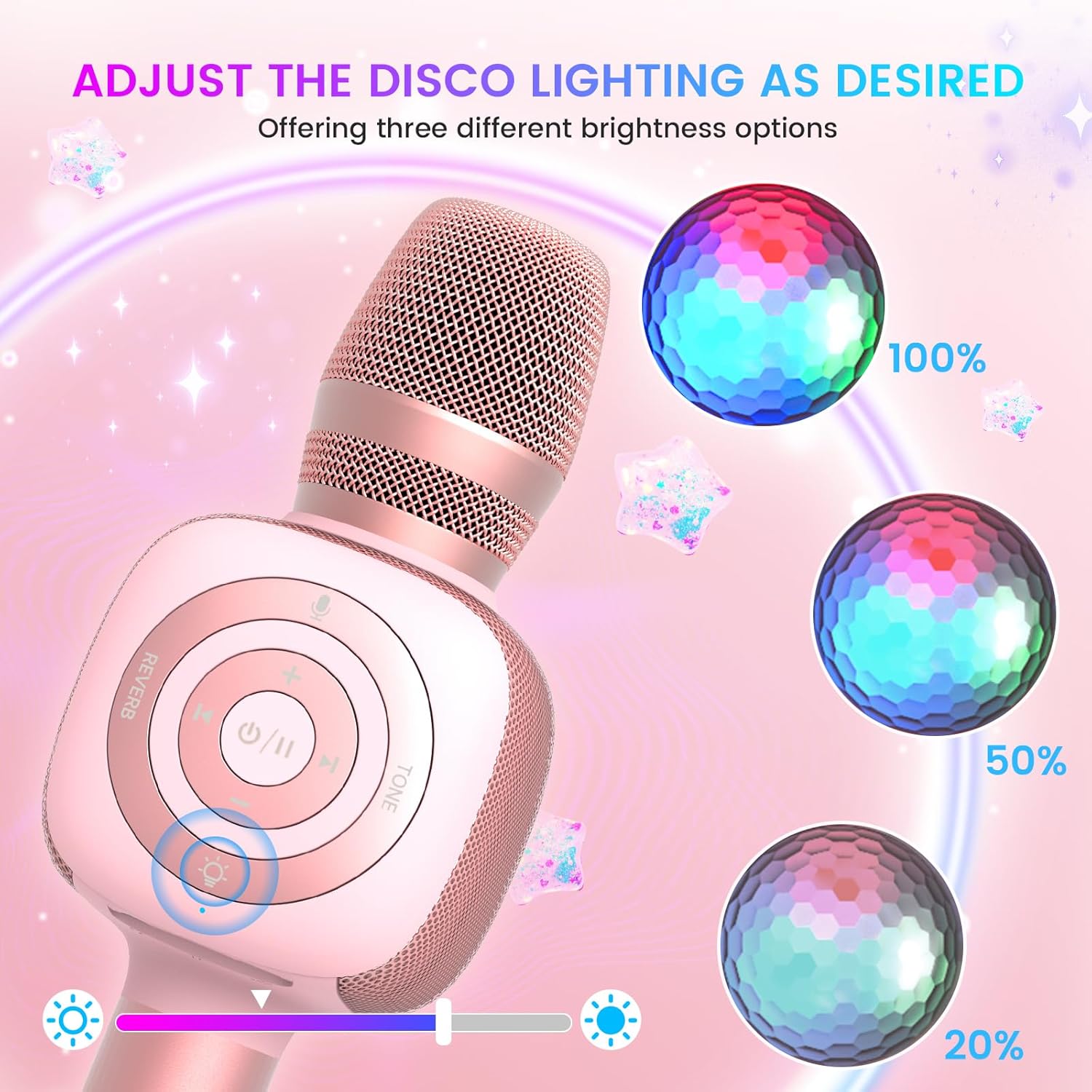
Image: The Star10 microphone's disco light feature, illustrating three adjustable brightness levels (100%, 50%, 20%) to suit different ambiance needs.
- Naciśnij Disco Light Control button (light bulb icon) to cycle through three RGB color modes and brightness levels.
- Press again to turn the disco light off.
Tone Modes (Magic Mode):
Experiment with different voice effects for added fun.

Image: The Star10 microphone's "Magic Mode" feature, depicting icons for Male Voice, Female Voice, Cartoon Voice, and Monster Sound effects.
- Naciśnij Tryb dźwiękowy button to cycle through various voice effects such as Male Voice, Female Voice, Cartoon Voice, and Monster Sound.
- Continue pressing to return to the original tone.
Twins Mode (Duet Mode):
Pair two Star10 microphones for a duet experience.

Image: Two individuals enjoying a duet, each holding a Star10 microphone, illustrating the "Twins Mode" functionality for shared singing experiences.
- Ensure both Star10 microphones are powered on.
- On one microphone, press and hold the Disco Light Control button for 2 seconds until a prompt tone "LINK CONNECTED" is heard. This microphone is now in Twins Mode pairing.
- On your cellphone/device, perform Bluetooth pairing selection and choose either of the two microphones. Both microphones will now be connected and output audio.
- To exit Twins Mode, press and hold the Disco Light Control button on the paired microphone for 2 seconds.
Konserwacja
- Czyszczenie: Wipe the microphone with a soft, dry cloth. Do not use liquid cleaners or aerosols.
- Składowanie: Przechowuj mikrofon w chłodnym, suchym miejscu, z dala od bezpośredniego światła słonecznego i ekstremalnych temperatur.
- Pielęgnacja baterii: For optimal battery life, charge the microphone regularly, even if not in frequent use. Avoid fully discharging the battery for extended periods.
Rozwiązywanie problemów
| Problem | Możliwa przyczyna | Rozwiązanie |
|---|---|---|
| Mikrofon nie włącza się. | Niski poziom naładowania baterii; przycisk zasilania nie został przytrzymany wystarczająco długo. | Charge the microphone fully; Press and hold the power button for 3-5 seconds. |
| Nie można nawiązać połączenia przez Bluetooth. | Microphone not in pairing mode; Device Bluetooth off; Interference. | Ensure microphone is on and in pairing mode; Enable Bluetooth on your device; Move closer to the microphone; Restart both devices. |
| Brak dźwięku z głośnika. | Volume too low; Device volume too low; Incorrect mode. | Increase microphone volume; Increase device volume; Ensure correct mode (Bluetooth/TF Card). |
| Voice effects not working. | Naciśnięcie niewłaściwego przycisku. | Press the 'Tone Mode' button repeatedly to cycle through effects. |
| Disco light not working. | Light turned off. | Press the 'Disco Light Control' button to turn on/cycle modes. |
Specyfikacje
- Model: GWIAZDA 10
- Marka: bopmen
- Rozmiar mikrofonu: Ręczny
- Technologia łączności: Bluetooth 5.2
- Źródło zasilania: Zasilany bateryjnie (w zestawie 2 baterie litowo-jonowe)
- Czas pracy baterii: Up to 10 hours (minimum 5 hours)
- Wymiary produktu: 18.7 x 16.54 x 12.2 cala
- Waga przedmiotu: 1.19 funta (540 gramów)
- Stosunek sygnału do szumu: 52dB
- Pasmo przenoszenia: 10 kHz
- Zgodne urządzenia: Personal Computer, Smartphone, Karaoke Machine
- Dodatek specjalny: Mute Function, Disco Light, Voice Changer, Twins Mode
- Kolor: Różowe złoto
- Zalecane zastosowanie: Wewnątrz/na zewnątrz
Gwarancja i wsparcie
Your bopmen Star10 Karaoke Microphone comes with a standard manufacturer's warranty. For detailed warranty information, please refer to the warranty card included in your package or visit the official bopmen webstrona.
If you encounter any issues or have questions regarding your product, please do not hesitate to contact our professional customer service team. We are committed to providing support and assistance within 24 hours to ensure your satisfaction.
Informacje kontaktowe: Please refer to the contact details provided in your product packaging or on the official bopmen support page for the most up-to-date information.
Ask a question about this manual
Ask about setup, troubleshooting, compatibility, parts, safety, or missing instructions. Manuals+ will review the question and use this page’s manual context to help answer it.