
1. Koniec produktuview
The Sudio F2 is a portable Bluetooth speaker designed for high-quality audio playback in various environments. It features Bluetooth 5.3 connectivity, an AUX input, IPX7 waterproof rating, and a unique broadcast function allowing connection of up to 100 speakers.

Przód view of the Sudio F2 Portable Bluetooth Speaker.
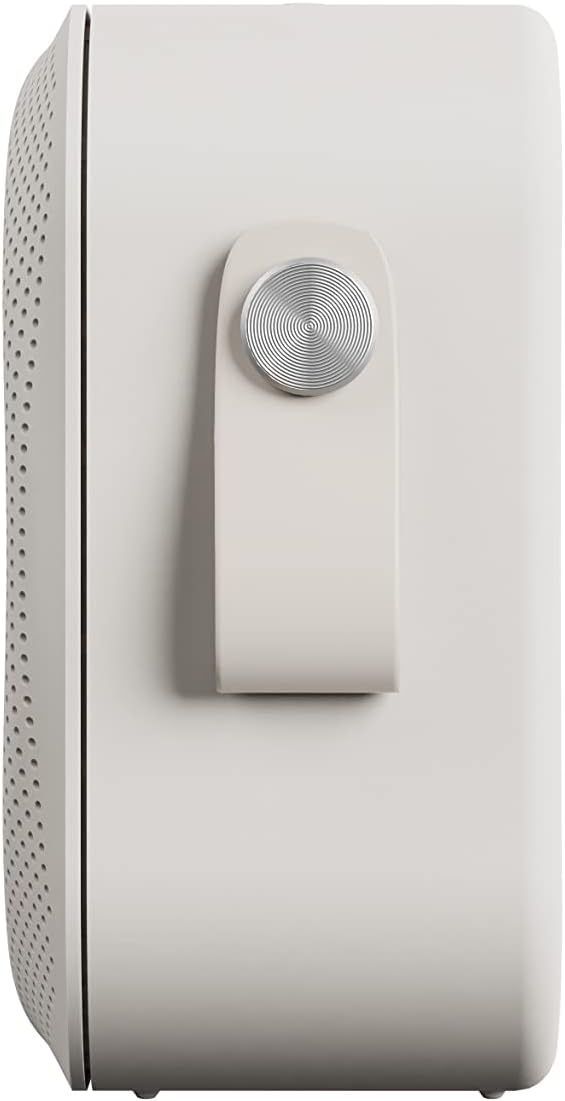
Strona view of the Sudio F2 speaker, highlighting the integrated silicone strap for portability.
2. Zawartość opakowania
Sprawdź, czy w przesyłce znajdują się wszystkie elementy:
- Sudio F2 Portable Bluetooth Speaker
- Type-C USB-cable for charging
- Instrukcja obsługi (ten dokument)
3. Konfiguracja i ładowanie
3.1 Opłata początkowa
Before first use, fully charge your Sudio F2 speaker. Connect the provided Type-C USB cable to the charging port on the speaker and to a compatible USB power adapter (not included). A full charge takes approximately 4 hours and provides up to 15 hours of playtime.
3.2 Włączanie/wyłączanie zasilania
- Włączanie: Naciśnij i przytrzymaj przycisk zasilania, aż zaświeci się kontrolka.
- Aby wyłączyć: Naciśnij i przytrzymaj przycisk zasilania, aż kontrolka zgaśnie.

Strona view of the Sudio F2 speaker, showing the power button location.
4. Instrukcja obsługi
4.1 parowanie Bluetooth
- Ensure the Sudio F2 speaker is powered on and in pairing mode (indicator light will flash).
- Włącz Bluetooth na swoim urządzeniu (smartfonie, tablecie itp.) i wyszukaj dostępne urządzenia.
- Select "Sudio F2" from the list.
- Once connected, the indicator light will become solid, and you will hear an audible confirmation.
The speaker uses Bluetooth 5.3 technology and has a connection range of up to 10 meters.
4.2 Wejście AUX
To connect a device via AUX, insert a 3.5mm audio cable (not included) into the AUX input port on the Sudio F2 speaker and the other end into your audio source. The speaker will automatically switch to AUX mode.

The Sudio F2 speaker featuring its AUX input port for wired connections.
4.3 Broadcast Function (Multi-Speaker Pairing)
The Sudio F2 allows you to link up to 100 speakers simultaneously for a larger sound experience. This feature is activated using the broadcast function button.
- Connect your primary Sudio F2 speaker to your device via Bluetooth.
- Power on all other Sudio F2 speakers you wish to connect.
- On the primary speaker, press the broadcast function button (refer to the speaker diagram for location).
- The primary speaker will begin searching for other F2 speakers.
- Once connected, all linked speakers will play audio synchronously.

Multiple Sudio F2 speakers demonstrating the broadcast function for synchronized audio playback.

The Sudio F2 speaker connected to a turntable via AUX, illustrating its compatibility with various audio sources.
4.4 Sterowanie
The Sudio F2 features touch controls for playback and volume adjustments. Specific functions include:
- Odtwórz/Pauza: Single tap the main control button.
- Zwiększanie/zmniejszanie głośności: Swipe or tap dedicated volume areas (refer to product diagram for exact locations).
- Następny / poprzedni utwór: Double tap or triple tap the main control button (functionality may vary, refer to quick start guide for details).
5. Wodoodporność (IPX7)
The Sudio F2 speaker has an IPX7 waterproof rating, meaning it can be submerged in water up to 1 meter for 30 minutes. This makes it suitable for use in showers, by pools, or in rainy conditions. Ensure all ports are securely closed before exposing the speaker to water.

The Sudio F2 speaker, highlighting its IPX7 waterproof capability, suitable for wet environments.

A Sudio F2 speaker in a shower setting, demonstrating its waterproof design.
6. Konserwacja
6.1 Czyszczenie
To clean your Sudio F2 speaker, use a soft, damp cloth. Avoid using harsh chemicals or abrasive materials, as these can damage the speaker's finish or waterproof seals. Ensure the speaker is dry before charging.
6.2 Przechowywanie
Przechowuj głośnik w chłodnym, suchym miejscu, z dala od bezpośredniego światła słonecznego i ekstremalnych temperatur. W przypadku dłuższego przechowywania, okresowo ładuj akumulator, aby utrzymać go w dobrym stanie.
7. Rozwiązywanie Problemów
7.1 Brak zasilania
- Ensure the speaker is fully charged. Connect it to a power source using the provided Type-C USB cable.
- Sprawdź, czy kabel ładujący i adapter działają prawidłowo.
7.2 Nie można sparować przez Bluetooth
- Make sure the speaker is in pairing mode (indicator light flashing).
- Upewnij się, że Bluetooth w Twoim urządzeniu jest włączony i znajduje się ono w odległości nie większej niż 10 metrów od głośnika.
- Try forgetting the "Sudio F2" device from your device's Bluetooth settings and re-pairing.
- Uruchom ponownie głośnik i urządzenie.
7.3 Brak dźwięku
- Sprawdź poziom głośności głośnika i podłączonego urządzenia.
- Sprawdź, czy głośnik jest prawidłowo sparowany przez Bluetooth lub podłączony przez AUX.
- If using AUX, verify the cable is fully inserted and functional.
7.4 Broadcast Function Not Working
- Ensure all speakers are Sudio F2 models.
- Verify that the primary speaker is successfully connected to your device via Bluetooth.
- Make sure all speakers are powered on and within close proximity to each other.
8. Specyfikacje
| Funkcja | Specyfikacja |
|---|---|
| Nazwa modelu | Sudio F2 |
| Numer modelu | SD-1802 |
| Technologia łączności | Bluetooth 5.3 |
| Zasięg bezprzewodowej | 10 metrów |
| Wejście audio | Wejście AUX 3.5 mm |
| Poziom wodoodporności | IPX7 (wodoodporny) |
| Pauza w szkole | Do 15 godzin |
| Czas ładowania | 4 godzin |
| Pojemność baterii | 2200 mAh |
| Maksymalna moc wyjściowa głośnika | 20 watów |
| Odpowiedź częstotliwościowa | 35 Hz – 18 KHz |
| Waga przedmiotu | 410 gramów (14.5 uncji) |
| Wymiary produktu | 2.16" gł. x 4.16" szer. x 4.17" wys. |
| Metoda kontroli | Dotykać |
| Zawarte komponenty | Type-C USB-cable for charging |
9. Gwarancja i wsparcie
9.1 Informacje o gwarancji
The Sudio F2 Portable Bluetooth Speaker comes with a limited warranty. Please refer to the official Sudio webSzczegółowe warunki gwarancji można znaleźć na stronie internetowej lub w dokumentacji zakupu.
9.2 Obsługa klienta
For further assistance, technical support, or warranty claims, please contact Sudio customer service. You can find contact information and additional resources on the official Sudio webstrona: Visit the Sudio Store on Amazon
10. Film o produkcie
Official Sudio F2 product video, showcasing the speaker's design and features in various settings.
