
Wstęp
This manual provides detailed instructions for the installation, operation, and maintenance of your Strong SRT 7040 Digital Satellite HD Receiver. Please read this manual carefully before using the device to ensure proper functionality and to prevent damage.

Image: The Strong SRT 7040 DTT Tuner and its retail packaging.
The Strong SRT 7040 is a Full HD digital satellite receiver designed for Free-To-Air (FTA) channels. It features a USB port for multimedia playback and software updates, and supports Dolby Audio for enhanced sound quality.
1. Konfiguracja
1.1 Rozpakowanie
Ostrożnie wyjmij wszystkie elementy z opakowania. Upewnij się, że znajdują się w nim następujące elementy:
- Strong SRT 7040 DTT Tuner
- Pilot zdalnego sterowania (z 2 bateriami AAA)
- Zasilacz
- Instrukcja obsługi
1.2 Podłączanie urządzenia
Follow these steps to connect your SRT 7040 receiver:
- Wejście satelitarne: Podłącz kabel anteny satelitarnej do SOB W port on the back of the receiver.
- Wyjście wideo (HDMI): Podłącz kabel HDMI do HDMI port on the receiver to an HDMI input on your television.
- Video Output (SCART): Alternatively, for older televisions, connect a SCART cable from the telewizor SCART port w odbiorniku do wejścia SCART w telewizorze.
- Audio Output (Digital): For digital audio, connect a coaxial cable from the COAXIAL S/PDIF port to your digital audio ampliyfikator.
- Audio Output (Analog): For analog audio, connect RCA cables from the AUDIO R/L ports to your audio Hi-Fi ampliyfikator.
- Urządzenie USB: If desired, connect a USB storage device to the USB port for multimedia playback or software updates.
- Moc: Podłącz zasilacz do 12V === 1.5A input on the receiver, then plug the adapter into a wall outlet.

Image: Rear panel connections of the Strong SRT 7040 DTT Tuner, showing SAT IN, HDMI, TV SCART, COAXIAL S/PDIF, AUDIO R/L, USB, and Power input.
1.3 First-Time Installation and Channel Scan
Upon first power-on, the receiver will guide you through an initial setup wizard. Follow the on-screen prompts to select your language, country, and perform an automatic channel scan. This process will detect and store all available satellite channels.
2. Instrukcja obsługi
2.1 Zdalne sterowanieview
The included remote control allows you to access all functions of the SRT 7040. Insert the two AAA batteries into the remote control, ensuring correct polarity.

Image: The remote control for the Strong SRT 7040 DTT Tuner, showing buttons for power, numbers, volume, channel, menu, and special functions.
2.2 Podstawowe funkcje
- Moc: Naciśnij MOC button to turn the receiver on or off (standby mode).
- Wybór kanału: Użyj CH+ / CH- buttons to change channels sequentially, or use the numeric keypad to enter a channel number directly.
- Regulacja głośności: Użyj Objętość + / TOM- przyciski do regulacji głośności dźwięku.
- Niemy: Naciśnij NIEMY przycisk, aby tymczasowo wyciszyć dźwięk.
2.3 Nawigacja po menu
Naciśnij MENU Aby uzyskać dostęp do menu głównego, naciśnij przycisk. Użyj klawiszy strzałek (UP, W DÓŁ, LEWY, PRAWIDŁOWY) to navigate through options and OK aby potwierdzić wybór. Naciśnij EXIT aby powrócić do poprzedniego ekranu lub transmisji telewizyjnej na żywo.
2.4 Funkcje specjalne
- Timery: The receiver supports programming timers for recording or switching to specific channels at scheduled times. Access this feature via the menu.
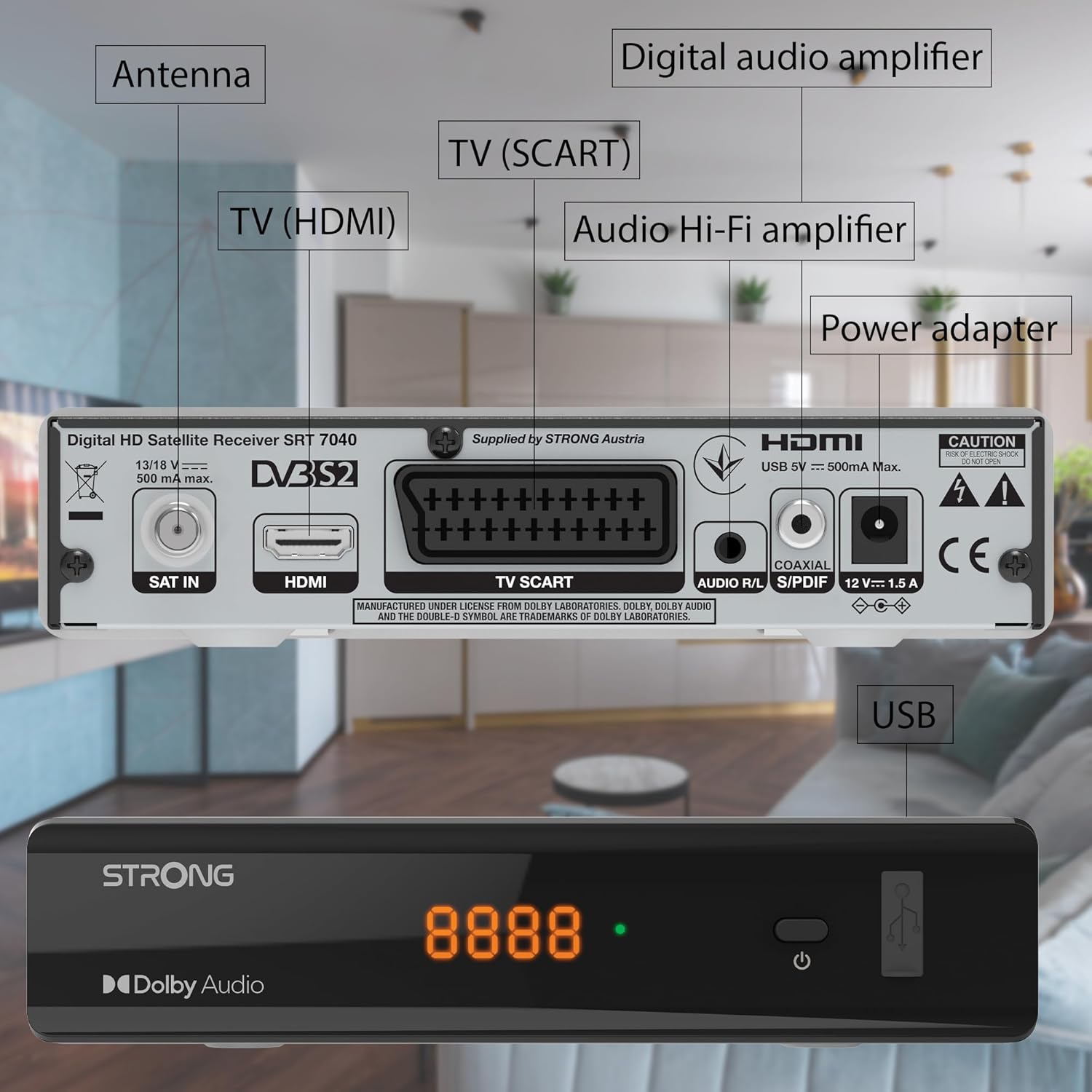
Image: The Strong SRT 7040 DTT Tuner displaying a timer icon, indicating its scheduling capabilities.
- Listy ulubionych: Create customized lists of your preferred channels for quick access.
- Napisy na filmie obcojęzycznym: Enable or disable subtitles for compatible broadcasts using the ZASTĄPIĆ przycisk na pilocie.
- Elektroniczny przewodnik po programach (EPG): Naciśnij EPG przycisk do view program information for upcoming broadcasts.
- Dźwięk Dolby: The receiver supports Dolby Audio for a high-quality sound experience.

Image: The Strong SRT 7040 DTT Tuner with the Dolby Audio logo, illustrating its sound processing capability.
3. Konserwacja
3.1 Czyszczenie
To clean the receiver, disconnect it from the power supply. Use a soft, dry cloth to wipe the exterior. Do not use liquid cleaners, aerosols, or abrasive materials, as these can damage the finish or internal components.
3.2 Aktualizacje oprogramowania
Okresowo sprawdzaj producenta website for available software updates. Updates can improve performance, add new features, or resolve issues. Software updates are typically performed via the USB port following specific instructions provided with the update file.
3.3 Informacje dotyczące bezpieczeństwa
- Nie otwierać odbiornika casing. Wewnątrz nie ma żadnych części, które mogłyby być naprawiane przez użytkownika. Wszelkie prace serwisowe należy zlecać wykwalifikowanemu personelowi.
- Trzymaj odbiornik z dala od bezpośredniego światła słonecznego, źródeł ciepła i wilgoci.
- Aby zapobiec przegrzaniu, należy zapewnić odpowiednią wentylację wokół urządzenia.
- Używaj wyłącznie dostarczonego zasilacza.
4. Rozwiązywanie Problemów
If you encounter problems with your SRT 7040, consult the following table before contacting support.
| Problem | Możliwa przyczyna | Rozwiązanie |
|---|---|---|
| Brak zasilania | Zasilacz nie jest podłączony; gniazdko elektryczne jest uszkodzone | Check power adapter connection; Try a different power outlet |
| Brak sygnału / Czarny ekran | Satellite cable loose or disconnected; Incorrect input selected on TV; Satellite dish alignment issue | Check SAT IN cable connection; Ensure TV is on correct HDMI/SCART input; Perform a channel scan; Consult a professional for dish alignment if necessary |
| Pilot nie działa | Baterie rozładowane lub nieprawidłowo włożone; Przeszkoda między pilotem a odbiornikiem | Replace batteries; Ensure correct polarity; Remove any obstructions; Point remote directly at receiver |
| Niska jakość obrazu | Weak satellite signal; Incorrect display settings | Check satellite signal strength in menu; Adjust TV display settings; Ensure Full HD content is being broadcast |
5. Specyfikacje
The following are the technical specifications for the Strong SRT 7040 Digital Satellite HD Receiver:
- Model: SRT 7040 (SAT FTA Full HD)
- Marka: Mocny
- Wymiary: 3.39 x 6.46 x 1.38 cala (8.6 x 16.4 x 3.5 cm)
- Waga przedmiotu: 9.2 uncji (260 grama)
- Kolor: Czarny
- Technologia łączności: USB
- Tomtage: 100 - 240 V
- Częstotliwość: 50 - 60 Hz
- Pobór mocy: 18 kWh (operational, typical)
- Zakres temperatur pracy: 0ºC do 40ºC
- Wilgotność względna: 10% - 95%
- Baterie: 2 baterie AAA (w zestawie do pilota)
- Specyfikacja spełniona: DVB-S2
- Dołączony: Wally Receiver
6. Gwarancja i wsparcie
For warranty information and technical support, please refer to the warranty card included in your product packaging or visit the official Strong webZachowaj paragon jako dowód zakupu na wypadek reklamacji.
For further assistance, you may contact Strong customer service through the contact details provided on their official webstrona.