
Wstęp
The Sony WF-1000XM5 earbuds offer an immersive audio experience with advanced noise-canceling technology. Designed for comfort and superior sound quality, these truly wireless earbuds integrate seamlessly with your devices, providing clear calls and long-lasting battery life. This manual provides essential information for setting up, operating, maintaining, and troubleshooting your earbuds.
- REDUKCJA SZUMÓW: Experience a personal concert with the bluetooth earbuds noise cancelling feature of Sony WF-1000XM5, designed to cancel out more external noise than ever before. Perfect for those who want to enjoy their favorite tunes without the distraction of ambient noise, these ear buds come equipped with dual feedback microphones and Noise Isolation Earbud Tips.
- JAKOŚĆ DŹWIĘKU: Uncover the richness of sound with the noise cancelling earbuds of Sony WF-1000XM5, specially designed for wide frequency reproduction. These earphones wireless bluetooth enhance your listening experience by delivering detailed vocals and fine nuances that make every song unique.
- CALL CLARITY: Maintain clear conversations with the bluetooth earbuds of Sony WF-1000XM5, featuring Sony's best ever call quality. These earbuds wireless bluetooth noise cancelling ensure that your voice is heard clearly on the other end, even in noisy situations.
- DŁUGOTRWAŁA BATERIA: Relish the long-lasting battery life of Sony WF-1000XM5, offering up to 8 hours of listening time (24-hours with case). The quick charging feature of these earbuds gives you up to 1 hour of listening time with just 3 minutes of charging.
Co jest w pudełku
Your Sony WF-1000XM5 package includes the following items:
- Headphones (Sony WF-1000XM5 Earbuds)
- Etui ładujące
- Kabel USB typu C (USB-A do USB-C) (ok. 20 cm (7.88 cala))
- Noise isolation earbud tips (SS/S/M/L 2 each)
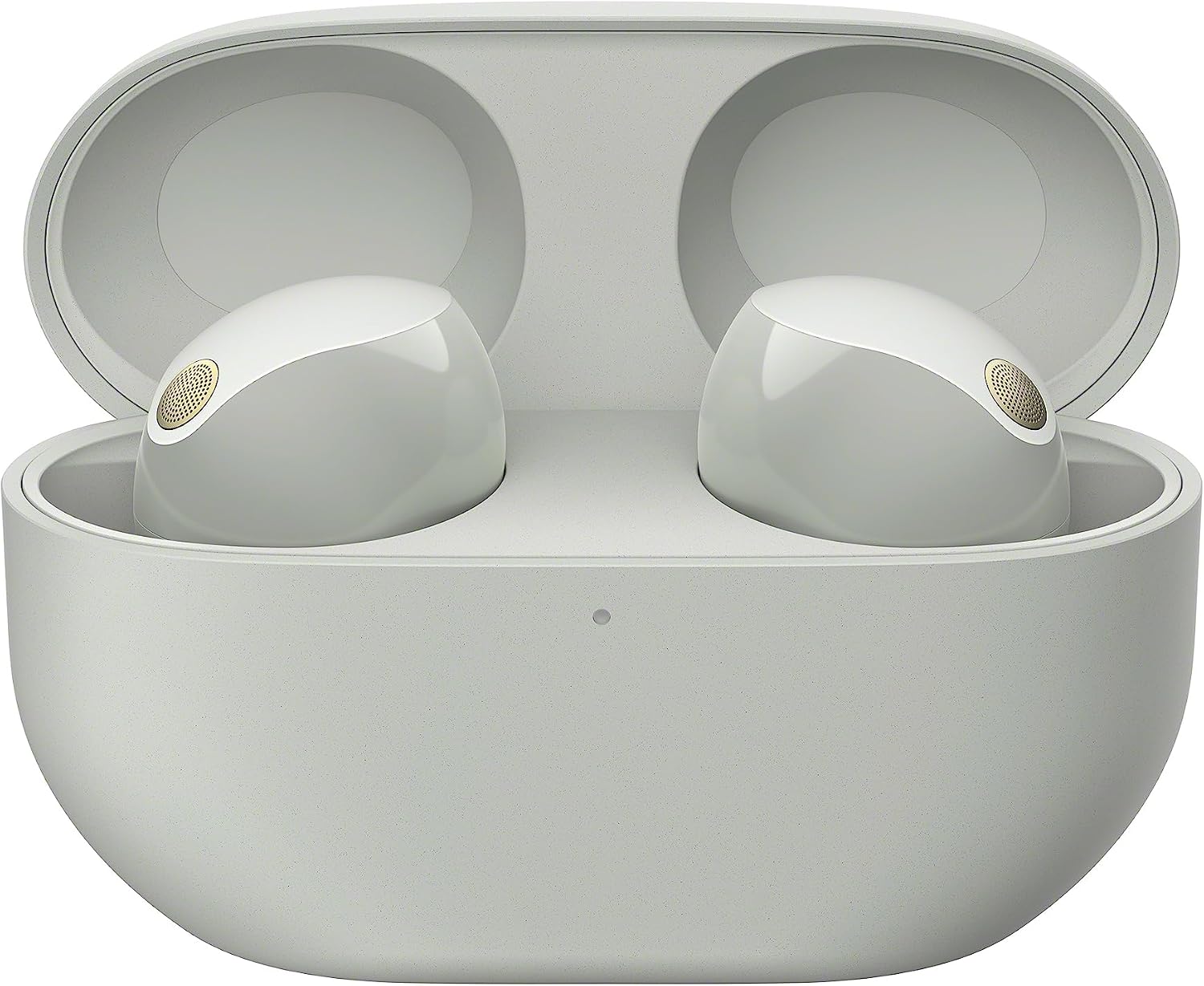
Figure 1: Sony WF-1000XM5 earbuds in their open charging case, showcasing the included components.
Organizować coś
Wstępna konfiguracja i parowanie
- Ładowanie słuchawek dousznych: Before first use, fully charge the earbuds and the charging case using the provided USB-C cable. The indicator light on the case will show charging status.
- Włączanie: Słuchawki włączają się automatycznie po wyjęciu z etui ładującego.
- Tryb parowania: With the earbuds in the charging case, open the lid. Press and hold the pairing button on the back of the case for about 5 seconds until the indicator light on the case flashes blue.
- Połącz przez Bluetooth: On your device (smartphone, tablet, computer), enable Bluetooth and select "WF-1000XM5" from the list of available devices.
- Pobierz aplikację: For full functionality and customization, download the "Sony | Headphones Connect" app from your device's app store.

Figure 2: The Sony WF-1000XM5 earbuds in their sleek silver finish.
Noszenie zestawu słuchawkowego
- Usuń z przypadku: Lay the headset units on their sides and remove them from the charging case. The headset turns on automatically.
- Włóż do uszu: Put the headset unit with the L (left) mark into your left ear and the headset unit with the R (right) mark into your right ear. The left headset unit has a tactile dot. If you feel it is difficult to put the earbud tips into your ears, squeeze the earbud tips lightly before wearing the headset.
Note: Be careful not to come in contact with the touch sensor when you put the headset units into your ears.
Figure 3: Proper insertion technique for the earbuds, highlighting the tactile dot for left ear identification.
- Dostosuj dopasowanie: Hold and rotate the headset unit with your thumb, index, and middle finger to adjust the headset to fit your ear. After putting the headset unit into your ear, hold the side of the headset unit with your fingers and slowly push the earbud tip into your ear canal.
Note: If you touch the touch sensor, the headset may operate. Check if there is a gap between the earbud tip and your ear canal because the earbud tip is not inserted all the way into your ear or the earbud tip is the wrong size.
Figure 4: Visual guide for adjusting the earbud to ensure a secure and comfortable fit.
- Check Fit with Smartphone: Use the video function on your smartphone to check the fit on your ears. The noise canceling effects may not be achieved depending on how the headset units are worn. If you use the video function of your smartphone or other devices to record and check how the headset units are worn in your ears, you can understand its feel when worn and get closer to discover the correct way to wear the headset.
- Stabilize Earbud Tip: Wait for about 10 seconds for the earbud tip shape to stabilize. If you feel your ears are not sealed, the noise canceling function is not sufficient or the low frequency sound performance is not sufficient, try larger size earbud tips. If the headset units come off while you are wearing them, try smaller size earbud tips.
Instrukcja obsługi
Noise Cancellation and Ambient Sound
The WF-1000XM5 earbuds feature advanced noise-canceling technology to block out external distractions, allowing you to fully immerse yourself in your audio. They also offer an Ambient Sound mode to keep you aware of your surroundings.

Figure 5: A user enjoying the superior noise cancellation of the WF-1000XM5 earbuds in a busy environment.
Video 1: Official Sony video demonstrating the noise-canceling capabilities of the WF-1000XM5 earbuds in various settings.
Zadzwoń do Clarity
Equipped with multiple microphones and advanced AI noise reduction algorithms, the WF-1000XM5 earbuds deliver Sony's best-ever call quality, ensuring your voice is heard clearly even in noisy environments.

Figure 6: A user engaging in a clear phone conversation using the WF-1000XM5 earbuds.
Żywotność baterii i ładowanie
The earbuds provide up to 8 hours of listening time on a single charge, with the charging case extending total playback to 24 hours. A quick 3-minute charge can provide up to 1 hour of listening time.

Figure 7: Visual representation of the impressive battery life and quick charging capabilities.
Połączenie wielopunktowe
Connect your WF-1000XM5 earbuds to two Bluetooth devices simultaneously, allowing for seamless switching between them without manual re-pairing.

Figure 8: Demonstrating the multipoint connection feature, allowing simultaneous connection to a laptop and a smartphone.
Odporność na wodę
With an IPX4 rating, the earbuds are resistant to splashes and sweat, making them suitable for workouts and outdoor activities. Note that the charging case is not water resistant.

Figure 9: The earbuds are designed to withstand splashes and sweat, ideal for active use.
Konserwacja
Czyszczenie
- Regularly clean the earbud tips with a dry, soft cloth to remove earwax and debris.
- Wipe the main body of the earbuds and the charging case with a dry, soft cloth. Avoid using liquids or abrasive cleaners.
Składowanie
- Gdy nie używasz słuchawek, przechowuj je w etui ładującym, aby je chronić i mieć pewność, że pozostaną naładowane.
- Avoid storing the earbuds in extreme temperatures or high humidity.
Rozwiązywanie problemów
Efekt redukcji szumów nie jest wystarczający.
- Upewnij się, że funkcja usuwania szumów jest włączona.
- Ustaw zestaw słuchawkowy w wygodnej pozycji.
- Funkcja redukcji szumów jest skuteczna w zakresie niskich częstotliwości, np. w samolotach, pociągach, biurach i w pobliżu klimatyzatorów, nie jest natomiast tak skuteczna w przypadku wyższych częstotliwości, takich jak głos ludzki.
- When the Adaptive Sound Control on the "Sony | Headphones Connect" app is turned on, the wearer's actions, like walking or running, are detected. The noise canceling function is automatically adjusted and the Ambient Sound Mode may be activated according to these actions. To make the most of the noise canceling function, turn off the Adaptive Sound Control, and try to turn on the noise canceling function manually when you need it.
- With the "Sony | Headphones Connect" app, check the setting of [Ambient Sound Control]. If it is set to [Ambient Sound], the effect of noise canceling is reduced. Set it to the noise canceling mode.
- Check with the "Sony | Headphones Connect" app whether the function of the NC/AMB button is set to [Ambient Sound Control].
- Because the noise canceling performance is automatically optimized by the Auto NC Optimizer function according to changes in the wearing condition and usage environment, you may notice fluctuations in the noise canceling effect.
Niski poziom dźwięku
- Turn up the volume of the headset and the connected device.
- Ponownie podłącz urządzenie Bluetooth do zestawu słuchawkowego.
- Zresetuj zestaw słuchawkowy.
- Zainicjuj zestaw słuchawkowy i ponownie sparuj zestaw słuchawkowy z urządzeniem.
Note: Depending on the connected device, the volume of the device and the headset may or may not be synced. If the volume on a device is not synced to the volume on the headset, it will not be possible to use the device to turn up the volume on the headset once the volume is turned down on the headset. In that case, turn up the volume of both the headset and the connected device.
The headset is turned off automatically.
- When you wear the headset over a cap, cloth, a scarf, hair, etc., wearing detection may not work properly. The automatic power off function may trigger and the headset may be turned off automatically. Wear the headset so that your ears are inside the earpads.
- When the automatic power off function is set to [Do not turn off] on the [System] tab of the "Sony | Headphones Connect" app, wearing detection will continue to work and the symptom may be improved.
- Sprawdź, czy akumulator jest w pełni naładowany.
Specyfikacje
| Funkcja | Szczegół |
|---|---|
| Nazwa modelu | WF1000XM5/S |
| Kontrola hałasu | Aktywna redukcja szumów |
| Technologia łączności | Bezprzewodowa (Bluetooth 5.3) |
| Żywotność baterii | 8 Hours (earbuds), 24 Hours (with case) |
| Szybkie ładowanie | 3 minut ładowania wystarcza na 1 godzinę odtwarzania |
| Poziom wodoodporności | IPX4 (tylko wkładki douszne) |
| Rozmiar sterownika audio | 8.4 milimetrów |
| Typ sterowania | Alexa, Voice, Touch |
| Waga przedmiotu | 0.4 uncji |
| Wymiary produktu | 3.86 x 2.11 x 3.46 cala |
| Producent | Sony |
| Kraj pochodzenia | Wietnam |
Gwarancja i wsparcie
For detailed warranty information and further support, please refer to the official User Manual (PDF) provided with your product or accessible via the link below.