
1. Wprowadzenie
This manual provides instructions for the ALLIMITY remote control, designed for seamless operation with Xbox One, Xbox One S, and Xbox One X series consoles. This remote requires no complex setup or programming; simply install the batteries, and it is ready for use.
2. Zawartość opakowania
- 1 x ALLIMITY Remote Control
Note: 2 x AAA Alkaline Batteries are not included and must be purchased separately.
3. Konfiguracja
3.1 Instalacja baterii
The remote control operates on two (2) AAA alkaline batteries. Follow these steps to install them:
- Znajdź pokrywę komory baterii z tyłu pilota.
- Aby otworzyć komorę, przesuń pokrywę w dół lub naciśnij zatrzask (jeśli jest obecny).
- Włóż dwie baterie AAA, upewniając się, że bieguny dodatni (+) i ujemny (-) są prawidłowo ustawione względem oznaczeń wewnątrz komory.
- Załóż pokrywę komory baterii i wsuń ją z powrotem na miejsce, aż usłyszysz kliknięcie.

Image: Back of the remote control with the battery compartment open for AAA battery insertion.
4. Instrukcja obsługi
4.1 Podstawowa obsługa
Once the batteries are correctly installed, the remote control is ready for immediate use. No additional pairing or programming is required.
- Point the remote control directly towards your Xbox console or the device's infrared receiver.
- Press the desired buttons for navigation, media playback, or system control functions.
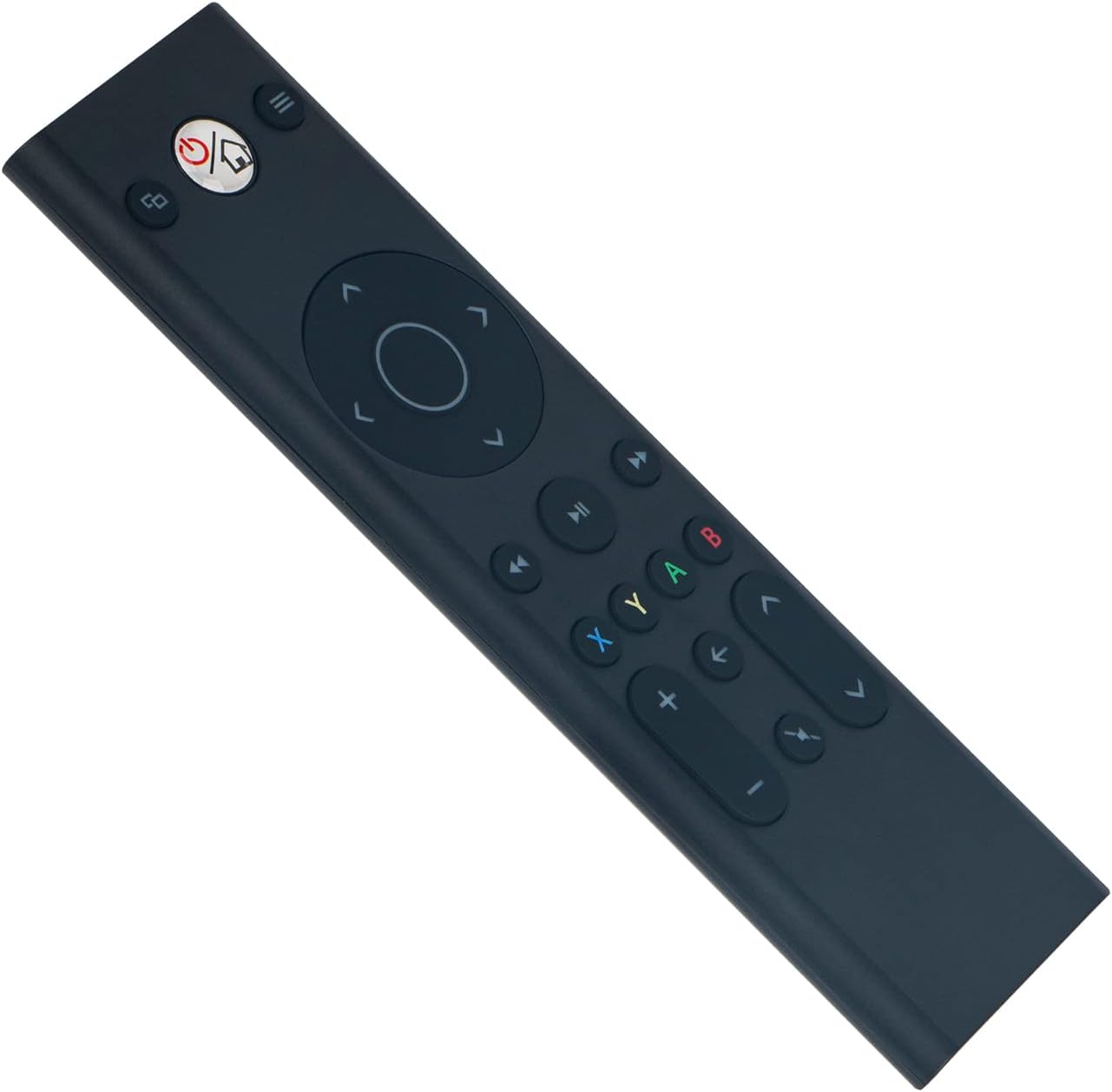
Obraz: Przód view of the ALLIMITY remote control, illustrating button layout.
4.2 Zgodność
This remote control is fully compatible with the following Microsoft Xbox console models:
- Xbox One
- Xbox One S
- Xbox One X
5. Konserwacja
- Czyszczenie: Use a soft, dry cloth to clean the remote control. Do not use liquid cleaners, abrasive materials, or solvents, as these may damage the surface or internal components.
- Składowanie: Przechowuj pilota w chłodnym i suchym miejscu, z dala od bezpośredniego światła słonecznego, ekstremalnych temperatur i wysokiej wilgotności.
- Pielęgnacja baterii: If the remote will not be used for an extended period (e.g., one month or more), remove the batteries to prevent potential leakage and damage to the device.
6. Rozwiązywanie Problemów
6.1 Pilot nie odpowiada
- Sprawdź baterie: Ensure the batteries are inserted with the correct polarity (+/-). Replace old batteries with fresh AAA alkaline batteries.
- Przeszkoda: Verify there are no objects blocking the line of sight between the remote control and the Xbox console's infrared (IR) receiver.
- Zakres: Ensure you are within the maximum operating range of 33 feet (10 meters) from the console.
6.2 Praca przerywana
- Poziom naładowania baterii: Low battery power can cause inconsistent performance. Replace batteries if necessary.
- Ingerencja: Strong light sources, such as direct sunlight or certain types of fluorescent lighting, can interfere with the remote's infrared signal. Try operating the remote in a different lighting environment.
7. Specyfikacje
| Marka | WSZECHSTRONNOŚĆ |
| Numer modelu | YK33-MB1356-BK3-RC |
| Technologia łączności | Podczerwony |
| Zasilacz | 2 baterie alkaliczne AAA (brak w zestawie) |
| Maksymalna liczba obsługiwanych urządzeń | 1 |
| Typ kontrolera | Sterowanie przyciskami |
| Ilość przycisków | 21 |
| Maksymalny zasięg | 33 stóp (10 m) |
| Waga przedmiotu | 55 gram |
| Funkcja specjalna | Nie wymaga programowania |
| Kompatybilne urządzenia | Xbox One, Xbox One S, Xbox One X series |
8. Gwarancja i wsparcie
For product support, warranty information, or any inquiries regarding your ALLIMITY remote control, please contact the retailer from whom you purchased the product or refer to the manufacturer's official support channels. Please retain your proof of purchase for warranty claims.