
1. Wprowadzenie
Thank you for choosing the Aigo AC SE 360 Rainbow 360mm Water Cooler. This all-in-one liquid cooling solution is designed to provide efficient thermal management for your high-performance CPU, featuring a 360mm triple radiator and vibrant ARGB lighting. This manual provides essential information for proper installation, operation, and maintenance to ensure optimal performance and longevity of your product.

Image 1.1: Aigo AC SE 360 Rainbow 360mm Water Cooler assembled view.
2. Informacje dotyczące bezpieczeństwa
- Przed instalacją lub konserwacją należy zawsze odłączyć komputer od zasilania.
- Aby uniknąć uszkodzeń, należy obchodzić się z elementami ostrożnie.
- Zapewnij właściwe uziemienie, aby zapobiec zagrożeniom elektrycznym.
- Trzymaj produkt z dala od wilgoci i ekstremalnych temperatur.
- Nie próbuj otwierać pompy ani chłodnicy, gdyż może to spowodować utratę gwarancji i wycieki.
- Przechowywać w miejscu niedostępnym dla dzieci.
3. Zawartość opakowania
Sprawdź, czy w Twoim opakowaniu znajdują się wszystkie wymienione poniżej elementy:
- 1x Aigo AC SE 360 Water Cooler Unit (Radiator, Pump/CPU Block, Tubing)
- 3x 120mm wentylatory ARGB
- Mounting Hardware for Intel Sockets (LGA 115X, 1200, 1700, 2011, 2066)
- Mounting Hardware for AMD Sockets (AM2, AM3, AM4, AM5)
- Pasta termoprzewodząca
- Śruby wentylatora i chłodnicy
- ARGB Controller (if included with your specific model)
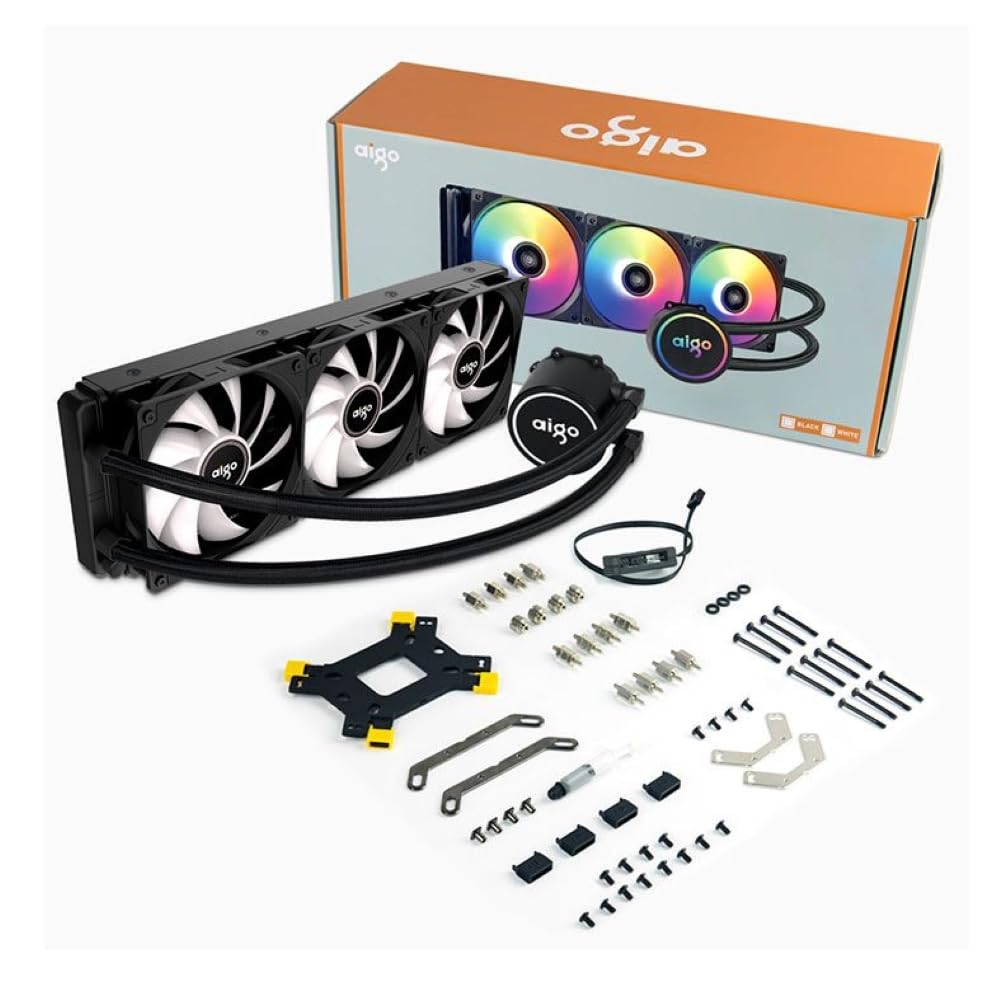
Image 3.1: All components included in the Aigo AC SE 360 package.
4. Konfiguracja i instalacja
Follow these steps for proper installation of your Aigo AC SE 360 Water Cooler:
- Przygotuj płytę główną: Install the appropriate backplate and standoffs for your CPU socket (Intel: 115X, 1200, 1700, 2011, 2066; AMD: AM2, AM3, AM4, AM5). Refer to your motherboard manual for specific instructions.
- Nałóż pastę termoprzewodzącą: Clean the CPU surface. Apply a small amount of thermal paste to the center of the CPU IHS (Integrated Heat Spreader).
- Mount the CPU Block/Pump: Carefully place the CPU block onto the CPU, aligning it with the standoffs. Secure it with the provided screws, tightening them in a diagonal pattern until snug. The magnetic block design allows for easy rotation to align the logo or tubing as desired.
- Install Fans to Radiator: Attach the three 120mm ARGB fans to the radiator using the longer screws provided. Ensure the fan airflow direction is correct for your case configuration (typically blowing air through the radiator).
- Montaż grzejnika: Install the radiator assembly into your PC case. The 360mm radiator is compatible with most ATX cases that support this size. Secure it with the appropriate screws.
- Connect Fans (Daisy Chain): The fans feature a daisy chain connection system. Connect the fans to each other in series, then connect the final fan's cable to the motherboard's fan header or an ARGB controller. This simplifies cable management by reducing the number of cables.
- Podłącz oświetlenie ARGB: Connect the ARGB cables from the fans and pump to a 3-pin, 5V ARGB header on your motherboard or a dedicated ARGB controller. Ensure the voltage is correct (5V) to prevent damage.
- Podłącz zasilanie pompy: Connect the pump's 4-pin power connector to a dedicated AIO_PUMP or CPU_FAN header on your motherboard.
- Zarządzanie kablami: Organize all cables neatly to ensure proper airflow and a clean build.
5. Instrukcja obsługi
Once installed, the Aigo AC SE 360 Water Cooler operates automatically to maintain optimal CPU temperatures. Here are key operational aspects:
- Automatyczne chłodzenie: The pump and fans will adjust their speed based on CPU temperature, ensuring efficient cooling. The pump operates at 12V with 3200 RPM, and fans operate between 800-1800 RPM.
- Sterowanie oświetleniem ARGB: The Rainbow ARGB lighting can be controlled via your motherboard's ARGB software (if connected to a compatible header) or through an included ARGB controller. This allows for various lighting effects and synchronization with other ARGB components.
- Poziom hałasu: The cooler is designed for quiet operation, with a noise level of approximately 30 dB.
6. Konserwacja
Regular maintenance helps ensure the longevity and performance of your water cooler:
- Czyszczenie kurzu: Okresowo czyść żeberka chłodnicy i łopatki wentylatora, aby zapobiec gromadzeniu się kurzu, który może utrudniać przepływ powietrza i wydajność chłodzenia. Używaj sprężonego powietrza lub miękkiej szczotki.
- Kontrola rur: Check the tubing for any signs of kinks, leaks, or damage.
- Monitoruj temperatury: Use monitoring software to keep an eye on your CPU temperatures. Significant increases may indicate a need for further inspection or cleaning.
- Pasta termoprzewodząca: While not frequently required, reapplying thermal paste every few years can help maintain optimal thermal transfer.
7. Rozwiązywanie Problemów
If you encounter issues with your Aigo AC SE 360 Water Cooler, refer to the following common problems and solutions:
| Problem | Możliwa przyczyna | Rozwiązanie |
|---|---|---|
| Wysokie temperatury procesora | Insufficient thermal paste, poor contact, dust buildup, pump failure, fan failure. | Reapply thermal paste, ensure CPU block is securely mounted, clean radiator and fans, check pump/fan connections. |
| Wentylatory nie kręcą się | Loose fan connection, incorrect fan header, faulty fan. | Check fan cables and connections, ensure connected to appropriate motherboard header, test fans individually if possible. |
| No ARGB Lighting | Loose ARGB connection, incorrect ARGB header (e.g., 12V instead of 5V), faulty ARGB component. | Verify ARGB cables are securely connected to a 3-pin, 5V ARGB header. Check motherboard manual for correct header. |
| Nietypowe dźwięki | Air bubbles in loop, fan rubbing, pump issue. | Gently tilt the PC case to help dislodge air bubbles. Check for obstructions around fans. If pump noise persists, contact support. |
8. Specyfikacje
| Funkcja | Szczegół |
|---|---|
| Model | AC SE 360 |
| Rozmiar grzejnika | 360 mm (394 x 120 x 27 mm) |
| Rozmiar wentylatora | 120 mm |
| Prędkość wentylatora | 800-1800 obr./min. |
| Przepływ powietrza | 64.05 stopy sześcienne na minutę |
| Ciśnienie statyczne | 1.85 mmH₂O |
| Poziom hałasu | 30dB |
| Objętość pompytage | 12 wolty |
| Prędkość pompy | 3200 obr./min. |
| Pobór mocy | 3.24 watów |
| Typ łożyska | Łożysko ceramiczne |
| TDP Supported | 280 W |
| Kompatybilne gniazda | Intel (LGA 115X, 1200, 1700, 2011, 2066), AMD (AM2, AM3, AM4, AM5) |
| Złącze zasilania | 4-pin |
| Złącze ARGB | 3-stykowe, 5 V |
9. Gwarancja i wsparcie
The Aigo AC SE 360 Water Cooler comes with a 12-miesięczna gwarancja od daty zakupu. Niniejsza gwarancja obejmuje wady produkcyjne powstałe w normalnych warunkach użytkowania.
For technical support, warranty claims, or any questions not covered in this manual, please contact your retailer or the Aigo customer support team. Please have your proof of purchase and product model number (ACSE360) ready when contacting support.