
Nolan BNCOM00000045
Nolan N-com B101 R Intercom User Manual
Model: BNCOM00000045
1. Wprowadzenie
The Nolan N-com B101 R Intercom is a communication system designed for integration with Nolan helmets, providing enhanced audio capabilities for riders. This manual provides comprehensive instructions for the installation, operation, maintenance, and troubleshooting of your N-com B101 R system.
2. Informacje dotyczące bezpieczeństwa
Please read all safety warnings and instructions carefully before using the N-com B101 R Intercom. Failure to follow these instructions may result in injury or damage to the device.
- Do not attempt to disassemble or modify the intercom unit.
- Ensure the unit is securely installed in the helmet before riding.
- Unikaj wystawiania urządzenia na działanie ekstremalnych temperatur lub bezpośredniego światła słonecznego przez dłuższy czas.
- Trzymaj urządzenie z dala od wody i wilgoci.
- Zawsze priorytetem jest bezpieczeństwo na drodze. Nie używaj interkomu w sposób, który odwraca Twoją uwagę od jazdy.
3. Zawartość opakowania
Sprawdź, czy w opakowaniu znajdują się wszystkie komponenty:
- Nolan N-com B101 R Intercom Unit
- Mikrofon
- Speakers (2x)
- Sprzęt montażowy
- Kabel ładujący USB
- Instrukcja obsługi (ten dokument)

Figure 3.1: The Nolan N-com B101 R Intercom packaging, showing the product and key features.
4. Koniec produktuview
The N-com B101 R system is designed for seamless integration into compatible Nolan helmets. It features a compact main unit, high-quality speakers, and a microphone for clear communication.

Rycina 4.1: Przód view of the Nolan N-com B101 R Intercom system integrated into a helmet, showing the main unit and microphone placement.
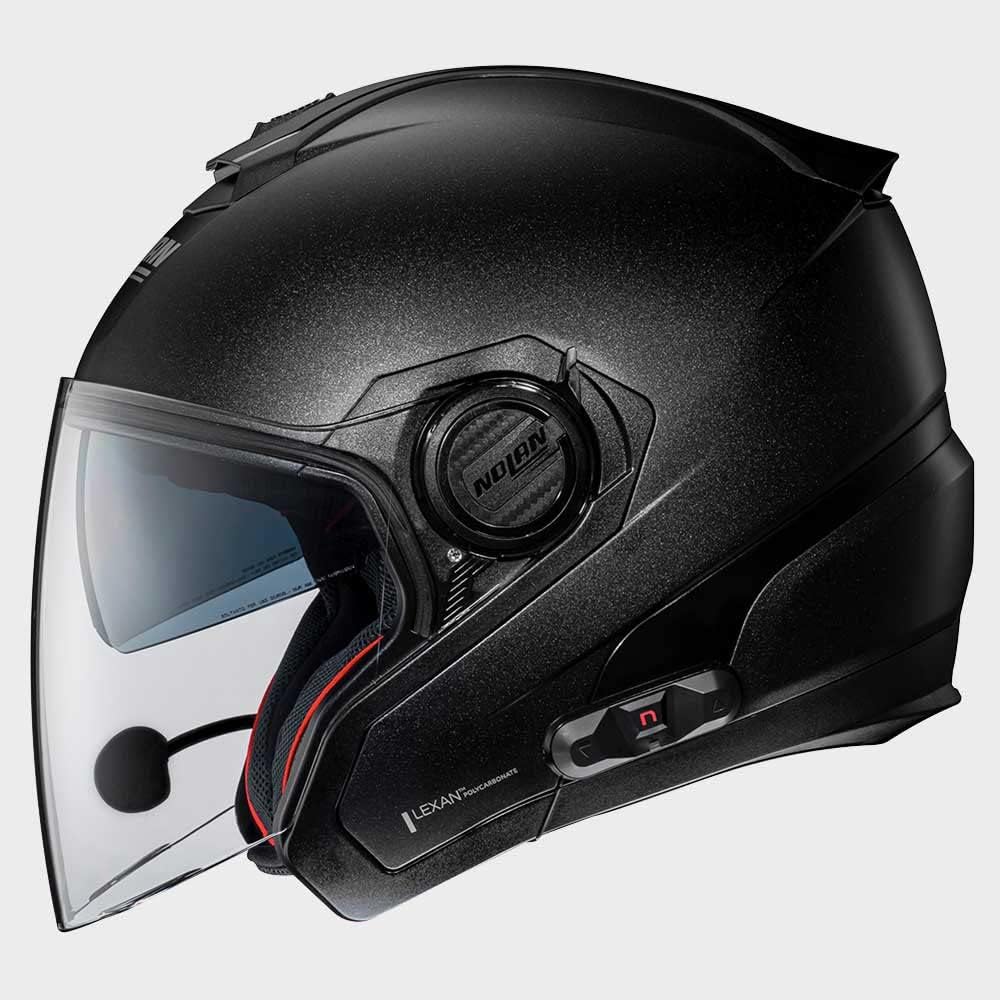
Rysunek 4.2: Strona view of the Nolan N-com B101 R Intercom system integrated into a helmet, highlighting the sleek profile of the communication unit.

Rysunek 4.3: Tył view of the Nolan N-com B101 R Intercom system integrated into a helmet, showing the discreet placement of the unit.
5. Konfiguracja i instalacja
Follow these steps to install the N-com B101 R Intercom into your compatible Nolan helmet:
- Przygotuj hełm: Remove the helmet's internal padding as per your helmet's specific instructions to access the speaker and microphone recesses.
- Instalacja głośników: Place the speakers into the designated ear recesses inside the helmet. Ensure they are positioned comfortably and securely.
- Zainstaluj mikrofon: Attach the microphone to the helmet's chin bar or cheek pad area, ensuring it is close to your mouth for optimal voice pickup. Route the cable discreetly along the helmet's interior.
- Montaż jednostki głównej: Secure the main intercom unit to the exterior of the helmet using the provided mounting hardware. Typically, this involves a clip or adhesive mount on the side of the helmet.
- Podłącz kable: Connect the speaker and microphone cables to the main intercom unit. Ensure all connections are firm.
- Ponowne złożenie hełmu: Carefully reinsert the helmet's internal padding, ensuring no cables are pinched or exposed.
- Opłata początkowa: Before first use, fully charge the intercom unit using the supplied USB cable. The charging indicator will change when charging is complete.
6. Instrukcja obsługi
6.1 Włączanie/wyłączanie zasilania
- Włączanie: Press and hold the Power button for approximately 3 seconds until you hear an audible tone or see the indicator light illuminate.
- Aby wyłączyć: Press and hold the Power button for approximately 3 seconds until you hear an audible tone and the indicator light turns off.
6.2 parowanie Bluetooth
To pair your N-com B101 R with a mobile phone or other Bluetooth device:
- Sprawdź, czy domofon jest wyłączony.
- Naciśnij i przytrzymaj przycisk zasilania przez około 5–7 sekund, aż kontrolka zacznie szybko migać, wskazując tryb parowania.
- Na swoim urządzeniu mobilnym włącz Bluetooth i wyszukaj dostępne urządzenia.
- Select "N-com B101 R" from the list of found devices.
- Jeśli zostaniesz poproszony o podanie hasła, wpisz „0000”.
- Once paired, the indicator light on the intercom will change to a slow flash or solid blue.
6.3 Podstawowe funkcje
- Odbieranie/kończenie połączeń: Naciśnij raz przycisk wielofunkcyjny.
- Odrzuć połączenie: Naciśnij i przytrzymaj przycisk wielofunkcyjny przez 2 sekundy.
- Odtwórz/wstrzymaj muzykę: Naciśnij raz przycisk wielofunkcyjny.
- Zwiększenie głośności: Naciśnij przycisk zwiększania głośności.
- Ściszanie: Naciśnij przycisk zmniejszania głośności.
7. Konserwacja
Proper maintenance ensures the longevity and optimal performance of your N-com B101 R Intercom.
- Czyszczenie: Użyj miękkiego, damp cloth to clean the exterior of the intercom unit. Do not use abrasive cleaners or solvents.
- Składowanie: When not in use for extended periods, store the intercom in a cool, dry place.
- Pielęgnacja baterii: To maintain battery health, charge the unit regularly, even if not in frequent use. Avoid fully discharging the battery before recharging.
8. Rozwiązywanie Problemów
| Problem | Możliwa przyczyna | Rozwiązanie |
|---|---|---|
| Intercom does not power on. | Niski poziom naładowania baterii. | Naładuj całkowicie jednostkę interkomu. |
| Nie można sparować z telefonem. | Intercom not in pairing mode; Bluetooth off on phone; previously paired device interfering. | Ensure intercom is in pairing mode (rapid flashing light). Turn phone's Bluetooth off and on. Forget previous pairings on phone. |
| Brak dźwięku z głośników. | Głośniki nie są podłączone; głośność jest zbyt niska; połączenie jest wadliwe. | Check speaker connections. Increase volume. Re-seat speaker cables. |
| Mikrofon nie odbiera głosu. | Microphone not connected; microphone positioned incorrectly. | Check microphone connection. Ensure microphone is close to your mouth and not obstructed. |
9. Specyfikacje
| Funkcja | Szczegół |
|---|---|
| Nazwa modelu | BNCOM00000045 |
| Marka | Nolan |
| Wymiary produktu | Wymiary 10 x 10 x 10 cm |
| Waga przedmiotu | 280 gramów |
| Kolor | Czarny |
| Tworzywo | Poliester |
| Producent | N-KOM |
| Typ certyfikatu | ECE |
| Typ zamknięcia | Zapadkowy |
10. Gwarancja i wsparcie
For warranty information and technical support, please refer to the official Nolan N-com webOdwiedź witrynę lub skontaktuj się z autoryzowanym dealerem. Zachowaj dowód zakupu na wypadek roszczeń gwarancyjnych.
Aby uzyskać dalszą pomoc, odwiedź stronę: www.n-com.it
Powiązane dokumenty - BNCOM00000045
 |
N-Com B101 R-Series Helmet Communication System User Manual Comprehensive user manual for the N-Com B101 R-Series helmet communication system, covering installation, basic functions, Bluetooth pairing, mobile phone integration, music playback, GPS navigation, battery management, and warranty information. |
 |
N-Com Mesh Quick Reference Guide Concise guide to N-Com Mesh intercom system operations, covering basic functions, phone calls, Mesh Intercom, and Wave Intercom modes. |
 |
Instrukcja obsługi N-Com MESH – system interkomowy Sena i Nolan Instrukcja obsługi systemu interkomu N-Com MESH firmy Sena i Nolan. Zawiera szczegółowe instrukcje dotyczące konfiguracji, obsługi, interkomu Mesh, interkomu Wave, parowania Bluetooth, wielozadaniowości audio oraz rozwiązywania problemów z kaskami motocyklowymi. |
 |
N-Com Mesh User Guide: Features, Operation, and Troubleshooting Comprehensive user guide for the N-Com Mesh intercom system by Sena and Nolan, covering setup, features like Mesh Intercom and Wave Intercom, Bluetooth pairing, audio multitasking, firmware updates, and troubleshooting. |
 |
Nolan HPS N-Com System Instruction Manual Comprehensive instruction manual for the Nolan HPS N-Com communication system, detailing features, specifications, installation, operation, and troubleshooting for motorcycle riders. |
 |
Podręcznik instrukcji Nolan N-Com Bluetooth kit3 PLUS - Segurança e Uso Kompletne instrukcje obsługi i instrukcje obsługi systemu komunikacji Nolan N-Com Bluetooth kit3 PLUS, cobrindo instalacji, zabawy, tworzenia, komunikacji wewnętrznej i gwarancji. |
Ask a question about this manual
Ask about setup, troubleshooting, compatibility, parts, safety, or missing instructions. Manuals+ will review the question and use this page’s manual context to help answer it.