
1. Wprowadzenie
Thank you for choosing the EBTOOLS 2.4G Wireless Keyboard and Mouse combo. This product is designed for comfortable and efficient use with its low-noise operation, adjustable DPI settings, and reliable 2.4G wireless connectivity. This manual provides detailed instructions for setup, operation, and maintenance to ensure optimal performance.
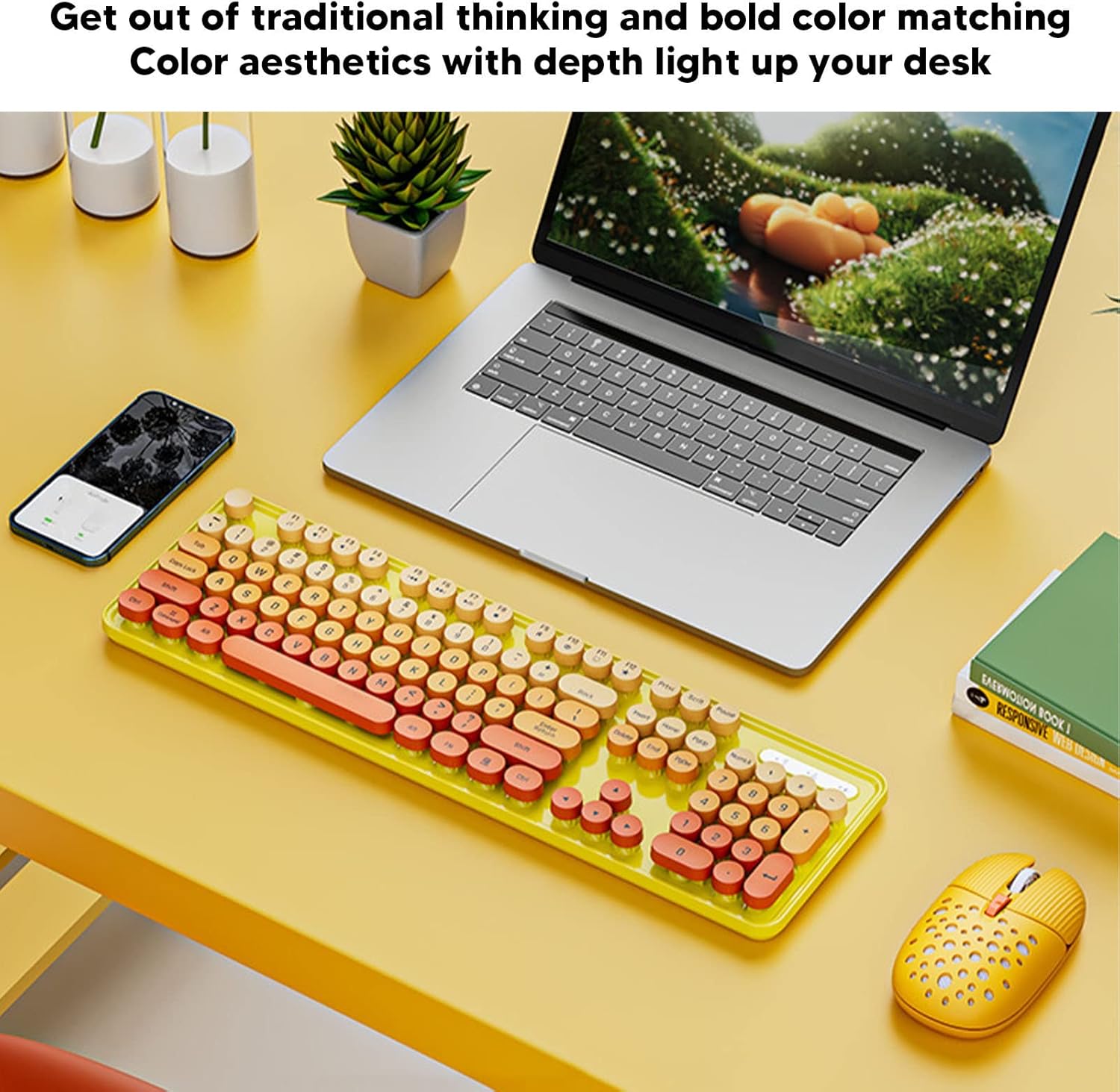
Image: The EBTOOLS 2.4G Wireless Keyboard and Mouse in mixed color yellow, displayed on a desk alongside a laptop and smartphone, showcasinze względu na swój design i kompaktowy rozmiar.
2. Zawartość opakowania
- 1 x EBTOOLS 2.4G Wireless Keyboard
- 1 x EBTOOLS 2.4G Wireless Mouse
- 1 x USB Receiver (typically stored in the mouse battery compartment)
- Instrukcja obsługi (ten dokument)
3. Instrukcje konfiguracji
3.1. Instalacja baterii
The keyboard and mouse require batteries for operation. Please ensure you have 1 AA battery for the keyboard and 1 AA battery for the mouse (batteries are not included).
- Znajdź komorę baterii na spodzie klawiatury.
- Otwórz pokrywę komory baterii.
- Insert the AA battery according to the polarity indicators (+/-) inside the compartment.
- Dokładnie zamknij pokrywę komory baterii.

Image: The underside of the EBTOOLS keyboard with the battery compartment open, showing where to insert the AA battery.
3.2. Podłączanie odbiornika USB
The keyboard and mouse share a single 2.4G USB receiver for wireless connection.
- Locate the USB receiver. It is typically stored in the battery compartment of the mouse for safekeeping.
- Wyjmij odbiornik USB z gniazda pamięci.
- Plug the USB receiver into an available USB port on your computer (desktop PC, laptop, etc.).
- System powinien automatycznie wykryć i zainstalować niezbędne sterowniki. Jest to urządzenie typu plug-and-play.

Image: A diagram illustrating the compatibility of the keyboard and mouse with various systems, including desktop PCs, laptops, and other computers, highlighting its plug-and-play functionality.

Image: An illustration demonstrating the 2.4G wireless connection mode for the keyboard and mouse, emphasizing the ability to connect two devices wirelessly with a single receiver.
4. Instrukcja obsługi
4.1. Regulacja DPI myszy
The mouse features three adjustable DPI (Dots Per Inch) settings to suit your preference and task requirements. You can cycle through these settings by pressing the DPI button, usually located near the scroll wheel on the mouse.
- 800 DPI: Nadaje się do zadań wymagających precyzji lub wolniejszego ruchu kursora.
- 1600 DPI: Standardowe ustawienie do użytku ogólnego.
- 2400 DPI: Ideal for faster cursor movement, such as gaming or navigating large screens.
4.2. Using Multimedia Keys
The keyboard is equipped with 18 multimedia keys for quick access to various functions. These keys are typically activated by pressing the Fn key in combination with the corresponding function key (F1-F12) or dedicated multimedia keys.

Obraz: szczegółowy view of the EBTOOLS keyboard layout, highlighting the standard keys and the 18 multimedia keys, along with their respective functions such as volume control, media playback, and quick access to applications.
Common multimedia functions include:
- Volume Down / Up / Mute
- Play / Pause / Previous Track / Next Track
- Home / My Computer / Mail / Favorites
- Other system-specific functions
5. Konserwacja
5.1. Czyszczenie
Aby zachować trwałość i wygląd klawiatury i myszy:
- Do przecierania powierzchni należy używać miękkiej, suchej ściereczki.
- W przypadku uporczywych zabrudzeń, delikatnieampPrzetrzyj ściereczkę wodą lub delikatnym środkiem czyszczącym. Unikaj silnych środków chemicznych.
- Use compressed air to remove dust and debris from between the keyboard keys.
5.2. Wymiana baterii
When the keyboard or mouse becomes unresponsive or exhibits intermittent connectivity, it may be time to replace the batteries. Follow the battery installation steps in Section 3.1.

Image: An illustration depicting the energy-saving features of the keyboard and mouse, emphasizing lower power consumption and extended battery life for continuous use.
6. Rozwiązywanie Problemów
| Problem | Rozwiązanie |
|---|---|
| Klawiatura/mysz nie reaguje |
|
| Przerywane połączenie |
|
| Kursor myszy porusza się nieregularnie lub nie jest płynny |
|
7. Specyfikacje
| Funkcja | Szczegół |
|---|---|
| Marka | EBTOOLS |
| Kolor | Mixed Color Yellow |
| Technologia łączności | Bezprzewodowa częstotliwość radiowa 2.4G |
| Funkcja specjalna | Praca o niskim poziomie hałasu |
| Kompatybilne urządzenia | Personal Computer (Desktop PC, Laptop) |
| System operacyjny | Major PC Operating Systems |
| Orientacja dłoni (mysz) | Oburęczny |
| Wymagane baterie | Yes (1 AA for keyboard, 1 AA for mouse) |
| Liczba klawiszy (klawiatura) | 104 |
| Źródło zasilania | Zasilany bateryjnie |
| Układ klawiatury | QWERTY |
| Ustawienia DPI myszy | 800, 1600, 2400 (regulowane) |
| Tworzywo | ABS |
8. Oficjalne filmy o produktach
8.1. Keyboard and Mouse Overview
Wideo: Ponadview of the EBTOOLS Keyboard and Mouse, demonstrating its features and design. This video is provided by the seller, Zhiyavex-US.
8.2. Yunseity Wireless Keyboard and Mouse Demonstration
Video: A demonstration of the Yunseity Wireless Keyboard and Mouse, showcasing its functionality and user experience. This video is provided by the seller, Zhiyavex-US.
9. Gwarancja i wsparcie
Produkty EBTOOLS zostały zaprojektowane z myślą o niezawodności i wydajności. W przypadku pytań, pomocy technicznej lub pytań gwarancyjnych prosimy o kontakt z danymi kontaktowymi dołączonymi do produktu lub odwiedzenie oficjalnej strony EBTOOLS. webStrona. Zachowaj dowód zakupu na wypadek roszczeń gwarancyjnych.
The product comes with a standard return policy of 30 days from the date of purchase for refund or replacement, as per seller terms.