
VIGORWORK B500W
VIGORWORK Portable Car MP5 Player User Manual
Model: B500W
Wstęp
This manual provides detailed instructions for the installation, operation, and maintenance of your VIGORWORK Portable Car MP5 Player, Model B500W. This device is designed to enhance your in-car entertainment and connectivity with features like Apple CarPlay, Android Auto, Bluetooth 5.1, FM transmission, and multimedia playback.
Zawartość opakowania
Proszę sprawdzić, czy w paczce znajdują się następujące elementy:
- 1 x Main Unit (Portable Car MP5 Player)
- 1 x Instrukcja obsługi
- 1 x kabel zasilający do zapalniczki samochodowej
- 1 x uchwyt na przyssawkę
- 1 x 2-Key Silicone Remote Control
- 1 x Reversing Video Cable (for optional backup camera)

Image: The VIGORWORK Portable Car MP5 Player main unit, suction cup holder, remote control, cigarette lighter power cable, and reversing video cable.
Główne cechy
- Wired and Wireless Apple CarPlay & Android Auto: Bezproblemowa integracja ze smartfonem umożliwiająca nawigację, wykonywanie połączeń, wysyłanie wiadomości i słuchanie muzyki.
- Transmisja sygnału FM: Transmit audio to your original car speakers via FM radio.
- Wiele połączeń: USB, TF Card, Bluetooth 5.1, AUX, Type-C Port.
- Link do lustra telefonu: Mirror your smartphone screen to the 7-inch HD display.
- Bluetooth 5.1: Stable and fast wireless connection for hands-free calls and audio streaming.
- Zasilanie zapalniczki samochodowej: Easy plug-and-play installation without modifying car wiring.
- Obsługa kamery cofania: Compatible with optional rear cameras for safer reversing.
- Wbudowany głośnik: Do bezpośredniego wyjścia audio.
Informacje dotyczące bezpieczeństwa
Przed użyciem urządzenia należy przeczytać i zrozumieć wszystkie instrukcje bezpieczeństwa. Nieprzestrzeganie tych instrukcji może spowodować obrażenia ciała lub uszkodzenie urządzenia lub pojazdu.
- Nie używaj urządzenia w sposób, który odwraca Twoją uwagę od prowadzenia pojazdu. Zawsze priorytetowo traktuj bezpieczeństwo na drodze.
- Upewnij się, że urządzenie jest bezpiecznie zamontowane i nie przeszkadza. view lub zakłócać sterowanie pojazdem.
- Use only the provided power cable. Using incompatible power sources may damage the device.
- Unikaj wystawiania urządzenia na działanie ekstremalnych temperatur, długotrwałego bezpośredniego światła słonecznego i wilgoci.
- Nie próbuj samodzielnie demontować ani naprawiać urządzenia. Skontaktuj się z wykwalifikowanym personelem serwisowym.
Przewodnik po konfiguracji
1. Montaż urządzenia
Attach the suction cup holder to a clean, smooth surface on your dashboard or windshield. Ensure it does not obstruct your view or interfere with airbags. Securely attach the main unit to the holder.
2. Podłączenie zasilania
Insert the cigarette lighter power cable into your vehicle's 12V-24V cigarette lighter socket. The device will power on automatically.

Image: The cigarette lighter power plug inserted into a vehicle's power outlet, demonstrating the plug-and-play power connection.
3. Podłączenie kamery cofania (opcjonalnie)
If you have an optional backup camera, connect its video output to the "Reverse Video Input" port on the MP5 player using the provided reversing video cable. The system will automatically switch to the camera view gdy pojazd jest na biegu wstecznym.

Image: The device screen showing a wide-angle view from a backup camera with green, yellow, and red customizable guidelines for parking assistance.
Instrukcja obsługi
1. Bluetooth Connection (Version 5.1)
Aby podłączyć smartfon przez Bluetooth:
- W odtwarzaczu MP5 przejdź do ustawień Bluetooth.
- Włącz Bluetooth w swoim smartfonie i wyszukaj dostępne urządzenia.
- Select "CarPlay" (default name) from the list on your phone.
- Jeśli zostaniesz o to poproszony, potwierdź kod parowania.
Bluetooth 5.1 offers improved connection range, signal reception, and transfer speed compared to previous versions.

Image: A visual representation of Bluetooth 5.1 technology, highlighting a 50% increase in connection range, 75% improvement in signal reception, and 150% faster transfer speed.
2 Apple CarPlay
Connect your iPhone to the MP5 player via wired USB or wirelessly via Bluetooth/Wi-Fi. CarPlay allows you to access iPhone features like navigation, calls, messages, and music directly on the car's display.

Image: The device screen showing the Apple CarPlay interface, which includes common iOS app icons for in-car use. It indicates both wireless and wired connection options.
Sterowanie głosowe Siri: Use Siri for hands-free operation. Simply say "Hey Siri" or press the voice command button to activate Siri and control functions like making calls or sending messages.
3. Android Auto
Connect your Android phone to the MP5 player via wired USB or wirelessly via Bluetooth/Wi-Fi. Android Auto mirrors your phone's essential apps to the display, enabling navigation, communication, and entertainment.

Image: The device screen showing the Android Auto interface, displaying app icons like Google Maps, YouTube Music, and Spotify. It also indicates both wireless and wired connection options.
Asystent Google: Use Google Assistant for voice commands. Say "Hey Google" to control functions hands-free.
Note: For Android Auto, your phone needs Android 6.0 or higher and an active data cable for wired connection.
4. Transmisja sygnału FM
This feature allows the MP5 player's audio to be played through your car's original speakers by transmitting it over an FM frequency.
- Adjust your original car radio to an empty FM channel (e.g., 92.3MHz) with no strong broadcast signal.
- On the MP5 player, navigate to the FM transmission settings.
- Set the MP5 player's FM transmission frequency to match the empty channel you selected on your car radio.
- The audio from the MP5 player will now be transmitted and played through your car's speakers.
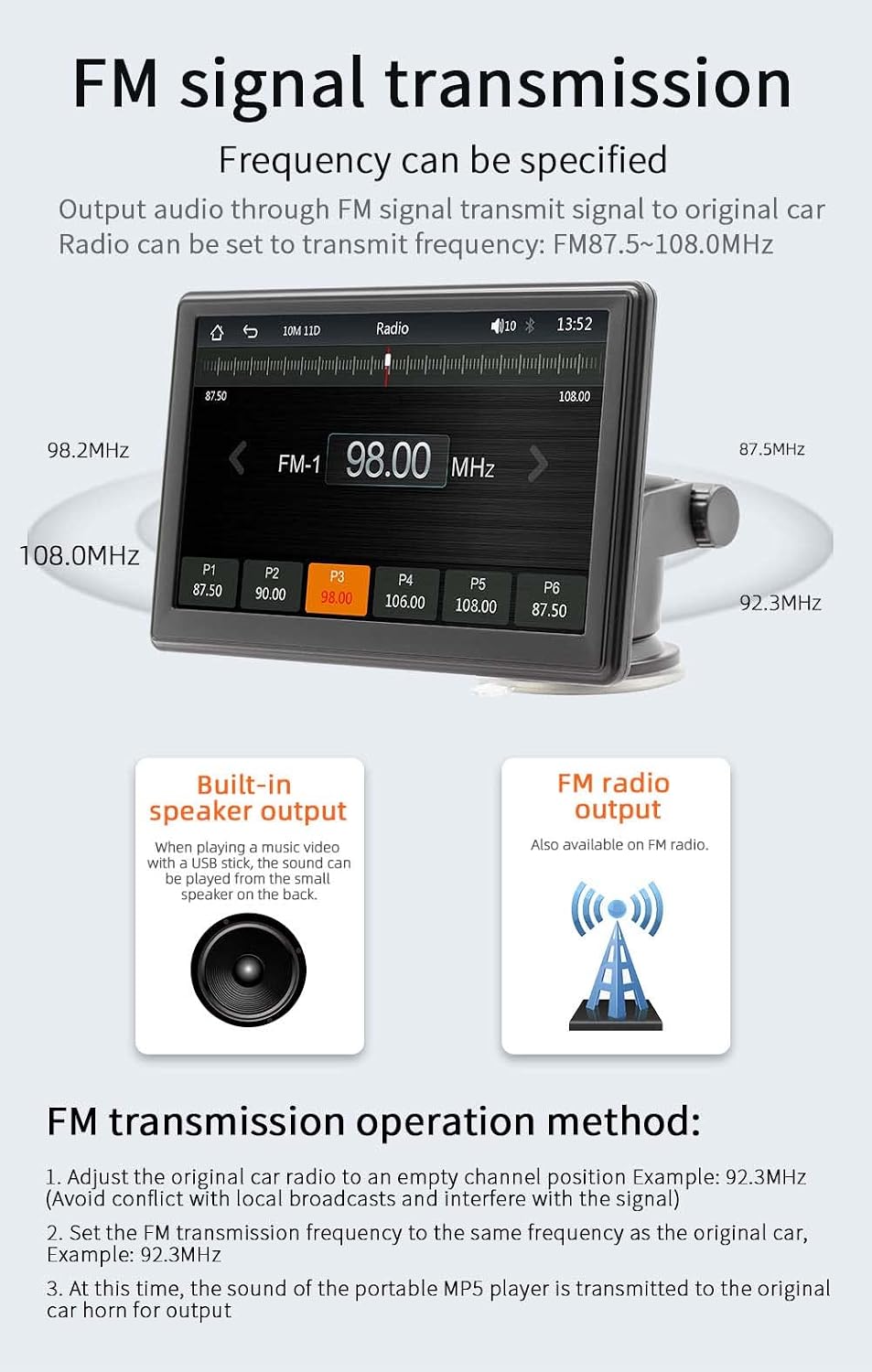
Image: The device screen showing the FM radio interface, demonstrating how to select a frequency for FM signal transmission. It also illustrates the concept of transmitting audio to the car's original speakers.
5 Odtwarzanie multimediów (karta USB/TF)
Insert a USB drive or TF card into the respective ports on the device. The MP5 player supports various audio (MP3/AAC/APE/OGG/M4A/RA/WAV), video (MP4/AVI/MKV/ASF/H264), and picture (JPG/PNG/BMP) formats for direct playback.

Image: The device screen showing options for multimedia playback, including music, video, and pictures. It highlights the use of a TF card and USB drive for media input.
6. Łącze lustrzane telefonu
The mirror link function allows you to display your smartphone's screen directly onto the MP5 player's 7-inch HD screen. This is useful for viewing content not directly supported by CarPlay or Android Auto.
7. Ustawienia językowe
The device supports multiple languages including English, Chinese, Spanish, Portuguese, Russian, German, French, Polish, Turkish, Arabic, Hebrew, Italian, Czech, and Japanese. Navigate to the system settings to change the display language.
8. Factory Reset Password
The factory set password for system settings is 113266. Use this password if prompted for advanced configurations or a factory reset.
Konserwacja
To ensure the longevity and optimal performance of your MP5 player:
- Czyść ekran i obudowę miękką, suchą ściereczką. Nie używaj środków czyszczących o właściwościach ściernych ani rozpuszczalników.
- Chroń urządzenie przed kurzem i zanieczyszczeniami.
- Unikaj umieszczania ciężkich przedmiotów na urządzeniu.
- Disconnect the power cable when the device is not in use for extended periods.
Rozwiązywanie problemów
| Problem | Możliwa przyczyna | Rozwiązanie |
|---|---|---|
| Urządzenie nie włącza się. | Cigarette lighter cable not properly connected or no power from socket. | Ensure the cigarette lighter cable is securely plugged in. Check if the car's cigarette lighter socket is working. |
| Brak dźwięku z głośników samochodowych. | FM transmission not set correctly or car radio not tuned to the correct frequency. | Verify FM transmission settings on the MP5 player and ensure your car radio is tuned to the same empty frequency. Increase volume on both devices. |
| Połączenie Bluetooth jest niestabilne. | Interference or device too far from the MP5 player. | Ensure your phone is within range. Restart Bluetooth on both devices. Clear previous pairings and re-pair. |
| CarPlay/Android Auto nie łączy się. | Incorrect cable, phone settings, or software incompatibility. | For wired connection, use a high-quality data cable. Ensure CarPlay/Android Auto is enabled on your phone. Check phone's operating system version. Restart both devices. |
| Obraz z kamery cofania nie jest wyświetlany. | Camera not connected, faulty cable, or camera not powered. | Ensure the reversing video cable is securely connected. Check the camera's power supply. (Note: Camera is optional and sold separately). |
Specyfikacje
| Parametr | Szczegół |
|---|---|
| Model | B500W |
| Typ | Przenośny odtwarzacz MP5 do samochodu |
| System | System Melis Allwinner |
| Częstotliwość radiowa | FM 87.5 ~ 108.0 MHz |
| Moc wyjściowa | Wbudowany głośnik 1W |
| Objętość operacyjnatage | 12~24 V |
| Temperatura pracy | -10~60℃ |
| Wersja Bluetooth | 5.1 (Default Name: CarPlay) |
| Częstotliwość Wi-Fi | 2.4G/5G Dual Band |
| Rozdzielczość wyświetlacza | 1024x600 |
| Rozmiar ekranu | 7-calowy ekran HD |
| Rozmiar montażowy | 65x65MM |
| Faceplate Size | 178x98MM |
| Mainframe Depth | 17 mm |
| Waga na jednostkę | 0.56 kg (1.23 funta) |
| Interfejs USB | USB 2.0 |
| Obsługa kart TF | Tak |
| Obsługiwane języki | Angielski, chiński, hiszpański, portugalski, rosyjski, niemiecki, francuski, polski, turecki, arabski, hebrajski, włoski, czeski, japoński |
| Hasło ustawione fabrycznie | 113266 |
Gwarancja i wsparcie
For warranty information and technical support, please refer to the contact details provided with your purchase or visit the official VIGORWORK webZachowaj paragon jako dowód zakupu.
Ask a question about this manual
Ask about setup, troubleshooting, compatibility, parts, safety, or missing instructions. Manuals+ will review the question and use this page’s manual context to help answer it.