1. Wprowadzenie
Thank you for choosing the Devoko Electric Height Adjustable Desk. This manual provides comprehensive instructions for the assembly, operation, and maintenance of your new desk. Designed for a healthier work-life balance, this desk allows you to seamlessly switch between sitting and standing positions, promoting better posture and productivity.
Key features include a robust steel frame, a spacious 120x80cm desktop, integrated USB-A and USB-C charging ports, and a smart control panel with memory presets and anti-collision functionality.

The Devoko Electric Height Adjustable Desk, showcasing its clean design and ampprzestrzeń robocza.
2. Informacje dotyczące bezpieczeństwa
- Przed montażem i użyciem należy uważnie przeczytać wszystkie instrukcje.
- Podczas pracy urządzenia należy trzymać dzieci i zwierzęta z dala od biurka.
- Upewnij się, że wszystkie kable są prawidłowo poprowadzone i zabezpieczone, aby zapobiec ryzyku potknięcia się lub uszkodzeniom.
- Do not overload the desk beyond its maximum weight capacity (70 kg dynamic, 80 kg static).
- Unikaj stawiania płynów bezpośrednio na panelu sterowania lub w pobliżu podzespołów elektrycznych.
- In case of malfunction, unplug the desk immediately and contact customer support.
- The desk is equipped with an anti-collision system. Do not obstruct its movement.
3. Zawartość opakowania
Przed rozpoczęciem montażu należy sprawdzić, czy wszystkie elementy są obecne:
- Panele biurkowe (4 sekcje)
- Nogi biurka (2)
- Elementy poprzeczki/ramy
- Skrzynka sterownicza
- Control Panel with USB Ports
- Zasilacz i kabel
- Taca do zarządzania kablami
- Sprzęt montażowy (śruby, nakrętki itp.)
- Narzędzia montażowe (klucz imbusowy, śrubokręt)
- Instrukcja obsługi
4. Instrukcja montażu
Assembly is designed to be straightforward, typically taking around 30 minutes. All necessary tools are included.
Przewodnik krok po kroku:
- Rozpakuj i zorganizuj: Carefully unpack all components and lay them out on a clean, soft surface to prevent scratches. Identify each part using the provided diagram.
- Złóż ramę: Attach the crossbar components to the desk legs using the provided hardware. Ensure all connections are secure.
- Zamontuj panele biurkowe: Secure the four desktop panels to the assembled frame. The pre-drilled holes will guide you.
- Install Control Box and Panel: Mount the control box and the control panel to the underside of the desktop as indicated in the instructions.
- Podłącz kable: Podłącz kable silnika od nóg do skrzynki sterowniczej, a następnie podłącz kabel panelu sterowania do skrzynki sterowniczej. Na koniec podłącz zasilacz do skrzynki sterowniczej.
- Install Cable Management Tray: Attach the cable management tray to the underside of the desk to organize your power strips and cables.
- Kontrole końcowe: Sprawdź dokładnie wszystkie śruby i połączenia, aby mieć pewność, że są dobrze dokręcone i bezpieczne.

The desk is designed for very easy installation, with assembly tools included.

The included cable management tray helps keep your workspace tidy.
5. Instrukcja obsługi
Your Devoko desk features an intelligent control panel for effortless height adjustment and convenient charging.
Funkcje panelu sterowania:
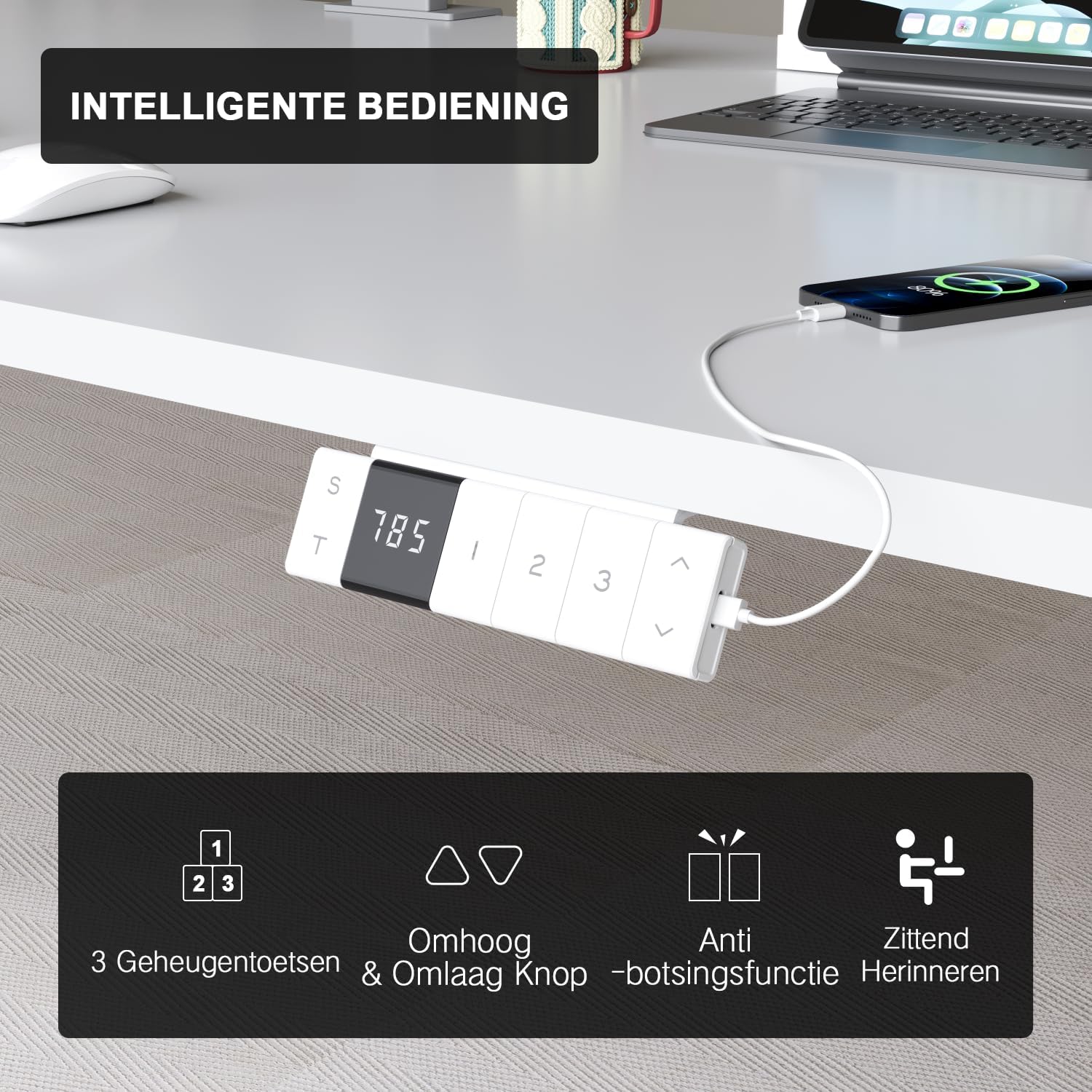
The intelligent control panel features a digital display, height adjustment buttons, memory presets, and USB charging ports.
- Przyciski góra/dół (▲ / ▼): Press and hold to smoothly adjust the desk height. The desk moves at a speed of 20mm/s with operating noise less than 45dB.
- Ustawienia pamięci (1, 2, 3): Save your preferred sitting and standing heights. To set a preset: adjust the desk to the desired height, then press the 'S' button followed by the desired number (1, 2, or 3). The desk will automatically move to this height with a single press.
- USB-A & USB-C Charging Ports: Conveniently located on the control panel, these ports allow you to charge your devices directly from the desk, eliminating the need for extra wall adapters.
- Anti-Collision Function: The desk is equipped with a sensitive anti-collision system that detects obstacles during movement and automatically stops to prevent damage or injury.
- Sitting Reminder (T): The control panel may feature a timer function (indicated by 'T') to remind you to switch between sitting and standing positions for healthier work habits.

Easily switch between sitting mode (72 cm) and standing mode (118 cm) to optimize your comfort and health.
6. Konserwacja
- Czyszczenie: Użyj miękkiego, damp cloth to wipe down the desktop and frame. Avoid abrasive cleaners or harsh chemicals that could damage the finish.
- Zarządzanie kablami: Periodically check and reorganize cables to prevent tangles and ensure smooth operation.
- Elementy złączne: Od czasu do czasu sprawdzaj, czy wszystkie śruby i nakrętki są dobrze dokręcone. W razie potrzeby dokręć je.
- Pielęgnacja silnika: The motor is designed for durability and has been tested over 10,000 cycles. No special maintenance is required for the motor itself.
7. Rozwiązywanie Problemów
If you encounter any issues with your Devoko desk, please refer to the following common problems and solutions:
| Problem | Możliwa przyczyna | Rozwiązanie |
|---|---|---|
| Biurko się nie porusza. | Power cable disconnected; Control box error. | Check power connection. Unplug and replug the desk for 10 seconds to reset the control box. |
| Biurko porusza się nierównomiernie lub wydaje nietypowe dźwięki. | Loose connections; Obstruction. | Check all assembly connections. Ensure no objects are obstructing the legs' movement. |
| System antykolizyjny uruchamia się zbyt często. | Sensitivity setting; Obstruction. | Ensure no objects are near the desk's path. Refer to the full manual for anti-collision sensitivity adjustment if available. |
| Porty USB nie ładują się. | Desk not powered; Device compatibility. | Ensure the desk is plugged in and powered on. Check if the device requires specific charging protocols. |
If the problem persists after trying these solutions, please contact Devoko customer support for further assistance.
8. Specyfikacje
| Funkcja | Szczegół |
|---|---|
| Marka | Devoko |
| Numer modelu | 0077B-1222 |
| Kolor | Biały |
| Wymiary biurka (dł. x szer.) | 120 cm x 80 cm (47.2 x 31.5 cala) |
| Zakres wysokości | od 72 cm do 118 cm (od 28.3 do 46.5 cala) |
| Tworzywo | FSC-certified particle board (desktop), Industrial-grade steel (frame) |
| Dynamiczna nośność | 70 kg (154 funta) |
| Nośność statyczna | 80 kg (176 funta) |
| Prędkość podnoszenia | 20 mm/s |
| Poziom hałasu | < 45 dB |
| Cechy specjalne | Electric height adjustment, Ergonomic design, Integrated USB-A & USB-C charging, 3-Function Memory, Anti-collision system, Mobile with wheels |
| Certyfikaty | TÜV, CE |
| Waga produktu | 24.5 kg (54 funta) |

Desktop dimensions: 120cm x 80cm.

Key performance metrics: 70kg load capacity, 20mm/s speed, quiet operation, and anti-collision safety.
9. Gwarancja i wsparcie
The Devoko Electric Height Adjustable Desk comes with a 5-letnia gwarancja, ensuring peace of mind regarding its durability and performance. This warranty covers manufacturing defects and motor malfunctions under normal use.
For technical support, warranty claims, or any questions not covered in this manual, please contact Devoko customer service through the retailer's platform or the official Devoko website. Please have your model number (0077B-1222) and purchase date ready when contacting support.