
USHINING T380
USHINING T380 4G Unlocked Flip Phone
Instrukcja obsługi
1. Wprowadzenie
Thank you for choosing the USHINING T380 4G Unlocked Flip Phone. This device is designed with simplicity and ease of use in mind, making it ideal for seniors. It features large buttons, a clear display, and essential functions like SOS emergency calls, speed dial, and a charging dock for convenient power management. This manual provides detailed instructions to help you set up, operate, and maintain your new phone.

Image: The USHINING T380 flip phone, closed and resting in its charging dock. The phone is blue with a black dock.
2. Zawartość opakowania
Proszę zaznaczyć pole dotyczące następujących elementów:
- USHINING T380 4G Senior Cell Phone
- Stacja ładująca
- Long Lasting Battery (1000mAh Lithium Ion)
- Instrukcja obsługi (ten dokument)
- Speedtalk SIM Card (if included with your purchase)
- Charging Cord (USB to Micro USB)
- Zasilacz

Image: A visual representation of the items included in the product package, showing the phone, charging dock, battery, user manual, Speedtalk SIM card, and charging cable with adapter.
3. Funkcje produktu
The USHINING T380 is equipped with a range of features designed for convenience and safety:
- Łączność 4G LTE: For reliable call quality and basic internet access.
- Large Buttons & Clear Display: Easy to see and press for comfortable dialing and navigation.
- Przycisk alarmowy SOS: Quickly contacts pre-set emergency numbers with a single press.
- Szybkie wybieranie: Assign up to 8 contacts for quick calling.
- Stacja ładująca: Simple drop-in charging, eliminating the need to fumble with cables.
- FM Radio & MP3 Player: Enjoy audio entertainment.
- Basic Camera: For simple photo capture.
- Flesz: Przydatne w warunkach słabego oświetlenia.
- Bluetooth: For connecting to compatible headsets or other devices.
- Kalendarz i budzik: Useful daily tools.
- Blacklist Function: Protects against unwanted calls.

Image: A graphic displaying various practical features of the phone, including FM Radio, Camera, Bluetooth, 4G LTE, MP3 player, Calendar, Call logs, Flashlight, Speed Dial, Alarm Clock, SMS, SOS, and Large buttons.
4. Konfiguracja
4.1 Instalacja baterii
- Otwórz tylną pokrywę telefonu, delikatnie podważając ją od wycięcia na dole.
- Align the battery's gold contacts with the phone's terminals.
- Dociśnij baterię mocno, aż zatrzaśnie się na miejscu.
- Załóż tylną pokrywę i upewnij się, że jest dobrze zamocowana.
4.2 SIM Card & Micro SD Card Installation
The phone supports dual SIM cards (Standard SIM) and one Micro SD card for expanded storage.
- With the back cover and battery removed, locate the SIM card slots. There are two standard SIM slots and one Micro SD card slot.
- Gently slide your SIM card(s) into the designated slot(s) with the gold contacts facing down, following the diagram on the phone.
- If installing a Micro SD card, carefully slide it into its slot. Note: There may be a small plastic cover over the Micro SD slot; slide the card underneath it.
- Włóż ponownie baterię i załóż tylną pokrywę.
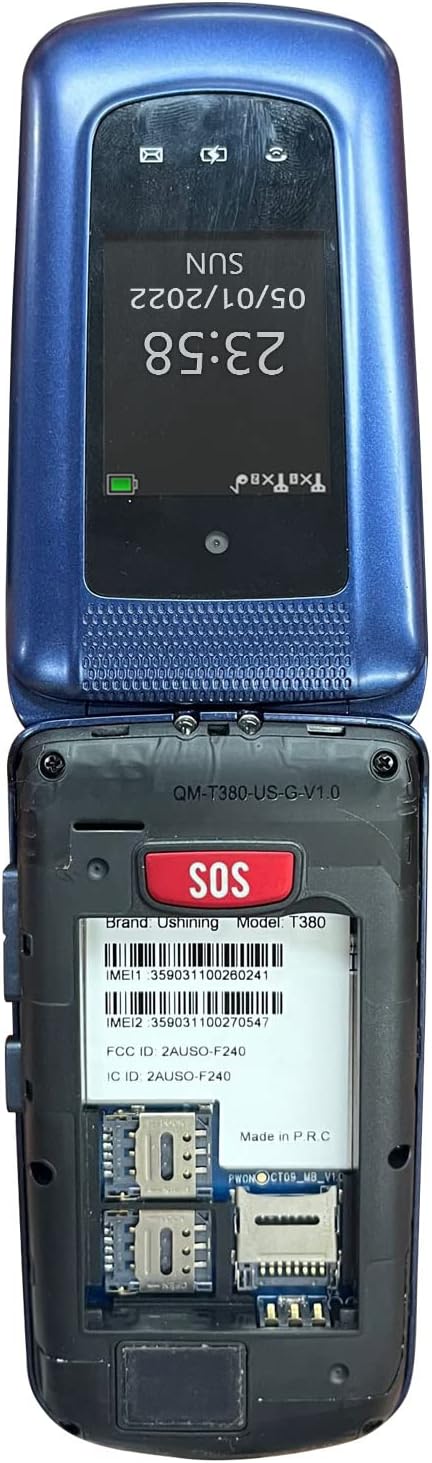
Image: The back of the USHINING T380 flip phone with the cover removed, revealing the battery compartment and slots for two SIM cards and one Micro SD card.
4.3 Ładowanie telefonu
Before first use, fully charge the phone for approximately 3 hours.
- Korzystanie ze stacji ładującej: Place the phone into the charging dock, ensuring it sits securely. The charging indicator on the phone's screen will activate.
- Ładowanie bezpośrednie: Connect the Micro USB charging cable directly to the phone's charging port and the other end to the power adapter, then plug into a wall outlet.
4.4 Włączanie/wyłączanie zasilania
- Włączanie: Naciśnij i przytrzymaj czerwony przycisk zakończenia połączenia/zasilania (⏏) aż ekran się zaświeci.
- Aby wyłączyć: Naciśnij i przytrzymaj czerwony przycisk zakończenia połączenia/zasilania (⏏) aż pojawią się opcje wyłączania, a następnie wybierz „Wyłącz”.
4.5 Zgodność sieciowa
The USHINING T380 is designed to work with T-Mobile and its associated MVNOs (Mobile Virtual Network Operators) in the United States. It is niekompatybilny with AT&T, Sprint, or Verizon networks.
Compatible Carriers (T-Mobile Network):
- T-Mobile
- Metro przez T-Mobile
- RedPocket (GSMT)
- Speedtalk Mobile
- Tello
- Lyca Mobile
- Ultramobilny
- Mint Mobile

Image: A diagram illustrating compatible carriers (T-Mobile, Metro, RedPocket, Speedtalk, Tello, Lyca, Ultra, Mint Mobile) and incompatible carriers (AT&T, Sprint, Verizon) for the USHINING T380 phone.
5. Instrukcja obsługi
5.1 Podstawowe funkcje wywołań
- Nawiązywanie połączenia: Enter the phone number using the keypad and press the green Call button (✆).
- Odbieranie połączenia: When the phone rings, open the flip or press the green Call button (✆).
- Zakończenie połączenia: Naciśnij czerwony przycisk Zakończ połączenie (⏏) or close the flip.
- Regulacja głośności: Use the volume buttons on the side of the phone during a call.
5.2 Połączenie alarmowe SOS
The SOS button is located on the back of the phone. It allows you to quickly contact pre-set emergency contacts.
- Konfigurowanie kontaktów SOS: Navigate to the SOS settings in the phone's menu. You can typically add up to 5 emergency numbers. These numbers will be called in sequence until one answers. The phone will also send an emergency SMS message to these contacts.
- Korzystanie z funkcji SOS: In an emergency, press and hold the SOS button on the back of the phone for a few seconds. The phone will activate an alarm, send an SMS to your emergency contacts, and then begin dialing them one by one.

Image: A visual explanation of the SOS Emergency Call feature, showing how it supports up to 5 family numbers and guarantees safety, alongside a Blacklist feature for protection from fraud calls.
5.3 Szybkie wybieranie
Przypisz często wybierane numery do konkretnych klawiszy, aby umożliwić szybkie wybieranie.
- Konfigurowanie szybkiego wybierania: Go to the phone's settings or contacts menu to find the speed dial options. You can typically assign numbers to keys 2-9.
- Korzystanie z szybkiego wybierania: Press and hold the assigned number key (e.g., '2' for Son, '3' for Daughter) to automatically dial the pre-set contact.

Image: A graphic demonstrating the 8 speed dial buttons on the phone, allowing users to assign contacts like Son, Daughter, Mom, Dad, etc., for quick access.
5.4 Wiadomości (SMS)
- Przejdź do menu „Wiadomości”.
- Wybierz „Napisz wiadomość”, aby napisać nową wiadomość SMS.
- Wprowadź numer odbiorcy lub wybierz go z kontaktów, a następnie wpisz wiadomość za pomocą klawiatury.
- Naciśnij „Wyślij”.
5.5 Radio FM
- Dostęp do aplikacji „Radio FM” uzyskasz z menu głównego.
- Użyj klawiszy nawigacyjnych, aby wyszukać stacje lub ręcznie dostroić się do częstotliwości.
- Headphones may be required to act as an antenna for optimal reception.
Odtwarzacz MP3 5.6
- Ensure you have MP3 files stored on a Micro SD card inserted into the phone.
- Go to the 'MP3 Player' or 'Music' application.
- Przeglądaj i wybierz żądany plik audio files grać.
5.7 Kamera
- Otwórz aplikację „Aparat” z menu.
- Skadruj ujęcie korzystając z wyświetlacza.
- Press the 'OK' or center navigation button to capture the photo.
5.8 Latarka
- The flashlight can typically be activated by a dedicated button on the side of the phone or through the main menu.
5.9 Bluetooth
- Przejdź do „Ustawień”, a następnie do „Bluetooth”.
- Włącz Bluetooth.
- Szukaj available devices and pair with your desired Bluetooth headset or speaker.
5.10 Calendar & Alarm Clock
- Access 'Calendar' to view daty i dodawaj przypomnienia.
- Access 'Alarm Clock' to set multiple alarms with custom times and tones.
6. Konserwacja
- Czyszczenie: Do czyszczenia obudowy telefonu używaj miękkiej, suchej ściereczki. Unikaj płynnych środków czyszczących.
- Pielęgnacja baterii: Aby przedłużyć żywotność baterii, należy unikać ekstremalnych temperatur. Nie pozostawiaj telefonu całkowicie rozładowanego przez dłuższy czas.
- Składowanie: Przechowuj telefon w chłodnym i suchym miejscu, gdy go nie używasz.
- Unikaj kropli: While durable, repeated drops can damage the internal components.
7. Rozwiązywanie Problemów
| Problem | Możliwa przyczyna / rozwiązanie |
|---|---|
| Telefon się nie włącza | Battery is low or not installed correctly. Charge the phone for at least 30 minutes. Ensure battery is properly seated. |
| "Emergency Call Only" or No Network | SIM card not installed correctly or not activated. Ensure your carrier is compatible with the phone (T-Mobile network only). Contact your service provider. |
| Cannot hear caller / Low sound | Volume is too low. Press the volume up button during a call. Ensure speaker is not blocked. |
| Cannot send/receive SMS | Check network signal. Verify SMS center number in message settings (contact your carrier for this). |
| Flashlight is dim | This phone's flashlight is designed for basic illumination and may not be as bright as smartphone flashlights. Ensure battery is charged. |
| Telefon zawiesza się lub nie reaguje | Remove the battery, wait a few seconds, then reinsert it and power on the phone. |
8. Specyfikacje
| Funkcja | Szczegół |
|---|---|
| Nazwa modelu | T380 |
| Marka | UŚWIETLANIE |
| Współczynnik kształtu | Telefon z klapką |
| Kolor | Niebieski |
| Technologia komórkowa | 4G |
| Zgodność z operatorami sieci bezprzewodowych | T-Mobile Network (e.g., T-Mobile, Metro, Speedtalk, Mint Mobile) |
| Rozmiar ekranu | 2.4 cali |
| Rezolucja | 240 x 320 pikseli |
| BARAN | 64 MB |
| Pojemność pamięci masowej | 128 MB (wewnętrzne) |
| Możliwość rozbudowy pamięci masowej | Slot na kartę Micro SD (karta nie jest dołączona do zestawu) |
| Pojemność baterii | 1000 mlnamp Godziny (litowo-jonowe) |
| Technologie łączności | Bluetooth, komórkowy |
| Wejście interfejsu ludzkiego | Przyciski, pokrętło |
| Wymiary produktu | 4.09 x 2.11 x 0.83 cala |
| Waga przedmiotu | 10.2 uncji |
9. Gwarancja i wsparcie
For warranty information and technical support, please refer to the documentation provided with your purchase or contact USHINING customer service directly. Contact details can typically be found on the manufacturer's official webmiejscu lub na opakowaniu produktu.
Ask a question about this manual
Ask about setup, troubleshooting, compatibility, parts, safety, or missing instructions. Manuals+ will review the question and use this page’s manual context to help answer it.