
Wstęp
This manual provides detailed instructions for the safe and proper installation, operation, and maintenance of your Atlantic Full-Motion Wall Mount. Please read all instructions carefully before beginning installation and retain this manual for future reference.
The Atlantic Full-Motion Wall Mount is designed to securely hold televisions ranging from 47 to 86 inches, with a maximum weight capacity of 121 lbs (55 kg). It offers versatile viewing options including tilt, swivel, and extension capabilities to optimize your viewzdobywania doświadczenia.
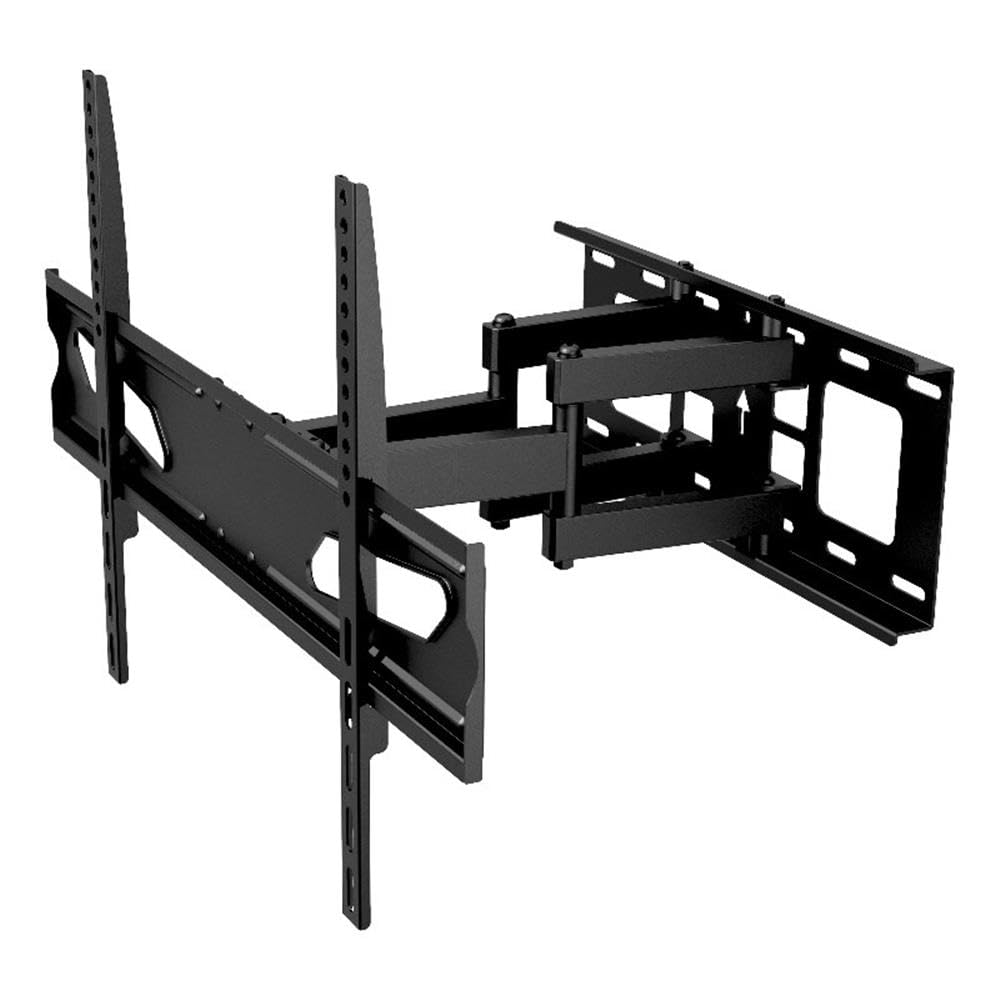
Image: The Atlantic Full-Motion TV Wall Mount, highlighting its ability to tilt ±20°, swivel ±45°, and extend up to 15.5 inches from the wall. It is suitable for TVs from 47 to 86 inches, supporting up to 121 lbs (55 kg).
Informacje dotyczące bezpieczeństwa
OSTRZEŻENIE: Niezapoznanie się z treścią niniejszej instrukcji i nieprzestrzeganie jej może spowodować poważne obrażenia ciała, uszkodzenie mienia lub unieważnienie gwarancji.
- Nośność: Nie przekraczać maksymalnego udźwigu 55 kg (121 funtów). Ten uchwyt jest przeznaczony wyłącznie do użytku z maksymalnym obciążeniem wskazanym w instrukcji. Użycie produktów o wadze większej niż wskazana w instrukcji może spowodować niestabilność i ewentualne obrażenia.
- Rozmiar telewizora: This mount is designed for TVs between 47 and 86 inches. Ensure your TV falls within this range.
- Struktura ściany: The wall mount must be securely fastened to a solid wall stud (wood or metal) or concrete/brick wall. Do not install on drywall alone. If unsure about your wall structure, consult a qualified professional.
- Narzędzia: Use appropriate tools for installation. Ensure all screws are tightened securely but do not overtighten.
- Dzieci: Trzymaj dzieci z dala od instalacji. Małe części mogą stanowić zagrożenie zadławienia.
- Profesjonalna instalacja: If you have any doubts about installing this product, please contact a professional installer.
Zawartość opakowania
Please verify that all components are present and undamaged before installation. Refer to the parts list included in your product packaging for a complete inventory. If any parts are missing or damaged, do not proceed with installation and contact customer support.
Konfiguracja i instalacja
Proper installation is critical for the safety and stability of your TV. Follow these steps carefully.
1. Prepare the Wall and Locate Studs
Identify the exact location on your wall where you intend to mount the TV. Use a stud finder to locate the center of the wall studs. Mark these locations clearly. For concrete or brick walls, use a masonry drill bit and appropriate anchors (not always included, check your package).
2. Przymocuj płytę ścienną do ściany
Position the wall plate against the wall, aligning the mounting holes with the marked stud centers. Use a level to ensure the plate is perfectly horizontal. Drill pilot holes as recommended in your specific hardware kit, then secure the wall plate using the provided lag bolts and washers. Ensure it is firmly attached.
3. Zamontuj uchwyty telewizora na telewizorze
Lay your TV face down on a soft, clean surface to prevent scratches. Identify the VESA mounting holes on the back of your TV. Select the appropriate screws, washers, and spacers from the hardware kit that fit your TV's VESA pattern. Attach the two vertical TV brackets to the back of your TV. Ensure they are securely fastened and evenly spaced.

Image: A diagram illustrating the TV mounting pattern (VESA compatibility) ranging from minimum 75mm/3 inches to maximum 600mm/23.6 inches horizontally and 410mm/16.1 inches vertically. Also shows overall mount dimensions.
4. Zawieś telewizor na uchwycie ściennym
With assistance, carefully lift the TV and hook the attached TV brackets onto the wall plate. Ensure the brackets are properly seated and locked into place. Most mounts include safety screws or locking mechanisms to prevent accidental dislodgement. Secure these as per the instructions in your hardware kit.

Obraz: strona A view of the wall mount, illustrating its extension capabilities. The mount can extend from 2.7 inches (profile from wall) to 15.5 inches from the wall.
Instrukcja obsługi
Once installed, your full-motion mount allows for flexible TV positioning.
- Rozszerzenie: Gently pull the TV away from the wall to extend the arm. The mount can extend up to 15.5 inches from the wall.
- Obracać: Carefully push or pull the TV horizontally to swivel it left or right. The mount offers a ±45° swivel range.
- Przechylenie: Adjust the vertical angle of the TV by gently pushing the top or bottom of the TV. The mount allows for a ±20° tilt (20° downward and upward). This can help reduce glare.
- Regulacja poziomu ekranu: The mounting plate allows for a ±3° rotation for last-minute level adjustments after installation.

Image: An illustration demonstrating the ±45° swivel range of the TV wall mount, allowing for flexible viewkąty.

Image: A living room setting demonstrating the full-motion capability, specifically the swivel range, to find the perfect viewkąt.

Image: A living room scene showing a TV mounted on the wall, tilted ±20° to avoid unwanted glare and improve viewkomfort.

Image: This image indicates the mount fits TVs up to a maximum of 86 inches (47-86 inches) and highlights the ±3° screen level adjustment feature.
Konserwacja
Regularna konserwacja zapewnia długowieczność i bezpieczne działanie uchwytu telewizyjnego.
- Czyszczenie: Przetrzyj uchwyt miękką, suchą ściereczką. Unikaj środków czyszczących o właściwościach ściernych i rozpuszczalników, które mogłyby uszkodzić wykończenie.
- Sprawdź połączenia: Periodically check all screws and bolts to ensure they remain tight. Over time, vibrations or adjustments can cause them to loosen. Do not overtighten.
- Sprawdź zużycie: Inspect the mount for any signs of wear, damage, or corrosion. If any issues are found, discontinue use and contact customer support.
Rozwiązywanie problemów
If you encounter issues with your TV mount, refer to the following common solutions.
- Telewizor nie jest wypoziomowany: Use the ±3° screen level adjustment feature to fine-tune the horizontal alignment. If this does not resolve the issue, re-check the wall plate installation to ensure it was level.
- Difficulty moving the TV (tilt/swivel/extend): Ensure no cables are snagged or obstructing movement. Check if any adjustment knobs or bolts are overtightened. Loosen slightly if necessary, but ensure the TV remains secure.
- Góra wydaje się niestabilna: Immediately remove the TV from the mount. Re-check all wall plate and TV bracket connections. Ensure the mount is securely fastened to wall studs or appropriate concrete/brick anchors. Verify that your TV's weight and size are within the mount's specifications. If instability persists, contact a professional installer.
Specyfikacje
| Funkcja | Specyfikacja |
|---|---|
| Numer modelu | 63607415 |
| Kompatybilność z rozmiarem telewizora | 47" – 86" |
| Nośność | 121 funta (55 kg) |
| Zawodowiecfile from Wall | 2.7" |
| Przedłużenie od ściany | Do 15.5" |
| Zakres pochylenia | ±20° (20° downward and upward) |
| Zakres obrotu | ±45° |
| Regulacja poziomu ekranu | ±3° |
| Zgodność ze standardem VESA | 200x100 do 600x400 mm |
| Tworzywo | Trwała konstrukcja stalowa |
| Waga przedmiotu | 10.8 funta |
| Wymiary produktu | 15.43 x 25.98 x 16.93 cala |
| UPC | 031742074158 |
Informacje o gwarancji
This Atlantic Full-Motion Wall Mount comes with a 1-letnia ograniczona gwarancja producenta. This warranty covers defects in materials and workmanship under normal use. It does not cover damage resulting from improper installation, misuse, abuse, accident, or unauthorized modifications. Please retain your proof of purchase for warranty claims.
Obsługa klienta
For technical assistance, missing parts, or warranty inquiries, please contact Atlantic customer support. You can typically find contact information on the manufacturer's official webstronie internetowej lub na opakowaniu produktu.
Webstrona: www.atlantic-inc.com (Proszę sprawdzić oficjalne web(Najnowsze dane kontaktowe znajdziesz na naszej stronie internetowej.)