
1. Wprowadzenie
Thank you for choosing the AKAMATE Marine Boat Radio Receiver. This manual provides detailed instructions for the proper installation, operation, and maintenance of your new marine stereo. Please read this manual thoroughly before using the product to ensure optimal performance and safety. Keep this manual for future reference.

Obraz: Przód view of the AKAMATE Marine Boat Radio Receiver, showcasing wyświetlacza i przycisków sterujących.
2. Informacje dotyczące bezpieczeństwa
Aby uniknąć obrażeń ciała lub uszkodzenia urządzenia, należy zawsze przestrzegać następujących środków ostrożności:
- Ensure proper wiring and connections to prevent electrical short circuits.
- Nie należy używać urządzenia, jeśli jest uszkodzone lub działa nieprawidłowo.
- Keep the unit away from extreme temperatures and direct sunlight for prolonged periods.
- This unit is IPX5 water-resistant, meaning it can withstand water jets. However, it is not designed for submersion.
- Przed przystąpieniem do prac konserwacyjnych lub instalacyjnych należy zawsze odłączyć zasilanie.

Image: The marine radio unit shown with water and mud splashes, highlighting its IPX5 water and mudproof capabilities, which also helps prevent display fogging.
3. Co znajduje się w pudełku
Przed rozpoczęciem instalacji sprawdź, czy wszystkie komponenty są obecne:
- AKAMATE Marine Bluetooth Audio Receiver
- Installation Kits (mounting hardware)
- ISO Harness (wiring harness)
- Instrukcja obsługi (ten dokument)

Image: Visual representation of the product packaging contents, including the marine radio, installation hardware, wiring harness, and user manual.
4. Koniec produktuview
The AKAMATE Marine Boat Radio Receiver features a user-friendly design with a clear display and intuitive controls.
Główne cechy:
- Wyświetlacz LCD 2.8'': Sunlight-viewable screen for clear visibility in various conditions.
- 7-Color Backlight Buttons: Customizable button illumination for enhanced aesthetics and visibility.
- Pokrętło wielofunkcyjne: Central rotary knob for volume control and menu navigation.
- Wodoodporność IPX5: Designed to withstand water jets and harsh marine environments.
- Radio AM/FM: Store up to 30 preset stations (12 AM / 18 FM).
- Przesyłanie strumieniowe dźwięku przez Bluetooth: Wireless music playback from compatible devices.
- Port USB 2.0: Supports thumb drives up to 64GB for MP3, WMA, FLAC playback.
- RCA Aux Input: Podłącz zewnętrzne urządzenia audio.
- Wyjścia RCA: Do podłączenia zewnętrznego ampgłośniki i subwoofery.
- 5-Band Preset EQ: Audio customization options.

Image: The marine radio unit mounted on an ATV, highlighting its 2.8-inch clear LCD display, 7-color backlight buttons, and crisp knob for easy use in various lighting conditions.
5. Instrukcja instalacji
Proper installation is crucial for the performance and longevity of your marine stereo. It is recommended to have this unit installed by a qualified professional.
5.1 Montaż urządzenia:
- Choose a suitable location on your boat or vehicle dashboard that is protected from direct water spray and excessive heat.
- Ensure there is sufficient depth behind the mounting surface for the unit (2.84 inches / 7.2 cm).
- Use a hole saw to create a circular opening of approximately 2.89 inches (7.34 cm) in diameter.
- Insert the unit into the opening and secure it using the provided installation kits.
5.2 Połączenia okablowania:
Refer to the wiring diagram below for correct connections. Always ensure the power source is disconnected before making any wiring connections.
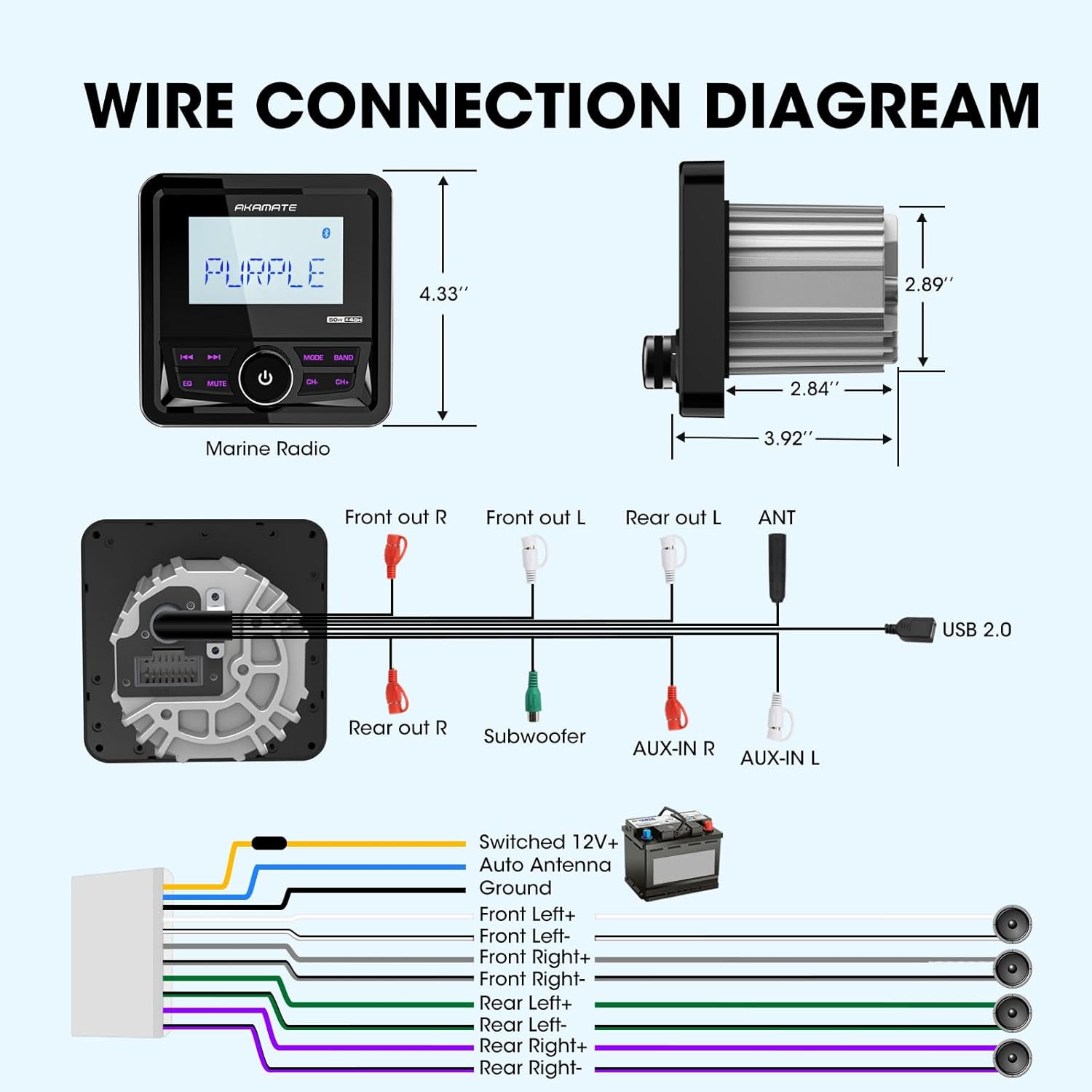
Image: A comprehensive wiring diagram illustrating connections for power, ground, speakers (Front Left/Right, Rear Left/Right), subwoofer, AUX-in, and USB 2.0.
- Moc (żółta): Connect to Switched 12V+ (Ignition).
- Ziemia (czarna): Podłącz do stałego punktu uziemienia podwozia.
- Auto Antenna (Blue): Podłącz do anteny zasilającej lub ampPrzewód zdalnego włączania Lifier.
- Speaker Outputs (White, Gray, Green, Purple pairs): Connect to your boat's speakers. Ensure correct polarity (+/-).
- RCA Outputs (Red/White): Połącz z zewnętrznym ampfiltry dla kanałów przednich, tylnych i subwoofera.
- AUX-IN (Red/White): Podłącz zewnętrzne źródła dźwięku.
- USB 2.0: Podłącz urządzenia pamięci masowej USB.
6. Instrukcja obsługi
6.1 Włączanie/wyłączanie zasilania:
Press the central knob to turn the unit ON or OFF.
6.2 Source Selection:
Press the "MODE" button to cycle through available sources: FM, AM, Bluetooth, USB, AUX.
6.3 Obsługa radia (AM/FM):
- Strojenie: Use the "CH-" and "CH+" buttons to manually tune or seek stations.
- Wybór zespołu: Press the "BAND" button to switch between FM1, FM2, FM3, AM1, AM2.
- Zaprogramowane stacje: The unit can store 18 FM and 12 AM preset stations. To save a station, tune to the desired frequency, then press and hold one of the numeric preset buttons (if available, or use the "EQ" button for auto-store if applicable, manual does not specify).

Image: The marine radio unit showing its AM/FM radio function and demonstrating Bluetooth audio streaming connectivity with a smartphone.
6.4 Bluetooth Operation:
- Łączenie w pary: Select "Bluetooth" mode. On your mobile device, search for "AKAMATE" (or similar name) in the Bluetooth settings and pair.
- Strumieniowe przesyłanie dźwięku: Once paired, you can stream audio from your device to the stereo. Use the "CH-" and "CH+" buttons for track navigation (previous/next).
6.5 USB/AUX Operation:
- USB: Insert a USB flash drive (up to 64GB) into the USB port. The unit will automatically switch to USB mode and begin playback of supported audio files (MP3, WMA, FLAC). Use "CH-" and "CH+" for track navigation.
- AUX: Connect an external audio device to the AUX-IN ports using an appropriate cable. Select "AUX" mode to play audio from the connected device.

Image: The marine radio unit highlighting its input capabilities, including USB (up to 64GB), AUX-IN, and compatibility with MP3 players and smartphones, along with its 200 watts peak power output.
6.6 Audio Settings (EQ & Time Set):
- Wstępnie ustawiony korektor: Press the "EQ" button to cycle through preset equalizer modes (e.g., Rock, Pop, Classic, Flat). The unit features a 5-band preset EQ.
- Ustawiony czas: The unit allows for time setting in 12-hour format. Refer to the on-screen prompts or specific button combinations (often involving holding the "EQ" or "MUTE" button) to enter time setting mode.

Image: The marine radio unit displaying its 5-band preset EQ function and time setting capability. Below, examples of compatible vehicles like motorcycles, yachts, golf carts, and ATVs are shown.
7. Konserwacja
To ensure the longevity and optimal performance of your AKAMATE Marine Boat Radio Receiver, follow these maintenance guidelines:
- Czyszczenie: Użyj miękkiego, damp cloth to wipe the unit's surface. Do not use abrasive cleaners or solvents.
- Znajomości: Okresowo sprawdzaj wszystkie połączenia przewodów, aby mieć pewność, że są solidne i nie są skorodowane.
- Składowanie: If the unit will not be used for an extended period, store it in a cool, dry place.
- Narażenie na działanie wody: While IPX5 rated, avoid prolonged exposure to direct high-pressure water jets. After exposure to saltwater, gently rinse with fresh water and dry thoroughly.
8. Rozwiązywanie Problemów
Jeśli napotkasz problemy z urządzeniem, zapoznaj się z poniższą tabelą, w której znajdziesz listę typowych problemów i ich rozwiązań.
| Problem | Możliwa przyczyna | Rozwiązanie |
|---|---|---|
| Brak zasilania | Luźne połączenie zasilania; Przepalony bezpiecznik; Niski poziom naładowania akumulatora pojazdu. | Check power and ground wires; Replace fuse; Charge vehicle battery. |
| Brak dźwięku | Przewody głośnikowe odłączone; Głośność zbyt niska; Funkcja wyciszenia aktywna. | Sprawdź połączenia głośników; Zwiększ głośność; Wyłącz wyciszenie. |
| Brak połączenia Bluetooth | Device not in pairing mode; Unit not in Bluetooth mode; Interference. | Ensure device is discoverable; Select Bluetooth mode on unit; Move closer to unit. |
| Błąd odtwarzania USB | Nieobsługiwane file format; dysk USB uszkodzony; dysk USB za duży. | Zapewnić files are MP3/WMA/FLAC; Reformat USB drive; Use a drive up to 64GB. |
| Display Foggy | Condensation due to temperature changes. | This unit has anti-foggy features, but in extreme conditions, minor condensation may occur. It should clear up as temperatures equalize. Ensure proper sealing during installation. |
9. Specyfikacje
| Funkcja | Specyfikacja |
|---|---|
| Numer modelu | Marine Boats Radio |
| Moc wyjściowa | Up to 200 Watts Peak Power (4 channels) |
| Objętość operacyjnatage | Prąd stały 12 V |
| Typ wyświetlacza | 2.8'' LCD Display |
| Ocena odporności na wodę | IPX5 |
| Wsparcie USB | USB 2.0, up to 64GB |
| Obsługiwane formaty audio | MP3, WMA, FLAC, etc. |
| Wersja Bluetooth | Bluetooth 5.0 |
| Wymiary (dł. x szer. x wys.) | 4.33'' (length) x 2.89'' (body diameter) x 2.84'' (depth) |
| Waga przedmiotu | 1.2 funta |
10. Gwarancja i wsparcie
AKAMATE products are designed for reliability and performance. For warranty information, please refer to the warranty card included with your product or contact AKAMATE customer support.
If you require technical assistance or have questions regarding your product, please contact our customer support team through the official AKAMATE website or the retailer where you purchased the product. Please have your model number and purchase date ready when contacting support.
Uwaga: Specyfikacje i funkcje produktu mogą ulec zmianie bez wcześniejszego powiadomienia.