
Flashpoint R2 XPro II
Flashpoint R2 XPro II 2.4GHz TTL Wireless Flash Trigger for Sony Cameras User Manual
Model: R2 XPro II
1. Wprowadzenie
This manual provides comprehensive instructions for the safe and effective use of the Flashpoint R2 XPro II 2.4GHz TTL Wireless Flash Trigger for Sony Cameras. This device is designed to provide reliable wireless control over compatible flash units, offering advanced features such as TTL, Manual, and Multi-flash modes, High-Speed Sync (HSS), and a robust 2.4GHz radio system.
Przed przystąpieniem do użytkowania urządzenia należy uważnie przeczytać instrukcję, aby mieć pewność, że będzie ono działać prawidłowo i uniknąć uszkodzeń.
2. Środki ostrożności
- Do not disassemble or modify the device. Unauthorized modifications can lead to malfunction or electric shock.
- Keep the device dry. Do not expose it to rain, moisture, or high humidity.
- Avoid strong impacts or vibrations. Dropping the device may cause internal damage.
- Przechowywać w miejscu niedostępnym dla dzieci.
- Use only specified batteries. Incorrect battery types may cause leakage or explosion.
- Nie należy używać urządzenia w otoczeniu, w którym znajdują się łatwopalne gazy lub ciecze.
- Turn off the device when not in use or during cleaning.
3. Komponenty i elementy sterujące produktu
The Flashpoint R2 XPro II features an intuitive layout for easy operation. Familiarize yourself with the various parts and controls:
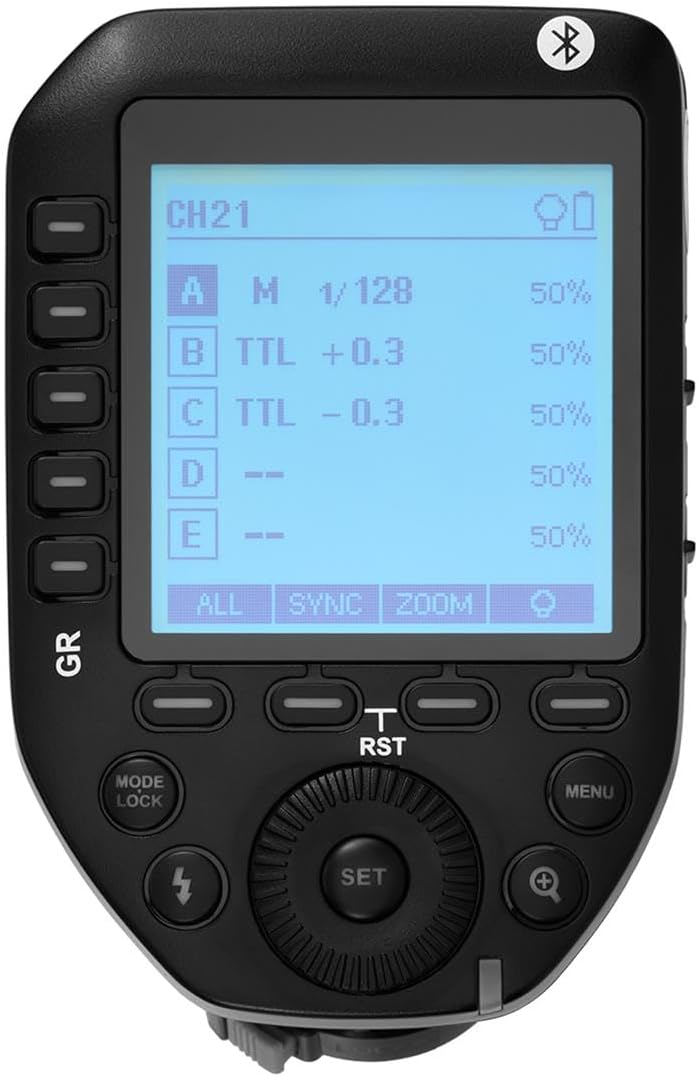
Rysunek 3.1: Góra view of the Flashpoint R2 XPro II, highlighting the large dot matrix LCD display and various control buttons including Group (GR), Mode/Lock, Set, Menu, and Zoom.

Rysunek 3.2: Kątowy view of the Flashpoint R2 XPro II, illustrating the hot shoe mount for camera attachment and the power ON/OFF switch located on the side.
Główne elementy sterujące:
- Wyświetlacz LCD: Large dot matrix display with adjustable backlight for clear visibility of settings.
- Group (GR) Buttons: Control individual flash groups (A, B, C, D, E).
- Mode/Lock Button: Switches between flash modes (TTL, Manual, Multi) and locks settings.
- Przycisk Ustaw: Potwierdza wybór i przechodzi do podmenu.
- Przycisk menu: Dostęp do ustawień systemowych i opcji zaawansowanych.
- Przycisk Zoom: Adjusts flash zoom settings for specific groups.
- Cyferblat: Navigates menus and adjusts values.
- Przycisk zasilania: Włącza/wyłącza urządzenie.
- Mocowanie stopki gorącej: Connects the trigger securely to your camera's hot shoe.
4. Konfiguracja i instalacja
4.1 Instalacja baterii
The R2 XPro II uses two AA batteries (not included). Ensure correct polarity when inserting.

Figure 4.1: The battery compartment of the Flashpoint R2 XPro II, with the cover removed, illustrating the correct orientation for inserting AA batteries.
- Znajdź pokrywę komory baterii znajdującą się na spodzie urządzenia.
- Otwórz pokrywę.
- Insert two AA batteries, matching the positive (+) and negative (-) indicators inside the compartment.
- Dokładnie zamknij pokrywę komory baterii.
4.2 Montaż na kamerze
Attach the trigger to your Sony camera's hot shoe for seamless integration.

Rysunek 4.2: Dół view of the Flashpoint R2 XPro II, displaying the hot shoe mount and the instant flip locking mechanism designed for secure camera connection.
- Ensure the trigger is turned OFF.
- Slide the hot shoe mount of the R2 XPro II into your camera's hot shoe.
- Secure the trigger by engaging the locking mechanism (typically a lever or dial) on the hot shoe mount.
- Turn on the trigger and your camera.
5. Instrukcja obsługi
The R2 XPro II offers various modes and settings for precise flash control.
5.1 Włączanie/wyłączanie
Use the ON/OFF switch located on the side of the unit to power the trigger.
5.2 Basic Screen Navigation
The large LCD display shows current settings for channels, groups, and flash modes. Use the dial to navigate and adjust values, and the SET button to confirm.
5.3 Flash Modes (TTL / M / Multi)
Naciśnij Tryb/blokada przycisk, aby przełączać się między dostępnymi trybami lampy błyskowej:
- TTL (przez obiektyw): Automatic exposure control. The trigger communicates with the camera to determine optimal flash output.
- M (Ręczny): Allows manual adjustment of flash power output (e.g., 1/1 to 1/128).
- Wielofunkcyjny (stroboskopowy): Wyzwala serię szybkich błysków w celu uzyskania kreatywnych efektów.
The R2 XPro II also features TCM (TTL Converted to Manual) fusion, which allows you to capture an exposure in TTL mode and then convert that exposure value to a manual setting for consistent repeat shots.
5.4 Channel and Group Management
The trigger supports 32 channels and multiple groups (A, B, C, D, E) for managing complex lighting setups.
- Użyj GR (Group) buttons to select and adjust individual flash groups.
- Access the menu to change the wireless channel to avoid interference.
5.5 Synchronizacja z dużą prędkością (HSS)
The R2 XPro II supports High-Speed Sync up to 1/8000s, enabling you to use flash with fast shutter speeds, ideal for overpowering ambient light or freezing fast motion.
5.6 Smartphone APP Control (Bluetooth)
The built-in Bluetooth allows for smartphone app control of flash functions. Download the compatible Flashpoint R2 app to manage settings remotely.

Figure 5.1: Illustration of the R2 Wireless System, demonstrating the Flashpoint R2 XPro II's ability to work with a complete family of Flashpoint speedlights, monolights, and strobe lights, and transmit atop any Sony DSLR, MSLR, or M Series body.
6. Konserwacja i pielęgnacja
- Czyszczenie: Use a soft, dry cloth to clean the exterior of the unit. Do not use solvents or abrasive cleaners.
- Składowanie: Jeśli urządzenie nie jest używane przez dłuższy czas, należy wyjąć baterie, aby zapobiec wyciekowi. Przechowuj urządzenie w chłodnym, suchym miejscu, z dala od bezpośredniego światła słonecznego i ekstremalnych temperatur.
- Aktualizacje oprogramowania układowego: Okresowo sprawdzaj producenta website for available firmware updates to ensure optimal performance and compatibility. The unit is Mac and PC firmware updatable.
7. Rozwiązywanie Problemów
If you encounter issues with your Flashpoint R2 XPro II, refer to the following common problems and solutions:
| Problem | Możliwa przyczyna | Rozwiązanie |
|---|---|---|
| Urządzenie nie włącza się. | Baterie są rozładowane lub nieprawidłowo włożone. | Wymień baterie lub sprawdź poprawność biegunowości. |
| Flash unit does not fire. | Incorrect channel/group settings; flash unit not compatible; trigger not securely mounted. | Verify channel and group settings on both trigger and flash; ensure flash is compatible with R2 system; re-mount trigger securely. |
| Inconsistent flash firing. | Interference from other wireless devices; low battery. | Change to a different wireless channel; replace batteries. |
| TTL exposure is inaccurate. | Environmental factors; flash unit limitations. | Adjust flash exposure compensation on the trigger or camera; consider switching to Manual mode. |
8. Specyfikacje
| Funkcja | Szczegół |
|---|---|
| Model | R2 XPro II |
| System bezprzewodowy | Flashpoint R2 / Godox X - 2.4GHz Radio System |
| Zgodność | Sony Cameras (TTL support) |
| Zasięg transmisji | 300-400 stóp (ok. 90-120 metra) |
| Kanały | 32 |
| Grupy | 5 (A, B, C, D, E) |
| Tryby Flash | TTL, Manual, Multi |
| Synchronizacja z dużą prędkością (HSS) | Do 1/8000 s |
| Wyświetlacz | Large Dot Matrix LCD with Adjustable Backlight |
| Łączność | Built-in Bluetooth for Smartphone APP Control |
| Aktualizacja oprogramowania sprzętowego | Mac and PC Updatable via USB-C port |
| Źródło zasilania | 2 baterie AA |
| Wymiary produktu | 5.15 x 4 x 2.8 cala |
| Waga przedmiotu | 8.8 uncji |
9. Informacje o gwarancji
Flashpoint products are designed and manufactured to the highest quality standards. For specific warranty terms and conditions, please refer to the warranty card included with your product or visit the official Flashpoint webZachowaj paragon jako dowód zakupu na wypadek reklamacji.
10. Obsługa klienta
For technical assistance, troubleshooting, or service inquiries, please contact Flashpoint customer support. You can find contact information on the official Flashpoint webna stronie internetowej lub u sprzedawcy.
Zasoby internetowe: Flashpoint Official Store on Amazon