
1. Ważne instrukcje bezpieczeństwa
Please read all instructions carefully before using the GEARSTONE GT-JT2 Under Desk Elliptical Stepper. Retain this manual for future reference.
- Przed rozpoczęciem jakiegokolwiek programu ćwiczeń skonsultuj się z lekarzem.
- This equipment is intended for home or office use only.
- Upewnij się, że stepper jest umieszczony na płaskiej i stabilnej powierzchni.
- Podczas użytkowania trzymaj dzieci i zwierzęta z dala od urządzenia.
- Nie należy przekraczać maksymalnej wagi użytkownika wynoszącej 110 kg (242 funtów).
- Podczas ćwiczeń należy nosić odpowiednie obuwie.
- Natychmiast przerwij ćwiczenia, jeśli poczujesz ból, zawroty głowy lub duszność.
- The LCD display requires batteries (not included). Ensure correct battery installation.
2. Koniec produktuview
The GEARSTONE GT-JT2 is a compact under-desk elliptical stepper designed for low-impact exercise. It features 'wing-style' steps for a smooth motion and an LCD display to track your workout progress. Its low-profile design allows for convenient use in various settings, including under a desk.
Główne cechy:
- Kompaktowa konstrukcja: Ideal for use at home or in the office.
- Ćwiczenia o niskim wpływie: Engages lower body muscles with minimal joint strain.
- Cyfrowy wyświetlacz LCD: Tracks time, distance, speed, step count, and calories burned.
- Trwała konstrukcja: Made from iron, ABS, and rubber for stability and longevity.
- Large Foot Pedals: Provides a secure and comfortable platform for various foot sizes.
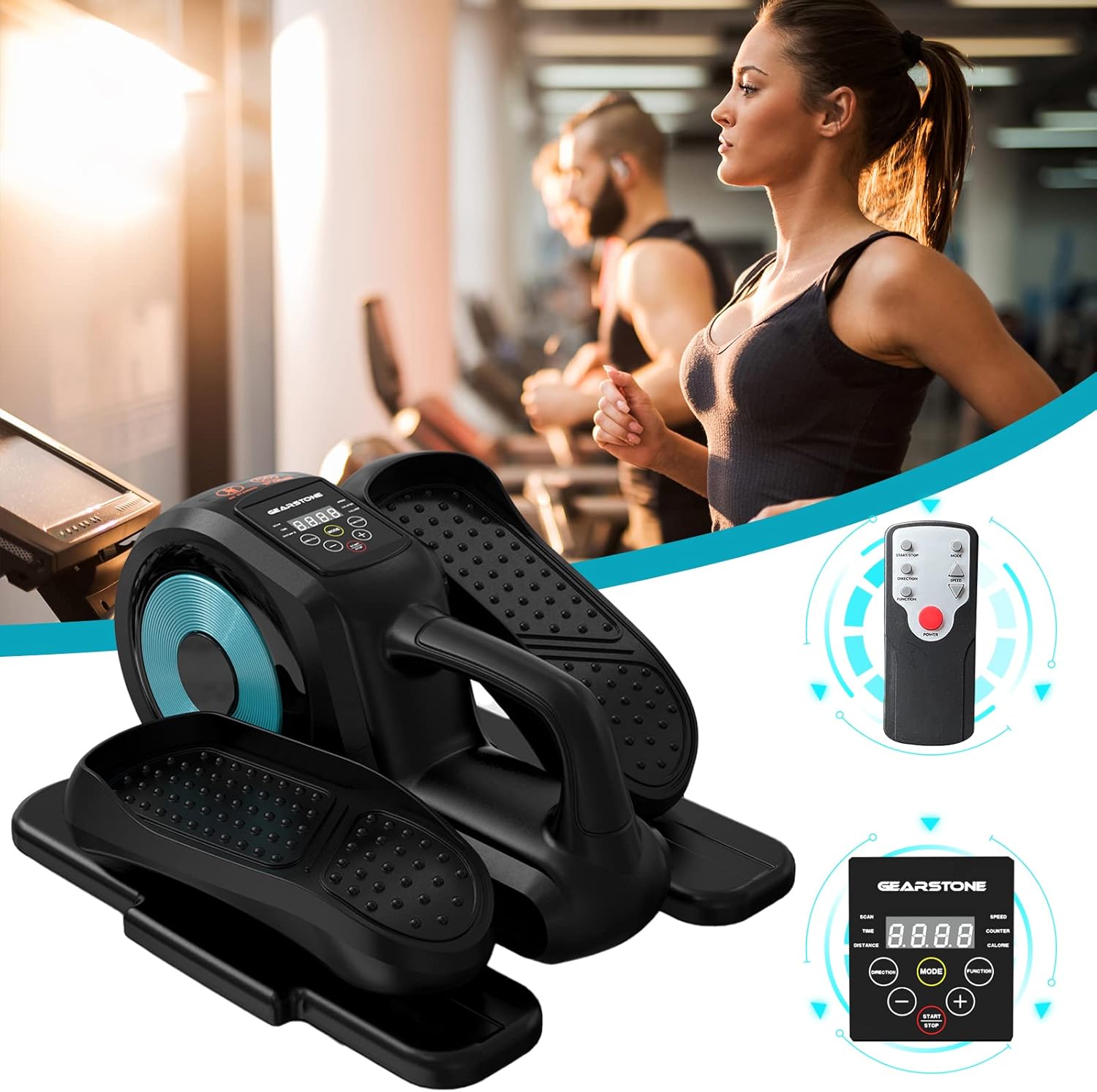
Image: The GEARSTONE GT-JT2 Under Desk Elliptical Stepper, shown with its remote control, ready for use in a home or office environment.
3. Zawartość opakowania
Sprawdź przesyłkę, aby upewnić się, że wszystkie elementy znajdują się w niej i nie są uszkodzone:
- GEARSTONE GT-JT2 Under Desk Elliptical Stepper Unit
- Pilot zdalnego sterowania (jeśli jest dołączony do Twojego modelu)
- Instrukcja obsługi (ten dokument)
Notatka: Batteries for the LCD display are not included and must be provided separately.
4. Instalacja i montaż
The GEARSTONE GT-JT2 Stepper comes largely pre-assembled. Minimal setup is required.
- Rozpakować: Ostrożnie wyjmij stepper z opakowania.
- Umieszczenie: Place the stepper on a flat, stable surface. Ensure there is enough clear space around the unit for safe operation.
- Battery Installation (for LCD Display):
- Locate the battery compartment on the back or underside of the LCD display unit.
- Otwórz pokrywę komory.
- Insert the required batteries (typically AA or AAA, refer to the compartment label) ensuring correct polarity (+/-).
- Dokładnie zamknij pokrywę komory baterii.
5. Instrukcja obsługi
Using your GEARSTONE GT-JT2 Stepper is straightforward. Follow these steps for an effective workout:
- Pozycjonowanie: Sit comfortably in a chair with the stepper placed directly in front of you on the floor. Ensure your knees are at a comfortable angle and your feet can reach the pedals easily.
- Umieszczenie stopy: Place your feet firmly on the large, non-slip pedals. Ensure your entire foot is supported.
- Rozpocznij ćwiczenia: Begin pedaling in a smooth, continuous motion. The 'wing-style' steps are designed to provide a natural elliptical movement.
- Adjust Resistance (if applicable): This model typically offers fixed resistance. Focus on maintaining a consistent pace.
- Monitoruj postęp: Observe the LCD display to track your workout data (see Section 6 for details).
- Pilot zdalnego sterowania (jeśli jest dołączony): If your model includes a remote, you can use it to control the display functions (e.g., changing modes, starting/stopping the timer) without bending down.
- Ending Workout: Gradually slow down your pedaling until you come to a complete stop. Remove your feet from the pedals.

Image: A user demonstrating the GEARSTONE GT-JT2 Under Desk Elliptical Stepper in use, positioned beneath a desk for convenient exercise during work.
6. Funkcje wyświetlacza LCD
The integrated LCD display provides real-time feedback on your workout. It is powered by user-provided batteries.

Obraz: szczegółowy view of the GEARSTONE GT-JT2's LCD display, illustrating the various metrics it tracks, such as time, distance, speed, step count, and calories.
Tryby wyświetlania:
- SKANDOWAĆ: Automatically cycles through all data metrics every few seconds.
- CZAS: Wyświetla czas trwania aktualnej sesji treningowej.
- DYSTANS: Pokazuje szacowany dystans pokonany podczas treningu.
- PRĘDKOŚĆ: Indicates your current pedaling speed.
- LADA: Displays the total number of steps or rotations.
- KALORIA: Szacuje liczbę kalorii spalonych podczas treningu.
Funkcje przycisków:
- Sposób użycia: Press to cycle through the different display modes (TIME, DISTANCE, SPEED, COUNTER, CALORIE, SCAN).
- ZACZĄĆ ZAKOŃCZYĆ: Initiates or pauses the tracking of your workout data.
- , Used for adjusting settings or values if applicable (e.g., setting target goals, though this model typically has simpler functionality).
The display will automatically turn off after a period of inactivity to conserve battery life. It will resume tracking when movement is detected or a button is pressed.
7. Konserwacja i pielęgnacja
Regularna konserwacja gwarantuje długowieczność i optymalną wydajność Twojego steppera.
- Czyszczenie: Przetrzyj urządzenie reklamąamp Po każdym użyciu przetrzyj szmatką pot i kurz. Nie używaj środków czyszczących ani rozpuszczalników o działaniu ściernym.
- Składowanie: Przechowuj stepper w chłodnym, suchym miejscu, z dala od bezpośredniego światła słonecznego i ekstremalnych temperatur. Jego kompaktowe rozmiary pozwalają na łatwe przechowywanie pod łóżkiem lub w szafie.
- Kontrola: Periodically check all bolts and moving parts to ensure they are secure and functioning correctly. Tighten any loose components.
- Wymiana baterii: Replace the LCD display batteries when the screen becomes dim or stops functioning.
8. Rozwiązywanie Problemów
If you encounter any issues with your GEARSTONE GT-JT2 Stepper, refer to the following common problems and solutions:
| Problem | Możliwa przyczyna | Rozwiązanie |
|---|---|---|
| Wyświetlacz LCD jest pusty lub słabo widoczny. | Rozładowane lub nieprawidłowo zainstalowane baterie. | Wymień baterie na nowe, zwracając uwagę na prawidłową biegunowość. |
| No data displayed during exercise. | Sensor not detecting movement; display in 'STOP' mode. | Ensure the stepper is in motion. Press the START/STOP button if applicable. Check battery status. |
| Stepper makes unusual noises. | Luźne elementy; brak smarowania. | Check and tighten all bolts and screws. Apply a small amount of silicone-based lubricant to moving joints if necessary. |
| Pedals feel stiff or uneven. | Problem z mechanizmem wewnętrznym; szczątki. | Inspect for any obstructions. If the problem persists, contact customer support. |
9. Specyfikacje
| Funkcja | Szczegół |
|---|---|
| Model | GT-JT2 |
| Marka | KAMIEŃ ZĘBATOWY |
| Wymiary (dł. x szer. x wys.) | Około 446 x 392 x 247 mm (17.5 x 15.4 x 9.7 cala) |
| Waga produktu | Około 8 kg (17.6 funty) |
| Maksymalna waga użytkownika | 110 kg (242 funta) |
| Tworzywo | Iron, ABS, Rubber |
| Wyświetlacz | LCD (Time, Distance, Speed, Counter, Calorie) |
| Źródło zasilania (wyświetlacz) | Batteries (Self-provided, not included) |
| Kolor | Posiniaczony |
10. Gwarancja i wsparcie
For warranty information or technical support, please refer to the documentation provided at the time of purchase or contact GEARSTONE customer service through the retailer where the product was purchased.
Please have your model number (GT-JT2) and purchase details ready when contacting support.