1. Wprowadzenie
The Sony FX3 Full-Frame Cinema Camera (ILME-FX3) is designed for solo shooters and travel applications, serving as a portable cinema camera. It integrates features from both Sony's Cinema Line and Alpha series. The FX3 features a lightweight, handheld form factor with a streamlined profile and a 'cage-free' design, allowing direct attachment of various accessories to the camera body. Its 12.1MP Exmor R BSI CMOS sensor (10.2MP effective in video mode) and BIONZ XR processor enable UHD 4K video capture with internal 10-bit 4:2:2 sampling or 16-bit raw output. The sensor's BSI design enhances clarity and sensitivity, offering an expandable ISO 80-409,600 range and over 15 stops of dynamic range for diverse lighting conditions.
2. Informacje dotyczące bezpieczeństwa
Please read all safety instructions carefully before using the camera. Retain this manual for future reference.
- Źródło zasilania: Use only the specified battery and charger. Do not attempt to disassemble or modify the battery.
- Woda i wilgoć: This camera is not waterproof. Avoid exposure to rain, moisture, or high humidity to prevent electric shock or malfunction.
- Temperatura: Do not expose the camera to extreme temperatures (hot or cold). Operating temperature range is typically 0°C to 40°C (32°F to 104°F).
- Obsługiwanie: Obchodź się z aparatem ostrożnie. Unikaj upuszczania go i narażania na silne uderzenia.
- Czyszczenie: Use a soft, dry cloth for cleaning. Do not use organic solvents.
- Sprzedaż: Baterie i podzespoły elektroniczne należy utylizować zgodnie z lokalnymi przepisami.
3. Zawartość opakowania
Sprawdź, czy w przesyłce znajdują się wszystkie elementy wymienione poniżej:
- Sony FX3 Full-Frame Cinema Camera (ILME-FX3)
- Jednostka uchwytu XLR
- Czapka na buty akcesoryjne
- Accessory Shoe Kit
- Sony BC-QZ1 Battery Charger
- Nakładka na korpus
- Handle Shoe Cap
- Przewód zasilający
- Akumulator litowo-jonowy Sony NP-FZ100 (2280 mAh)
- Kabel USB typu A do typu C (USB 3.2)
- Lilliput A7S 7" Full HD Monitor
- 2 x SanDisk SecureDigital 64GB Extreme PRO Memory Card
- Miękka torba
- 3 x NP-FZ100 Compatible Battery
- Światło LED
- Czytnik kart pamięci
- Corel Photo Software (PhotoMirage, AfterShot, Painter Essentials, PaintShop Pro, Video Studio)
- Rode VideoMicro Ultracompact Camera-Mount Shotgun Microphone
- 12-calowy elastyczny statyw
- Pasek na rękę
- Portfel na karty pamięci
- Osłona obiektywu
- Zestaw do czyszczenia
- Kabel HDMI
4. Koniec kameryview
Familiarize yourself with the physical components and controls of your Sony FX3 camera.

Rysunek 4.1: Przód view of the Sony FX3 camera body, showing the E-mount for interchangeable lenses and the full-frame sensor. The grip is visible on the left side.

Rysunek 4.2: Przód view of the Sony FX3 camera with a Zeiss Sonnar FE 55mm F1.8 ZA lens attached. This illustrates the camera's compact form with a lens.

Rysunek 4.3: Tył view of the Sony FX3, displaying the LCD screen, control dial, and various buttons such as MENU, FOCUS MAG, Fn, DISP, ZEBRA, PEAKING, SHUTTER, and playback controls.
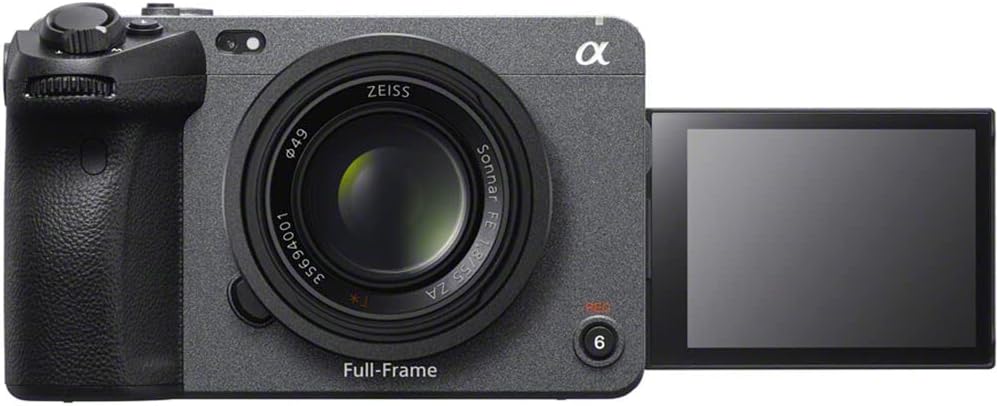
Rysunek 4.4: Przód view of the Sony FX3 with the LCD screen articulated outwards, demonstrating its flexible viewing angles for various shooting scenarios.
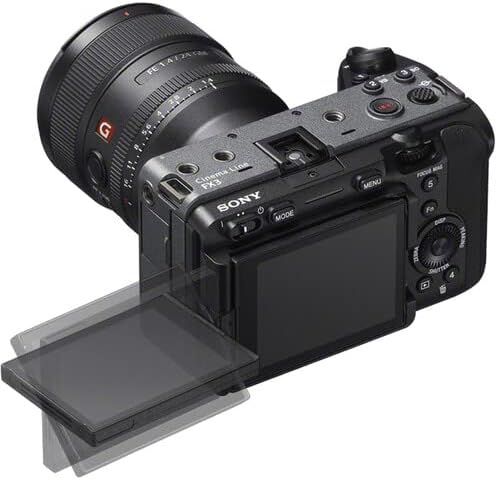
Rysunek 4.5: Top-rear perspective of the Sony FX3, showing the articulated LCD screen, a mounted lens, and top-panel controls including the record button and mode dial.

Rysunek 4.6: Lewa strona view of the Sony FX3, revealing the battery compartment and dual CFexpress Type A/SDXC card slots, secured by a lock/open mechanism.

Rysunek 4.7: Prawa strona view of the Sony FX3, displaying various input/output ports including HDMI, USB-C (MULTI), USB-A (CHG), headphone jack, and microphone input with plug-in power.
5. Konfiguracja
5.1. Montaż i ładowanie akumulatora
- Open the battery cover on the left side of the camera (refer to Figure 4.6).
- Insert the NP-FZ100 battery with the arrow facing inward until it locks into place.
- Zamknij pokrywę baterii.
- To charge, remove the battery and insert it into the supplied BC-QZ1 charger. Connect the charger to a power outlet using the power cord. The charging indicator will illuminate during charging and turn off when complete.
5.2. Instalacja karty pamięci
- Open the memory card slot cover on the left side of the camera (refer to Figure 4.6).
- Insert a CFexpress Type A or SDXC memory card into the appropriate slot until it clicks. Ensure the card is oriented correctly.
- Zamknij pokrywę gniazda karty pamięci.
- Format the memory card in the camera before first use to ensure optimal performance.
5.3. Mocowanie akcesoriów
- XLR Handle Unit: Attach the XLR handle unit to the multi-interface shoe on top of the camera. Secure it using the locking mechanism.
- Lilliput A7S 7" Monitor: Connect the monitor to the camera via an HDMI cable (refer to Figure 4.7 for HDMI port location). Mount the monitor using a suitable mounting solution.
- Rode VideoMicro Microphone: Connect the microphone to the camera's microphone input jack (refer to Figure 4.7).
5.4. Pierwsze włączenie i ustawienia podstawowe
- Naciśnij przycisk POWER, aby włączyć kamerę.
- Postępuj zgodnie z instrukcjami wyświetlanymi na ekranie, aby ustawić datę, godzinę i język.
- Adjust basic settings such as video format (e.g., XAVC S-I 4K), frame rate, and picture profile (e.g., S-Cinetone) as needed for your shooting requirements.
6. Obsługa aparatu
6.1. Podstawowe nagrywanie wideo
- Włączanie: Włącz kamerę za pomocą przycisku POWER.
- Wybierz tryb: Use the MODE button or dial to select your desired shooting mode (e.g., Movie mode).
- Dostosuj ustawienia: Set ISO, aperture, and shutter speed. The FX3 offers an expandable ISO range of 80-409,600.
- Centrum: Utilize the Fast Hybrid AF system. The camera supports Face Tracking and Eye AF for precise subject focus.
- Rozpocznij/zatrzymaj nagrywanie: Press the REC button (often located on the top or front grip) to start recording. Press again to stop.
6.2. Advanced Video Features
- Nagrywanie wideo w rozdzielczości 4K: The camera supports UHD 4K up to 120fps and 1080p up to 240fps.
- Nagrywanie wewnętrzne: Record internally with 10-bit 4:2:2 sampling using XAVC S-I.
- Raw Output: Output 16-bit raw video via HDMI to compatible external recorders.
- Kolor Profiles: Use S-Cinetone for cinematic color science, or S-Log3/2 for maximum dynamic range in post-production. 10-bit HLG (Hybrid Log-Gamma) is available for direct HDR productions.
- Zakres dynamiki: Benefit from over 15 stops of dynamic range for capturing detail in both highlights and shadows.
6.3. Odtwarzanie
- Naciśnij przycisk Odtwórz (często oznaczony ikoną trójkąta).
- Use the control dial or directional buttons to navigate through your recorded footage.
- Press the center button to play or pause a video.
Oficjalne filmy produktowe
Wideo 6.1: Ponadview of the Sony FX3 Full-Frame Cinema Camera, highlighting its key features and design for cinematic production. (Duration: 3:11)
Wideo 6.2: A detailed demonstration of the Sony FX3's advanced functionalities, including autofocus performance and color science. (Duration: 5:23)
7. Konserwacja
7.1. Czyszczenie aparatu
- Korpus aparatu: Przetrzyj korpus aparatu miękką, suchą ściereczką. W przypadku uporczywych zabrudzeń delikatnie przetrzyj.ampen the cloth with water and then wipe dry. Avoid using alcohol or other chemical cleaners.
- Obiektyw: Use a lens brush to remove dust, then gently wipe with a lens cleaning cloth and lens cleaning solution.
- Transduktor: Sensor cleaning should be performed with extreme care. If dust spots appear on images, use a blower brush. For persistent dust, consult a professional service center.
- Ekran LCD: Delikatnie przetrzeć miękką, niepozostawiającą włókien ściereczką.
7.2. Przechowywanie
- Jeśli aparat nie będzie używany przez dłuższy czas, należy wyjąć z niego baterię.
- Przechowuj kamerę w chłodnym i suchym miejscu, z dala od bezpośredniego światła słonecznego i ekstremalnych temperatur.
- W wilgotnych środowiskach należy stosować środek pochłaniający wilgoć, aby zapobiegać powstawaniu pleśni i grzybów.
8. Rozwiązywanie Problemów
If you encounter issues with your Sony FX3, refer to the following common problems and solutions:
| Problem | Możliwa przyczyna / rozwiązanie |
|---|---|
| Kamera się nie włącza. | Bateria może być rozładowana lub nieprawidłowo włożona. Upewnij się, że bateria jest naładowana i prawidłowo włożona. |
| Nie można nagrywać wideo. | Memory card may be full, locked, or not formatted. Check card status and format if necessary. Ensure sufficient battery charge. |
| Obrazy są niewyraźne. | Check focus settings (AF/MF). Ensure lens is clean. Verify shutter speed is appropriate for lighting conditions to avoid motion blur. |
| Brak nagrania audio. | Check microphone connection. Verify audio recording settings in the camera menu. Ensure microphone is powered if required. |
| Aparat się przegrzewa. | Prolonged recording in high ambient temperatures can cause overheating. Allow the camera to cool down. Reduce recording resolution or frame rate if possible. |
9. Specyfikacje
| Funkcja | Szczegół |
|---|---|
| Marka | Sony |
| Numer modelu | ILME-FX3 |
| Typ czujnika | 12.1MP Full-Frame CMOS Exmor R Sensor (10.2MP effective in video mode) |
| Rozdzielczość przechwytywania wideo | UHD 4K (up to 120fps), 1080p (up to 240fps) |
| Nagranie wewnętrzne | 10-Bit 4:2:2 XAVC S-I |
| Wyjście zewnętrzne | 16-Bit Raw Output via HDMI |
| Zakres dynamiczny | 15+ Stops |
| Zakres ISO | 80 to 409,600 (Expanded) |
| System autofokusa | Phase Detection AF, Face Tracking, Eye AF |
| Kolor Profiles | S-Cinetone, S-Log3/2, HLG |
| Gniazda kart pamięci | Dual CFexpress Type A / SDXC Card Slots |
| Łączność | USB,HDMI |
| Rozmiar ekranu | 7 Inches (Lilliput A7S Monitor) |
| Waga przedmiotu | 10.4 pounds (approximate, with accessories) |
| Wymiary produktu | 9.6 x 9.1 x 5.8 inches (approximate, with accessories) |
| Cechy specjalne | Anti-Shake, Low Light, Time Lapse |
10. Gwarancja i wsparcie
This product is covered by Sony's standard warranty. For specific warranty terms and conditions, please refer to the warranty card included with your product or visit the official Sony support website. For technical assistance, troubleshooting, or service inquiries, please contact Sony customer support.
Zasoby internetowe: For the latest firmware updates, detailed manuals, and support articles, please visit the official Sony support webstrona.