
1. Wprowadzenie
This manual provides detailed instructions for the setup, operation, maintenance, and troubleshooting of your Cosmic Byte ARES Wired Controller for PC. Designed for an enhanced gaming experience, this controller features Hall Effect joysticks and triggers, dual vibration, and customizable Turbo functions.
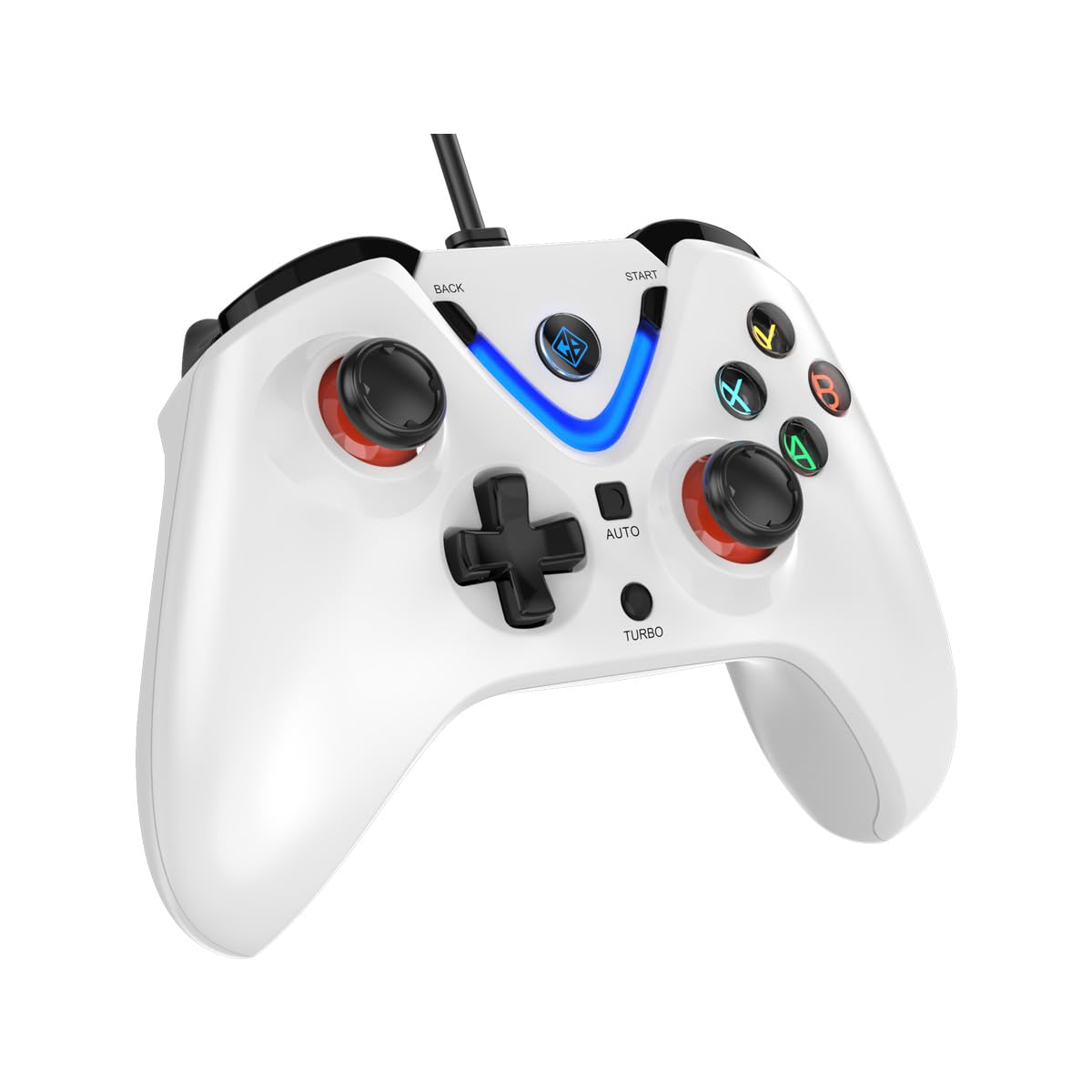
Image 1: The Cosmic Byte ARES Wired Controller in white, showcasing jego ergonomicznej konstrukcji.
2. Instrukcje konfiguracji
2.1 Podłączanie do komputera
- Sprawdź, czy komputer jest włączony.
- Znajdź dostępny port USB na swoim komputerze.
- Plug the USB connector of the Cosmic Byte ARES Wired Controller into the USB port.
- System operacyjny automatycznie wykryje i zainstaluje niezbędne sterowniki. Ten proces może potrwać chwilę.
- Once installation is complete, the controller is ready for use.

Image 2: The controller connected via its wired USB connection, ensuring fast response.
3. Instrukcja obsługi
3.1 Podstawowe sterowanie
The Cosmic Byte ARES controller features standard gamepad layouts, including:
- Left and Right Analog Joysticks: Do precyzyjnego ruchu i kontroli kamery.
- Pad kierunkowy: Do wprowadzania informacji kierunkowych, często używany w menu lub przy wykonywaniu określonych akcji w grze.
- Przyciski akcji (A, B, X, Y): For primary game interactions.
- Przyciski naramienne (L1, R1) i spusty (L2, R2): For various in-game functions like shooting, aiming, or accelerating.
- Start and Back Buttons: For pausing games, accessing menus, or specific in-game commands.
- Przycisk Turbo: For activating rapid-fire functions.
- Przycisk automatyczny: For activating automatic rapid-fire functions.
3.2 Joysticki i wyzwalacze z efektem Halla
The controller is equipped with Hall Effect joysticks and triggers, which use magnetic sensors instead of physical contacts. This technology provides:
- Większa precyzja: More accurate and responsive input.
- Zwiększona trwałość: Reduces wear and tear, preventing stick drift over time.
- Płynna praca: Consistent and linear response for triggers, allowing for nuanced control in games.

Obraz 3: Wybuch view illustrating the Hall Effect joystick mechanism and the Hall Effect triggers.
3.3 Podwójne sprzężenie zwrotne wibracji
The controller features dual vibration motors that provide tactile feedback during gameplay, enhancing immersion by simulating in-game events such as impacts, explosions, or engine rumbling.
3.4 Backlit LED Buttons
The action buttons (A, B, X, Y) and the central V-shaped indicator feature LED backlighting, providing visibility in low-light conditions and adding to the controller's aesthetic.

Image 4: The controller with its LED buttons illuminated and visual representation of vibration effects.
3.5 Funkcje Turbo i Auto Turbo
The Turbo and Auto Turbo functions allow for rapid, repeated input of a button press without continuously pressing the button.
- Aktywacja Turbo: Press and hold the desired action button (e.g., A) and then press the Turbo button. The button will now rapidly repeat its input as long as you hold it down.
- Activating Auto Turbo: Press and hold the desired action button (e.g., A) and then press the Automatyczny button. The button will now rapidly repeat its input automatically without needing to be held down.
- Deactivating Turbo/Auto Turbo: To deactivate, repeat the activation steps for the specific button, or press the Jasne button (if available) or disconnect and reconnect the controller.

Image 5: Close-up of the controller showing the Turbo and Auto function buttons.
4. Konserwacja
- Czyszczenie: Do czyszczenia kontrolera należy używać miękkiej, suchej ściereczki. W przypadku uporczywych zabrudzeń należy użyć delikatnegoamp cloth can be used, ensuring no liquid enters the controller. Avoid harsh chemicals or abrasive cleaners.
- Składowanie: Store the controller in a cool, dry place away from direct sunlight and extreme temperatures. Avoid placing heavy objects on the controller.
- Pielęgnacja kabli: Do not sharply bend or pull the USB cable. Always grasp the plug when disconnecting from the PC.
5. Rozwiązywanie Problemów
- Kontroler nie został rozpoznany:
- Upewnij się, że kabel USB jest prawidłowo podłączony do kontrolera i komputera.
- Spróbuj podłączyć kontroler do innego portu USB.
- Uruchom ponownie komputer.
- Check Device Manager on Windows to see if the controller is listed and if there are any driver issues.
- Przyciski/Joysticki nie reagują:
- Verify the controller is recognized by your PC (see above).
- Test the controller in a different game or a controller testing utility to rule out game-specific issues.
- Upewnij się, że żadne inne urządzenia wejściowe nie powodują zakłóceń.
- Wibracje nie działają:
- Sprawdź ustawienia gry, aby upewnić się, że opcja wibracji jest włączona.
- Some games may not support vibration or may have limited vibration effects.
6. Specyfikacje
| Funkcja | Szczegół |
|---|---|
| Marka | Kosmiczny bajt |
| Nazwa modelu | Ares |
| Kompatybilne urządzenia | PC |
| Typ kontrolera | Gamepad |
| Technologia łączności | USB |
| Cechy produktu | Ergonomic |
| Ilość przycisków | 16 |
| Platforma sprzętowa | PC |
| Typ źródła zasilania | Przewodowy elektryczny, kabel USB |
| Waga przedmiotu | 220 gram |
| Wymiary przedmiotu | 6 x 10 x 4 centymetrów |
| Kolor | Biały |
| Kraj pochodzenia | Chiny |

Image 6: A comparison table highlighting features of different ARES controller models.
7. Gwarancja i wsparcie
7.1 Informacje o gwarancji
The Cosmic Byte ARES Wired Controller comes with a Roczna gwarancja na wady produkcyjne od daty zakupu. Zachowaj dowód zakupu na wypadek roszczeń gwarancyjnych.
7.2 Informacje kontaktowe producenta
For support, service, or warranty inquiries, please contact:
Kosmiczny bajtPrakash Warehousing, S. No.163, Hissa No 1-2-3-4-5A-5B/2/1,
Phursungi, Pune 412308, Maharashtra, India
For further assistance, please visit the official Cosmic Byte webwitryny lub skontaktuj się z obsługą klienta.