
1. Wprowadzenie i koniecview
This manual provides detailed instructions for the installation, operation, and maintenance of your Yansoo 3-Channel Dash Cam. Please read this manual thoroughly before using the device to ensure proper functionality and safety.
Cechy produktu:
- Nagrywanie 3-kanałowe: Simultaneously captures video from the front (170° wide-angle), rear (165°), and inside (140°) of your vehicle.
- Wideo w wysokiej rozdzielczości: Supports 1080P Front video + AHD-720P Rear video + AHD-720P Inside video.
- Ulepszone widzenie w nocy: Features 4 unique infrared LED fill lights, F1.8 aperture, and WDR technology for optimal performance in low light.
- Blokada awaryjna (czujnik G): Automatically detects sudden shocks or collisions and locks the current video footage, aby zapobiec nadpisywaniu.
- Nagrywanie w pętli: Continuously records and automatically overwrites the oldest unlocked video files gdy karta pamięci jest pełna.
- Monitor parkowania: Activates recording when motion or shocking is detected while parked (requires separate hardwire kit for 24/7 monitoring).
- Adjustable Interior Camera: The interior lens can be rotated 60° for flexible positioning.
Zawartość opakowania:
- Yansoo 3-Channel Dash Cam Unit
- Kamera tylna z kablem
- Mocowanie przyssawki
- Ładowarka samochodowa (typ C)
- Kabel danych USB
- Instrukcja obsługi
- Mounting Hardware for Rear Camera
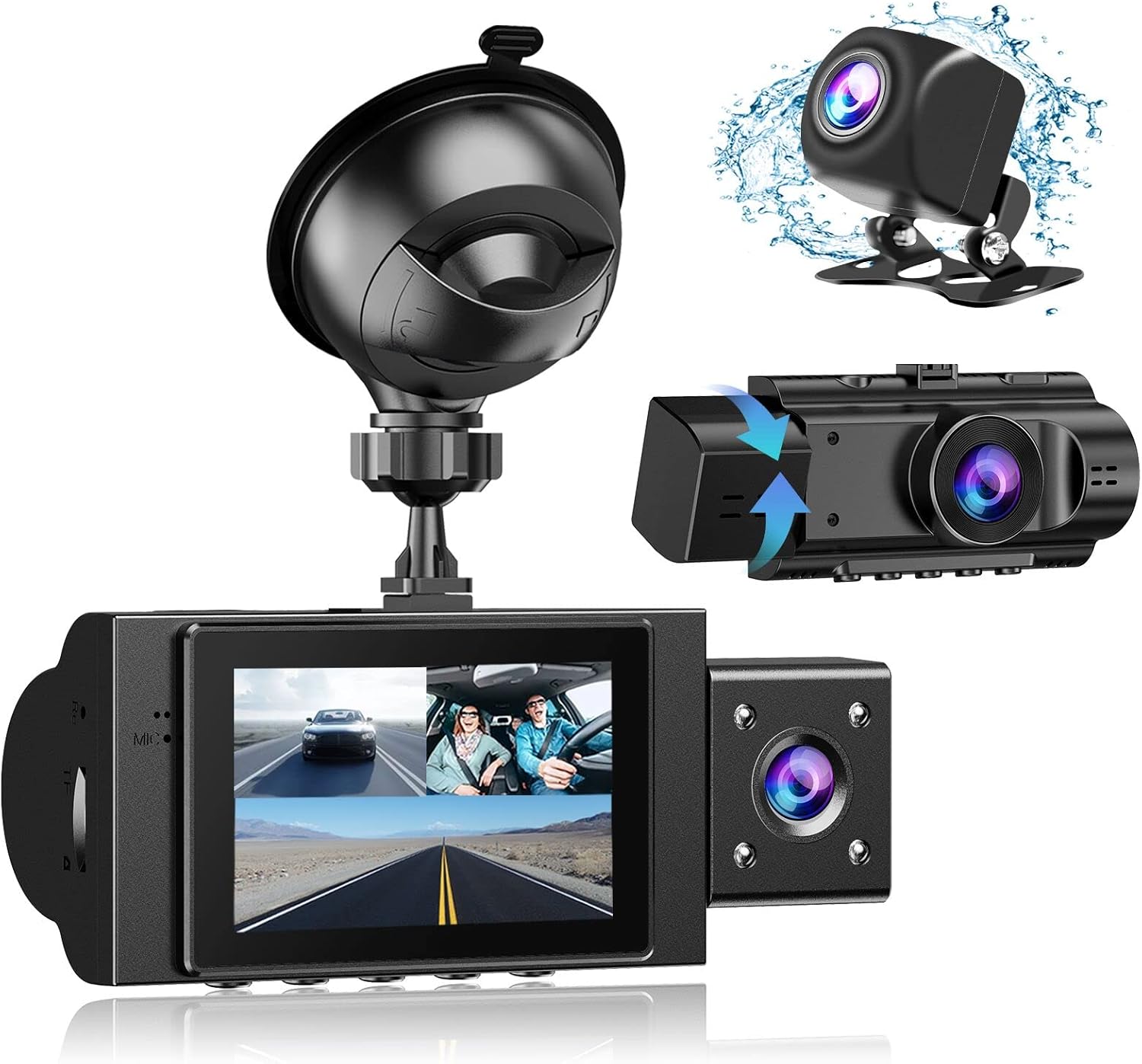
Image: The Yansoo 3-Channel Dash Cam unit with its suction cup mount and the separate rear camera, illustrating the complete package.
2. Konfiguracja
2.1 Wkładanie karty pamięci
The dash cam supports Micro Memory cards up to 64GB (Class 10 or above recommended, not included). Please format the card in the camera menu before first use.
- Znajdź gniazdo karty pamięci znajdujące się z boku kamery samochodowej.
- Insert the Micro Memory card into the slot until it clicks into place.
- Aby wyjąć kartę, delikatnie naciśnij, aż wyskoczy.

Image: A four-panel illustration showing the steps to insert a Micro SD card into the dash cam's slot.
2.2 Montaż kamery samochodowej
Mount the main dash cam unit to your windshield using the provided suction cup mount. Choose a location that does not obstruct your view podczas jazdy samochodem.
- Dokładnie wyczyść wybrany obszar na przedniej szybie.
- Przymocuj uchwyt z przyssawką do kamery samochodowej.
- Dociśnij mocno przyssawkę do szyby i przesuń dźwignię, aby ją zabezpieczyć.
- Dostosuj kąt kamery, aby zapewnić wyraźny obraz view drogi przed nami.

Image: The Yansoo 3-Channel Dash Cam mounted on a car's windshield, showing its position relative to the driver's view.
2.3 Instalowanie kamery cofania
The rear camera provides a view of the vehicle's rear. It can be installed inside the rear window or externally above the license plate.
- Podłącz kabel tylnej kamery do głównego urządzenia kamery samochodowej.
- Route the cable neatly along the vehicle's interior trim to the rear.
- Mount the rear camera in the desired location, ensuring a clear view.

Image: A diagram illustrating the recommended cable routing path for the dash cam and rear camera within a car's interior.
2.4 Połączenie zasilania
Connect the dash cam to your vehicle's cigarette lighter socket using the provided car charger. The camera will automatically power on and begin recording when the vehicle starts.

Image: The Yansoo 3-Channel Dash Cam connected to a power source, indicating its readiness for operation.
3. Instrukcja obsługi
3.1 Podstawowa obsługa
- Włączanie/wyłączanie: The camera powers on/off automatically with your vehicle's ignition. You can also manually power on/off by pressing and holding the power button.
- Rozpocznij/zatrzymaj nagrywanie: Recording starts automatically when the camera powers on. Press the "OK" button to manually stop or start recording.
- Przełącz wyświetlacz Views: Press the "Up" button to cycle through different display modes (Front, Inside, Rear, Picture-in-Picture combinations).
Video: Demonstration of the Yansoo X88 Dash Cam's recording capabilities, showcasing jego zdolność do przechwytywania wyraźnego wideo footage.
Wideo: Footage from the Yansoo X88 Dash Cam demonstrating its clear day and night recording capabilities.
Video: A demonstration of the Yansoo X88 Dash Cam's 1080P Full HD recording quality.
3.2 Ustawienia menu
To access the menu settings, stop recording (if active) by pressing the "OK" button, then press the "M" button twice.
- Rezolucja: Adjust video resolution for front, inside, and rear cameras.
- Nagrywanie w pętli: Set the duration of video segments (e.g., 1, 3, 5 minutes).
- Czułość czujnika G: Adjust the sensitivity of the emergency lock feature.
- Monitor parkowania: Enable or disable the parking monitoring function.
- Data/Godzina: Ustaw prawidłową datę i godzinę, aby uzyskać dokładny czasampna nagraniach.
- Język: Wybierz preferowany język menu.
Video: A step-by-step guide on how to set the date and time on the Yansoo Dash Cam.
4. Konserwacja
- Formatowanie standardowe: Format the memory card regularly (e.g., once a month) to prevent data corruption and ensure optimal recording performance.
- Czyszczenie soczewek: Utrzymuj obiektywy aparatu w czystości, używając miękkiej, niepozostawiającej włókien ściereczki. Unikaj materiałów ściernych, które mogłyby zarysować obiektyw.
- Aktualizacje oprogramowania układowego: Check the official Yansoo webodwiedź tę witrynę, aby sprawdzić, czy są dostępne aktualizacje oprogramowania sprzętowego, które poprawią wydajność i dodadzą nowe funkcje.
- Zagadnienia dotyczące temperatury: Unikaj wystawiania kamery samochodowej na działanie ekstremalnych temperatur przez dłuższy czas.
5. Rozwiązywanie Problemów
| Problem | Możliwa przyczyna | Rozwiązanie |
|---|---|---|
| Kamera się nie włącza. | Brak zasilania z gniazda zapalniczki; luźne połączenie. | Check car charger connection; ensure vehicle ignition is on. |
| Nagrywanie zostaje nieoczekiwanie przerwane. | Memory card full or corrupted; G-Sensor triggered. | Format memory card; adjust G-Sensor sensitivity. |
| Wideotage jest rozmazane. | Protective film on lens; dirty lens. | Remove protective film; clean lenses with a soft cloth. |
| Data/Czas są nieprawidłowe. | Date/Time not set or battery low. | Set Date/Time in menu; ensure continuous power supply. |
| Kamera zawiesza się lub działa nieprawidłowo. | Błąd oprogramowania. | Use a needle to press the "RE" (Reset) button. |
6. Specyfikacje
| Funkcja | Szczegół |
|---|---|
| Wymiary produktu | 4.13 x 1.57 x 1.77 cala |
| Waga przedmiotu | 1.23 funta |
| Rozdzielczość przechwytywania wideo | 1080p (Front), 720p (Inside & Rear) |
| Pole View | 170° (Front), 140° (Inside), 165° (Rear) |
| Technologia łączności | USB |
| Funkcja specjalna | G-Sensor, Loop Recording, Parking Monitor, Night Vision |
| Typ montażu | Przyssawka |
| Producent | Yansoo |
7. Gwarancja i wsparcie
Yansoo offers comprehensive after-sales support for your dash cam.
- Gwarancja: 1-YEAR warranty from the date of purchase.
- Obsługa techniczna: 7*24 hours technical service is available.
- Kontakt: For any questions or issues, please contact our customer service team via Amazon or the after-sales email provided in the original product packaging.
- Instrukcja obsługi (PDF): Cyfrową wersję instrukcji obsługi można pobrać Tutaj.