
1. Wprowadzenie
Thank you for choosing the Sharp SumoBox CP-LS100. This high-performance portable speaker is designed to deliver powerful and clear audio for various applications, from personal entertainment to small events. This manual provides essential information for setting up, operating, and maintaining your SumoBox CP-LS100 to ensure optimal performance and longevity.

Figure 1.1: Sharp SumoBox CP-LS100 Portable Speaker
2. Informacje dotyczące bezpieczeństwa
Przed użyciem produktu należy przeczytać wszystkie instrukcje bezpieczeństwa. Zachowaj instrukcję do wykorzystania w przyszłości.
- Do not expose the speaker to rain, moisture, or extreme temperatures. The CP-LS100 model is not IPX rated and is not designed for use in damp lub w wilgotnych warunkach.
- Zapewnij odpowiednią wentylację wokół głośnika. Nie blokuj otworów wentylacyjnych.
- Używaj wyłącznie zasilacza dostarczonego wraz z urządzeniem.
- Do not open the speaker enclosure. Refer all servicing to qualified service personnel.
- Avoid placing the speaker on unstable surfaces.
- Trzymaj głośnik z dala od źródeł ciepła, takich jak grzejniki, kratki wentylacyjne, piece lub inne urządzenia (w tym amp(lifiers) wytwarzające ciepło.
- Chroń przewód zasilający przed deptaniem i przytrzaśnięciem, zwłaszcza przy wtyczkach, gniazdkach i miejscach, w których wychodzi z urządzenia.
3. Zawartość opakowania
Carefully unpack your SumoBox CP-LS100 and ensure all items are present and in good condition. The package should contain:
- Sharp SumoBox CP-LS100 Portable Speaker
- Kabel zasilający
- Eight (8) Round Protective Corners
- Hex Driver and Screws for protective corners
- Instrukcja obsługi (ten dokument)
4. Koniec produktuview
The Sharp SumoBox CP-LS100 is a robust portable speaker designed for powerful audio output and versatile connectivity. It features a durable construction with a heavy-duty metal grill and integrated handles for easy transport.
4.1 Główne cechy
- Wysoka moc wyjściowa: Delivers 125W RMS (105dB) through 2 x 8-inch woofers and 2 x 2-inch tweeters.
- Wyjmowana bateria: Provides up to 10 hours of playing time on a single charge. Additional batteries are available separately.
- Duo Mode (True Wireless Stereo): Pair two SumoBox speakers for a true stereo sound experience.
- 3-Channel Pro Panel: Features XLR/TRS combo inputs for microphones, instruments (keys, guitar), and other audio sources, with individual volume, treble, bass, and reverb controls.
- Amplified Speaker Link: Connect multiple SumoBox speakers via daisy chain for expanded sound coverage.
- SAM by Devialet: Utilizes Speaker Active Matching (SAM) technology for optimized speaker driver performance.
- Port ładowania USB: Conveniently charge mobile devices.
- Indoor/Outdoor Mode: Optimizes sound for different environments.
- Speaker Stand Mount: Integrated 35mm mount for use with compatible speaker stands (minimum 25kg weight handling).
- Sterowanie aplikacją Smart Life: Manage settings and controls via the dedicated mobile application.
4.2 Elementy sterujące i porty
The rear panel of the SumoBox CP-LS100 provides access to all controls and input/output ports.

Figure 4.1: 3-Channel Pro Panel
- CH1/CH2 XLR/TRS Combo Inputs: For connecting microphones or instruments.
- Volume, Treble, Bass, Reverb Knobs: Individual controls for each channel.
- Ducking Button: Automatically lowers music volume when a microphone input is detected.
- Przycisk parowania Bluetooth: Inicjuje tryb parowania Bluetooth.
- Duo Mode Button: Activates True Wireless Stereo pairing with another SumoBox.
- Indoor/Outdoor Mode Selector: Dostosowuje dźwięk profile dla optymalnej wydajności.
- Wejście AUX (3.5 mm): For connecting external audio devices. Note: Using this port will override any active Bluetooth connection.
- Speaker Link IN/OUT: XLR ports for connecting multiple SumoBox units.
- Port ładowania USB: Do ładowania urządzeń zewnętrznych.
- Wejście prądu stałego 18 V: For charging the battery when it is not in the SumoBox.
- Power Input (AC 100-240V): For main power supply and charging.
5. Konfiguracja
5.1 Attaching Protective Corners
The SumoBox CP-LS100 comes with eight protective corners to enhance durability and allow for stable positioning. Use the provided hex driver and screws to attach these corners to the designated points on the speaker.
5.2 Ładowanie akumulatora
Before first use, fully charge the speaker's battery. Connect the power cable to the speaker's power input and then to a wall outlet. The battery indicator lights will show the charging status. A full charge provides approximately 10 hours of playback.

Rysunek 5.1: Wyjmowany akumulator
5.3 Włączanie/wyłączanie
Press and hold the Power button on the rear panel to turn the speaker on or off.
6. Obsługa
6.1 parowanie Bluetooth
- Turn on the SumoBox CP-LS100.
- Press the Bluetooth pairing button on the rear panel. The Bluetooth indicator will flash.
- On your Bluetooth-enabled device (smartphone, tablet, laptop), search for "SumoBox CP-LS100" in the Bluetooth settings.
- Select the speaker to pair. Once connected, the Bluetooth indicator will glow solid.
Tryb Duo 6.2 (prawdziwe bezprzewodowe stereo)
To achieve true wireless stereo sound, you can pair two SumoBox CP-LS100 speakers.

Figure 6.1: Duo Mode Setup
- Ensure both SumoBox speakers are powered on and not connected to any other Bluetooth device.
- On the first speaker (which will be the primary/left channel), press the Duo Mode button. The Duo Mode indicator will flash.
- On the second speaker (which will be the secondary/right channel), press the Duo Mode button.
- The two speakers will automatically connect. Once connected, the Duo Mode indicators on both speakers will glow solid.
- Teraz podłącz urządzenie Bluetooth do głównego głośnika zgodnie z opisem w rozdziale 6.1. Dźwięk będzie odtwarzany w stereo na obu głośnikach.
6.3 Podłączanie mikrofonów i instrumentów
Use XLR or 1/4-inch TRS cables to connect microphones or instruments to the CH1 and CH2 combo inputs. Adjust the individual Volume, Treble, Bass, and Reverb knobs for each channel to achieve the desired sound.

Figure 6.2: XLR/TRS Combo Inputs
6.4 Speaker Linking (Daisy Chain)
For larger venues or events, you can connect multiple SumoBox speakers using the Speaker Link IN/OUT XLR ports. This allows you to expand your sound system.

Rysunek 6.3: Amplified Speaker Link
Connect the Speaker Link OUT of the first speaker to the Speaker Link IN of the second speaker, and so on. Note that daisy-chaining speakers via this method may introduce a slight latency (approximately 35ms per additional speaker).
6.5 Indoor/Outdoor Mode
Toggle the Indoor/Outdoor mode selector to optimize the speaker's sound profile for your environment. The outdoor mode typically enhances bass and projection for open spaces.
6.6 Inteligentna aplikacja do życia
Download the Smart Life app to control your SumoBox CP-LS100 from your mobile device. The app provides access to most of the rear panel controls for convenience.
7. Konserwacja
- Czyszczenie: Do czyszczenia zewnętrznej części głośnika należy używać miękkiej, suchej ściereczki. Nie należy używać płynów czyszczących ani aerozoli.
- Pielęgnacja baterii: For optimal battery life, avoid fully discharging the battery frequently. If storing the speaker for an extended period, charge the battery to about 50% and store in a cool, dry place.
- Składowanie: Przechowuj głośnik w chłodnym i suchym miejscu, z dala od bezpośredniego światła słonecznego i ekstremalnych temperatur.
8. Rozwiązywanie Problemów
| Problem | Możliwa przyczyna | Rozwiązanie |
|---|---|---|
| Głośnik nie włącza się. | Battery is depleted or power cable is not connected. | Connect the power cable and charge the battery. Ensure the power outlet is functional. |
| Brak dźwięku. | Volume is too low, input source not connected, or incorrect input selected. | Increase volume. Check all cable connections. Ensure the correct input channel is active. |
| Problemy z połączeniem Bluetooth. | Device is out of range, not in pairing mode, or already connected to another device. | Move device closer to speaker. Ensure speaker is in Bluetooth pairing mode. Disconnect from other devices. |
| Zniekształcony dźwięk. | Volume too high, input signal too strong, or speaker placed on an unstable surface. | Reduce volume on speaker and/or input device. Check input signal level. Ensure speaker is on a stable surface. |
| Duo Mode not connecting. | Głośniki znajdują się zbyt daleko od siebie lub są już sparowane z innymi urządzeniami. | Ensure speakers are within close proximity. Disconnect both speakers from any other Bluetooth devices before initiating Duo Mode. |
9. Specyfikacje
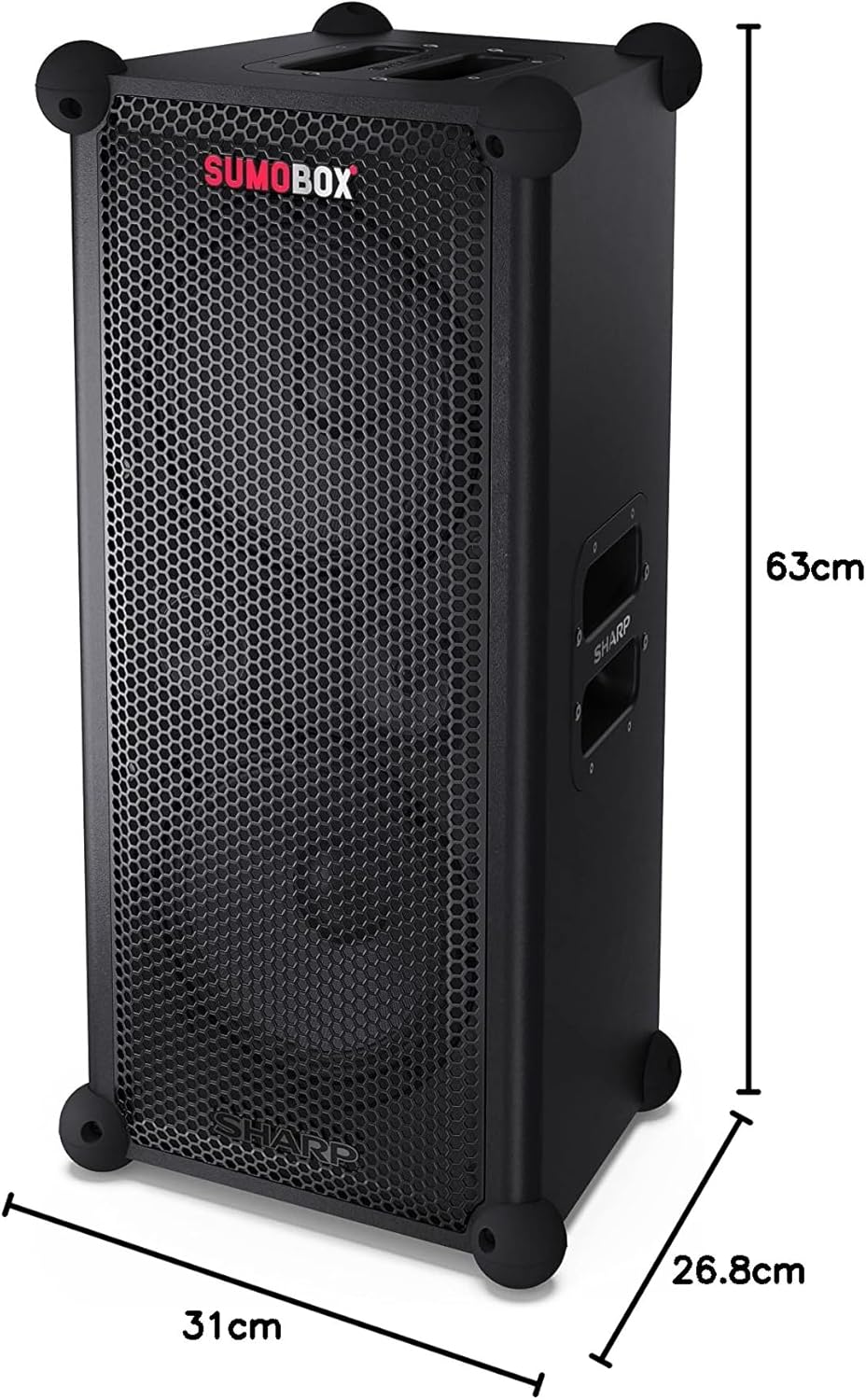
Rysunek 9.1: Wymiary produktu
| Funkcja | Szczegół |
|---|---|
| Nazwa modelu | SumoBox CP-LS100 |
| Typ głośnika | Tower, Portable |
| Moc wyjściowa głośnika | 120 W (RMS) |
| Poziom ciśnienia akustycznego (SPL) | 105dB |
| Średnica subwoofera | 8 cale (x2) |
| Technologia łączności | Bluetooth |
| Tryb wyjścia audio | Stereo (with Duo Mode) |
| Typ kontrolera | Pro panel with advanced control and Sharp Life app |
| Żywotność baterii | Do 10 godzin |
| Pojemność baterii | 5 Amp Godziny |
| Waga przedmiotu | 9.7 kilograma |
| Wymiary produktu (dł. x szer. x wys.) | Wymiary 26.8 x 31 x 63 cm |
| Kolor | Czarny |
| Stopień wodoodporności | Not IPX Rated (Not waterproof) |
10. Gwarancja i wsparcie
Aby uzyskać informacje dotyczące gwarancji i pomocy technicznej, zapoznaj się z kartą gwarancyjną dołączoną do produktu lub odwiedź oficjalną stronę internetową firmy Sharp website. You can also contact Sharp customer service for assistance with product registration, troubleshooting, and service inquiries.
Sharp Customer Support: www.ostry.pl