
1. Wprowadzenie
The eppfun SK001 MAX is a versatile Bluetooth speakerphone designed for home office, remote work, and conference calls. It features 360° voice coverage with two omnidirectional microphones, intelligent noise cancellation, and echo elimination for clear audio. This device supports both USB and Bluetooth connectivity, offering broad compatibility with various operating systems and popular online meeting applications such as Zoom, Skype, Microsoft Teams, Google Meet, Webbyły i FaceTime.
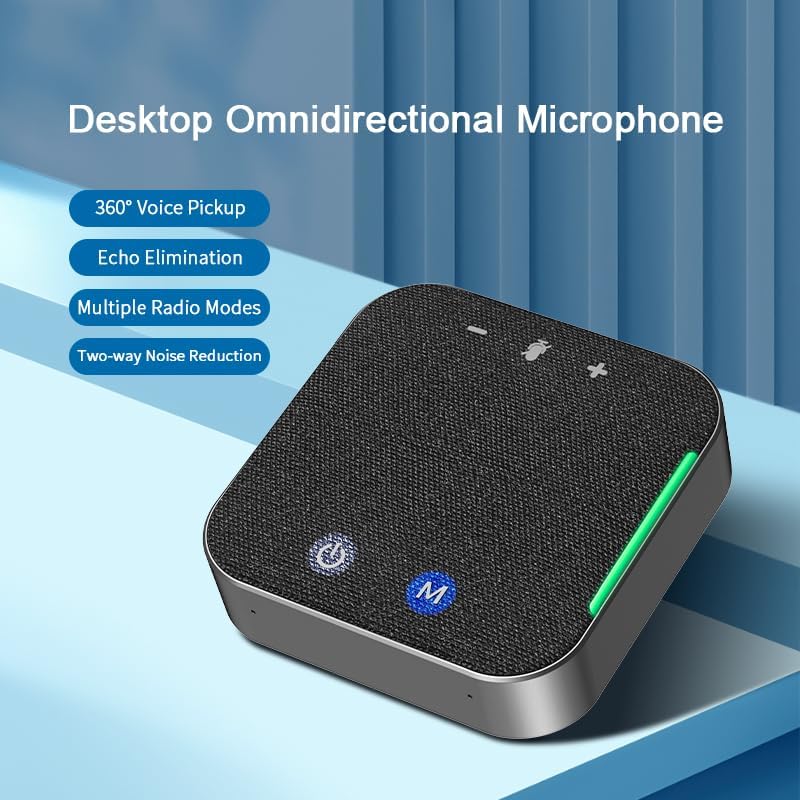
Rysunek 1: eppfun SK001 MAX Desktop Omnidirectional Microphone. This image shows the compact, square-shaped speakerphone with its fabric top and control buttons, highlighting its 360° voice pickup, echo elimination, multiple radio modes, and two-way noise reduction capabilities.
2. Zawartość opakowania
Sprawdź, czy w opakowaniu znajdują się wszystkie elementy:
- eppfun SK001 MAX Speakerphone
- Kabel USB-A do USB-C
- Instrukcja obsługi
- Karta gwarancyjna
3. Koniec produktuview
The SK001 MAX features an intuitive design with easily accessible controls and ports.
3.1 Elementy sterujące i wskaźniki
- Przycisk zasilania: Naciśnij i przytrzymaj, aby włączyć lub wyłączyć urządzenie.
- M Button (Mode/Mute): Used for switching modes or muting the microphone.
- Przyciski zwiększania / zmniejszania głośności: Dostosuj głośność głośnika.
- Wskaźniki LED: Provide status information for power, Bluetooth connection, and microphone mute.
Porty 3.2
- Port USB-C: Do przewodowego połączenia z komputerem i ładowania.
- Port AUX 3.5 mm: For auxiliary audio input/output.

Rysunek 2: USB-C Port for connection. This image shows a close-up of the speakerphone's side, highlighting the USB-C port and a USB-C cable being inserted, emphasizing its plug-and-play, drive-free design for easy PC connection.
4. Konfiguracja
4.1 Ładowanie urządzenia
Before initial use, fully charge the SK001 MAX. Connect the provided USB-C cable to the speakerphone's USB-C port and the other end to a USB power adapter (not included) or a computer's USB port. The LED indicator will show charging status and turn off when fully charged. A full charge provides up to 12 hours of continuous use.
4.2 Wired Connection (USB)
- Connect the provided USB-C cable to the SK001 MAX.
- Connect the USB-A or USB-C end of the cable to an available port on your computer (PC or Mac).
- The device is plug-and-play and does not require driver installation. It will be automatically recognized by your operating system.
- Select "eppfun SK001 MAX" as your audio input and output device in your computer's sound settings and conferencing application.
4.3 Połączenie bezprzewodowe (Bluetooth)
- Press and hold the Power button on the SK001 MAX to turn it on.
- Zacznie migać kontrolka Bluetooth, wskazując, że urządzenie jest w trybie parowania.
- Na swoim urządzeniu (smartfonie, tablecie, laptopie) przejdź do ustawień Bluetooth i włącz Bluetooth.
- Szukaj available devices and select "eppfun SK001 MAX" from the list.
- Po nawiązaniu połączenia kontrolka Bluetooth zacznie świecić światłem ciągłym.
- Select "eppfun SK001 MAX" as your audio input and output device in your device's sound settings and conferencing application.

Rysunek 3: Wireless and Wired Connection Options. This image illustrates the flexibility of the speakerphone, showing it connected wirelessly via Bluetooth to a smartphone displaying a live broadcast, and implying wired connectivity for stable transmission.
5. Operating the Speakerphone
5.1 Wykonywanie/odbieranie połączeń
Once connected via USB or Bluetooth, the SK001 MAX will function as your primary audio device for calls and meetings. Use your connected device or conferencing application to initiate or answer calls.
5.2 Regulacja głośności
Use the Volume Up (+) and Volume Down (-) buttons on the speakerphone to adjust the playback volume. You can also control the volume from your connected device.
5.3 Wyciszanie mikrofonu
Press the 'M' button to mute or unmute the microphone. The LED indicator will change to show the microphone's status (e.g., red for muted).
5.4 Noise Reduction and Echo Cancellation
The SK001 MAX features an integrated DSP processor for intelligent noise canceling and echo elimination. This technology works automatically to reduce background noise and prevent echoes, ensuring clear communication. The device supports single or two-way noise reduction, which can be freely switched to optimize voice clarity for all participants.
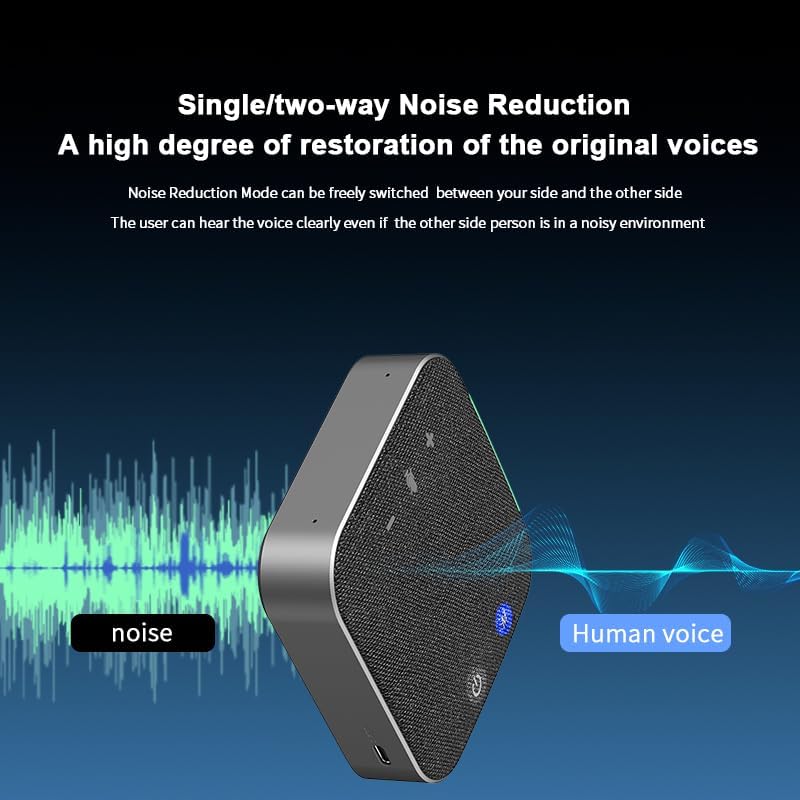
Rysunek 4: Single/Two-way Noise Reduction. This image visually represents the speakerphone's noise reduction capability, showing how it filters out ambient noise to deliver clear human voice, ensuring participants can hear clearly even in noisy environments.
5.5 360° Voice Pickup
Equipped with two omnidirectional microphones, the SK001 MAX captures sound from all directions within a 4-meter radius. This ensures that all participants in a meeting, even in a multi-person setting, are heard clearly.

Rysunek 5: Multi-person Meeting Scenario. This image depicts the speakerphone in use during a conference, illustrating its 4-meter voice pickup radius coverage, making it suitable for small and medium-sized meeting rooms.
6. Konserwacja
- Czyszczenie: Do czyszczenia głośnika używaj miękkiej, suchej ściereczki. Nie używaj płynów ani aerozoli.
- Składowanie: Przechowywać urządzenie w chłodnym i suchym miejscu, z dala od bezpośredniego światła słonecznego i ekstremalnych temperatur.
- Pielęgnacja baterii: Aby przedłużyć żywotność baterii, unikaj częstego całkowitego rozładowywania baterii. Regularnie ładuj urządzenie, nawet jeśli nie jest używane przez dłuższy czas.
- Wodoodporność: The SK001 MAX is NOT waterproof. Avoid exposure to liquids.
7. Rozwiązywanie Problemów
| Problem | Możliwe rozwiązanie |
|---|---|
| Urządzenie nie włącza się. | Upewnij się, że urządzenie jest naładowane. Podłącz je do źródła zasilania za pomocą kabla USB-C. |
| Brak dźwięku lub słaba jakość dźwięku. |
|
| Mikrofon nie działa. |
|
| Problemy z połączeniem Bluetooth. |
|
8. Specyfikacje
| Funkcja | Szczegół |
|---|---|
| Marka | śmiech |
| Numer modelu | SK001 |
| Technologia łączności | Pomocniczy, Bluetooth, USB |
| Technologia bezprzewodowa | Bluetooth |
| Zasięg Bluetooth | 10 metrów |
| Liczba mikrofonów | 2 (Omnidirectional) |
| Maksymalna moc wyjściowa głośnika | 5 watów |
| Tryb wyjścia audio | Mononukleoza |
| Rozmiar głośnika | 40 milimetrów |
| Średnia żywotność baterii | 12 godzin |
| Źródło zasilania | Zasilanie bateryjne (w zestawie 1 bateria litowo-jonowa) |
| Metoda kontroli | Naciśnij przycisk |
| Kolor | Czarny |
| Waga przedmiotu | 0.5 funtów |
| Wodoodporny | NIE |
| Kompatybilne urządzenia | Komputer stacjonarny, laptop, smartfon, tablet, telewizor |
| Konkretne zastosowania | Conference calls, web meetings, remote work, home office |
9. Gwarancja i pomoc techniczna
9.1 Informacje o gwarancji
The eppfun SK001 MAX comes with a limited warranty of up to 12 months. Please refer to the included Warranty Card for detailed terms and conditions. Keep your proof of purchase for warranty claims.
9.2 Obsługa klienta
For further assistance, technical support, or warranty inquiries, please visit the official eppfun store or contact their customer service. You can find more information and contact details on the Sklep eppfun Amazon.