
1. Wprowadzenie
The Browning Command Ops Elite 22 (BTC-4E22) is a high-performance trail camera designed for wildlife monitoring. It features an infrared LED flash with an 80-foot range and Illuma-Smart technology for exceptional nighttime photos. With a rapid 0.3-second trigger reaction and a 70-foot detection range, this camera ensures comprehensive capture of wildlife activity. It delivers 22MP photo resolution and 720p video with sound, offering versatile recording options.
This camera is equipped with advanced features such as multi-shot and rapid-fire image modes, SD card management, and a programmable delay from 1 second to 60 minutes. All captured photos and videos are stamped with essential data including time, date, temperature, moon phase, and camera ID. For extended use, a 12V power jack allows connection to external power sources, complementing its long battery life with 6 AA batteries. The camera supports up to a 32GB memory card.

Image 1.1: The Browning Command Ops Elite 22 Trail Camera, showcasing its compact design and camouflage finish, ready for deployment in a natural environment.
2. Główne cechy
- Obrazowanie o wysokiej rozdzielczości: Captures 22 Megapixel still images and 720p HD+ video with sound.
- Szybka prędkość spustu: Ultra-fast 0.3-second trigger speed to capture fleeting moments.
- Extended Detection & Flash Range: 70-foot detection range and 80-foot infrared flash range with Illuma-Smart Technology for optimal night vision.
- Flexible Capture Modes: Supports up to 8 multi-shot images and up to 4 rapid-fire images.
- Programmable Delay: Adjustable picture delay from 1 second to 60 minutes.
- Data Stamping: Photos and videos include time, date, temperature, moon phase, and camera ID stamps.
- Opcje zasilania: Operates on 6 AA batteries (included) with a 12V external power jack for alternative power sources.
- Obsługa kart pamięci: Compatible with SD cards up to 32GB (included).
- Trwała konstrukcja: Rugged and water-resistant construction suitable for outdoor use.
- Timelapse Plus Camera Mode: Advanced mode for capturing time-lapse sequences.

Rysunek 2.1: Szczegółowy view of the camera highlighting features such as adjustable IR flash, programmable delay, multi-shot options, battery life, SD card management, and the 12-volt external power jack.

Obraz 2.2: Inny view of the camera, emphasizing its 22MP images, 70ft detection range with 80ft infrared illumination, 0.3-second trigger speed, and Timelapse Plus Camera Mode.
3. Przewodnik konfiguracji
3.1 Instalacja baterii
- Otwórz zatrzask obudowy kamery.
- Zlokalizuj komorę baterii.
- Insert 6 AA alkaline or lithium batteries, ensuring correct polarity (+/-).
- Dokładnie zamknij komorę baterii.
3.2 Instalacja karty SD
- Po otwarciu obudowy kamery znajdź gniazdo karty SD.
- Insert an SD card (up to 32GB) into the slot until it clicks into place. Ensure the card is inserted with the correct orientation.
- Aby wyjąć kartę, delikatnie naciśnij ją, aż wyskoczy.
3.3 Montaż kamery
The Command Ops Elite 22 offers two primary mounting options:
- Rear Housing Bracket: Use the included strap to secure the camera to a tree or post via the bracket on the back of the camera.
- Standard 1/4"-20 Thread: Attach the camera to a tripod or other mounting accessories using the threaded insert located at the bottom of the camera.
Ensure the camera is mounted securely and pointed towards the desired area of observation, free from obstructions that might trigger false detections (e.g., swaying branches).

Image 3.1: Demonstrates the process of mounting and positioning the trail camera in an outdoor setting.
4. Instrukcja obsługi
4.1 Włączanie/wyłączanie
Locate the ON/OFF switch inside the camera housing. Slide the switch to 'ON' to power up the camera. Slide to 'OFF' to power down.
4.2 Nawigacja po menu
The camera features a small LCD screen and control buttons (UP, DOWN, OK, M) for navigating the menu. Press 'M' to enter the menu, use UP/DOWN to scroll through options, and 'OK' to select.

Obraz 4.1: Zbliżenie view of the camera's control panel, showing the LCD screen, navigation buttons (UP, DOWN, OK), and the 'M' (Mode) button.
4.3 Ustawienia zdjęć i wideo
W menu możesz dostosować różne ustawienia:
- Tryb: Select between Photo, Video, or Timelapse Plus.
- Rozdzielczość zdjęcia: Set to 22MP for maximum detail.
- Rozdzielczość wideo: Choose 720p for video capture.
- Długość filmu: Adjust video clip duration from 5 seconds up to 2 minutes.
- Multi-Shot/Rapid-Fire: Configure the number of photos taken per trigger event.
4.4 Delay Settings
The 'Delay' setting determines the waiting period before the camera can be re-triggered after an event. This can be set from 1 second to 60 minutes to prevent excessive captures of the same animal.
4.5 Time and Date Stamp
Ensure the camera's internal clock is set correctly. All captured media will automatically include a stamp with the time, date, temperature, moon phase, and camera ID for detailed record-keeping.

Obraz 4.2: Byłyample of a captured image, demonstrating the automatic data stamp including temperature, date, time, moon phase, and camera ID.
5. Konserwacja
5.1 Czyszczenie
- Regularly clean the camera lens and the PIR sensor window with a soft, lint-free cloth to ensure clear images and proper detection.
- Wyczyść korpus aparatu za pomocąamp szmatką, aby usunąć brud i zanieczyszczenia. Unikaj ostrych środków chemicznych.
5.2 Wymiana baterii
Replace all 6 AA batteries when the low battery indicator appears on the LCD screen or when performance degrades. For optimal performance, use high-quality alkaline or lithium batteries.
5.3 Zarządzanie kartami SD
- Periodically check the SD card capacity. Format the SD card regularly to maintain optimal performance and prevent data corruption.
- Always remove the SD card when the camera is powered off to prevent data loss.
6. Rozwiązywanie Problemów
- Kamera nie włącza się: Sprawdź instalację baterii i upewnij się, że są nowe. Upewnij się, że przełącznik WŁ./WYŁ. jest w pozycji „WŁ.”.
- Brak zdjęć/filmów: Ensure the SD card is properly inserted and not full. Check the camera's mode settings (Photo/Video). Verify the detection range and sensitivity settings.
- Słaba jakość obrazu: Clean the camera lens and ensure it is free from dirt or condensation. Check for obstructions in front of the lens or flash.
- Fałszywe wyzwalacze: Adjust the camera's sensitivity settings. Ensure the camera is not pointed at heat sources or moving vegetation that could cause false detections.
- Krótki czas pracy baterii: Use high-quality alkaline or lithium batteries. Reduce the frequency of captures or video length if possible. Consider using the 12V external power option for prolonged deployment.
7. Specyfikacje
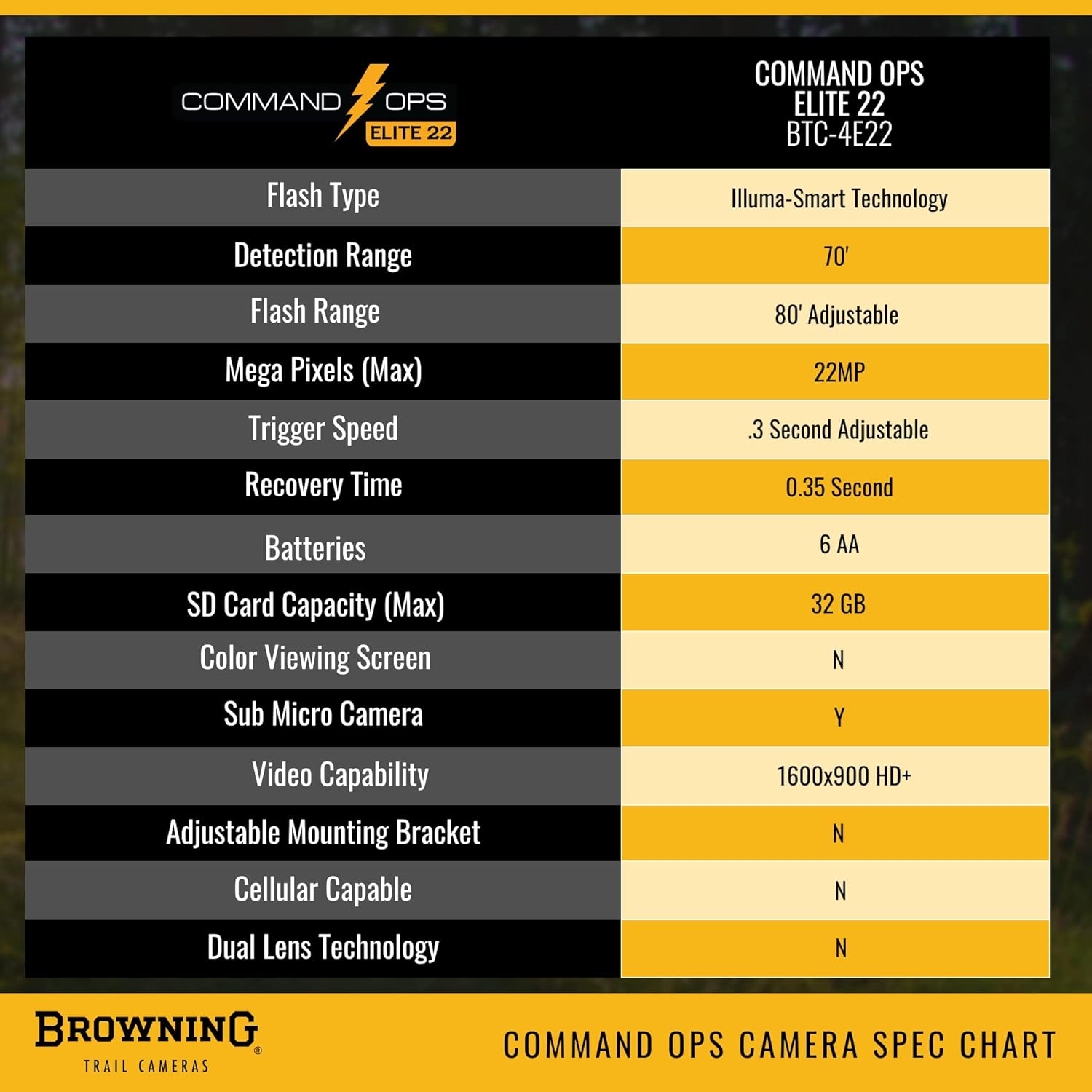
Image 7.1: Official specification chart for the Browning Command Ops Elite 22 (BTC-4E22) Trail Camera.
| Funkcja | Specyfikacja |
|---|---|
| Nazwa modelu | Dowództwo Operacyjne Elite 22 |
| Numer modelu | BTC-4E22 |
| Rozdzielczość zdjęcia | 22 megapiksela |
| Rozdzielczość wideo | 720p (1600x900 HD+) |
| Szybkość wyzwalania | 0.3 sekund |
| Zasięg wykrywania | 70 stóp |
| Zasięg błysku | 80 feet (Infrared LED with Illuma-Smart) |
| Źródło zasilania | 6 AA Batteries (or 12V External Power) |
| Obsługa kart pamięci | Karta SD do 32 GB |
| Odporność na wodę | Wodoodporność (IP65) |
| Technologia łączności | Bezprzewodowy (Wi-Fi) |
| Wymiary przedmiotu | 3.13 x 9.13 x 4.25 cala |
| Waga przedmiotu | 0.82 funtów |
| UPC | 850042317013 |
8. Informacje o gwarancji
The Browning Command Ops Elite 22 Trail Camera comes with a 1-roczna ograniczona gwarancja. This warranty covers defects in workmanship and materials under normal operating conditions. In the event of a defect, Browning will repair or replace the unit with a new or refurbished product as deemed necessary.
9. Wsparcie
For further assistance, technical support, or warranty claims, please refer to the official Browning webOdwiedź witrynę lub skontaktuj się z działem obsługi klienta. Zachowaj paragon jako dowód zakupu na potrzeby serwisu gwarancyjnego.
Browning Official Webstrona: www.browning.com