
1. Wprowadzenie
The Cooler Master Synk X is an ergonomic real-time tactile immersion chair designed to enhance your entertainment experience. It converts sound waves into vibrations, providing tactile feedback for games, movies, and music. This manual provides essential information for the safe and efficient use of your Synk X chair.

Figure 1.1: Cooler Master Synk X Immersive Chair
2. Informacje dotyczące bezpieczeństwa
Please read all safety instructions carefully before using the Synk X chair. Failure to follow these instructions may result in injury or damage to the product.
- Limit wagowy: This product has a maximum weight recommendation of 275 pounds (125 kg). Exceeding this limit could result in damage to the chair or pose a risk of injury.
- Źródło zasilania: Do ładowania należy używać wyłącznie dołączonego zasilacza.
- Umieszczenie: Ensure the chair is placed on a stable, level surface. Avoid placing it near heat sources or in direct sunlight.
- Czyszczenie: Refer to the maintenance section for proper cleaning procedures. Do not use abrasive cleaners or immerse electrical components in water.
- Dzieci: Keep children and pets away from the chair during operation and assembly.
- Modyfikacje: Do not attempt to modify or disassemble the chair. Unauthorized modifications may void the warranty and pose safety risks.
3. Zawartość opakowania
Sprawdź, czy w przesyłce znajdują się wszystkie wymienione poniżej elementy:
- Synk X Chair (Seat and Backrest)
- Podstawa krzesła
- Siłownik gazowy
- 5 kółka samonastawne
- Poduszka lędźwiowa
- Podłokietniki (2)
- Zasilacz
- Bluetooth Transceiver (optional accessory)
- Auxiliary Cables
- Zestaw narzędzi (śruby, podkładki, klucz imbusowy)
- Instrukcja obsługi
Film 3.1: Rozpakowywanie i koniecview zawartych komponentów.
4. Konfiguracja
Follow these steps to assemble your Cooler Master Synk X chair:
- Zamontuj kółka jezdne do podstawy: Insert each of the five caster wheels into the openings at the ends of the chair base until they click securely into place.
- Włóż podnośnik gazowy: Umieść cylinder podnośnika gazowego w centralnym otworze podstawy krzesła.
- Dołącz podłokietniki: Secure the armrests to the underside of the seat using the provided screws from the hardware kit. Ensure they are firmly attached.
- Podłącz fotel do podnośnika gazowego: Carefully align the central mechanism on the underside of the seat with the top of the gas lift cylinder and press down firmly until the seat is securely seated.
- Zamocuj oparcie: Connect the backrest to the seat assembly using the remaining screws. Ensure all connections are tight.
- Podłącz kable: Locate the internal cables for the haptic system and RGB lighting. Connect them according to the diagrams in the included user manual.
- Załóż poduszkę lędźwiową: Position the lumbar pillow on the backrest for ergonomic support.
Video 4.1: Visual guide for chair assembly.

Figure 4.1: Fully assembled Cooler Master Synk X chair.
5. Instrukcja obsługi
The Synk X chair features an intuitive control panel for managing its functions.
5.1 Panel sterowania ponadview

Rysunek 5.1: Szczegółowy view panelu sterowania.
- Wejście DC 19V: Power input for charging the chair's internal battery. A full charge takes approximately 6 hours and provides 4 hours of battery life.
- Wskaźniki stanu baterii: LEDs display the current battery charge level.
- WEJŚCIE AUX: 3.5mm auxiliary input for wired audio sources.
- Przycisk parowania: Initiates Bluetooth pairing mode for wireless audio connections.
- Wybierz przycisk: Cycles through different audio input modes (AUX, Bluetooth, 5.8G).
- Gniazdo słuchawkowe: 3.5mm output for connecting wired headphones.
- Pokrętła głośności: Adjust master volume and headphone volume.
- Vibration Level Knob: Controls the intensity of the tactile feedback.
- ARGB Button: Cycles through various RGB lighting modes and colors.
- Przycisk zasilania: Turns the chair on or off.
Video 5.1: Demonstration of the control panel functions.
5.2 Tactile Immersion
The Synk X converts audio signals into real-time vibrations, providing a dynamic tactile experience. Adjust the 'Vibration Level' knob to customize the intensity.
Video 5.2: Demonstration of the chair's vibration mode with a bowl of water.
5.3 Oświetlenie RGB
The chair features customizable RGB lighting on the backrest. Press the 'ARGB' button on the control panel to cycle through various lighting effects and colors.

Figure 5.2: RGB lighting on the Synk X chair.
Video 5.3: Demonstration of RGB lighting modes.
5.4 Regulacje ergonomiczne
The Synk X chair offers multiple adjustments for personalized comfort:
- Wysokość siedziska: Use the lever located under the seat to adjust the chair's height.
- Kąt odchylenia: The backrest can recline up to 135 degrees. Use the recline lever to find your preferred angle.
- Retractable Leg Rest: Pull out the leg rest from under the seat for extended comfort.
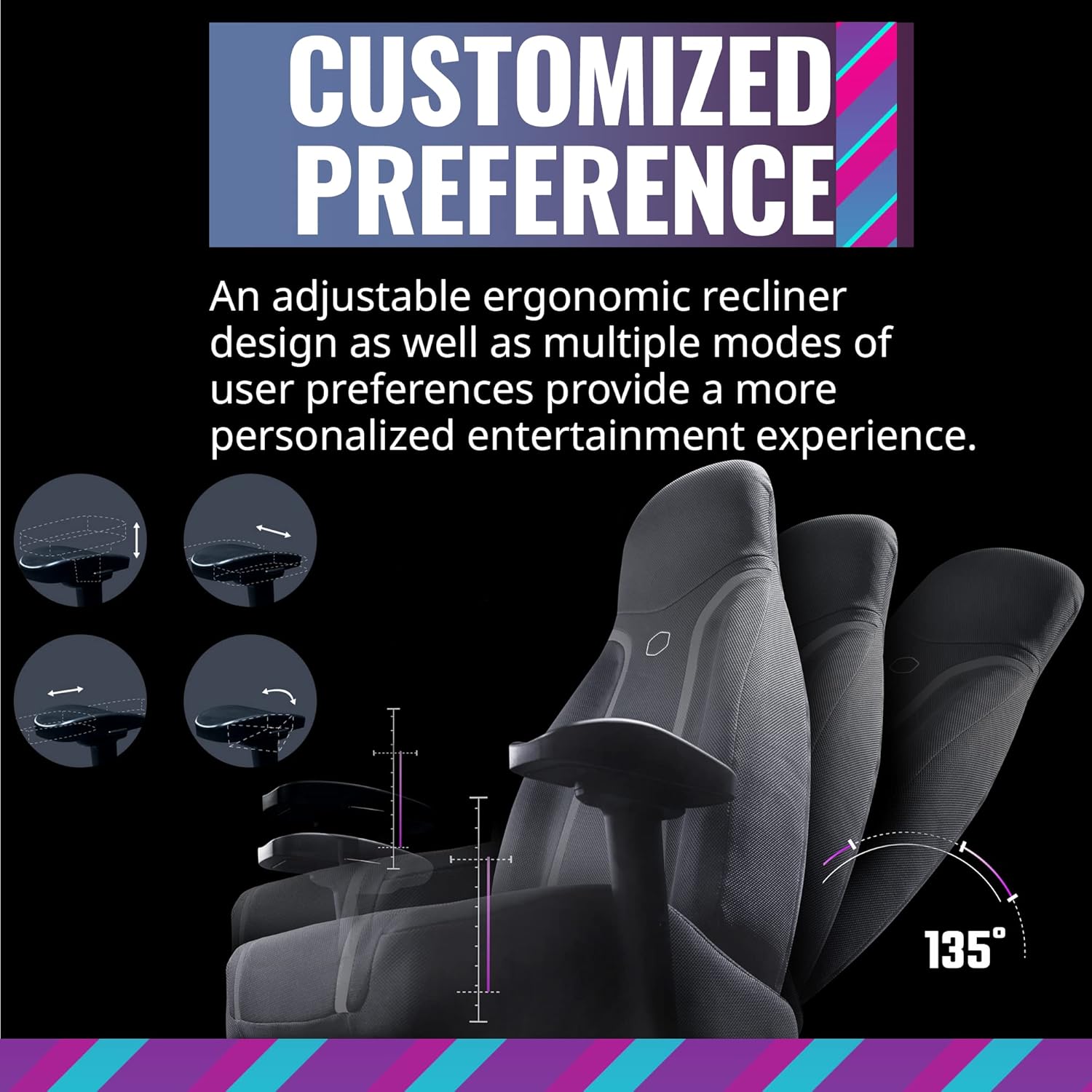
Figure 5.3: Ergonomic adjustments including recline and leg rest.
6. Konserwacja
Proper care will extend the life of your Synk X chair:
- Czyszczenie: Wyczyść za pomocą reklamyamp płótno. Nie używaj żrących chemikaliów ani materiałów ściernych.
- Wycieki: W przypadku rozlania natychmiast wytrzyj zabrudzenie czystą, suchą szmatką.
- Przesuwanie krzesła: Przesuwając krzesło, podnoś je, a nie ciągnij, aby zapobiec uszkodzeniu podstawy i podłogi.
- Składowanie: Store the chair in a cool, dry place away from direct sunlight and extreme temperatures.
7. Rozwiązywanie Problemów
If you encounter issues with your Synk X chair, refer to the following common problems and solutions:
| Problem | Możliwa przyczyna | Rozwiązanie |
|---|---|---|
| No power/Chair not turning on | Bateria jest rozładowana; Zasilacz nie jest podłączony; Przycisk zasilania nie jest naciśnięty. | Connect the power adapter and charge the chair. Ensure the power button is pressed firmly. |
| No tactile feedback/vibration | Vibration level set too low; Audio source not connected or playing; Cables are loose. | Increase the vibration level using the knob. Verify the audio source is connected and playing. Check all internal cable connections. |
| Problemy z parowaniem Bluetooth | Chair not in pairing mode; Device too far; Interference. | Press the pairing button on the control panel. Ensure your device is within range. Reduce interference from other wireless devices. |
| Nie działa oświetlenie RGB | Lighting off; Cable connection loose. | Press the ARGB button to cycle through modes. Check the RGB cable connection. |
| Krzesło wydaje się niestabilne lub chwiejne | Luźne śruby; nierówna podłoga. | Sprawdź i dokręć wszystkie śruby montażowe. Upewnij się, że krzesło stoi na płaskiej, równej powierzchni. |
8. Specyfikacje
- Marka: Mistrz chłodnicy
- Nazwa modelu: Synek X
- Numer modelu przedmiotu: IXC-SX1-I-US1
- Kolor: Księżycowy Szary
- Tworzywo: Poliwęglan
- Waga przedmiotu: 80.8 funtów (36.74 kg)
- Wymiary produktu (DxSxW): 22 x 26.25 x 37 cala
- Maksymalna zalecana waga: 275 funtów (125 kg)
- Styl pleców: Otwarte plecy
- Dodatek specjalny: Ergonomic, Rolling, Tactile Immersion
- Zalecane zastosowanie: Hazard
- Liczba pozycji leżących: More than one (up to 135 degrees)
- Łączność: Bluetooth, AUX, 5.8G (with optional transceiver)
- Czas pracy baterii: Approximately 4 hours on a full charge
- Czas ładowania: Około 6 godzin
9. Gwarancja i pomoc techniczna
For warranty information and customer support, please refer to the official Cooler Master webOdwiedź witrynę lub skontaktuj się z działem obsługi klienta. Zachowaj paragon jako dowód zakupu na wypadek reklamacji.
Wsparcie online: Visit the Cooler Master support page for FAQs, drivers, and contact options.
Informacje kontaktowe: Refer to the Cooler Master webstrona zawierająca dane kontaktowe dotyczące regionu.