
UNITOPSCI A3197A4
UNITOPSCI 2G+64G 9 Inch Double Din Android Car Stereo
Instrukcja obsługi
1. Wprowadzenie
Thank you for choosing the UNITOPSCI 2G+64G 9 Inch Double Din Android Car Stereo. This advanced head unit is designed to enhance your driving experience with its comprehensive features, including a 9-inch capacitive touch screen, Android 13 operating system, wireless Apple CarPlay, Android Auto, Bluetooth, GPS navigation, mirror link, WiFi, FM radio, USB connectivity, steering wheel control (SWC), and DVR support. This manual provides detailed instructions for installation, operation, maintenance, and troubleshooting to ensure optimal performance and longevity of your device.

Image: The UNITOPSCI 9-inch Android Car Stereo, showcasing its user interface with navigation, music playback, and system settings.
2. Co znajduje się w pudełku
Please verify that all components are present in the package before proceeding with installation.
- 1 x samochodowe stereo z Androidem
- 1 x kamera cofania
- 1 x antena GPS
- 1 x kabel wejściowy kamery tylnej
- Kabel 1 x RCA
- 1 x kabel zasilający
- 1 x kabel USB
- 2 x Metal Frame
- 1 x Instrukcja obsługi
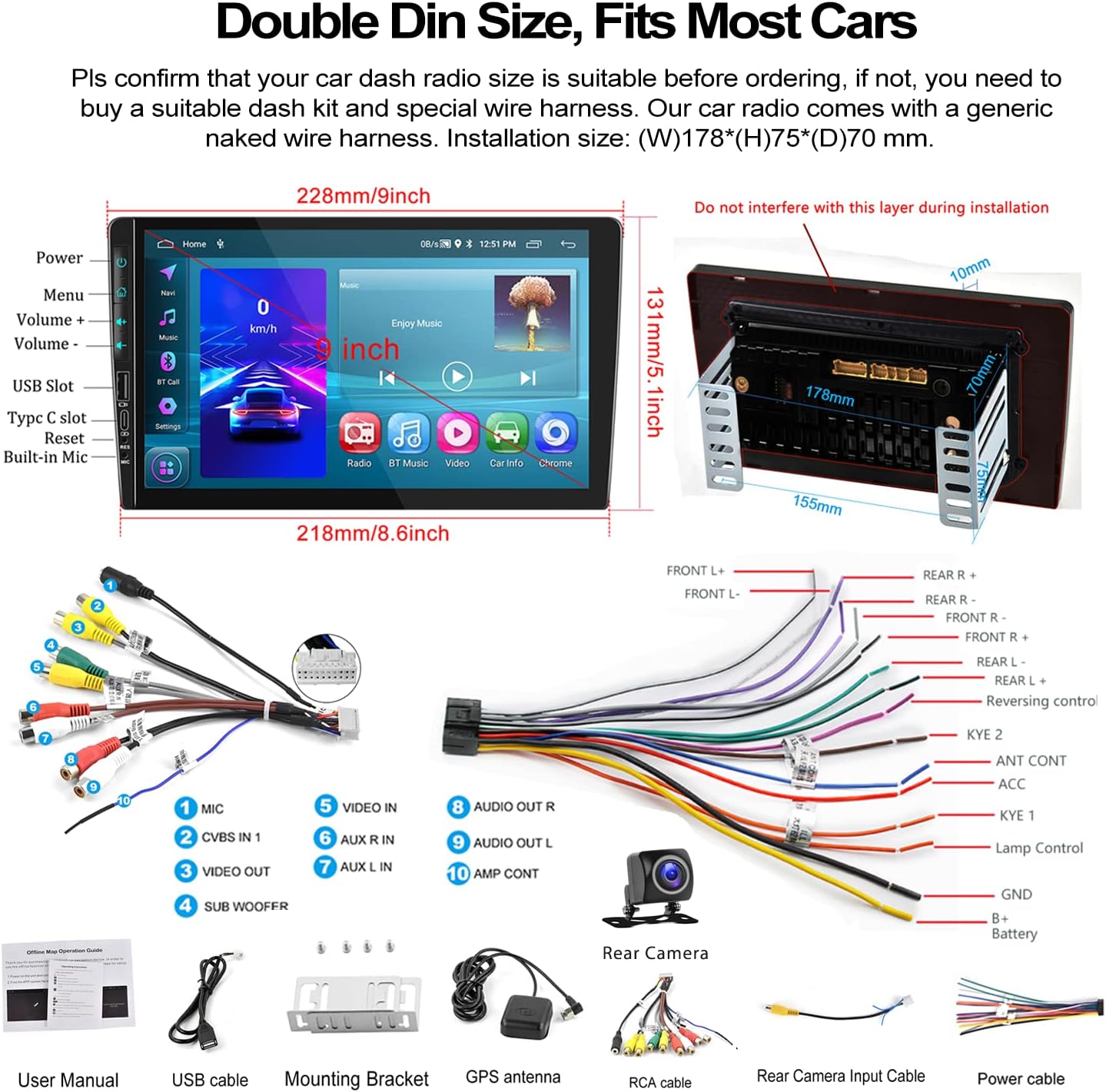
Image: A visual representation of the car stereo's dimensions, along with all the cables and accessories included in the package, such as the power cable, RCA cables, USB cable, GPS antenna, and backup camera.
3. Specyfikacje
| Funkcja | Opis |
|---|---|
| System | Android 13 |
| BARAN | 2 GB |
| ROM | 64 GB |
| Rozmiar ekranu | 9 cali |
| Rozdzielczość ekranu | 1024x600 |
| Moc Ampukład scalony | 7388 |
| Układ radiowy | 8035 |
| Moc wyjściowa | 4*45W |
| Wersja Bluetooth | 4.2 |
| Pasmo częstotliwości radiowej | UKF/RDS |
| Temperatura pracy | -40℃ do 80℃ |
| Rozmiar instalacji | 7 inch (W), 3.8 inch (H) / 178mm (W) x 97mm (H) |
| Wymiary produktu | 1.85 x 7 x 4.02 cala |
| Waga przedmiotu | 2.29 funta |
4. Konfiguracja i instalacja
Proper installation is crucial for the performance and safety of your car stereo. It is recommended to have the installation performed by a professional if you are unsure about any steps.
4.1 Kontrola przed instalacją
- Ensure your car's dashboard opening is compatible with the standard double din size (approximately 7 inches wide by 3.8 inches high).
- Disconnect the car battery's negative terminal before starting any wiring.
- Familiarize yourself with the wiring harness provided.
4.2 połączeń przewodów
Refer to the wiring diagram provided in the 'What's in the Box' section and the specific rear view wiring diagram below for detailed connections.
- Przewód zasilający: Connect the power cable to your car's power supply according to the diagram.
- Kable RCA: Connect audio and video input/output cables as needed for external devices (e.g., amplifiers, headrest monitors).
- Kable USB: Connect the dual USB interfaces for media playback, charging, or wired Android Auto.
- Antena GPS: Zamontuj antenę GPS w miejscu z wolnym dostępem view nieba w celu optymalnego odbioru sygnału.
- Kabel wejściowy kamery tylnej: This cable is essential for the backup camera functionality.
4.3 Okablowanie kamery cofania
Do prawidłowego działania dołączona kamera cofania AHD wymaga specjalnego okablowania:
- Moc aparatu: The red wire of the backup camera connects to the positive (+) back battery supply (e.g., reverse light power). The black wire connects to the negative (-) battery supply (ground).
- Wejście wideo: The yellow RCA video output from the backup camera connects to the "CAM IN" port on the rear of the car radio.
- Przewód spustowy: Locate the wire labeled "BACK" or "REVERSE" on the car radio's wire harness. This wire needs to be connected to the positive power supply of your car's reversing light. This signal tells the head unit to automatically switch to the reversing image when reverse gear is engaged.

Image: A comprehensive wiring diagram for the backup camera, showing how to connect the camera's power, video signal, and the trigger wire to the car stereo and vehicle's reverse light system.
5. Instrukcja obsługi
This section details the various functions and how to operate your UNITOPSCI car stereo.
5.1 Bezprzewodowy Apple CarPlay i Android Auto
Connect your smartphone for seamless integration of navigation, music, calls, and more.
- Połączenie bezprzewodowe: For both Apple CarPlay and Android Auto, connect your phone via Bluetooth and/or WiFi. Follow the on-screen prompts to establish the connection.
- Połączenie przewodowe: Alternatively, connect your Android phone via a USB data cable for wired Android Auto.
- Sterowanie głosowe: Utilize Siri (for CarPlay) or Google Assistant (for Android Auto) for hands-free operation of functions like navigation, calls, and music.
- Notatka: The Android Auto function may not work for some Samsung phones. CarPlay supports iOS phones up to version 15.4.

Image: Displays of the car stereo showing Wireless Apple CarPlay, Wireless Android Auto, and Mirror Link in action, highlighting their respective interfaces and connection methods.
5.2 Łącze lustrzane
Mirror Link pozwala na wyświetlanie ekranu smartfona bezpośrednio na wyświetlaczu radia samochodowego.
- Android/iOS Compatibility: Supports screen mirroring for both Android and iOS devices.
- Połączenie: Connect your phone via USB or WiFi as per the instructions on the stereo.

Image: The car stereo screen mirroring a smartphone, demonstrating the Mirror Link feature.
5.3 Bluetooth Hands-Free & FM Radio
Enjoy safe communication and your favorite radio stations.
- Parowanie Bluetooth: Enable Bluetooth on your phone and search for the car stereo. Pair the devices to enable hands-free calling and wireless audio streaming.
- Książka telefoniczna: The stereo supports automatic download of your phone book for easy access to contacts.
- Radio FM: Tune into your favorite FM stations. The radio features 18 preset stations for quick access to news, sports, and music.

Image: The car stereo's display showing the Bluetooth hands-free calling interface, FM radio tuner, and options for Bluetooth music and phone book access.
5.4 Nawigacja GPS i Wi-Fi
Navigate with ease and stay connected.
- Mapy offline: The unit comes with built-in offline maps (HERE WE GO). Switch on WiFi to download map data for your region.
- Mapy online: Supports various online navigation apps for real-time traffic and updates.
- Łączność WiFi: Connect to a WiFi hotspot (e.g., from your phone) to access online features, download apps, and browse the internet.
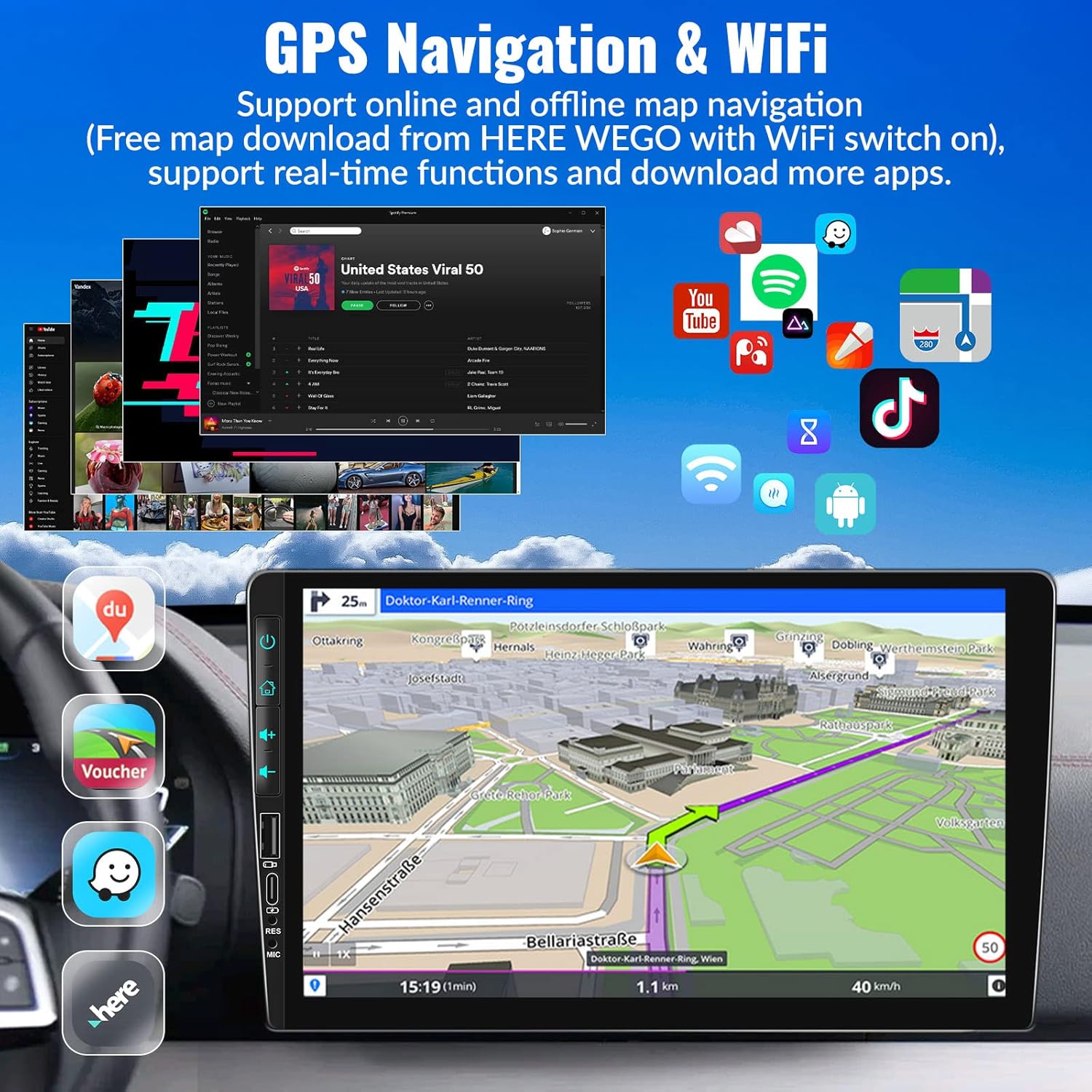
Image: The car stereo's screen showing a GPS navigation map, with various app icons floating around, illustrating the device's WiFi and app capabilities.
5.5 Sterowanie z kierownicy (SWC)
Control your stereo without taking your hands off the wheel.
- Organizować coś: Access the Steering Wheel Control settings in the system menu. Follow the on-screen instructions to map your car's steering wheel buttons to the stereo's functions (e.g., volume up/down, track skip, mode).
- Wygoda: Easily switch songs, radio channels, and adjust volume for a safer driving experience.
5.6 Ustawienia dźwięku EQ
Dostosuj swoje wrażenia dźwiękowe.
- Ustawienia wstępne: Choose from various preset EQ modes such as Pop, Classic, Rock, Jazz, and more.
- Personalizacja: Adjust individual frequency bands to create your preferred sound profile.

Image: The car stereo screen showing the AHD rear view camera display with parking lines, and a separate image illustrating the steering wheel control setup interface.
5.7 AHD Rear View Kamera
Enhance parking safety with the included backup camera.
- Automatyczny przełącznik: When properly wired, the stereo will automatically switch to the reversing image on the 9-inch touch screen when you engage reverse gear.
- Cechy: The camera provides HD image quality, is waterproof, offers night vision, and has a wide-angle view.
5.8 HD Screen & UI Themes
Personalize your stereo's appearance.
- Wyświetlacz: The 1024x600 capacitive touch screen features 2.5D glass and supports HD 1080p video playback.
- Motywy interfejsu użytkownika: Choose from 28 different UI themes to customize the look and feel of your car stereo's interface.

Image: The car stereo's HD screen displaying a vibrant image, alongside a selection of 28 different desktop UI themes for personalization.
5.9 Kolorowe światła
Customize the button illumination.
- Opcje: There are 7 options for button light colors, allowing you to match your car's interior lighting or your personal preference.

Image: The car stereo showcasing its customizable colorful button lights, with a spectrum of 7 color options.
6. Konserwacja
Aby zapewnić długą żywotność i optymalną pracę radia samochodowego, należy przestrzegać poniższych wskazówek dotyczących konserwacji:
- Czyszczenie ekranu: Delikatnie przetrzyj ekran dotykowy miękką, niepozostawiającą włókien ściereczką. W przypadku uporczywych plam delikatnie przetrzyj.ampPrzetrzyj ściereczkę wodą lub środkiem do czyszczenia ekranów. Unikaj materiałów ściernych i silnych środków chemicznych.
- Ogólne sprzątanie: Keep the unit free from dust and debris. Use a soft brush or compressed air to clean vents and button crevices.
- Kontrola temperatury: Unikaj wystawiania urządzenia na działanie ekstremalnych temperatur (bardzo wysokich lub bardzo niskich) przez dłuższy czas, ponieważ może to wpłynąć na wydajność i żywotność urządzenia.
- Aktualizacje oprogramowania: Periodically check for software updates from UNITOPSCI to ensure you have the latest features and bug fixes.
- Połączenia kablowe: Upewnij się, że wszystkie kable są solidnie podłączone. Luźne połączenia mogą powodować sporadyczne problemy.
7. Rozwiązywanie Problemów
Jeśli napotkasz jakiekolwiek problemy z radiem samochodowym, zapoznaj się z poniższymi, często występującymi problemami i ich rozwiązaniami:
| Problem | Możliwa przyczyna i rozwiązanie |
|---|---|
| Brak zasilania / Urządzenie nie włącza się |
|
| Brak wyjścia dźwięku |
|
| Backup Camera Not Displaying Image |
|
| Wireless CarPlay/Android Auto Not Connecting or Laggy |
|
| Sterowanie na kierownicy nie działa |
|
| Touch Screen Unresponsive or Malfunctioning |
|
Jeśli po wypróbowaniu tych rozwiązań problem nadal występuje, skontaktuj się z obsługą klienta w celu uzyskania dalszej pomocy.
8. Gwarancja i wsparcie
UNITOPSCI is committed to providing high-quality products and satisfactory services.
- Gwarancja: Produkt objęty jest 1-letnią gwarancją liczoną od daty zakupu.
- Usługa wymiany: Enjoy a 12-month replacement service for eligible issues.
- Gwarancja zwrotu pieniędzy: Oferowana jest 30-dniowa gwarancja zwrotu pieniędzy.
- Wsparcie dożywotnie: UNITOPSCI provides full-life product support, including after-sales consultation and technical assistance.
- Skontaktuj się z pomocą techniczną: For any product problems or inquiries, please feel free to write to us at UNITOPSCI@126.com. Our team aims for a quick response within 16 hours.

Image: Visual representation of UNITOPSCI's customer support services, including contact information.
Ask a question about this manual
Ask about setup, troubleshooting, compatibility, parts, safety, or missing instructions. Manuals+ will review the question and use this page’s manual context to help answer it.