
Wstęp
This manual provides detailed instructions for the proper setup, operation, and maintenance of your Sensyne 12-inch Ring Light with 50-inch Extendable Tripod Stand. Please read this manual thoroughly before using the product to ensure optimal performance and safety. This ring light kit is designed for content creators, offering adjustable lighting for various applications such as live streaming, makeup tutorials, YouTube videos, and TikTok content.
Co jest w pudełku
- 1 x 12-calowa lampa pierścieniowa
- 1 x Tripod Stand (50-inch Extendable)
- 1 x Phone Holder (360-degree rotatable)
- 1 x bezprzewodowy pilot zdalnego sterowania
- Kabel zasilający 1 x USB
- 1 x torba transportowa
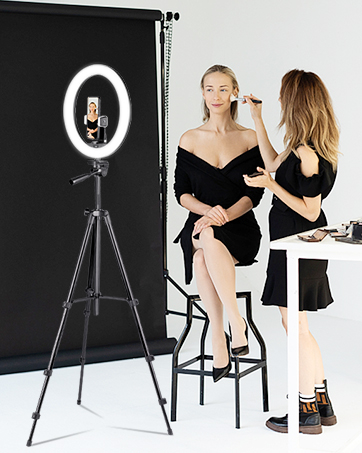
Image: All components included in the Sensyne 12-inch Ring Light package.
Instrukcje konfiguracji
- Złóż statyw:
Unfold the tripod legs and extend them to your desired height. The tripod features easily adjustable leg height, allowing for quick setup. Secure the legs using the locking mechanisms. The tripod can extend up to 50 inches. - Zamontuj lampę pierścieniową:
Locate the 1/4" screw on top of the tripod stand. Align the ring light's mounting hole with the screw and rotate clockwise until securely fastened. - Zainstaluj uchwyt telefonu:
The 360-degree rotatable phone holder can be attached to the center of the ring light. Secure it firmly. This holder is compatible with almost all cell phones. - Podłącz zasilanie:
Insert the USB power cable into the ring light's power port. Connect the other end of the USB cable to a power source that provides at least 5V 2A (10W or higher) for optimal performance. Compatible devices include laptops, PCs, power banks, USB chargers, and AC adapters. - Sparuj bezprzewodowy pilot zdalnego sterowania:
Turn on the remote control. On your phone, enable Bluetooth and search for the remote (e.g., "AB Shutter3"). Pair the devices. The remote is compatible with both iOS and Android phones.

Image: Diagram illustrating the dimensions of the 12-inch ring light and the 50-inch extendable tripod stand.

Obraz: Zbliżenie view of the ring light demonstrating its rotatable design and the extendable phone holder.
Instrukcja obsługi
- Włączanie/wyłączanie:
Use the inline control on the USB power cord to power the ring light on or off. - Dostosuj jasność:
The ring light offers 10 adjustable brightness levels. Use the '+' and '-' buttons on the inline control to increase or decrease the light intensity. - Zmień temperaturę barwową:
Select from 3 color temperatures: Warm Light (3000K), Daylight (4500K), and Cool White (6000K). Use the mode button on the inline control to cycle through these options. - Korzystanie z pilota bezprzewodowego:
Once paired, use the wireless remote control to remotely trigger your phone's camera for photos or videos, allowing for hands-free operation. - Adjusting Ring Light and Phone Holder Angle:
The ring light and phone holder can be adjusted vertically and horizontally to achieve the perfect shooting angle. The tripod's 3-way pan head and built-in bubble level assist in precise positioning.

Image: Visual representation of the three color temperature modes (Warm, Daylight, Cool White) and the range of 10 brightness levels.

Image: Close-up of the inline USB control with buttons for power on/off, brightness adjustment, and color mode switching.
Konserwacja
- Czyszczenie: Use a soft, dry cloth to clean the ring light and tripod. Avoid using abrasive cleaners or solvents.
- Składowanie: When not in use, store the ring light kit in its provided carry bag to protect it from dust and damage.
- Pielęgnacja kabli: Ensure the USB power cable is not bent sharply or tangled to prevent internal damage.
Rozwiązywanie problemów
- Light not turning on, dim, or flickering: Ensure the power source provides at least 5V 2A (10W or higher). Insufficient power is a common cause for these issues.
- Phone holder feels wobbly: Double-check that all screws and adjustment knobs on the phone holder and tripod head are securely tightened.
- Pilot zdalnego sterowania nie łączy się: Ensure Bluetooth is enabled on your phone and the remote is powered on. Try re-pairing the remote if issues persist.
Specyfikacje
| Funkcja | Szczegół |
|---|---|
| Marka | SENSYNA |
| Technologia łączności | Bluetooth, USB |
| Interfejs sprzętowy | USB |
| Wymiary produktu | 12" dł. x 12" szer. x 50" wys. |
| UPC | 762704433873 |
| Opis trybów lampy błyskowej | Regulowana temperatura barwowa i jasność |
| Poziom wodoodporności | Nie jest wodoodporny |
| Kompatybilne urządzenia | Phones, Cameras, Webcams, Laptops, PCs, Power Banks, USB Chargers |
| Kolor | Natura |
| Rozmiar ekranu | 12 cali |
| Model Number (Remote) | Migawka AB3 |
| Manufacturer Part Number (Product) | 12in with tripod |
Gwarancja i wsparcie
Sensyne provides high-quality after-sales service within 12 months of purchase. If you have any questions or require support, please contact Sensyne customer service.