
1. Wprowadzenie
Thank you for choosing the HDWR wagPRO-P500 Platform Scale. This manual provides essential information for the safe and efficient operation, setup, and maintenance of your new scale. Please read this manual thoroughly before use and keep it for future reference.
The HDWR wagPRO-P500 is a robust platform scale designed for precise weighing of larger items in industrial, warehouse, agricultural, and logistics environments. It features a high capacity, accurate measurements, and a user-friendly interface.
2. Funkcje produktu
- Platforma: The scale features a spacious 60 x 45 cm platform for easy placement of goods, equipped with special tabs to prevent accidental slipping.
- Precyzyjny pomiar: Offers precise measurement for items weighing from 200 grams up to a maximum capacity of 500 kg, with an accuracy of 0.2 kg.
- Przyjazny dla użytkownika interfejs: Features three easy-to-read, green backlit LCD digital displays showing product weight and unit price.
- Funkcje dodatkowe: Includes useful functions such as Tare, unit price input, and totalization.
- Zasilanie: An integrated 4 Ah battery provides wireless operation for approximately 150 hours.

Image: Key features of the HDWR wagPRO-P500 scale, including display, hold function, unit conversion, accuracy, tare, and battery power.

Image: Details on measurement accuracy, charging process, the robust platform, and the clear display of the scale.
3. Instrukcje konfiguracji
- Rozpakowywanie: Carefully remove all components from the packaging. Verify that all parts are present: platform, display unit, support column, power adapter, and user manual.
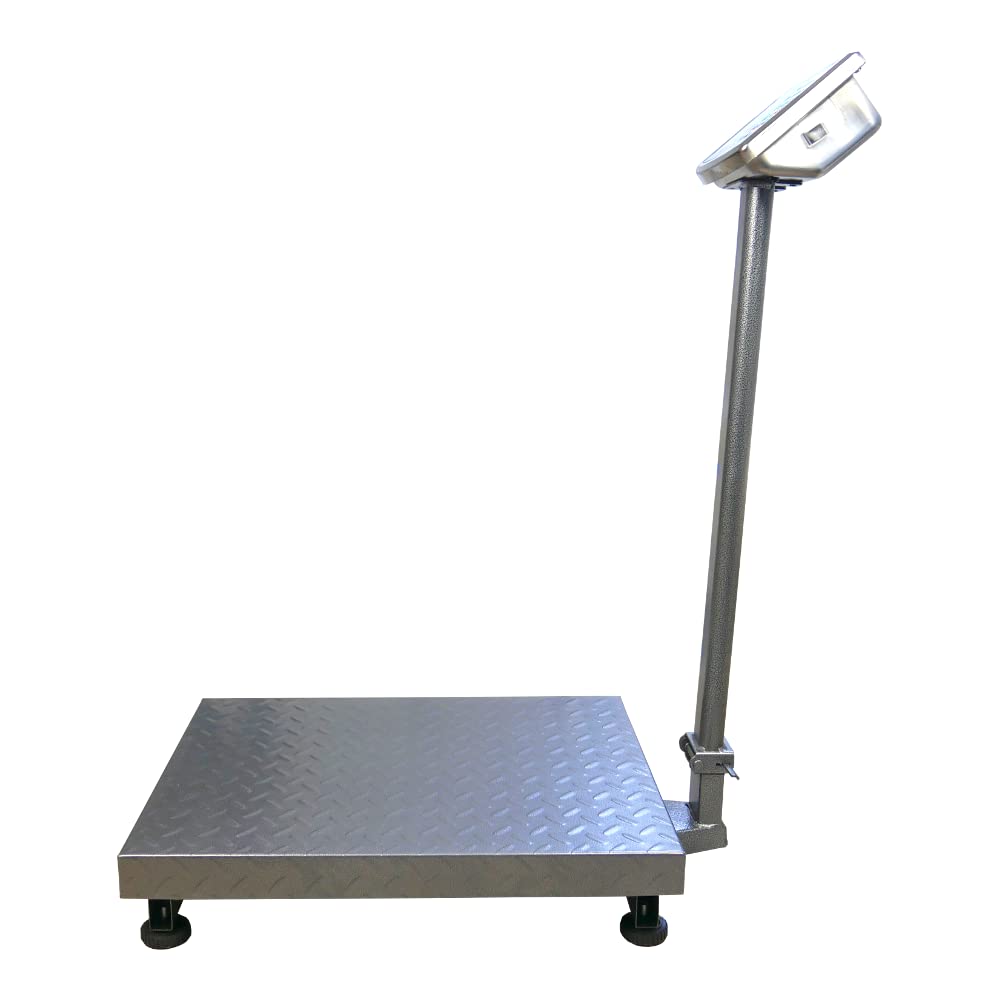
- Assemble the Support Column: Attach the display support column to the platform base. Ensure it is securely fastened using the provided hardware.
- Attach the Display Unit: Mount the display unit onto the top of the support column. Connect the cable from the platform to the display unit.
- Umieszczenie: Place the scale on a firm, level, and stable surface to ensure accurate readings. Avoid areas with excessive vibration, drafts, or extreme temperature changes.
- Początkowe ładowanie: Connect the scale to a power outlet using the supplied mains adapter. Allow the internal battery to fully charge before the first wireless use. The charging indicator on the display will show the charging status.

Image: An assembled HDWR wagPRO-P500 platform scale, ready for use.
4. Instrukcja obsługi
4.1 Włączanie/wyłączanie zasilania
- Aby włączyć wagę, naciśnij przycisk [WŁ./WYŁ.] przycisk.
- To power off the scale, press and hold the [WŁ./WYŁ.] przycisk, aż wyświetlacz się wyłączy.
4.2 Podstawowe ważenie
- Sprawdź, czy waga jest włączona, a wyświetlacz wskazuje „0.00”.
- Carefully place the item to be weighed onto the center of the platform.
- Odczytaj wagę wyświetlaną na ekranie.
4.3 Funkcja tary
Funkcja tarowania umożliwia odjęcie ciężaru pojemnika lub opakowania, dzięki czemu mierzona jest tylko waga netto zawartości.
- Place the empty container onto the platform. The display will show its weight.
- Naciśnij [TARA] przycisk. Wyświetlacz zresetuje się do „0.00”.
- Umieść przedmioty do zważenia w pojemniku. Na wyświetlaczu będzie teraz wyświetlana tylko waga przedmiotów.
- To clear the tare, remove the container and items, then press [TARA] Ponownie.
4.4 Konwersja jednostek
The scale supports measurement in kilograms (kg) and pounds (lb).
- Aby przełączać się między jednostkami, naciśnij [JEDNOSTKI] button (or similar button as indicated on your display). The active unit will be shown on the display.
4.5 Price Calculation (if applicable)
If your model supports price calculation, follow these steps:
- Umieść przedmiot na platformie.
- Using the numeric keypad, enter the unit price.
- The total price will be displayed automatically.
Obraz: szczegółowy view of the scale's green backlit LCD display and control keypad, showing weight, unit price, and total price fields.
5. Konserwacja
5.1 Czyszczenie
- Przed czyszczeniem należy zawsze odłączyć wagę od zasilania.
- Wipe the platform and display unit with a soft, damp płótno. W razie potrzeby użyj łagodnego detergentu.
- Do not use abrasive cleaners, solvents, or immerse any part of the scale in water.
- Ensure no liquid enters the display unit or internal components.
5.2 Pielęgnacja baterii
- Naładuj baterię, gdy na wyświetlaczu pojawi się wskaźnik niskiego poziomu naładowania baterii.
- Aby zapewnić optymalną żywotność baterii, należy unikać częstego całkowitego rozładowywania baterii.
- If the scale is not used for an extended period, charge the battery every 3 months to prevent deep discharge.
5.3 Przechowywanie
- Store the scale in a dry, clean environment, away from direct sunlight and extreme temperatures.
- Podczas przechowywania należy unikać umieszczania ciężkich przedmiotów na platformie.

Obraz: Zbliżenie view of the durable, textured metal platform, designed for secure placement of items.
6. Rozwiązywanie Problemów
| Problem | Możliwa przyczyna | Rozwiązanie |
|---|---|---|
| Waga nie włącza się. | Akumulator jest rozładowany lub zasilacz nie jest podłączony. | Connect the power adapter and charge the battery. Ensure the power outlet is functional. |
| Niedokładne odczyty. | Scale not on a level surface, external vibrations, or overload. | Place the scale on a stable, level surface. Remove any sources of vibration. Do not exceed the maximum weight capacity. |
| Display shows 'Err' or similar error. | Overload, internal error, or unstable reading. | Remove the load from the platform. Power off and restart the scale. If the error persists, contact customer support. |
| Wyświetlacz jest przyciemniony lub migocze. | Niski poziom naładowania baterii. | Recharge the battery using the provided power adapter. |
7. Specyfikacje
- Model: wagPRO-P500
- Marka: HDWR
- Wymiary (dł. x szer. x wys.): Wymiary 75 x 45 x 88 cm
- Wymiary platformy: Wymiary: 60x45 cm
- Waga: 11.6 kilogramów
- Maksymalny udźwig: 500 kilogramów
- Dokładność odczytu: 200 gramów (0.2 kg)
- Dokładność pomiaru: +/- 0.2%
- Tworzywo: Metal
- Typ wyświetlacza: LCD z zielonym podświetleniem
- Bateria: Integrated 4 Ah (approx. 150 hours wireless operation)
- Cechy szczególne: Backlit display, high load capacity, tare function, large display, portable.
- Zalecane zastosowanie: Industry, agriculture, logistics, wholesale.

Image: Dimensions of the wagPRO-P500 platform scale, illustrating its robust design and size.
8. Gwarancja i wsparcie
This product is supplied with a user manual. For information regarding warranty coverage, please refer to the documentation provided at the time of purchase or contact your retailer.
For technical support, service, or inquiries about spare parts, please contact HDWR customer service through their official website or the contact information provided with your purchase. Please have your model number (wagPRO-P500) and purchase date ready when contacting support.