
KKmoon KKM828
KKmoon KKM828 2-in-1 Digital Multimeter with Oscilloscope User Manual
Model: KKM828
1. Wprowadzenie
The KKmoon KKM828 is a versatile 2-in-1 device combining the functionalities of a digital multimeter and an oscilloscope. Designed for efficiency and accuracy, it features a 2.4-inch color display, a 1MHz bandwidth for AC voltage, and a 2.5Msps real-time sampling rate. This manual provides essential information for safe and effective operation of your KKM828 device.
2. Informacje dotyczące bezpieczeństwa
Please read and understand all safety instructions before using the device. Failure to follow these instructions may result in electric shock, fire, or damage to the device or other equipment.
- Always ensure the device is in good working condition and free from damage before use.
- Nie stosować objętościtage or current that exceeds the maximum limits specified in the technical specifications.
- Zachowaj ostrożność podczas pracy z objętościątages above 24V, as they pose a shock hazard. The device will emit an audible warning if the input voltage przekracza 24V.
- Przed dokonaniem pomiarów należy upewnić się, że wybrano właściwą funkcję i zakres.
- Aby zapewnić dokładne odczyty, należy niezwłocznie wymienić baterie, gdy tylko pojawi się wskaźnik niskiego poziomu naładowania.
- The device is equipped with double fuses (500mA/250V and 10A/250V) for protection. Do not bypass or use incorrect fuse types.
- Nie należy używać urządzenia w wilgotnym otoczeniu ani w atmosferze zagrożonej wybuchem.
- Refer to the "Maintenance" section for proper cleaning and storage procedures.
3. Koniec produktuview
The KKmoon KKM828 integrates a digital multimeter and an oscilloscope into a compact, handheld unit. Key components and features are detailed below.
3.1 Główne cechy
- Funkcjonalność 2 w 1: Combines a digital multimeter and an oscilloscope.
- Wyświetlacz: 2.4-inch 320x240 LCM color screen for clear readings and waveform display.
- Oscilloscope Performance: 1MHz ACV bandwidth, 2.5Msps real-time sampstawka lingwistyczna.
- Funkcje multimetru: Mierzy objętość AC/DCtagnp. prąd przemienny/stały, rezystancja, pojemność, częstotliwość, współczynnik wypełnienia, dioda i ciągłość.
- Przechowywanie danych: Stores up to 100 sets of data and 10 waveforms.
- Interfejs użytkownika: Silicone buttons and a pressure-sensitive dial for precise function selection.
- Ergonomia: Integrated back bracket for a 60° viewkąt.
- Bezpieczeństwo: Double fuse protection (500mA/250V, 10A/250V) and input voltagostrzeżenie.
3.2 Komponenty urządzenia
Aby uzyskać więcej informacji, zobacz poniższy obrazekview of the device's main components.

Figure 1: KKM828 Product Details. This image highlights the device's HD color screen (01), the function dial for accurate gear changes (02), and the back bracket (03) for easy viewing.
- Ekran HD: 2.4-inch color screen for clear display of measurements and waveforms.
- Pokrętło funkcji: Rotary switch for selecting measurement functions (voltage, current, resistance, etc.) and oscilloscope mode.
- Buttons (F1-F4, R, S): Used for navigating menus, selecting ranges, holding data, and other specific functions.
- Gniazda wejściowe: Terminals for connecting test leads for various measurements (e.g., VΩHz, mA, 10A, COM).
- Wspornik tylny: Foldable stand for propping up the device at a 60° angle for convenient viewing.
4. Konfiguracja
4.1 Instalacja baterii
The KKM828 requires three AA batteries for operation. Ensure the device is powered off before installing or replacing batteries.
- Znajdź pokrywę komory baterii z tyłu urządzenia.
- Open the battery compartment cover by sliding or unscrewing it (if applicable).
- Insert three AA batteries, observing the correct polarity (+ and -) as indicated inside the compartment.
- Dokładnie zamknij pokrywę komory baterii.
4.2 Włączanie/wyłączanie
To power on the device, rotate the function dial from the "OFF" position to any desired measurement function. To power off, rotate the dial back to the "OFF" position.
5. Instrukcja obsługi
5.1 Funkcje multimetru
The KKM828 offers a comprehensive range of multimeter measurement capabilities. Always connect test leads correctly to the appropriate input jacks (e.g., COM, VΩHz, mA, 10A) for the selected function.
- AC/DC Objętośćtage Pomiar: Rotate the dial to the 'V~' or 'V=' position. Connect test leads in parallel with the circuit.
- Pomiar prądu AC/DC: Rotate the dial to the 'mA~', 'mA=', '10A~', or '10A=' position. Connect test leads in series with the circuit.
- Pomiar rezystancji: Rotate the dial to the 'Ω' position. Ensure the circuit is de-energized before measuring resistance.
- Pomiar pojemności: Rotate the dial to the 'mF' position. Discharge capacitors before measurement.
- Pomiar częstotliwości i współczynnika wypełnienia: Rotate the dial to the 'Hz%' position.
- Test diody: Rotate the dial to the 'Diode' position. Connect leads across the diode to check forward voltagkropla.
- Test ciągłości: Rotate the dial to the 'Continuity' position. The device will beep if resistance is below approximately 50Ω.

Rysunek 2: Pomiar multimetremamples. This image illustrates the display during Frequency, Duty Cycle, Diode Test, and Continuity measurements, demonstrating the device's various multimeter functions.
5.2 Funkcje oscyloskopu
The KKM828 features a convenient one-button oscilloscope for waveform analysis.
- Rotate the function dial to the 'Graphical' (oscilloscope) mode.
- Connect the test leads to the circuit where you wish to observe the waveform.
- The device will automatically display the waveform. Use the secondary display at the bottom to view parameters such as Peak-to-Peak voltage (VP-P), average value, RMS value, frequency, time base, and amplitość.
- Measurement modes include 'Normal' and 'Automatic'. The device can quickly and accurately measure and display waveforms.
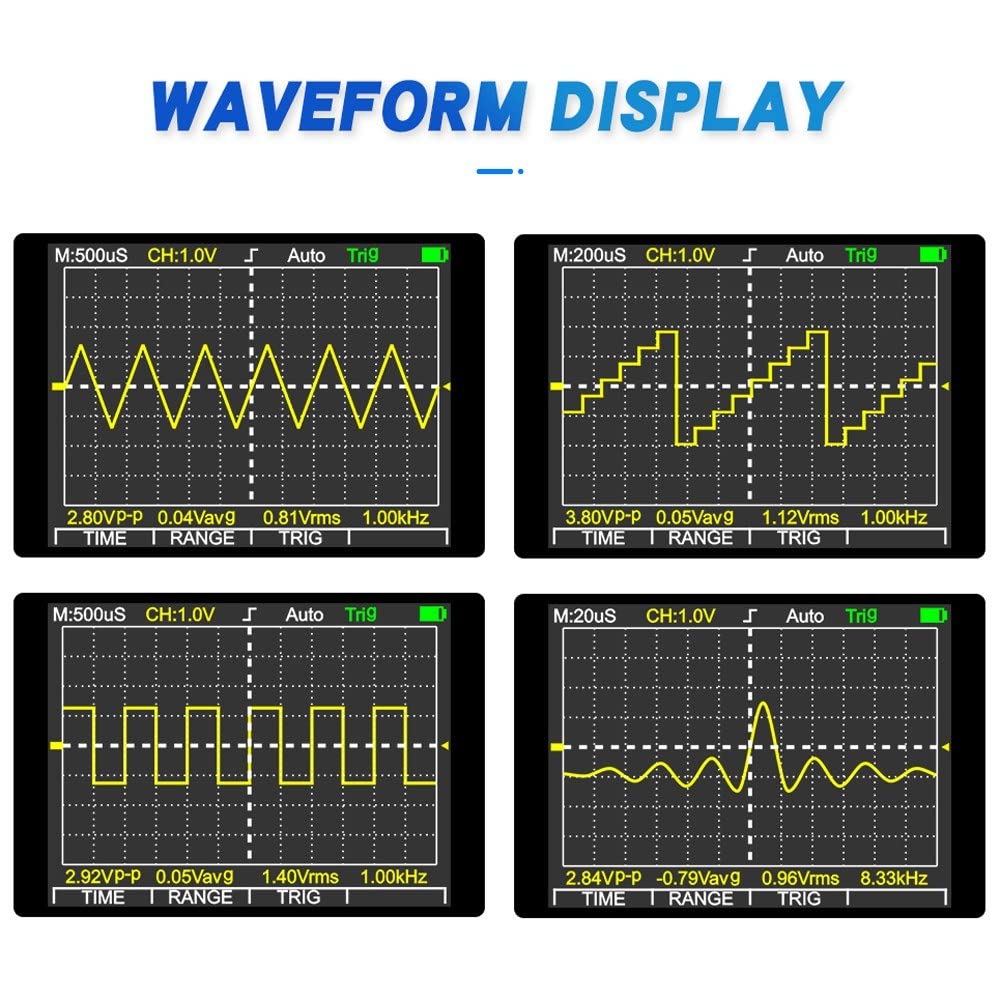
Figure 3: Oscilloscope Waveform Display. Na tym zdjęciu widać byłegoamples of different electrical waveforms (sine, square, pulse, complex) as displayed on the KKM828's oscilloscope screen, along with key measurement parameters.
5.3 Przechowywanie i przywracanie danych
The KKM828 can store up to 100 sets of measurement data and 10 waveforms for later review.
- Specific instructions for saving and recalling data are typically accessed via the function buttons (e.g., 'S' for Save, 'R' for Recall) in relevant measurement modes. Refer to the on-screen prompts for detailed operation.
- The device allows for simultaneous display of historical records and real-time data for easy comparison and analysis.
6. Konserwacja
6.1 Czyszczenie
To clean the device, wipe the casing z reklamąamp cloth and a mild detergent. Do not use abrasive cleaners or solvents. Ensure the device is powered off and disconnected from any circuits before cleaning. Do not allow moisture to enter the device.
6.2 Wymiana baterii
When the low battery indicator appears on the display, replace the three AA batteries as described in the "Battery Installation" section (4.1). Always use fresh batteries of the same type.
6.3 Przechowywanie
When not in use for extended periods, remove the batteries to prevent leakage. Store the device in a cool, dry place within the specified storage environment: -10°C to 60°C, with relative humidity less than 90% RH.
7. Rozwiązywanie Problemów
This section addresses common issues you might encounter with your KKM828 device.
| Problem | Możliwa przyczyna | Rozwiązanie |
|---|---|---|
| Urządzenie nie włącza się. | Rozładowane lub nieprawidłowo zainstalowane baterie. | Sprawdź biegunowość baterii i wymień je na nowe baterie AA. |
| Brak odczytu lub komunikat „OL” (Przeciążenie). | Incorrect range selected, open circuit, or input exceeds maximum limit. | Select appropriate range, check test lead connections, ensure circuit is closed. Verify input does not exceed specifications. |
| Niedokładne pomiary. | Low battery, incorrect connection, or environmental factors. | Replace batteries, re-check test lead connections, ensure operating environment is within specified range. |
| Oscilloscope waveform is unstable or absent. | Poor connection, signal too weak/strong, or incorrect mode. | Ensure secure test lead connection. Adjust amplitude or time base if available (though KKM828 is mostly auto-ranging). Verify signal source. |
| Urządzenie wydaje ciągły sygnał dźwiękowy. | Objętość wejściowatage exceeds 24V (safety warning). | Immediately disconnect the device from the circuit and verify the voltage level. Do not proceed if voltage jest za wysokie. |
8. Specyfikacje
The following table details the technical specifications of the KKmoon KKM828.
| Parametr | Wartość |
|---|---|
| Model | KKM828 |
| Wyświetlacz | 2.4-inch 320 x 240 LCM Color Screen |
| Rezystancja wejściowa | 10 MOhm |
| Typ baterii | 3 baterie AA (brak w zestawie) |
| Pobór mocy | Około. 80 mA |
| Operating Time (low brightness) | Około 5 godzin |
| Przechowywanie danych | 100 data sets / 10 waveforms |
| Środowisko operacyjne | 0 ~ 40 °C, <75% RH |
| Środowisko przechowywania | -10 ~ 60 °C, <90% RH |
| Bandwidth (ACV) | 1MHz |
| Bandwidth (ACA) | 5 kHz |
| Max. Real-time Sampling Oceń | 2.5 Msps |
| Multimeter Range (DC Voltage) | 400mV / 4V / 40V / 400V / 1000V (Accuracy: 0.75% rdg + 10dgt) |
| Multimeter Range (AC Voltage) | 400mV / 4V / 40V / 400V / 750V (Accuracy: 1.0% rdg + 10dgt) |
| Multimeter Range (DC Current) | 40mA / 400mA / 4A / 10A (Accuracy: 1.2% rdg + 10dgt) |
| Multimeter Range (AC Current) | 40mA / 400mA / 4A / 10A (Accuracy: 1.5% rdg + 10dgt) |
| Multimeter Range (Resistance) | 400.0 Ω ~ 40.00 MΩ (Accuracy: 1.0% rdg + 5dgt) |
| Multimeter Range (Capacitance) | 0.1nF ~ 100, 10.00mF (Accuracy: 2.0% rdg + 10dgt) |
| Multimeter Range (Frequency) | 5Hz ~ 10MHz (Accuracy: 1.0% rdg + 5dgt) |
| Multimeter Range (Duty Cycle) | 0.1 % ~ 99.9 % (Accuracy: 1.0% rdg + 5dgt) |
| Test Diody | Tomtage approx. 5V, Test current approx. 1.5mA |
| Test ciągłości | Brzęczyk wydaje dźwięk, jeśli rezystancja jest < 50Ω |
| Specyfikacje bezpieczników | 500mA / 250V, 10A / 250V |
| Wymiary | Wymiary: 160 x 83 x 32 mm |
| Waga | 195 gramów |
Ask a question about this manual
Ask about setup, troubleshooting, compatibility, parts, safety, or missing instructions. Manuals+ will review the question and use this page’s manual context to help answer it.