
1. Wprowadzenie
Thank you for choosing the FLEXISPOT EF1 Basic Plus Electric Height-Adjustable Desk. This manual provides essential information for the safe and efficient assembly, operation, and maintenance of your new desk. Please read these instructions thoroughly before use and retain them for future reference.
Ostrzeżenia dotyczące bezpieczeństwa
- Always follow the assembly instructions carefully to prevent accidents and ensure proper function.
- Do not exceed the maximum load capacity of 70 kg (154 lbs) on the desktop. Overloading can compromise stability and cause damage.
- To prevent tipping, especially when the desk is at its maximum height (121 cm), ensure the desk is anchored correctly to a stable wall.
- Keep children and pets away from the desk during operation to avoid injury from moving parts.
- Upewnij się, że podczas regulacji wysokości biurka nie ma żadnych przeszkód na jego drodze.
- Nie siadaj i nie stawaj na biurku.
- Przed przystąpieniem do czyszczenia lub wykonywania prac konserwacyjnych należy odłączyć zasilanie.
2. Instalacja i montaż
The FLEXISPOT EF1 Basic Plus desk requires assembly. Please ensure all components are present before beginning. Refer to the included assembly guide for detailed step-by-step instructions.
Rozpakowywanie i sprawdzanie podzespołów
Carefully unpack all parts and lay them out on a soft, clean surface to prevent scratches. Verify that all components listed in the packing list are present.
Koniec montażuview
- Attach the lifting columns to the desk feet.
- Connect the crossbar to the lifting columns.
- Przymocuj blat biurka do zmontowanej ramy.
- Install the control panel and cable management tray (if included).
- Connect all motor and control cables according to the wiring diagram.
- Podłącz przewód zasilający do uziemionego gniazdka.

Rysunek 1: The FLEXISPOT EF1 Basic Plus Electric Height-Adjustable Desk with a black tabletop and white frame, set up in a home office environment.

Rysunek 2: This image illustrates the smooth, single-piece desktop construction of the FlexiSpot desk, contrasting it with typical multi-piece desktops that may have uneven surfaces.

Rysunek 3: An illustrative diagram detailing various desktop size and color options, along with key specifications for the desk frame, including adjustable height range, static and dynamic load capacities, and lifting noise levels.
3. Instrukcja obsługi
Panel sterowania nadview

Rysunek 4: Szczegółowy view of the desk's Smart Control Panel, highlighting the LED display, the up and down adjustment buttons, and four numbered buttons for memory presets.
The desk is equipped with an advanced all-in-one keypad for easy height adjustment and memory functions.
- Wyświetlacz LED: Pokazuje aktualną wysokość biurka w centymetrach.
- Przyciski góra/dół (⌃ / ⌄): Press and hold to manually adjust the desk height upwards or downwards. Release the button to stop at the desired height.
- Ustawienia pamięci (1, 2, 3, 4): Four programmable buttons to save and recall your preferred sitting and standing heights.
Ustawianie ustawień pamięci
- Dostosuj wysokość biurka do swoich potrzeb za pomocą przycisków Góra/Dół.
- Press the "M" or "SET" button (if available, otherwise proceed to step 3) to activate memory mode.
- Press one of the numbered preset buttons (1, 2, 3, or 4) within 3 seconds. The LED display will show "S-1", "S-2", etc., indicating the height has been saved to that preset.
Przywoływanie ustawień pamięci
Simply press the desired numbered preset button (1, 2, 3, or 4). The desk will automatically move to the saved height.
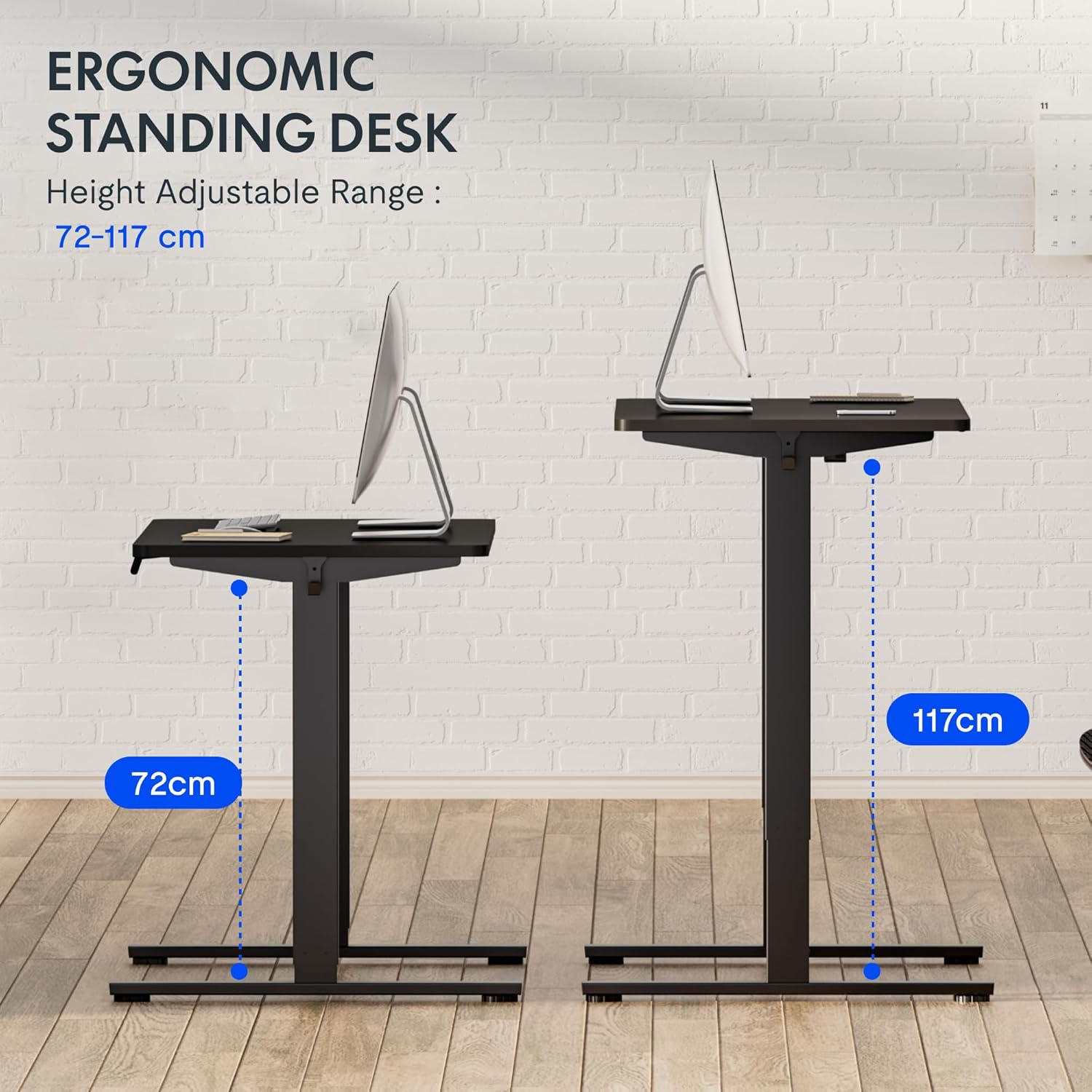
Rysunek 5: This image demonstrates the height adjustment capabilities of the desk, showing a range from 72 cm (sitting height) to 117 cm (standing height). Note that the full adjustable range for this model is 71 cm to 121 cm.
4. Konserwacja
Regularna konserwacja gwarantuje długowieczność i optymalną wydajność biurka FLEXISPOT.
- Czyszczenie: Przetrzyj blat i ramę miękką szmatką.amp szmatką. Unikaj środków czyszczących o działaniu ściernym i silnych środków chemicznych, które mogłyby uszkodzić wykończenie.
- Zarządzanie kablami: Periodically check and organize cables to prevent tangles and ensure smooth operation.
- Kontrola: Regularly inspect all screws and bolts to ensure they are tight. Retighten if necessary.
- Smarowanie: The lifting columns are generally maintenance-free. Do not attempt to lubricate internal components unless specifically instructed by customer support.
5. Rozwiązywanie Problemów
Jeśli napotkasz jakiekolwiek problemy z biurkiem, zapoznaj się z poniższymi, często występującymi problemami i ich rozwiązaniami.
| Problem | Możliwa przyczyna | Rozwiązanie |
|---|---|---|
| Biurko się nie porusza. |
|
|
| Biurko porusza się nierównomiernie lub wydaje nietypowe dźwięki. |
|
|
| Kod błędu wyświetlany na diodzie LED. |
|
|
Procedura resetowania
If the desk is not functioning correctly, a reset may resolve the issue.
- Press and hold the "Down" button until the desk reaches its lowest position and slightly retracts, then releases.
- If this does not initiate a reset, unplug the desk from the power outlet for at least 10 seconds, then plug it back in.
- Repeat step 1. The desk should now be reset.
6. Specyfikacje
| Marka | ELASTYCZNI |
| Numer modelu | HU-XI-201 |
| Desktop Dimensions (L x W x Thickness) | Wymiary 120 x 80 x 2.5 cm |
| Adjustable Height Range (without tabletop) | 71 cm - 121 cm |
| Maksymalna prędkość podnoszenia | 2.5 cm/s |
| Maksymalna ładowność | 70 kg (154 funta) |
| Lifting Noise Level | <50 dB |
| Materiał na biurko | Engineered Wood (MDF) with High-Pressure Laminate |
| Materiał ramy | Stal proszkowana |
| Kolor | Black tabletop + White frame |
| Cechy | Electric height adjustment, 4 memory presets |
7. Gwarancja i wsparcie
Informacje o gwarancji
FLEXISPOT stands behind the quality of its products. Your EF1 Basic Plus desk comes with the following warranty:
- 3-letnia gwarancja: Covers controllers and motors.
- 5-letnia gwarancja: Covers the desk frame.
Please retain your proof of purchase for warranty claims. The warranty covers manufacturing defects under normal use. It does not cover damage caused by misuse, accidents, unauthorized modifications, or failure to follow the instructions in this manual.

Rysunek 6: An image outlining the warranty coverage for FlexiSpot desks, specifically mentioning a 3-year warranty for controllers and motors, and a 5-year warranty for the desk frame.
Obsługa klienta
For technical assistance, warranty claims, or any questions regarding your FLEXISPOT EF1 Basic Plus desk, please contact FLEXISPOT customer support.
Webstrona: www.flexispot.com (lub odpowiednik regionalny)
E-mail: Refer to your purchase documentation or the official FlexiSpot webstrona z adresem e-mail kontaktowym.
Telefon: Refer to your purchase documentation or the official FlexiSpot webstrona z numerem telefonu kontaktowego.