
1. Wprowadzenie
Thank you for choosing the ZGCINE S200 V-Mount Battery. This high-capacity 199Wh/14.8V battery is designed to provide reliable power for professional video cameras, camcorders, and other compatible devices. It features multiple output ports, including Dual DC, USB-C PD, Dual D-TAP, and a BP Interface, allowing simultaneous power delivery to various equipment. This manual provides essential information for safe and efficient operation, setup, maintenance, and troubleshooting.
2. Informacje dotyczące bezpieczeństwa
- Nie rozbieraj, nie otwieraj ani nie niszcz akumulatora.
- Nie wystawiaj baterii na działanie ciepła lub ognia. Unikaj przechowywania w bezpośrednim świetle słonecznym.
- Nie wolno powodować zwarcia akumulatora.
- Nie narażaj akumulatora na wstrząsy mechaniczne.
- W przypadku wycieku z baterii, nie dopuścić do kontaktu płynu ze skórą ani oczami. W przypadku kontaktu, przemyć skażone miejsce dużą ilością wody i zasięgnąć porady lekarza.
- Utrzymuj akumulator w czystości i suchości.
- Nie należy używać żadnej innej ładowarki niż ta, która jest przeznaczona specjalnie do tego urządzenia.
- Baterię należy utylizować zgodnie z lokalnymi przepisami.

Image: The ZGCINE S200 V-Mount Battery highlighting its built-in protection features including overcurrent, overpower, overvoltage, overcharge, short circuit, temperature, reset, and circuit protection.
3. Koniec produktuview
The ZGCINE S200 V-Mount Battery is designed with a compact form factor and robust construction, featuring an aluminum alloy V-lock mount and an ABS cover for durability. It includes various input and output ports to meet diverse power requirements.
3.1 Układ portów i wskaźniki

Obraz: góra i bok views of the ZGCINE S200 V-Mount Battery, clearly labeling all input and output ports including D-Tap, DC (8.4V/12V), USB-C PD, and the V-mount interface. Input/Output specifications are also shown.
- D-Tap Ports: Two D-Tap ports for input and output (Input: 16.8V/3A Max, Output: 14.8V/13A Max).
- Porty wyjściowe DC: Two DC output ports (8.4V/3A and 12V/3A).
- Port USB-C PD: Bi-directional USB-C Power Delivery port for both input and output (Input: 5V/3A, 9V/3A, 12V/3A, 15V/3A, 20V/5A Max; Output: 5V/3A, 9V/3A, 12V/3A, 15V/3A, 20V/3.25A Max).
- Interfejs BP: For additional power output.
- Przycisk zasilania: Activates the battery and checks charge status.
- Wskaźniki LED: Five LED lights indicate the remaining battery capacity (20%, 40%, 60%, 80%, 100%).

Obraz: Zbliżenie view of the ZGCINE S200 V-Mount Battery's top panel, showing the LED power indicators and the various output ports with their respective voltagi i ampoceny erage.
4. Konfiguracja
4.1 Pierwsze ładowanie
Before first use, fully charge the ZGCINE S200 battery. Charging can be done via the USB-C PD port or a D-Tap charger. A 100W USB-C PD charger can fully charge the battery in approximately 3.5 hours.

Image: The ZGCINE S200 V-Mount Battery connected to a wall charger via its USB-C PD port, illustrating the fast-charging capability.
4.2 Montaż akumulatora
To mount the battery, align the V-mount plate on your camera rig or accessory with the V-lock mechanism on the battery. Slide the battery onto the plate until it clicks securely into place. To release, press the release button on the V-mount plate and slide the battery off.
5. Instrukcja obsługi
5.1 Sprawdzanie stanu baterii
Press the power button on the side of the battery. The five LED indicators will illuminate to show the current charge level:
- 1 diody LED: 0-20%
- 2 diod LED: 20-40%
- 3 diod LED: 40-60%
- 4 diod LED: 60-80%
- 5 diod LED: 80-100%
5.2 Zasilanie urządzeń
Connect your camera, camcorder, LED light, monitor, or other compatible devices to the appropriate output port on the ZGCINE S200 battery. The battery supports simultaneous power delivery to multiple devices.
- USB-C PD: Use a USB-C to USB-C cable to power devices like the Sony FX3, BMPCC 4K/6K Pro, or charge smartphones/tablets.
- D-Tap: Connect D-Tap compatible accessories such as LED lights or monitors.
- Wyjścia prądu stałego: Use the 8.4V or 12V DC outputs for devices requiring these specific voltagt.j.

Image: A user holding a camera rig with the ZGCINE S200 V-Mount Battery attached, demonstrating its use in a portable setup.
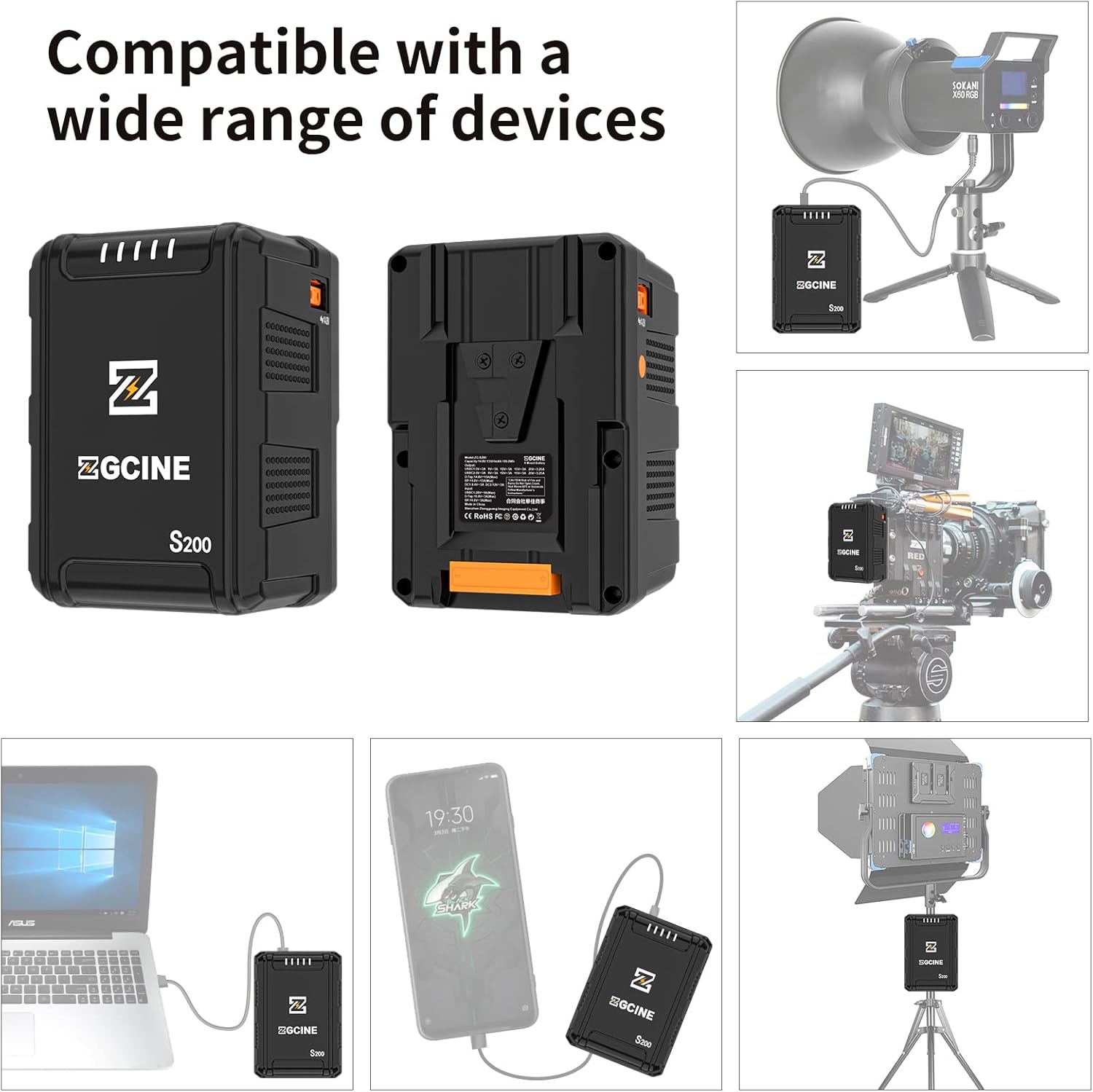
Image: Illustrations showing the ZGCINE S200 V-Mount Battery connected to a studio LED light, a camera rig, a laptop, and a smartphone, demonstrating its wide compatibility.
6. Konserwacja
6.1 Przechowywanie
When storing the battery for extended periods, ensure it is charged to approximately 50-70% capacity. Store in a cool, dry place away from direct sunlight and extreme temperatures. Avoid storing fully charged or completely depleted batteries for long durations.
6.2 Czyszczenie
Clean the battery's exterior and contact points with a soft, dry cloth. Do not use liquid cleaners or solvents. Ensure all ports are free from dust and debris.
6.3 Wskazówki dotyczące ochrony baterii
- Avoid deep discharges; recharge the battery before it is completely depleted.
- Do not expose the battery to extreme hot or cold environments.
- Regularly check the battery for any signs of damage or swelling. Discontinue use if any abnormalities are observed.
7. Rozwiązywanie Problemów
- Bateria nie ładuje się:
- Ensure the charging cable and adapter are securely connected and functional.
- Sprawdź, czy źródło zasilania jest aktywne.
- Try a different charging port (USB-C PD or D-Tap) or charger.
- Battery not powering devices:
- Sprawdź czy akumulator jest wystarczająco naładowany.
- Upewnij się, że urządzenie jest kompatybilne z objętością wyjściowątage and current of the selected port.
- Verify that the connection cables are secure and undamaged.
- Press the power button to activate the battery's output.
- Wskaźniki LED nie działają:
- Press the power button firmly. If indicators still do not light up, the battery may be completely depleted or require service.
If you encounter issues not covered here, please contact ZGCINE customer support.
8. Specyfikacje
| Funkcja | Specyfikacja |
|---|---|
| Numer modelu | S200 |
| Pojemność baterii | 199 Wh / 14.8 V |
| Skład ogniw baterii | Litowo-jonowy |
| Wymiary produktu | 3.5 x 3.1 x 5.1 cala (8.9 x 7.9 x 13 cm) |
| Waga przedmiotu | 2.4 funtów (1.09 kg) |
| Wejście/wyjście USB-C PD | Input: 5V/3A, 9V/3A, 12V/3A, 15V/3A, 20V/5A (Max 100W) Output: 5V/3A, 9V/3A, 12V/3A, 15V/3A, 20V/3.25A (Max 65W) |
| D-Tap Input/Output | Input: 16.8V/3A (Max) Wyjście: 14.8V / 13A (Max) |
| Wyjście DC | 8.4V/3A, 12V/3A |
| Zalecane zastosowania | Camcorder, Camera, LED Light, Monitor, Smartphone, Tablet |
| Producent | ZGCIŃ |
9. Gwarancja i wsparcie
ZGCINE products are covered by a limited warranty. For specific warranty terms and conditions, please refer to the warranty card included with your product or visit the official ZGCINE website. For technical support, troubleshooting assistance, or warranty claims, please contact ZGCINE customer service through their official channels.
Informacje kontaktowe: Please refer to the ZGCINE official website or product packaging for the most up-to-date customer support contact details.