
1. Wprowadzenie
Thank you for choosing the Giantex Modern TV Stand, Model GT60170-JZCF. This TV stand is designed to accommodate televisions up to 65 inches and features 8 open shelves for media devices and accessories. Its sturdy construction and minimalist design make it a functional addition to any living space. Please read this manual carefully before assembly and use to ensure proper installation and safe operation.
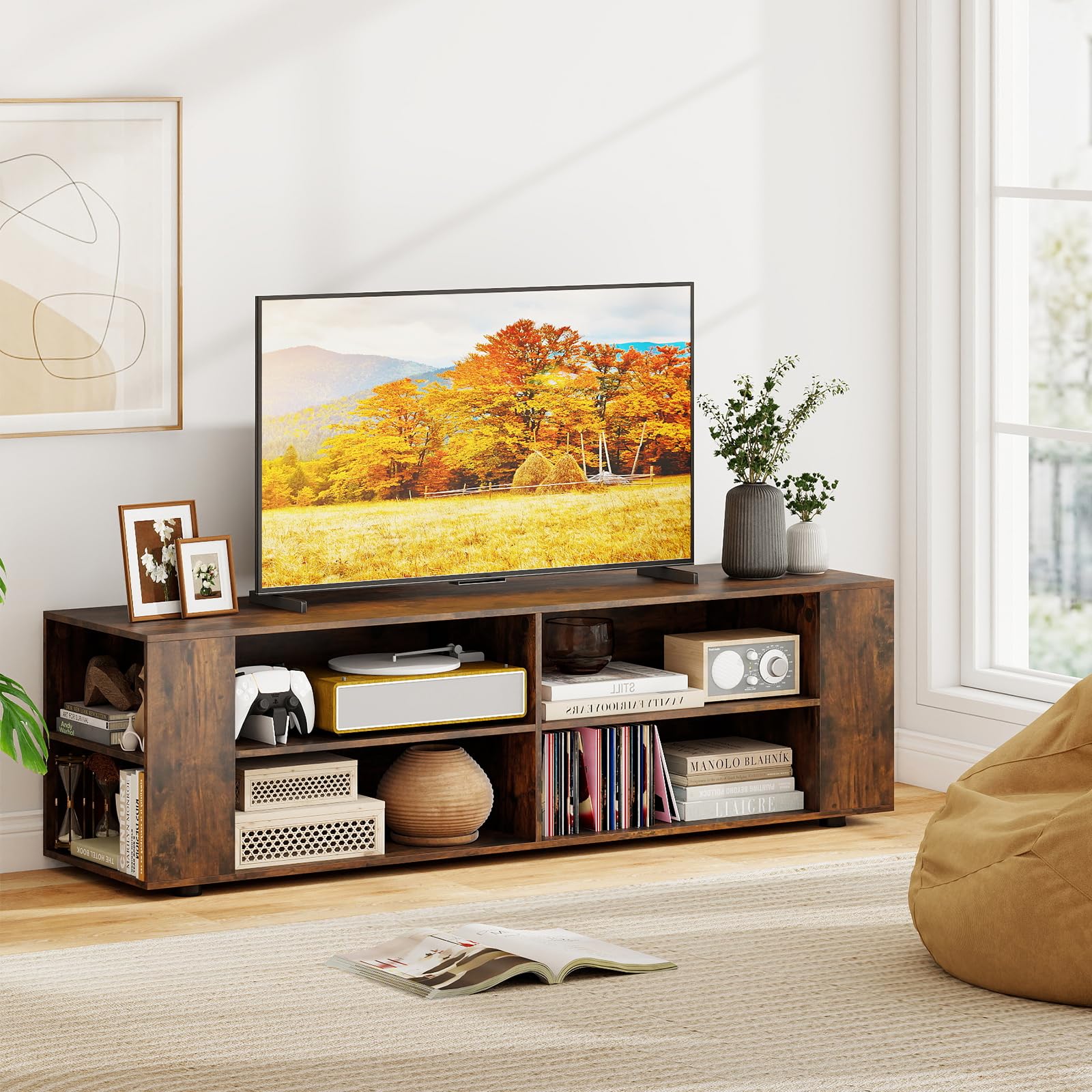
Image 1.1: The Giantex Modern TV Stand (Model GT60170-JZCF) in Rustic Brown, showcasing jego konstrukcji i możliwości magazynowania.
2. Informacje dotyczące bezpieczeństwa
Aby zapobiec obrażeniom ciała lub uszkodzeniu produktu, należy stosować się do następujących wskazówek bezpieczeństwa:
- Always secure the TV stand to the wall using the provided anti-tip hardware to prevent accidental tipping.
- Do not place items exceeding the specified weight capacity on the tabletop or shelves.
- Keep cords and wires organized and away from cable management holes to prevent entanglement or damage.
- Avoid exposing the product to high temperatures, direct sunlight, or excessive moisture.
- Keep the product away from children and pets during assembly and ensure stable placement after setup.
3. Zawartość opakowania
Before beginning assembly, verify that all parts are present and undamaged. If any parts are missing or damaged, please contact Giantex customer support.
- TV Stand Components (Engineered Wood, MDF, Plastic)
- Assembly Hardware (Screws, dowels, connectors, anti-tip kit)
- Instrukcja obsługi (Niniejsza instrukcja)
4. Instrukcja montażu i konfiguracji
Assembly is required for this TV stand. It is recommended to have two people for assembly. Please follow these steps carefully:
- Rozpakuj i zidentyfikuj części: Lay out all components on a clean, soft surface (e.g., a blanket or cardboard) to prevent scratches. Identify each part using the included hardware list and diagrams.
- Zamontuj panele boczne: Attach the side panels to the base and top panels using the designated screws and dowels. Ensure all connections are secure.
- Montaż półek wewnętrznych: Insert the fixed and adjustable shelves into their respective slots or attach them with the provided hardware.
- Zamontuj nogi podporowe: Secure the 5 support legs to the bottom of the TV stand. Ensure they are tightened firmly for stability.
- Ostateczne dokręcanie: Once all components are in place, gently tighten all screws and connectors. Do not overtighten.
- Montaż zestawu zabezpieczającego przed wywróceniem: For safety, attach the anti-tip hardware to the back of the TV stand and secure it to a wall stud according to the instructions provided with the kit.

Image 4.1: Detailed dimensions of the TV stand, including overall size and compartment measurements.

Obraz 4.2: Zbliżenie view of the 5 sturdy support legs, highlighting the robust construction.
5. Instrukcja obsługi
Once assembled, the Giantex Modern TV Stand is ready for use.
- Ustawianie telewizora: Carefully place your television on the tabletop. This stand is suitable for TVs up to 65 inches. Ensure the TV's base is fully supported and does not exceed the tabletop's weight capacity of 110 lbs.
- Wykorzystanie pamięci masowej: Use the 4 open compartments and 4 side shelves to store media devices such as DVD players, game consoles, soundbars, and other accessories. The open design allows for easy access and ventilation.
- Zarządzanie kablami: Route power cords and signal cables neatly through the open back design to maintain an organized appearance and prevent tripping hazards.

Image 5.1: Illustration showing the TV stand's compatibility with TV sizes up to 65 inches.

Image 5.2: The TV stand showcasing jego ample storage for DVD players, game consoles, books, and decorative items.
6. Konserwacja
To keep your Giantex Modern TV Stand in optimal condition:
- Czyszczenie: Przetrzyj powierzchnie suchą, miękką ściereczką. Unikaj stosowania silnych środków chemicznych i ściernych środków czyszczących, które mogą uszkodzić powłokę.
- Kontrola: Okresowo sprawdzaj wszystkie śruby i połączenia, aby upewnić się, że są dobrze dokręcone. W razie potrzeby dokręć.
- Unikaj wilgoci: Protect the stand from spills and excessive humidity.
7. Rozwiązywanie Problemów
Jeśli napotkasz jakiekolwiek problemy ze stojakiem pod telewizor, zapoznaj się z poniższymi typowymi rozwiązaniami:
- Kołysanie się: Ensure all assembly screws are securely tightened. Check that the floor surface is even. Adjust the feet if they are uneven.
- Brakujące części: If any parts were missing upon delivery, please contact Giantex customer support with your purchase details.
- Uszkodzenia powstałe podczas montażu: If a part was damaged during assembly, stop and contact customer support for assistance.
8. Specyfikacje
| Funkcja | Specyfikacja |
|---|---|
| Marka | Gigantex |
| Numer modelu | GT60170-JZCF |
| Kolor | Rustykalny brąz |
| Wymiary całkowite (dł. x szer. x wys.) | 59" x 15.5" x 18" |
| Tworzywo | Engineered Wood, MDF, Plastic |
| Waga przedmiotu | 48.5 funtów |
| Nośność blatu stołu | 110 funtów |
| Each Cube Weight Capacity | 33 funtów |
| Large Compartment Dimensions (L x W x H) | 23" x 14.5" x 7.5" |
| Side Shelf Dimensions (L x W x H) | 14" x 6" x 7.5" |
| UPC | 798470344075 |
| Wymagany montaż | Tak |
9. Gwarancja i wsparcie
For any questions, concerns, or assistance with your Giantex Modern TV Stand, please contact Giantex customer support. While specific warranty details are not provided in this manual, please retain your proof of purchase for any warranty claims.
You can visit the official Giantex store for more information and support: Sklep Giantex na Amazonie