
1. Koniecview
The waveshare FT232RNL USB to RS232/485/422/TTL Interface Converter is an industrial-grade isolated converter designed for reliable and stable communication across various serial interfaces. It leverages an original FT232RNL chip for superior performance and compatibility. This device is engineered with multiple protection features to ensure safe and durable operation in diverse environments.

Figure 1: waveshare FT232RNL USB to RS232/485/422/TTL Interface Converter
2. Funkcje
- Original FT232RNL Chip: Ensures fast, stable, and reliable communication with enhanced compatibility.
- Multi-Interface Conversion: Supports USB to RS232, USB to RS485, USB to RS422, and USB to TTL.
- Unibody Power Supply Isolation: Zapewnia stabilną, izolowaną objętośćtage without requiring external power for the isolated terminal.
- Unibody Digital Isolation: Allows signal isolation, offering high reliability, strong anti-interference, and low power consumption.
- TVS (przejściowa ilośćtage Suppressor): Skutecznie tłumi skoki objętościtage i skok przejściowy voltage, providing lightningproof and ESD protection.
- Self-Recovery Fuse & Protection Diodes: Ensures stable current/voltagwyjścia e, oferujące zabezpieczenie przed przetężeniem/przepięciemtage proof and improved shock resistance.
- Automatic Transceiver Circuit: Fully automatic, no-delay transceiver circuit for fast and stable communication without interference.
- TTL Serial 3.3V/5V Voltage Tłumacz: Configurable TTL level via switch.
- Wskaźniki LED: Trzy diody LED wskazują zasilanie (PWR) i stan transceivera (TXD, RXD).
- Wysokiej jakości złącza: Durable USB-B and RS232 connectors for smooth plug/pull.
- Industrial-Grade Metal Case: Supports wall-mount and rail-mount installations, providing a solid and aesthetically pleasinprojekt g.

Figure 2: Internal Design and Protection Features
3. Zawartość opakowania!
Opakowanie produktu zazwyczaj zawiera następujące elementy:
- waveshare FT232RNL USB to RS232/485/422/TTL Interface Converter
- Kabel USB-A do USB-B
- Śrubokręt
- Mounting Brackets (pre-attached or separate)

Rysunek 3: Zawartość opakowania
4. Konfiguracja
To set up your waveshare FT232RNL converter, follow these general steps:
- Połącz z hostem: Use the provided USB-A to USB-B cable to connect the converter's USB-B port to a USB port on your computer (PC, Mac, Linux, Android device).
- Instalacja sterownika: For most modern operating systems (Windows, Linux, Mac, Android), the necessary drivers for the FT232RNL chip should install automatically upon connection. If not, drivers can be obtained from the FTDI website or waveshare's official support page.
- Select TTL Level (if applicable): If using the TTL interface, adjust the 3.3V/5V voltage translator switch on the converter to match the voltage level of your target device.
- Podłącz urządzenie szeregowe: Connect your RS232, RS485, RS422, or TTL serial device to the corresponding screw terminals or DB9 connector on the converter. Ensure correct pin assignments (refer to Section 6: Interface Introduction).
- Sprawdź połączenie: The PWR LED on the converter should illuminate when connected to a powered USB port. The TXD and RXD LEDs will flash during data transmission.
Video 1: Demonstrates the connection and various interface conversions of the waveshare USB to RS232/485/422/TTL converter.
5. Obsługa
Once the converter is set up and connected, it operates as a transparent bridge between your USB host and the connected serial device. The onboard automatic transceiver circuit manages data flow without manual intervention.
Wskaźniki LED:
- PWR (czerwony): Indicates power. Lights up when the USB connection is established and voltage zostało wykryte.
- TXD (Green): Transmit Data Indicator. Lights up when the USB port sends data.
- RXD (Green): Receive Data Indicator. Lights up when the device ports send data back.
To communicate with your serial device, use appropriate serial communication software on your computer. Configure the software with the correct COM port (assigned by your operating system), baud rate, data bits, parity, and stop bits to match your serial device's settings.
6. Wprowadzenie do interfejsu
The converter provides multiple interfaces for versatile connectivity:

Rysunek 4: Koniecview of Converter Interfaces
RS232 Pinout (DB9 Male):
| SZPILKA | Opis |
|---|---|
| 2 | Receiving data (RXD) |
| 3 | Sending data (TXD) |
| 5 | Uziemienie GND |
| 1, 4, 6, 7, 8, 9 | N/C (Not Connected) |
RS485/RS422 Pinout (Screw Terminal):
| Screw Terminal (PIN) | Opis |
|---|---|
| PE | 485/422 signal ground |
| TA | RS422 send differential signal positive / RS485 differential signal positive A+ |
| TB | RS422 send differential signal negative / RS485 differential signal negative B- |
| RA | RS422 receive differential signal positive |
| RB | RS422 receive differential signal negative |
TTL (UART) Pinout (Screw Terminal):
| Screw Terminal (PIN) | Opis |
|---|---|
| TXD | TTL transmit data pin, connect to MCU.RXD |
| RXD | TTL receive data pin, connect to MCU.TXD |
| GND | Połącz z GND |
| VCC | 5V / 3.3V power supply output, configurable via 5V/3.3V level switch |

Figure 5: Detailed Pinouts
7. Specyfikacje
| Kategoria | Specyfikacja |
|---|---|
| Typ produktu | Industrial grade digital isolated converter |
| Objętość operacyjnatage | 5V (USB) / 3.3V / 5V (TTL) |
| Złącze USB | USB-B |
| Ochrona USB | Bezpiecznik samopowrotny 200mA, wyjście izolowane |
| Złącze RS232 | DB9 męski |
| Ochrona RS232 | Dioda TVS, zabezpieczenie przeciwprzepięciowe i ochrona ESD |
| RS232 Transmission Mode | Punkt-punkt |
| Szybkość transmisji RS232 | 300bps ~ 921600bps |
| Złącze RS485/422 | Zacisk śrubowy |
| RS485/422 Direction Control | Sprzętowa kontrola automatyczna |
| RS485/422 Protection | 600W lightningproof and surge-suppress, 15KV ESD protection (reserved two 120R balancing resistors, enabled/disabled via jumper) |
| RS485/422 Transmission Mode | Point-to-multipoints (485 mode: up to 32 nodes, repeaters recommended for 16+ nodes; 422 mode: up to 256 nodes, repeaters recommended for 16+ nodes) |
| RS485/422 Baud Rate | 300 bps ~ 2 Mb/s |
| TTL (UART) Connector | Zacisk śrubowy |
| TTL (UART) Pins | TXD, RXD, GND, 5V/3.3V |
| TTL (UART) Protection | Clamp dioda zabezpieczająca, over-voltage/ujemna-objętośćtage dowód, odporność na wstrząsy |
| TTL (UART) Transmission Mode | Punkt-punkt |
| TTL (UART) Baud Rate | 300 bps ~ 2 Mb/s |
| Temperatura pracy | -40°C ~ 85°C |
| Wilgotność robocza | 5% RH ~ 95% RH |
| Obsługiwane systemy operacyjne | Mac, Linux, Android, Windows 11/10/8.1/8/7 |
| Wymiary opakowania | 6.14 x 4.33 x 1.26 cala |
| Waga przedmiotu | 1.76 uncji |
| Producent | Udostępnianie fal |
| Data pierwszej dostępności | 6 lutego 2023 r. |
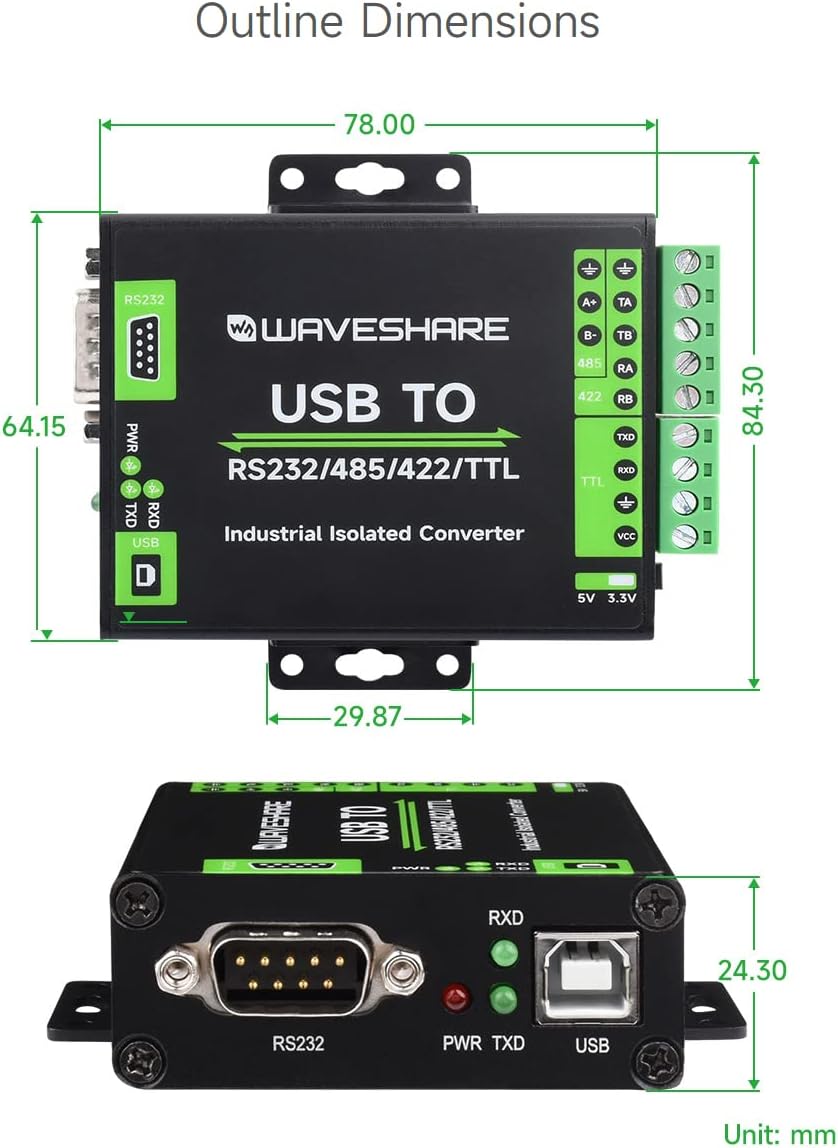
Rysunek 6: Wymiary obrysu (jednostka: mm)
8. Konserwacja
To ensure the longevity and optimal performance of your waveshare FT232RNL converter, follow these maintenance guidelines:
- Czyszczenie: Use a soft, dry cloth to clean the exterior of the device. Avoid using liquid cleaners or solvents, which may damage the casing lub komponentów wewnętrznych.
- Środowisko: Operate and store the converter in a clean, dry environment, away from excessive dust, moisture, and extreme temperatures. Refer to the operating temperature and humidity specifications.
- Obsługiwanie: Handle the device with care. Avoid dropping it or subjecting it to strong impacts, which could damage the internal circuitry.
- Znajomości: Ensure all cable connections are secure and free from strain. Periodically check screw terminals for tightness.
9. Rozwiązywanie Problemów
If you encounter issues with your waveshare FT232RNL converter, consider the following troubleshooting steps:
- Brak zasilania (dioda LED zasilania wyłączona):
- Ensure the USB cable is securely connected to both the converter and the host computer.
- Wypróbuj inny port USB na swoim komputerze.
- Verify that your computer's USB port is providing power.
- No Data Transmission (TXD/RXD LEDs not flashing):
- Check all serial connections (RS232, RS485, RS422, TTL) for correct wiring and secure connections.
- Verify that the serial communication software on your computer is correctly configured (COM port, baud rate, data bits, parity, stop bits).
- Ensure the TTL level switch is set correctly for your TTL device (3.3V or 5V).
- Confirm that the connected serial device is powered on and functioning correctly.
- Problemy ze sterownikiem:
- If the device is not recognized by your operating system, try reinstalling the FTDI drivers. These can typically be found on the FTDI webstrona.
- Check your device manager (Windows) or equivalent system information (Linux/Mac) to see if the device is listed without errors.
- Ingerencja:
- While the device has strong anti-interference capabilities, ensure it is not placed near strong electromagnetic interference sources.
10. Gwarancja i wsparcie
For warranty information, technical support, or further assistance with your waveshare FT232RNL USB to RS232/485/422/TTL Interface Converter, please contact waveshare directly through their official webwitrynę lub sprzedawcę, u którego kupiłeś produkt.
An official user guide in PDF format is also available for download: Instrukcja użytkownika (PDF)