
ALLIMITY RC43157
Instrukcja obsługi pilota zamiennego ALLIMITY RC43157
Model: RC43157 | Brand: ALLIMITY
1. Wprowadzenie
The ALLIMITY RC43157 is a replacement remote control designed to operate various Westwood and EDENWOOD television models. This remote control is ready to use without any programming required; simply insert the batteries, and it will function immediately, replicating all the essential functions of your original remote.
2. Konfiguracja i instalacja baterii
Follow these simple steps to begin using your ALLIMITY RC43157 replacement remote control:
- Otwórz komorę baterii: Locate the battery compartment cover on the back of the remote control. Slide or press the latch to open it.
- Włóż baterie: Insert two new AAA alkaline batteries (not included) into the compartment. Ensure the positive (+) and negative (-) terminals of the batteries match the markings inside the compartment.
- Zamknij komorę: Załóż pokrywę komory baterii i upewnij się, że jest dobrze zamocowana.
- Przetestuj pilota: Point the remote control towards your compatible Westwood or EDENWOOD TV and press the Power button. The TV should respond. No additional programming is required.

Obraz 1: Przód view of the ALLIMITY RC43157 remote control. This image displays the full layout of buttons, including number keys, navigation, volume, channel, and dedicated app buttons.
3. Operating Instructions (Button Functions)
The ALLIMITY RC43157 remote control features a standard layout for easy operation of your television. Below is a description of the main button functions:
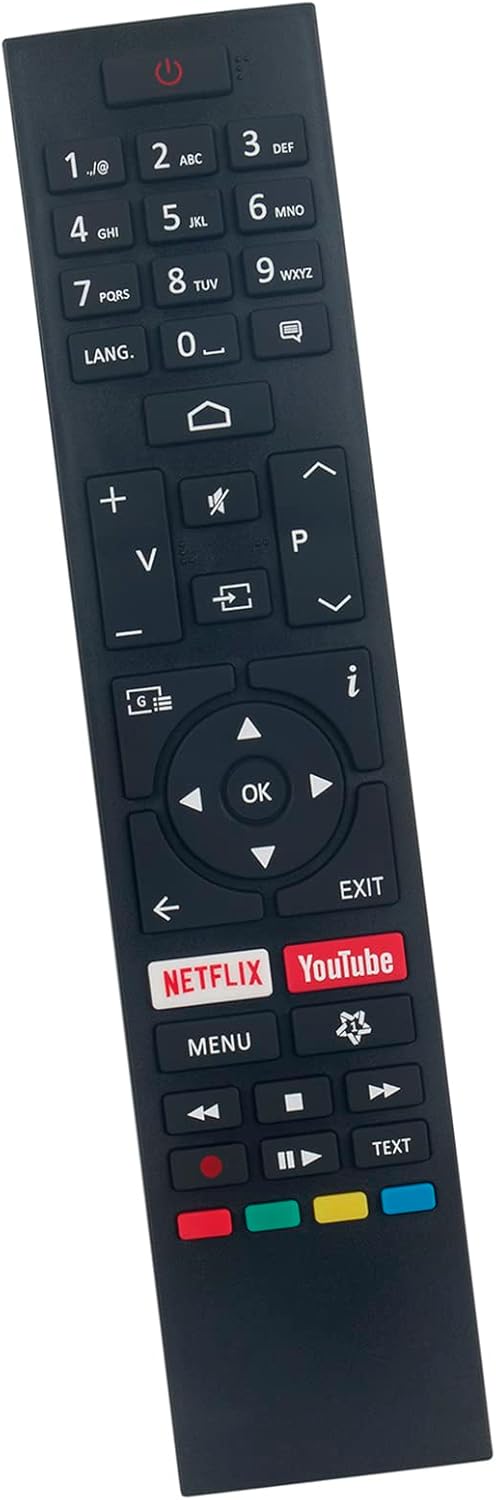
Obraz 2: Pod kątem view of the ALLIMITY RC43157 remote control, highlighting the ergonomic design and button placement.
- ⏻ Power: Włącza lub wyłącza telewizor.
- Przyciski numeryczne (0-9): Selects channels directly or enters numerical input.
- JĘZYK: Changes audio language or subtitle options.
- ⌂ Home: Dostęp do głównego menu telewizora lub interfejsu Smart TV.
- V+/V- (Volume Up/Down): Reguluje głośność dźwięku.
- 🔇 Mute: Wycisza lub włącza dźwięk telewizora.
- ⎌ Input/Source: Wybiera źródło sygnału wejściowego (HDMI, AV itp.).
- P+/P- (Channel Up/Down): Zmienia kanały telewizyjne.
- i (Info): Wyświetla informacje o bieżącym programie.
- ◀ ▶ ▲ ▼ (Navigation Arrows): Nawigacja po menu i opcjach.
- OK: Potwierdza wybory w menu.
- WYJŚCIE: Wyjście z bieżącego menu lub funkcji.
- PL: Bezpośredni dostęp do aplikacji Netflix.
- YouTube: Bezpośredni dostęp do aplikacji YouTube.
- MENU: Opens the TV's main settings menu.
- ⏪, ⏸, ⏹, ⏩ (Playback Controls): Controls media playback (Rewind, Play/Pause, Stop, Fast Forward).
- Kolorowe przyciski (czerwony, zielony, żółty, niebieski): Functions vary depending on the TV model and current on-screen prompts.
- TEKST: Accesses teletext services (if supported by TV).
4. Kompatybilne modele telewizorów
The ALLIMITY RC43157 remote control is compatible with the following Westwood and EDENWOOD television models:
- EDENWOOD ED32C01HD-VE
- EDENWOOD ED50C02UHD-VE
- EDENWOOD ED43C00UHD-VE
- EDENWOOD ED43C01UHD-VE
- EDENWOOD ED50C00UHD-VE
- EDENWOOD ED50C01UHD-VE
- EDENWOOD ED55C00UHD-VE
- EDENWOOD ED55C01UHD-VE
- EDENWOOD ED65C01UHD-VE
- Westwood WTA55UHD20B
- Westwood WTA58UHD20B
This remote is designed to replace your original remote for these specific models without the need for complex setup procedures.
5. Rozwiązywanie Problemów
Jeśli masz problemy z pilotem, zapoznaj się z poniższymi typowymi procedurami rozwiązywania problemów:
- Pilot nie odpowiada:
- Upewnij się, że baterie zostały włożone prawidłowo, zachowując właściwą polaryzację (+/-).
- Wymień stare baterie na nowe baterie alkaliczne AAA.
- Sprawdź, czy między pilotem zdalnego sterowania a czujnikiem podczerwieni telewizora nie znajdują się żadne przeszkody.
- Ensure you are within the effective operating range (up to 10 meters) and pointing the remote directly at the TV.
- Niektóre przyciski nie działają:
- Press the button firmly. Sometimes, debris can get under the button.
- Remove and reinsert the batteries to reset the remote.
- If only one or a few buttons are consistently unresponsive, the remote may be faulty.
- Przerywana funkcjonalność:
- This can often be caused by low battery power. Replace the batteries.
- Ensure there are no strong light sources (like direct sunlight or bright fluorescent lights) interfering with the IR signal.
If the problem persists after trying these steps, please contact the seller for further assistance.
6. Specyfikacje produktu
| Marka | WSZECHSTRONNOŚĆ |
| Nazwa modelu | RC43157 |
| Funkcja specjalna | Nie wymaga programowania |
| Kolor | Czarny |
| Technologia łączności | Podczerwony |
| Maksymalny zasięg | 10 metrów |
| Typ baterii | Alkaliczne (AAA, nie dołączone) |
| Zgodność z inteligentnym domem | Niekompatybilny z systemami inteligentnego domu |
| Kraj pochodzenia | Chiny |
7. Gwarancja i wsparcie
This product is covered by a standard manufacturer's warranty. For specific warranty details, duration, and terms, please refer to the information provided at the time of purchase or contact the seller directly.
For technical support, troubleshooting assistance beyond what is provided in this manual, or inquiries regarding product defects, please reach out to the ALLIMITY customer support or the retailer from whom you purchased the remote control. Please have your purchase details and model number (RC43157) ready when contacting support.
Ask a question about this manual
Ask about setup, troubleshooting, compatibility, parts, safety, or missing instructions. Manuals+ will review the question and use this page’s manual context to help answer it.