
1. Informacje dotyczące bezpieczeństwa
Please read this manual carefully before using the camera to ensure safe and proper operation. Keep this manual for future reference.
- Nie narażaj aparatu na działanie wody lub wilgoci.
- Unikaj upuszczania aparatu i narażania go na silne uderzenia.
- Do not attempt to disassemble or modify the camera. Repairs should only be performed by qualified personnel.
- Trzymaj aparat z dala od bezpośredniego światła słonecznego i wysokich temperatur.
- Należy używać wyłącznie wskazanego typu baterii i kabla ładującego.
- Baterie należy utylizować zgodnie z lokalnymi przepisami.
- Clean the camera lens and screen with a soft, dry cloth.
2. Zawartość opakowania
Sprawdź, czy w przesyłce znajdują się wszystkie elementy wymienione poniżej:
- Andoer Digital Camera Body
- Bateria litowa (3.7 V 550 mAh)
- Kabel ładujący USB
- Torba
- Instrukcja obsługi (ten dokument)

Image: Contents of the Andoer Digital Camera package, showing the camera, wrist strap, USB charging cable, carry bag, and user manual.
3. Koniec produktuview
3.1 Przód View

Obraz: Przód view of the Andoer Digital Camera, displaying the lens, built-in flash, and indicating 2.7" TFT screen and 18 Megapixels.
3.2 Tył View (Wyświetlacz i sterowanie)
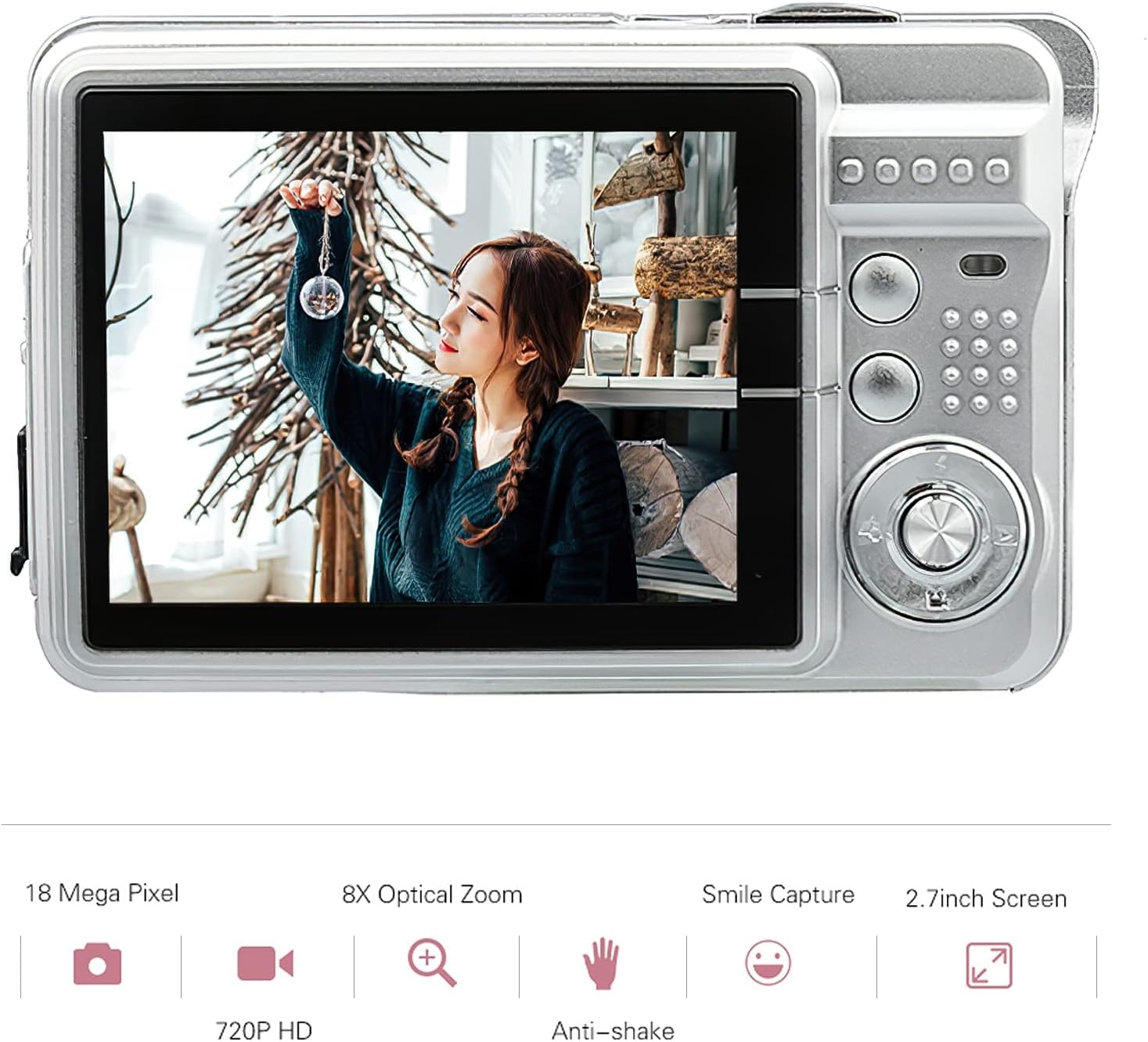
Obraz: Tył view of the Andoer Digital Camera, featuring the 2.7-inch TFT display and various control buttons on the right side.
The camera features a 2.7-inch TFT display for viewing photos and videos, along with intuitive controls for navigation and settings adjustment.
4. Konfiguracja
4.1 Ładowanie akumulatora
- Open the battery compartment cover on the side of the camera.
- Insert the provided Lithium battery (3.7V 550mAh) into the compartment, ensuring correct polarity.
- Dokładnie zamknij pokrywę komory baterii.
- Connect the camera to a USB power source (e.g., computer, USB wall adapter) using the supplied USB charging cable.
- The charging indicator light will illuminate. Charging is complete when the light turns off or changes color (refer to camera display for battery status).
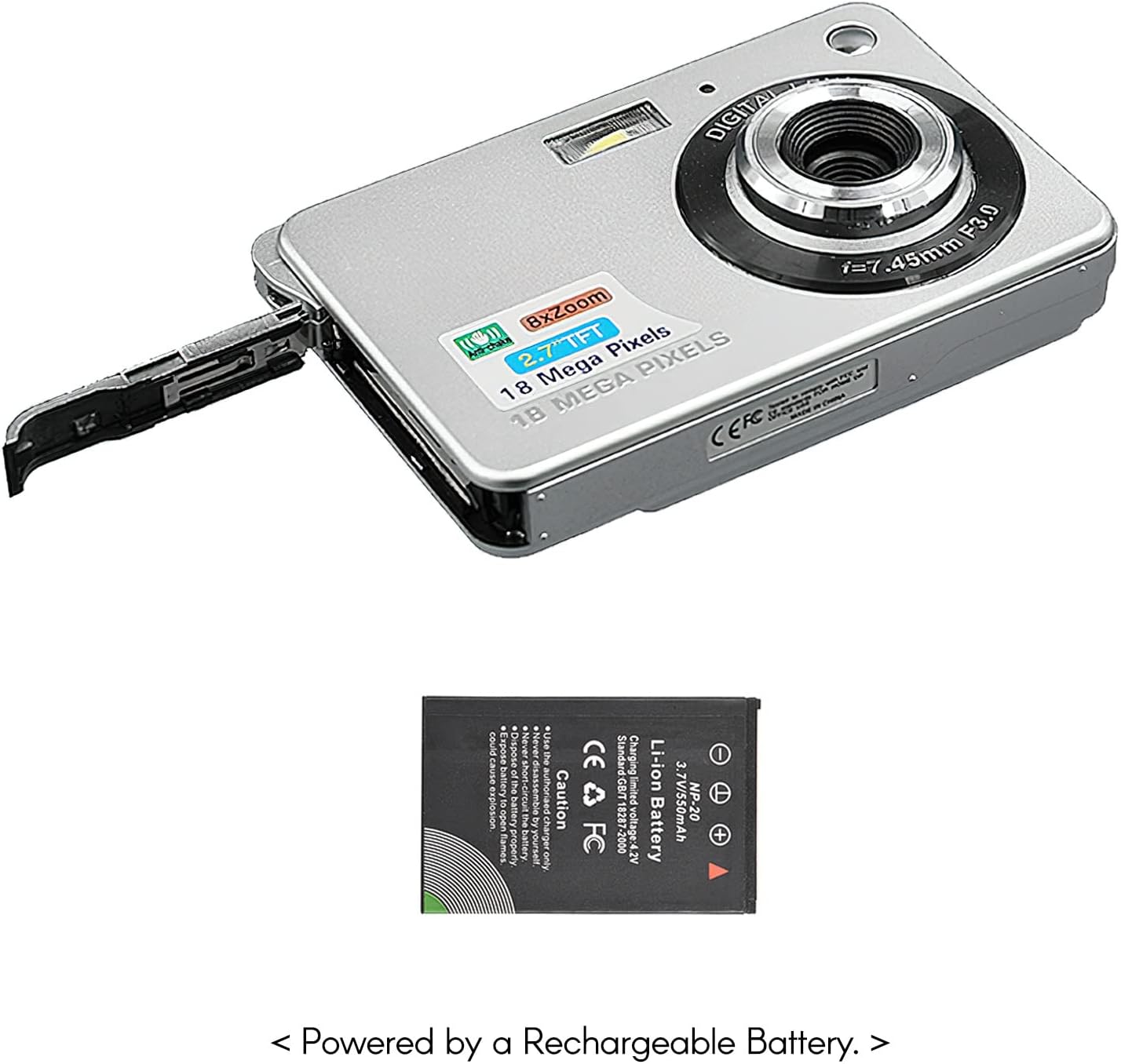
Obraz: Bok view of the camera with the battery compartment open, illustrating how to insert the rechargeable lithium battery.
4.2 Inserting a Memory Card (Not Included)
This camera supports SD memory cards up to 32GB. A memory card is required to save photos and videos.
- Znajdź gniazdo karty pamięci, zazwyczaj znajdujące się w pobliżu komory baterii.
- Insert the SD card with the metal contacts facing down (or as indicated by the diagram near the slot) until it clicks into place.
- Aby wyjąć kartę, delikatnie wciśnij ją, aż wysunie się.
5. Instrukcja obsługi
5.1 Włączanie/wyłączanie
Press and hold the Power button (usually located on the top or side) to turn the camera on or off.
5.2 Robienie zdjęć
- Włącz kamerę.
- Frame your shot using the 2.7-inch TFT display.
- Press the Shutter button (typically on top) halfway down to focus, then press fully to capture the image.

Image: The camera's screen showing a captured image, demonstrating the 18 Megapixel photo capability.
5.3 Nagrywanie filmów
- Włącz kamerę.
- Switch to video recording mode (usually via a mode button or menu option).
- Press the Record button (often marked with a red dot) to start recording. Press again to stop.

Image: The camera's screen displaying a video playback, illustrating its 720P high-definition video recording function.
5.4 Zoom cyfrowy
The camera features 8X digital zoom. Use the zoom buttons (often labeled 'W' for Wide and 'T' for Telephoto) to adjust the zoom level.

Image: A visual representation of the 8x digital zoom capability, showing a scene at 1x magnification and then zoomed in at 8x.
5.5 Nawigacja po menu
Press the 'Menu' button to access camera settings. Use the directional buttons to navigate and the 'OK' or 'Set' button to confirm selections. Available settings include:
- Samowyzwalacz: Off/ 2 sec/ 5 sec/ 10 sec
- Narażenie: EV-3 do EV+3
- Balans bieli: Auto/ Daylight/ Cloudy/ Incandescent/ Fluorescent
- Tryby scen: Auto/ Night Portrait/ Night Scenery/ Portrait/ Scenery/ Sport/ Party/ Beach/ High sensitivity
- Inne funkcje: Anti-Shake, Face Detect, Smile Capture
6. Konserwacja
6.1 Czyszczenie aparatu
- Do czyszczenia korpusu aparatu należy używać miękkiej, niepozostawiającej włókien ściereczki.
- For the lens and screen, use a specialized lens cleaning cloth and solution if necessary. Avoid abrasive materials.
- Do not use organic solvents to clean the camera.
6.2 Pielęgnacja baterii
- Całkowicie naładuj baterię przed pierwszym użyciem.
- Jeżeli aparat nie będzie używany przez dłuższy czas, należy wyjąć baterię.
- Przechowuj baterie w chłodnym, suchym miejscu.
7. Rozwiązywanie Problemów
| Problem | Możliwa przyczyna | Rozwiązanie |
|---|---|---|
| Kamera się nie włącza. | Bateria jest rozładowana lub nieprawidłowo włożona. | Naładuj akumulator. Upewnij się, że akumulator jest włożony z zachowaniem prawidłowej polaryzacji. |
| Nie można robić zdjęć/nagrywać filmów. | Nie włożono karty pamięci lub karta jest pełna/uszkodzona. | Włóż kompatybilną kartę SD. Usuń niepotrzebne. filelub sformatuj kartę (spowoduje to usunięcie wszystkich danych). |
| Obrazy są niewyraźne. | Obiektyw jest brudny, światło jest niewystarczające lub aparat się trzęsie. | Clean the lens. Use the flash in low light. Hold the camera steady or use anti-shake feature. |
| Kamera zawiesza się lub przestaje reagować. | Tymczasowy błąd oprogramowania. | Wyjmij baterię i włóż ją ponownie, aby zresetować kamerę. |
8. Specyfikacje
| Funkcja | Szczegół |
|---|---|
| Model | IAT4319650447530BC |
| Czujnik obrazu | Czujnik CMOS |
| Wyświetlacz | 2.7 Inch TFT LCD |
| Rozdzielczość zdjęcia | Do 18 megapikseli |
| Rozdzielczość wideo | 1280x720 (720P), 720x480, 640x480 (VGA), 320x240 (QVGA) |
| Zoom cyfrowy | 8X |
| Stabilizacja obrazu | Cyfrowy system przeciwwstrząsowy |
| Kompensacja ekspozycji | EV-3 do EV+3 |
| Balans bieli | Auto/ Daylight/ Cloudy/ Incandescent/ Fluorescent |
| File Format | JPEG (Photo), AVI (Video) |
| Nośniki pamięci | Karta SD (do 32 GB, nie jest dołączona) |
| Zasilacz | 1 * Lithium battery (3.7V 550mAh) |
| Obsługiwany system | Windows XP, VISTA, WIN7, MAC |
| Rozmiar przedmiotu | 9 * 6 * 2 cm / 3.5 * 2.4 * 0.8 cala |
| Waga przedmiotu | 90g / 3.2 uncji |
9. Gwarancja i wsparcie
Andoer products are designed and manufactured to the highest quality standards. For warranty information and customer support, please refer to the documentation provided at the time of purchase or visit the official Andoer webstrona.
If you encounter any issues not covered in this manual, please contact Andoer customer service for assistance.
Uwaga: Dane techniczne mogą ulec zmianie bez wcześniejszego powiadomienia.