
1. Wprowadzenie
The VILTROX NF-Z Auto Focus Lens Mount Adapter is designed to allow Nikon F-mount series lenses to be used with Nikon Z-mount mirrorless cameras. This adapter provides a seamless connection, enabling features such as autofocus, electronic aperture control, and EXIF information transmission, thereby expanding your lens options without requiring new Z-mount specific lenses.
This manual provides detailed instructions for the proper installation, operation, and maintenance of your VILTROX NF-Z adapter.
2. Funkcje produktu
- Szeroka kompatybilność: Allows Nikon F-mount lenses to be mounted on Nikon Z-mount cameras including Z5, Z50, Z30, Z6, Z6II, Z7, Z7II, Zfc, Z8, Z6III, and Z7III. Supports full-frame sensors.
- Szybki autofokus: Supports quick and accurate autofocus, comparable to original Nikon Z-mount lenses, even in challenging light conditions.
- Electronic Aperture Control: Enables aperture adjustment of the F-mount lens directly from the Nikon Z-mount camera body.
- EXIF Signal Transmission: Built-in copper electronic contacts ensure efficient transmission of EXIF data, recording photo information such as aperture, shutter speed, and ISO.
- VR Lens Image Stabilization Support: Compatible with VR (Vibration Reduction) lenses, maintaining image stabilization functionality.
- Trwała konstrukcja: Made from aluminum alloy for robust and stable performance.
- Aktualizacja oprogramowania sprzętowego USB: Features a Type-C port for continuous software updates, ensuring compatibility with new lenses and cameras, and bug fixes.
- Matting Threaded Design: The interior features a matting threaded design to reduce internal reflections and improve image quality.
- Custom Function Key: Includes a customizable function key for enhanced user control.
3. Zgodność
The VILTROX NF-Z adapter is compatible with a wide range of Nikon F-mount lenses and Nikon Z-mount camera bodies. Please refer to the detailed compatibility chart below for specific models and firmware versions.

Kompatybilne modele aparatów: Nikon Z5, Z50, Z30, Z6, Z6II, Z7, Z7II, Zfc, Z8, Z6III, Z7III.
Compatible Lens Types: Nikon F-mount series lenses (AF-S, AF-I, AF-D, G-type, E-type, etc.). Note that some older manual focus lenses may have limited functionality.
4. Konfiguracja
Follow these steps to correctly attach the VILTROX NF-Z adapter to your camera and lens:
- Przygotuj kamerę: Ensure your camera is powered off. Remove the body cap from your Nikon Z-mount camera.
- Podłącz adapter do aparatu: Align the white dot on the VILTROX NF-Z adapter with the white dot on your camera's lens mount. Insert the adapter into the camera mount and rotate it clockwise until it clicks securely into place.
- Przygotuj soczewkę: Remove the rear cap from your Nikon F-mount lens.
- Attach the Lens to the Adapter: Align the white dot on your F-mount lens with the red dot on the VILTROX NF-Z adapter. Insert the lens into the adapter mount and rotate it clockwise until it clicks securely into place.
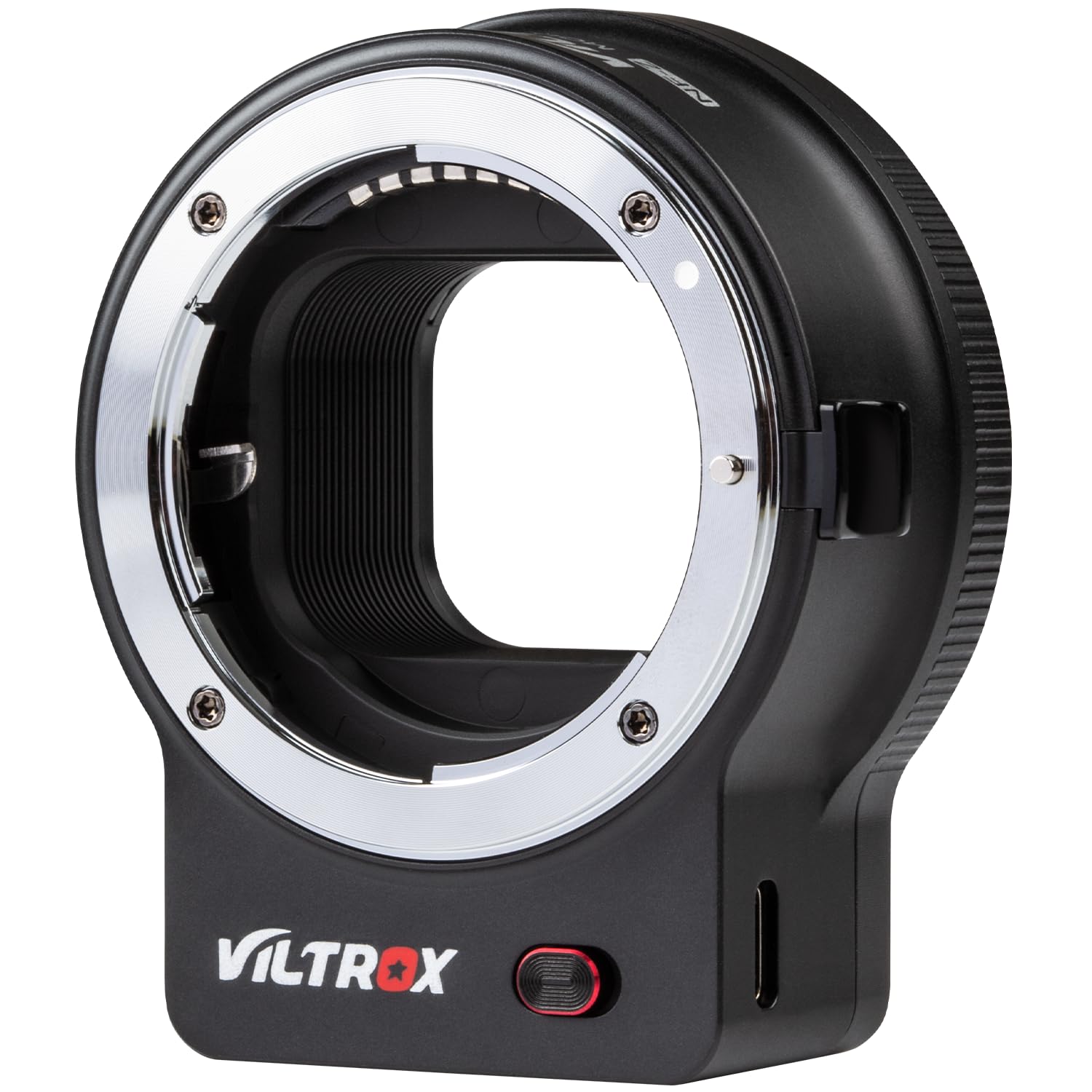


To remove the lens, press the lens release button on the adapter and rotate the lens counter-clockwise. To remove the adapter from the camera, press the camera's lens release button and rotate the adapter counter-clockwise.
5. Instrukcja obsługi
Once the VILTROX NF-Z adapter is correctly installed, your Nikon F-mount lens will function with your Nikon Z-mount camera as follows:
- Autofokus: The adapter supports fast and accurate autofocus. Ensure your lens is set to AF (Autofocus) mode if it has a physical switch. The camera's autofocus settings will control the lens.
- Kontrola przysłony: The camera body will electronically control the aperture of the attached F-mount lens. Adjustments made on the camera will be reflected by the lens.
- EXIF Data: All relevant shooting information, such as aperture, shutter speed, ISO, and focal length, will be transmitted to the camera and recorded in the image's EXIF data.
- Image Stabilization (VR): If your F-mount lens features Vibration Reduction (VR), this function will be supported through the adapter. Activate or deactivate VR via the lens switch or camera settings, depending on the lens model.
- Custom Function Key: The adapter includes a custom function key. Refer to the VILTROX website or future firmware updates for details on its programmable functions.

6. Aktualizacja oprogramowania sprzętowego
VILTROX regularly releases firmware updates to improve performance, fix bugs, and enhance compatibility with new lenses and camera models. To update the firmware:
- Pobierz oprogramowanie układowe: Visit the official VILTROX website and navigate to the support section for the NF-Z adapter. Download the latest firmware file do twojego komputera.
- Podłącz adapter: Connect the VILTROX NF-Z adapter to your computer using a USB Type-C cable. The Type-C port is located on the side of the adapter.
- Install Firmware: Follow the specific instructions provided with the firmware download on the VILTROX website to install the update. This typically involves copying the firmware file to the adapter's drive that appears on your computer.
- Odłącz się bezpiecznie: After the update is complete, safely eject the adapter from your computer before disconnecting the USB cable.

7. Konserwacja
Proper maintenance ensures the longevity and optimal performance of your VILTROX NF-Z adapter:
- Czyszczenie: Use a clean, dry microfiber cloth to wipe the exterior of the adapter. For electronic contacts, use a clean, soft cloth lightly dampened with lens cleaning solution or isopropyl alcohol. Avoid touching the contacts directly with your fingers.
- Składowanie: When not in use, always attach the front and rear protective caps to the adapter to prevent dust and debris from entering. Store the adapter in a dry, cool place away from direct sunlight and extreme temperatures.
- Obsługiwanie: Avoid dropping or subjecting the adapter to strong impacts, as this can damage the internal electronic components or mechanical structure.
8. Rozwiązywanie Problemów
If you encounter issues with your VILTROX NF-Z adapter, try the following troubleshooting steps:
- Lens Not Recognized / No Autofocus:
- Ensure the adapter and lens are securely attached to the camera and each other.
- Check the electronic contacts on both the adapter and the lens for cleanliness. Gently wipe them with a clean, dry cloth.
- Verify that the lens is compatible with the adapter and your camera model using the compatibility chart (Figure 1).
- Ensure the camera and adapter firmware are up to date.
- Uruchom ponownie kamerę.
- Aperture Control Issues:
- Confirm that the lens is an electronic aperture control lens (G-type or E-type Nikon F-mount lenses). Older D-type lenses may require manual aperture adjustment.
- Check for firmware updates for the adapter.
- Problemy z jakością obrazu:
- Ensure the lens elements are clean and free from dust or smudges.
- Verify that the adapter is securely mounted, as any looseness can affect optical performance.
If problems persist after attempting these steps, please contact VILTROX customer support for further assistance.
Video 1: This video demonstrates the VILTROX NF-Z adapter in use, showing how it connects a Nikon F-mount lens to a Nikon Z-mount camera and highlights its functionality.
9. Specyfikacje
| Marka | VILTROX |
| Numer modelu | JY-NF-Z |
| Kompatybilne urządzenia | Nikon F-mount Series Lenses, Nikon Z-mount Series Cameras |
| Kolor | Czarny |
| Pozycja Wymiary (dł. x szer. x wys.) | 0.8 x 2 x 2.2 cala |
| Waga przedmiotu | 0.25 kilograma |
| Producent | VILTROX |
10. Gwarancja i wsparcie
The VILTROX NF-Z Auto Focus Lens Mount Adapter comes with a 1-letnia gwarancja producentaNiniejsza gwarancja obejmuje wady materiałowe i wykonawcze powstałe w wyniku normalnego użytkowania.
For technical support, warranty claims, or any inquiries regarding your product, please contact VILTROX customer service through their official website or the retailer where the product was purchased. Please have your model number (JY-NF-Z) and proof of purchase ready when contacting support.