
1. Wprowadzenie
This manual provides detailed instructions for the amazon basics Wired Gaming Mouse, Model ABIM03. This mouse is designed to enhance your gaming and computing experience with its adjustable DPI, customizable RGB lighting, and programmable buttons. Please read this manual thoroughly before use to ensure proper operation and longevity of your device.
2. Funkcje produktu
- Regulowane DPI: Up to 6400 DPI for precise cursor control and quick movements.
- Konfigurowalne oświetlenie RGB: Personalize your mouse with various RGB lighting modes and driver customization options for PC.
- Przyciski programowalne: Equipped with multiple programmable buttons for assigning custom functions or macros.
- Gaming-Grade Sensor: Ensures accurate tracking and rapid response for gaming.
- Trwała konstrukcja: Features extra durable switches and enhanced build quality for extended use.
- Honeycomb Grip: Ergonomic honeycomb design provides a comfortable and secure grip.

Image: The amazon basics Wired Gaming Mouse highlighting its adjustable DPI settings, ranging from 1200 to 7200 (though product states up to 6400).
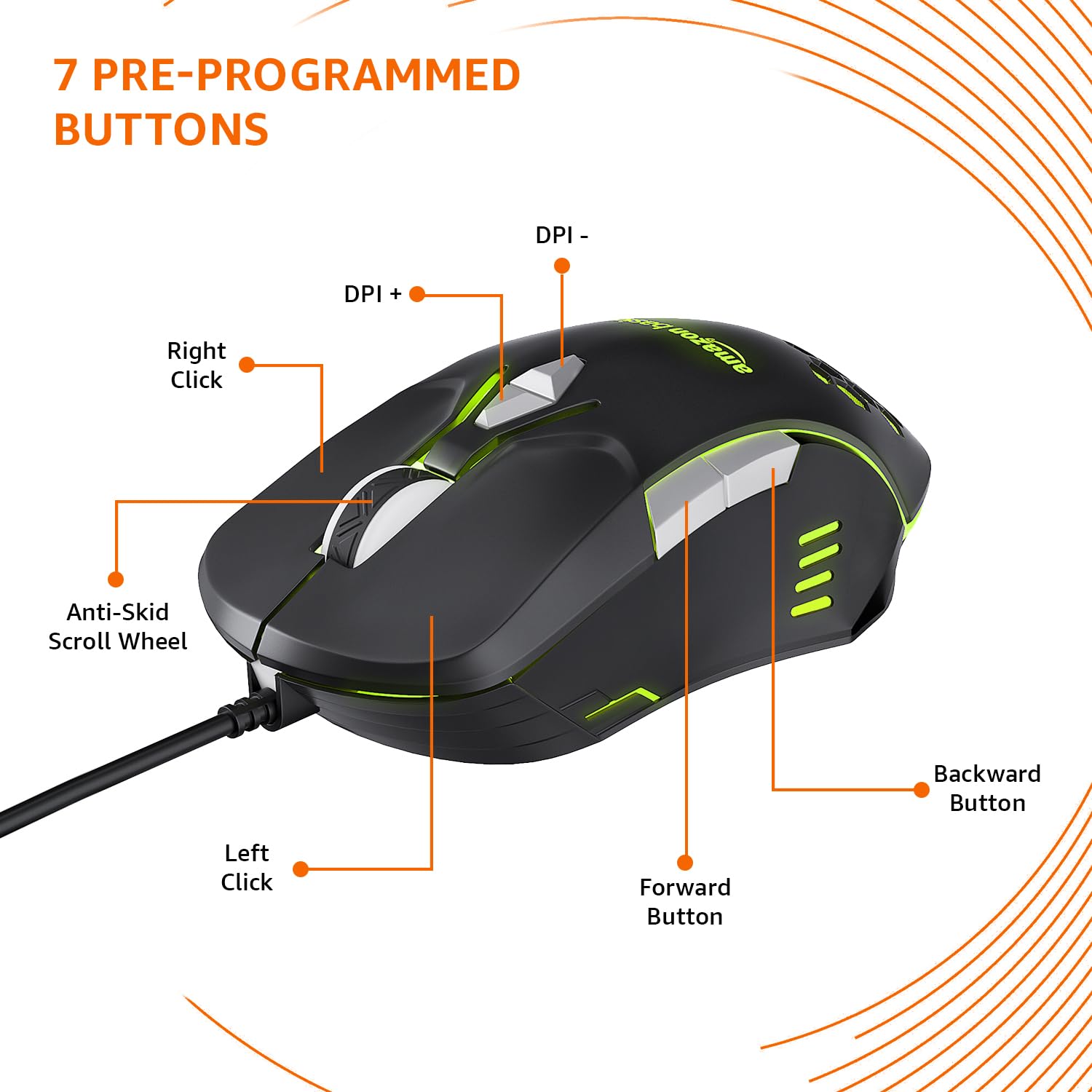
Image: The amazon basics Wired Gaming Mouse showing its 7 pre-programmed buttons, including Left Click, Right Click, Anti-Skid Scroll Wheel, DPI+, DPI-, Forward Button, and Backward Button.

Obraz: widok z góry view of the amazon basics Wired Gaming Mouse, emphasizing its honeycomb-designed surface for improved grip and airflow.

Image: The amazon basics Wired Gaming Mouse illuminated with red RGB lighting, showcasing its light and comfortable design.
3. Instrukcje konfiguracji
- Rozpakuj mysz: Ostrożnie wyjmij mysz do gier z opakowania.
- Połącz z komputerem: Podłącz złącze USB myszy do dostępnego portu USB w komputerze.
- Instalacja sterownika: Your operating system (Windows, Linux) should automatically detect and install the necessary drivers. If prompted, follow the on-screen instructions. For advanced customization of RGB and programmable keys, refer to the manufacturer's website for specific driver software.
- Umieszczenie: Place the mouse on a flat, clean surface or a mouse pad for optimal performance.
4. Instrukcja obsługi
4.1 Podstawowa funkcjonalność
- Lewy przycisk myszy: Podstawowa akcja: selekcja.
- Kliknij prawym przyciskiem myszy: Akcja drugorzędna: menu kontekstowe.
- Kółko przewijania: Scroll up/down pages. Pressing the scroll wheel often acts as a middle click.
- Przyciski do przodu/do tyłu: Zwykle używany do nawigacji w web przeglądarki lub file odkrywcy.
4.2 Regulacja DPI (punktów na cal)
The mouse features dedicated DPI adjustment buttons (DPI+ and DPI-) to change cursor sensitivity on the fly. Press these buttons to cycle through different DPI levels up to 6400. A higher DPI setting results in faster cursor movement across the screen with less physical mouse movement.
4.3 Customizing RGB Lighting
The mouse includes customizable RGB lighting. Specific lighting modes can often be cycled through using a dedicated button (if present) or through the optional driver software. Refer to the driver software for advanced customization options, including color selection, effects, and brightness.
4.4 Programming Buttons
The mouse is equipped with programmable buttons. To assign custom functions, macros, or key combinations to these buttons, you will need to install and use the specific driver software provided by the manufacturer. This software typically allows you to create profiledla różnych aplikacji i gier.
Video: A short product highlight video demonstrating the key features of the amazon basics Wired Gaming Mouse, including adjustable DPI, RGB lighting, programmable buttons, and durable design.
5. Konserwacja
- Czyszczenie: Do czyszczenia zewnętrznej części myszy użyj miękkiej, suchej ściereczki. W przypadku uporczywych zabrudzeń, delikatnie przetrzyjamp Można użyć ściereczki, aby mieć pewność, że do wnętrza myszy nie dostanie się żadna ciecz.
- Czyszczenie czujnika: Czasami delikatnie przetrzyj wacikiem.ampened with isopropyl alcohol to gently clean the optical sensor on the underside of the mouse. Ensure the mouse is disconnected before cleaning.
- Unikaj płynów: Do not immerse the mouse in water or any cleaning solutions.
- Składowanie: Przechowuj mysz w chłodnym, suchym miejscu, z dala od bezpośredniego światła słonecznego i ekstremalnych temperatur.
6. Rozwiązywanie Problemów
| Problem | Rozwiązanie |
|---|---|
| Mysz nie reaguje. |
|
| Ruch kursora jest chaotyczny lub przerywany. |
|
| Programmable buttons are not working. |
|
| Oświetlenie RGB nie działa lub się zawiesza. |
|
7. Specyfikacje
| Funkcja | Szczegół |
|---|---|
| Marka | podstawy amazon |
| Numer modelu | ABIM03 |
| Technologia łączności | Przewodowy (USB) |
| Technologia wykrywania ruchu | Optyczny |
| Zakres DPI | Do 6400 DPI |
| Programowalne klawisze | 4 (in addition to standard left/right click and scroll) |
| Oświetlenie | RGB |
| Kolor | Czarny |
| Waga przedmiotu | 145 gramów |
| Wymiary produktu (dł. x szer. x wys.) | Wymiary 15.8 x 10.4 x 5.4 cm |
| Platforma sprzętowa | PC |
| Zgodność z systemem operacyjnym | Linux, Windows 7 i nowsze |
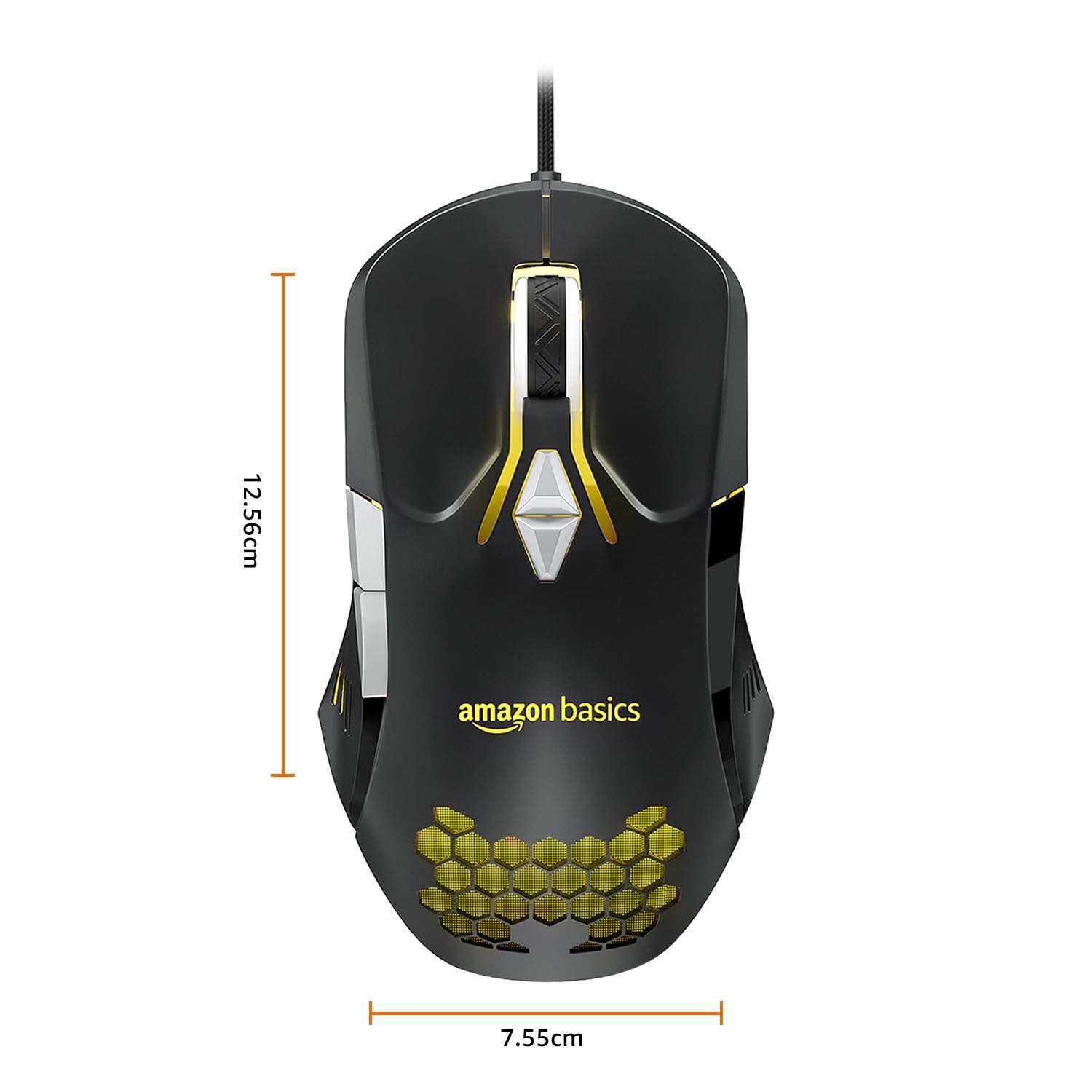
Image: The amazon basics Wired Gaming Mouse with its length (12.56cm) and width (7.55cm) dimensions indicated.
8. Informacje o gwarancji
This amazon basics Wired Gaming Mouse comes with a 1 rok gwarancji from the date of purchase. This warranty covers manufacturing defects and issues arising from normal use. It does not cover damage caused by misuse, accidents, unauthorized modifications, or normal wear and tear. Please retain your proof of purchase for warranty claims.
9. Wsparcie
For further assistance, technical support, or warranty claims, please visit the official amazon basics support page or contact customer service through your purchase platform. Ensure you have your product model number (ABIM03) and proof of purchase ready when contacting support.
Zasoby internetowe:
- Strona produktu: amazon.in/dp/B0BTD2YN6Y
- amazon basics Store: amazon basics Store